![[5주차 - Cilium 스터디] BGP Control Plane & ClusterMesh (25.08.10)](https://img1.daumcdn.net/thumb/R750x0/?scode=mtistory2&fname=https%3A%2F%2Fblog.kakaocdn.net%2Fdna%2FAiFCQ%2FbtsPTK1Eu0s%2FAAAAAAAAAAAAAAAAAAAAAFUE-6kVA5gbBr0SAp_GwTi8XKzi8WHjKv6BhOpvnCYF%2Fimg.png%3Fcredential%3DyqXZFxpELC7KVnFOS48ylbz2pIh7yKj8%26expires%3D1785509999%26allow_ip%3D%26allow_referer%3D%26signature%3DDKBe%252FrjE%252BwRqXcpJEi8qydI6qEY%253D)

들어가며
안녕하세요! Devlos입니다.
이번 포스팅은 CloudNet@ 커뮤니티에서 주최하는 Cilium Study 5주 차 주제인 "BGP Control Plane & Cluster Mesh"에 대해서 정리한 내용입니다.
실습환경 구성
이번 주차 실습 환경은 mac M3 Pro max 환경에서 실습을 진행했고, VirtualBox + Vagrant로 환경을 구성했어요.
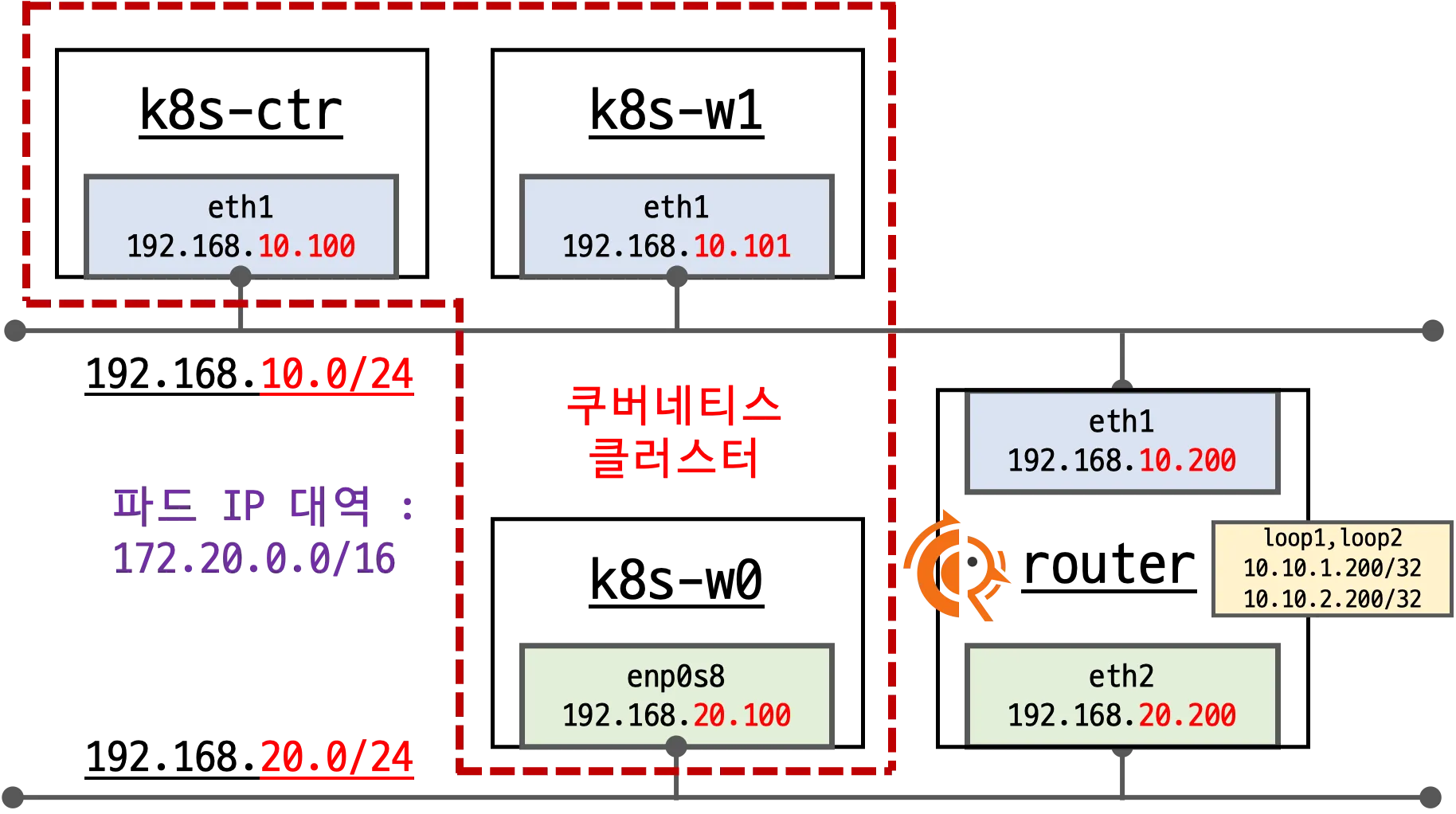
- Control Plane (k8s-ctr): Kubernetes 마스터 노드, API 서버 및 컨트롤 플레인 컴포넌트 실행
- Worker Node (k8s-w0): 실제 워크로드가 실행되는 워커 노드
- Worker Node (k8s-w1): 실제 워크로드가 실행되는 워커 노드
- Router (router): 192.168.10.0/24 ↔ 192.168.20.0/24 대역 라우팅 역할, k8s 에 join 되지 않은 서버, BGP 동작을 위한 FRR 툴 설치됨
BGP란?
BGP(Border Gateway Protocol)는 인터넷의 핵심 라우팅 프로토콜로, 서로 다른 자율시스템(AS) 간에 네트워크 경로 정보를 교환하는 표준 프로토콜입니다.
특히 클라우드 환경과 온프레미스 네트워크 간의 연결, 또는 여러 데이터센터 간의 라우팅 정보 공유에 널리 사용됩니다.
FRR이란?

출처 - https://docs.frrouting.org/en/stable-10.4/about.htm
FRR(Free Range Routing)은 오픈소스 라우팅 소프트웨어 스위트로, BGP, OSPF, IS-IS 등 다양한 라우팅 프로토콜을 지원합니다.
기존의 Quagga 프로젝트를 포크하여 개발되었으며, 네트워크 운영자들이 상용 라우터 없이도 고급 라우팅 기능을 구현할 수 있게 해주는 강력한 툴입니다.
FRR은 BGP 프로토콜을 구현하는 오픈소스 라우팅 소프트웨어로, 네트워크 장비 없이도 BGP 라우팅 기능을 제공할 수 있습니다.
실습 환경에서는 FRR을 설치하여 라우터 역할을 하는 서버에서 BGP 세션을 구성하고, Kubernetes 클러스터와 외부 네트워크 간의 라우
팅 정보를 교환합니다.
실습환경 구성
실습 환경은 가시다님의 lab환경을 설치하였습니다.
mkdir cilium-lab && cd cilium-lab
curl -O https://raw.githubusercontent.com/gasida/vagrant-lab/refs/heads/main/cilium-study/5w/Vagrantfile
vagrant up
실습환경에서의 주요 내용은 다음과 같습니다.
Vagrantfile : 가상머신 정의, 부팅 시 초기 프로비저닝 설정
Vagrantfile은 실습 환경의 가상머신들을 정의하고 자동으로 프로비저닝하는 설정 파일입니다.
Control Plane, Worker Node, Router 등 총 4개의 가상머신을 생성하며, 각각의 역할에 맞는 네트워크 설정과 초기화 스크립트를 자동으로 실행합니다.
VirtualBox를 기반으로 하며, Ubuntu 24.04 베이스 이미지를 사용하여 일관된 환경을 구성합니다.
# Variables
K8SV = '1.33.2-1.1' # Kubernetes Version : apt list -a kubelet , ex) 1.32.5-1.1
CONTAINERDV = '1.7.27-1' # Containerd Version : apt list -a containerd.io , ex) 1.6.33-1
CILIUMV = '1.18.0' # Cilium CNI Version : https://github.com/cilium/cilium/tags
N = 1 # max number of worker nodes

# Base Image  https://portal.cloud.hashicorp.com/vagrant/discover/bento/ubuntu-24.04
BOX_IMAGE = "bento/ubuntu-24.04"
BOX_VERSION = "202508.03.0"

Vagrant.configure("2") do |config|  # Vagrant 설정 시작
#-ControlPlane Node
    config.vm.define "k8s-ctr" do |subconfig|  # Control Plane 노드 정의
      subconfig.vm.box = BOX_IMAGE  # 베이스 이미지 설정

      subconfig.vm.box_version = BOX_VERSION  # 이미지 버전 설정
      subconfig.vm.provider "virtualbox" do |vb|  # VirtualBox 프로바이더 설정
        vb.customize ["modifyvm", :id, "--groups", "/Cilium-Lab"]  # VirtualBox 그룹 설정
        vb.customize ["modifyvm", :id, "--nicpromisc2", "allow-all"]  # 네트워크 인터페이스 프로미스큐어스 모드 설정
        vb.name = "k8s-ctr"  # 가상머신 이름
        vb.cpus = 2  # CPU 코어 수
        vb.memory = 2560  # 메모리 크기 (MB)
        vb.linked_clone = true  # 링크드 클론 사용으로 빠른 생성
      end
      subconfig.vm.host_name = "k8s-ctr"  # 호스트명 설정
      subconfig.vm.network "private_network", ip: "192.168.10.100"  # 프라이빗 네트워크 IP 설정
      subconfig.vm.network "forwarded_port", guest: 22, host: 60000, auto_correct: true, id: "ssh"  # SSH 포트 포워딩
      subconfig.vm.synced_folder "./", "/vagrant", disabled: true  # 폴더 동기화 비활성화
      subconfig.vm.provision "shell", path: "https://raw.githubusercontent.com/gasida/vagrant-lab/refs/heads/main/cilium-study/4w/init_cfg.sh", args: [ K8SV, CONTAINERDV ]  # 초기 설정 스크립트 실행
      subconfig.vm.provision "shell", path: "https://raw.githubusercontent.com/gasida/vagrant-lab/refs/heads/main/cilium-study/4w/k8s-ctr.sh", args: [ N, CILIUMV, K8SV ]  # Control Plane 설정 스크립트 실행
      subconfig.vm.provision "shell", path: "https://raw.githubusercontent.com/gasida/vagrant-lab/refs/heads/main/cilium-study/4w/route-add1.sh"  # 라우팅 설정 스크립트 실행
    end

#-Worker Nodes Subnet1
  (1..N).each do |i|  # 워커 노드 개수만큼 반복
    config.vm.define "k8s-w#{i}" do |subconfig|  # 워커 노드 정의
      subconfig.vm.box = BOX_IMAGE  # 베이스 이미지 설정
      subconfig.vm.box_version = BOX_VERSION  # 이미지 버전 설정
      subconfig.vm.provider "virtualbox" do |vb|  # VirtualBox 프로바이더 설정
        vb.customize ["modifyvm", :id, "--groups", "/Cilium-Lab"]  # VirtualBox 그룹 설정
        vb.customize ["modifyvm", :id, "--nicpromisc2", "allow-all"]  # 네트워크 인터페이스 프로미스큐어스 모드 설정
        vb.name = "k8s-w#{i}"  # 가상머신 이름
        vb.cpus = 2  # CPU 코어 수
        vb.memory = 1536  # 메모리 크기 (MB)
        vb.linked_clone = true  # 링크드 클론 사용
      end
      subconfig.vm.host_name = "k8s-w#{i}"  # 호스트명 설정
      subconfig.vm.network "private_network", ip: "192.168.10.10#{i}"  # 프라이빗 네트워크 IP 설정 (동적 할당)
      subconfig.vm.network "forwarded_port", guest: 22, host: "6000#{i}", auto_correct: true, id: "ssh"  # SSH 포트 포워딩
      subconfig.vm.synced_folder "./", "/vagrant", disabled: true  # 폴더 동기화 비활성화
      subconfig.vm.provision "shell", path: "https://raw.githubusercontent.com/gasida/vagrant-lab/refs/heads/main/cilium-study/4w/init_cfg.sh", args: [ K8SV, CONTAINERDV]  # 초기 설정 스크립트 실행
      subconfig.vm.provision "shell", path: "https://raw.githubusercontent.com/gasida/vagrant-lab/refs/heads/main/cilium-study/4w/k8s-w.sh"  # 워커 노드 설정 스크립트 실행
      subconfig.vm.provision "shell", path: "https://raw.githubusercontent.com/gasida/vagrant-lab/refs/heads/main/cilium-study/4w/route-add1.sh"  # 라우팅 설정 스크립트 실행
    end
  end

#-Router Node
    config.vm.define "router" do |subconfig|  # 라우터 노드 정의
      subconfig.vm.box = BOX_IMAGE  # 베이스 이미지 설정
      subconfig.vm.box_version = BOX_VERSION  # 이미지 버전 설정
      subconfig.vm.provider "virtualbox" do |vb|  # VirtualBox 프로바이더 설정
        vb.customize ["modifyvm", :id, "--groups", "/Cilium-Lab"]  # VirtualBox 그룹 설정
        vb.name = "router"  # 가상머신 이름
        vb.cpus = 1  # CPU 코어 수 (라우터는 1개)
        vb.memory = 768  # 메모리 크기 (MB)
        vb.linked_clone = true  # 링크드 클론 사용
      end
      subconfig.vm.host_name = "router"  # 호스트명 설정
      subconfig.vm.network "private_network", ip: "192.168.10.200"  # 첫 번째 네트워크 인터페이스 IP
      subconfig.vm.network "forwarded_port", guest: 22, host: 60009, auto_correct: true, id: "ssh"  # SSH 포트 포워딩
      subconfig.vm.network "private_network", ip: "192.168.20.200", auto_config: false  # 두 번째 네트워크 인터페이스 IP (수동 설정)
      subconfig.vm.synced_folder "./", "/vagrant", disabled: true  # 폴더 동기화 비활성화
      subconfig.vm.provision "shell", path: "https://raw.githubusercontent.com/gasida/vagrant-lab/refs/heads/main/cilium-study/4w/router.sh"  # 라우터 설정 스크립트 실행
    end

#-Worker Nodes Subnet2
    config.vm.define "k8s-w0" do |subconfig|  # 서브넷2 워커 노드 정의
      subconfig.vm.box = BOX_IMAGE  # 베이스 이미지 설정
      subconfig.vm.box_version = BOX_VERSION  # 이미지 버전 설정
      subconfig.vm.provider "virtualbox" do |vb|  # VirtualBox 프로바이더 설정
        vb.customize ["modifyvm", :id, "--groups", "/Cilium-Lab"]  # VirtualBox 그룹 설정
        vb.customize ["modifyvm", :id, "--nicpromisc2", "allow-all"]  # 네트워크 인터페이스 프로미스큐어스 모드 설정
        vb.name = "k8s-w0"  # 가상머신 이름
        vb.cpus = 2  # CPU 코어 수
        vb.memory = 1536  # 메모리 크기 (MB)
        vb.linked_clone = true  # 링크드 클론 사용
      end
      subconfig.vm.host_name = "k8s-w0"  # 호스트명 설정
      subconfig.vm.network "private_network", ip: "192.168.20.100"  # 서브넷2 네트워크 IP 설정
      subconfig.vm.network "forwarded_port", guest: 22, host: 60010, auto_correct: true, id: "ssh"  # SSH 포트 포워딩
      subconfig.vm.synced_folder "./", "/vagrant", disabled: true  # 폴더 동기화 비활성화
      subconfig.vm.provision "shell", path: "https://raw.githubusercontent.com/gasida/vagrant-lab/refs/heads/main/cilium-study/4w/init_cfg.sh", args: [ K8SV, CONTAINERDV]  # 초기 설정 스크립트 실행
      subconfig.vm.provision "shell", path: "https://raw.githubusercontent.com/gasida/vagrant-lab/refs/heads/main/cilium-study/4w/k8s-w.sh"  # 워커 노드 설정 스크립트 실행
      subconfig.vm.provision "shell", path: "https://raw.githubusercontent.com/gasida/vagrant-lab/refs/heads/main/cilium-study/4w/route-add2.sh"  # 서브넷2 라우팅 설정 스크립트 실행
    end

end
init_cfg.sh : args 참고하여 설치
#!/usr/bin/env bash

echo ">>>> Initial Config Start <<<<"

echo "[TASK 1] Setting Profile & Bashrc"
echo 'alias vi=vim' >> /etc/profile
echo "sudo su -" >> /home/vagrant/.bashrc
ln -sf /usr/share/zoneinfo/Asia/Seoul /etc/localtime # Change Timezone


echo "[TASK 2] Disable AppArmor"
systemctl stop ufw && systemctl disable ufw >/dev/null 2>&1
systemctl stop apparmor && systemctl disable apparmor >/dev/null 2>&1


echo "[TASK 3] Disable and turn off SWAP"
swapoff -a && sed -i '/swap/s/^/#/' /etc/fstab


echo "[TASK 4] Install Packages"
apt update -qq >/dev/null 2>&1
apt-get install apt-transport-https ca-certificates curl gpg -y -qq >/dev/null 2>&1

# Download the public signing key for the Kubernetes package repositories.
mkdir -p -m 755 /etc/apt/keyrings
K8SMMV=$(echo $1 | sed -En 's/^([0-9]+\.[0-9]+)\..*/\1/p')
curl -fsSL https://pkgs.k8s.io/core:/stable:/v$K8SMMV/deb/Release.key | sudo gpg --dearmor -o /etc/apt/keyrings/kubernetes-apt-keyring.gpg
echo "deb [signed-by=/etc/apt/keyrings/kubernetes-apt-keyring.gpg] https://pkgs.k8s.io/core:/stable:/v$K8SMMV/deb/ /" >> /etc/apt/sources.list.d/kubernetes.list
curl -fsSL https://download.docker.com/linux/ubuntu/gpg -o /etc/apt/keyrings/docker.asc
echo "deb [arch=$(dpkg --print-architecture) signed-by=/etc/apt/keyrings/docker.asc] https://download.docker.com/linux/ubuntu $(. /etc/os-release && echo "$VERSION_CODENAME") stable" | tee /etc/apt/sources.list.d/docker.list > /dev/null

# packets traversing the bridge are processed by iptables for filtering
echo 1 > /proc/sys/net/ipv4/ip_forward
echo "net.ipv4.ip_forward = 1" >> /etc/sysctl.d/k8s.conf

# enable br_netfilter for iptables
modprobe br_netfilter
modprobe overlay
echo "br_netfilter" >> /etc/modules-load.d/k8s.conf
echo "overlay" >> /etc/modules-load.d/k8s.conf


echo "[TASK 5] Install Kubernetes components (kubeadm, kubelet and kubectl)"
# Update the apt package index, install kubelet, kubeadm and kubectl, and pin their version
apt update >/dev/null 2>&1  # 패키지 목록 업데이트

# apt list -a kubelet ; apt list -a containerd.io
apt-get install -y kubelet=$1 kubectl=$1 kubeadm=$1 containerd.io=$2 >/dev/null 2>&1  # Kubernetes 컴포넌트 설치
apt-mark hold kubelet kubeadm kubectl >/dev/null 2>&1  # 패키지 버전 고정

# containerd configure to default and cgroup managed by systemd
containerd config default > /etc/containerd/config.toml  # containerd 기본 설정 생성
sed -i 's/SystemdCgroup = false/SystemdCgroup = true/g' /etc/containerd/config.toml  # systemd cgroup 사용 설정

# avoid WARN&ERRO(default endpoints) when crictl run
cat <<EOF > /etc/crictl.yaml  # crictl 설정 파일 생성
runtime-endpoint: unix:///run/containerd/containerd.sock
image-endpoint: unix:///run/containerd/containerd.sock
EOF

# ready to install for k8s
systemctl restart containerd && systemctl enable containerd  # containerd 서비스 재시작 및 활성화
systemctl enable --now kubelet  # kubelet 서비스 활성화 및 즉시 시작


echo "[TASK 6] Install Packages & Helm"
export DEBIAN_FRONTEND=noninteractive
apt-get install -y bridge-utils sshpass net-tools conntrack ngrep tcpdump ipset arping wireguard jq yq tree bash-completion unzip kubecolor termshark >/dev/null 2>&1
curl -s https://raw.githubusercontent.com/helm/helm/master/scripts/get-helm-3 | bash >/dev/null 2>&1


echo ">>>> Initial Config End <<<<"
kubeadm-init-ctr-config.yaml
#!/usr/bin/env bash

echo ">>>> K8S Controlplane config Start <<<<"

echo "[TASK 1] Initial Kubernetes"
curl --silent -o /root/kubeadm-init-ctr-config.yaml https://raw.githubusercontent.com/gasida/vagrant-lab/refs/heads/main/cilium-study/kubeadm-init-ctr-config.yaml
K8SMMV=$(echo $3 | sed -En 's/^([0-9]+\.[0-9]+\.[0-9]+).*/\1/p')
sed -i "s/K8S_VERSION_PLACEHOLDER/v${K8SMMV}/g" /root/kubeadm-init-ctr-config.yaml
kubeadm init --config="/root/kubeadm-init-ctr-config.yaml"  >/dev/null 2>&1


echo "[TASK 2] Setting kube config file"
mkdir -p /root/.kube
cp -i /etc/kubernetes/admin.conf /root/.kube/config
chown $(id -u):$(id -g) /root/.kube/config


echo "[TASK 3] Source the completion"
echo 'source <(kubectl completion bash)' >> /etc/profile
echo 'source <(kubeadm completion bash)' >> /etc/profile


echo "[TASK 4] Alias kubectl to k"
echo 'alias k=kubectl' >> /etc/profile
echo 'alias kc=kubecolor' >> /etc/profile
echo 'complete -F __start_kubectl k' >> /etc/profile


echo "[TASK 5] Install Kubectx & Kubens"
git clone https://github.com/ahmetb/kubectx /opt/kubectx >/dev/null 2>&1
ln -s /opt/kubectx/kubens /usr/local/bin/kubens
ln -s /opt/kubectx/kubectx /usr/local/bin/kubectx


echo "[TASK 6] Install Kubeps & Setting PS1"
git clone https://github.com/jonmosco/kube-ps1.git /root/kube-ps1 >/dev/null 2>&1
cat <<"EOT" >> /root/.bash_profile
source /root/kube-ps1/kube-ps1.sh
KUBE_PS1_SYMBOL_ENABLE=true
function get_cluster_short() {
  echo "$1" | cut -d . -f1
}
KUBE_PS1_CLUSTER_FUNCTION=get_cluster_short
KUBE_PS1_SUFFIX=') '
PS1='$(kube_ps1)'$PS1
EOT
kubectl config rename-context "kubernetes-admin@kubernetes" "HomeLab" >/dev/null 2>&1


echo "[TASK 7] Install Cilium CNI"
NODEIP=$(ip -4 addr show eth1 | grep -oP '(?<=inet\s)\d+(\.\d+){3}')
helm repo add cilium https://helm.cilium.io/ >/dev/null 2>&1
helm repo update >/dev/null 2>&1
helm install cilium cilium/cilium --version $2 --namespace kube-system \
--set k8sServiceHost=192.168.10.100 --set k8sServicePort=6443 \
--set ipam.mode="cluster-pool" --set ipam.operator.clusterPoolIPv4PodCIDRList={"172.20.0.0/16"} --set ipv4NativeRoutingCIDR=172.20.0.0/16 \
--set routingMode=native --set autoDirectNodeRoutes=false --set bgpControlPlane.enabled=true \
--set kubeProxyReplacement=true --set bpf.masquerade=true --set installNoConntrackIptablesRules=true \
--set endpointHealthChecking.enabled=false --set healthChecking=false \
--set hubble.enabled=true --set hubble.relay.enabled=true --set hubble.ui.enabled=true \
--set hubble.ui.service.type=NodePort --set hubble.ui.service.nodePort=30003 \
--set prometheus.enabled=true --set operator.prometheus.enabled=true --set hubble.metrics.enableOpenMetrics=true \
--set hubble.metrics.enabled="{dns,drop,tcp,flow,port-distribution,icmp,httpV2:exemplars=true;labelsContext=source_ip\,source_namespace\,source_workload\,destination_ip\,destination_namespace\,destination_workload\,traffic_direction}" \
--set operator.replicas=1 --set debug.enabled=true >/dev/null 2>&1


echo "[TASK 8] Install Cilium / Hubble CLI"
CILIUM_CLI_VERSION=$(curl -s https://raw.githubusercontent.com/cilium/cilium-cli/main/stable.txt)
CLI_ARCH=amd64
if [ "$(uname -m)" = "aarch64" ]; then CLI_ARCH=arm64; fi
curl -L --fail --remote-name-all https://github.com/cilium/cilium-cli/releases/download/${CILIUM_CLI_VERSION}/cilium-linux-${CLI_ARCH}.tar.gz >/dev/null 2>&1
tar xzvfC cilium-linux-${CLI_ARCH}.tar.gz /usr/local/bin
rm cilium-linux-${CLI_ARCH}.tar.gz

HUBBLE_VERSION=$(curl -s https://raw.githubusercontent.com/cilium/hubble/master/stable.txt)
HUBBLE_ARCH=amd64
if [ "$(uname -m)" = "aarch64" ]; then HUBBLE_ARCH=arm64; fi
curl -L --fail --remote-name-all https://github.com/cilium/hubble/releases/download/$HUBBLE_VERSION/hubble-linux-${HUBBLE_ARCH}.tar.gz >/dev/null 2>&1
tar xzvfC hubble-linux-${HUBBLE_ARCH}.tar.gz /usr/local/bin
rm hubble-linux-${HUBBLE_ARCH}.tar.gz


echo "[TASK 9] Remove node taint"
kubectl taint nodes k8s-ctr node-role.kubernetes.io/control-plane-


echo "[TASK 10] local DNS with hosts file"
echo "192.168.10.100 k8s-ctr" >> /etc/hosts
echo "192.168.10.200 router" >> /etc/hosts
echo "192.168.20.100 k8s-w0" >> /etc/hosts
for (( i=1; i<=$1; i++  )); do echo "192.168.10.10$i k8s-w$i" >> /etc/hosts; done


echo "[TASK 11] Dynamically provisioning persistent local storage with Kubernetes"
kubectl apply -f https://raw.githubusercontent.com/rancher/local-path-provisioner/v0.0.31/deploy/local-path-storage.yaml >/dev/null 2>&1
kubectl patch storageclass local-path -p '{"metadata": {"annotations":{"storageclass.kubernetes.io/is-default-class":"true"}}}' >/dev/null 2>&1


# echo "[TASK 12] Install Prometheus & Grafana"
# kubectl apply -f https://raw.githubusercontent.com/cilium/cilium/1.18.0/examples/kubernetes/addons/prometheus/monitoring-example.yaml >/dev/null 2>&1
# kubectl patch svc -n cilium-monitoring prometheus -p '{"spec": {"type": "NodePort", "ports": [{"port": 9090, "targetPort": 9090, "nodePort": 30001}]}}' >/dev/null 2>&1
# kubectl patch svc -n cilium-monitoring grafana -p '{"spec": {"type": "NodePort", "ports": [{"port": 3000, "targetPort": 3000, "nodePort": 30002}]}}' >/dev/null 2>&1

# echo "[TASK 12] Install Prometheus Stack"
# helm repo add prometheus-community https://prometheus-community.github.io/helm-charts  >/dev/null 2>&1
# cat <<EOT > monitor-values.yaml
# prometheus:
#   prometheusSpec:
#     scrapeInterval: "15s"
#     evaluationInterval: "15s"
#   service:
#     type: NodePort
#     nodePort: 30001

# grafana:
#   defaultDashboardsTimezone: Asia/Seoul
#   adminPassword: prom-operator
#   service:
#     type: NodePort
#     nodePort: 30002

# alertmanager:
#   enabled: false
# defaultRules:
#   create: false
# prometheus-windows-exporter:
#   prometheus:
#     monitor:
#       enabled: false
# EOT
# helm install kube-prometheus-stack prometheus-community/kube-prometheus-stack --version 75.15.1 \
#   -f monitor-values.yaml --create-namespace --namespace monitoring  >/dev/null 2>&1


echo "[TASK 13] Install Metrics-server"
helm repo add metrics-server https://kubernetes-sigs.github.io/metrics-server/  >/dev/null 2>&1
helm upgrade --install metrics-server metrics-server/metrics-server --set 'args[0]=--kubelet-insecure-tls' -n kube-system  >/dev/null 2>&1


echo "[TASK 14] Install k9s"
CLI_ARCH=amd64
if [ "$(uname -m)" = "aarch64" ]; then CLI_ARCH=arm64; fi
wget https://github.com/derailed/k9s/releases/latest/download/k9s_linux_${CLI_ARCH}.deb -O /tmp/k9s_linux_${CLI_ARCH}.deb  >/dev/null 2>&1
apt install /tmp/k9s_linux_${CLI_ARCH}.deb  >/dev/null 2>&1


echo ">>>> K8S Controlplane Config End <<<<"
k8s-ctr.sh : kubeadm init, Cilium CNI 설치, 편리성 설정(k, kc), k9s, local-path-sc, metrics-server
#!/usr/bin/env bash

echo ">>>> K8S Controlplane config Start <<<<"

echo "[TASK 1] Initial Kubernetes"
curl --silent -o /root/kubeadm-init-ctr-config.yaml https://raw.githubusercontent.com/gasida/vagrant-lab/refs/heads/main/cilium-study/kubeadm-init-ctr-config.yaml
K8SMMV=$(echo $3 | sed -En 's/^([0-9]+\.[0-9]+\.[0-9]+).*/\1/p')
sed -i "s/K8S_VERSION_PLACEHOLDER/v${K8SMMV}/g" /root/kubeadm-init-ctr-config.yaml
kubeadm init --config="/root/kubeadm-init-ctr-config.yaml"  >/dev/null 2>&1


echo "[TASK 2] Setting kube config file"
mkdir -p /root/.kube
cp -i /etc/kubernetes/admin.conf /root/.kube/config
chown $(id -u):$(id -g) /root/.kube/config


echo "[TASK 3] Source the completion"
echo 'source <(kubectl completion bash)' >> /etc/profile
echo 'source <(kubeadm completion bash)' >> /etc/profile


echo "[TASK 4] Alias kubectl to k"
echo 'alias k=kubectl' >> /etc/profile
echo 'alias kc=kubecolor' >> /etc/profile
echo 'complete -F __start_kubectl k' >> /etc/profile


echo "[TASK 5] Install Kubectx & Kubens"
git clone https://github.com/ahmetb/kubectx /opt/kubectx >/dev/null 2>&1
ln -s /opt/kubectx/kubens /usr/local/bin/kubens
ln -s /opt/kubectx/kubectx /usr/local/bin/kubectx


echo "[TASK 6] Install Kubeps & Setting PS1"
git clone https://github.com/jonmosco/kube-ps1.git /root/kube-ps1 >/dev/null 2>&1
cat <<"EOT" >> /root/.bash_profile
source /root/kube-ps1/kube-ps1.sh
KUBE_PS1_SYMBOL_ENABLE=true
function get_cluster_short() {
  echo "$1" | cut -d . -f1
}
KUBE_PS1_CLUSTER_FUNCTION=get_cluster_short
KUBE_PS1_SUFFIX=') '
PS1='$(kube_ps1)'$PS1
EOT
kubectl config rename-context "kubernetes-admin@kubernetes" "HomeLab" >/dev/null 2>&1


echo "[TASK 7] Install Cilium CNI"
NODEIP=$(ip -4 addr show eth1 | grep -oP '(?<=inet\s)\d+(\.\d+){3}')
helm repo add cilium https://helm.cilium.io/ >/dev/null 2>&1
helm repo update >/dev/null 2>&1
helm install cilium cilium/cilium --version $2 --namespace kube-system \
--set k8sServiceHost=192.168.10.100 --set k8sServicePort=6443 \                    # Kubernetes API 서버 주소 및 포트 설정
--set ipam.mode="cluster-pool" --set ipam.operator.clusterPoolIPv4PodCIDRList={"172.20.0.0/16"} --set ipv4NativeRoutingCIDR=172.20.0.0/16 \  # IPAM 모드를 cluster-pool로 설정하고 Pod CIDR 범위 지정
--set routingMode=native --set autoDirectNodeRoutes=false --set bgpControlPlane.enabled=true \  # 네이티브 라우팅 모드 활성화 및 BGP 컨트롤 플레인 활성화
--set kubeProxyReplacement=true --set bpf.masquerade=true --set installNoConntrackIptablesRules=true \  # kube-proxy 대체, BPF 마스커레이딩, 연결 추적 규칙 비활성화
--set endpointHealthChecking.enabled=false --set healthChecking=false \  # 엔드포인트 헬스 체킹 비활성화
--set hubble.enabled=true --set hubble.relay.enabled=true --set hubble.ui.enabled=true \  # Hubble 관찰성 도구 활성화
--set hubble.ui.service.type=NodePort --set hubble.ui.service.nodePort=30003 \  # Hubble UI를 NodePort 타입으로 설정하고 포트 지정
--set prometheus.enabled=true --set operator.prometheus.enabled=true --set hubble.metrics.enableOpenMetrics=true \  # Prometheus 메트릭 수집 활성화
--set hubble.metrics.enabled="{dns,drop,tcp,flow,port-distribution,icmp,httpV2:exemplars=true;labelsContext=source_ip\,source_namespace\,source_workload\,destination_ip\,destination_namespace\,destination_workload\,traffic_direction}" \  # 수집할 메트릭 종류 및 라벨 컨텍스트 설정
--set operator.replicas=1 --set debug.enabled=true >/dev/null 2>&1  # Operator 복제본 수 및 디버그 모드 활성화


echo "[TASK 8] Install Cilium / Hubble CLI"
CILIUM_CLI_VERSION=$(curl -s https://raw.githubusercontent.com/cilium/cilium-cli/main/stable.txt)
CLI_ARCH=amd64
if [ "$(uname -m)" = "aarch64" ]; then CLI_ARCH=arm64; fi
curl -L --fail --remote-name-all https://github.com/cilium/cilium-cli/releases/download/${CILIUM_CLI_VERSION}/cilium-linux-${CLI_ARCH}.tar.gz >/dev/null 2>&1
tar xzvfC cilium-linux-${CLI_ARCH}.tar.gz /usr/local/bin
rm cilium-linux-${CLI_ARCH}.tar.gz

HUBBLE_VERSION=$(curl -s https://raw.githubusercontent.com/cilium/hubble/master/stable.txt)
HUBBLE_ARCH=amd64
if [ "$(uname -m)" = "aarch64" ]; then HUBBLE_ARCH=arm64; fi
curl -L --fail --remote-name-all https://github.com/cilium/hubble/releases/download/$HUBBLE_VERSION/hubble-linux-${HUBBLE_ARCH}.tar.gz >/dev/null 2>&1
tar xzvfC hubble-linux-${HUBBLE_ARCH}.tar.gz /usr/local/bin
rm hubble-linux-${HUBBLE_ARCH}.tar.gz


echo "[TASK 9] Remove node taint"
kubectl taint nodes k8s-ctr node-role.kubernetes.io/control-plane-


echo "[TASK 10] local DNS with hosts file"
echo "192.168.10.100 k8s-ctr" >> /etc/hosts
echo "192.168.10.200 router" >> /etc/hosts
echo "192.168.20.100 k8s-w0" >> /etc/hosts
for (( i=1; i<=$1; i++  )); do echo "192.168.10.10$i k8s-w$i" >> /etc/hosts; done


echo "[TASK 11] Dynamically provisioning persistent local storage with Kubernetes"
kubectl apply -f https://raw.githubusercontent.com/rancher/local-path-provisioner/v0.0.31/deploy/local-path-storage.yaml >/dev/null 2>&1
kubectl patch storageclass local-path -p '{"metadata": {"annotations":{"storageclass.kubernetes.io/is-default-class":"true"}}}' >/dev/null 2>&1

echo "[TASK 13] Install Metrics-server"
helm repo add metrics-server https://kubernetes-sigs.github.io/metrics-server/  >/dev/null 2>&1
helm upgrade --install metrics-server metrics-server/metrics-server --set 'args[0]=--kubelet-insecure-tls' -n kube-system  >/dev/null 2>&1


echo "[TASK 14] Install k9s"
CLI_ARCH=amd64
if [ "$(uname -m)" = "aarch64" ]; then CLI_ARCH=arm64; fi
wget https://github.com/derailed/k9s/releases/latest/download/k9s_linux_${CLI_ARCH}.deb -O /tmp/k9s_linux_${CLI_ARCH}.deb  >/dev/null 2>&1
apt install /tmp/k9s_linux_${CLI_ARCH}.deb  >/dev/null 2>&1


echo ">>>> K8S Controlplane Config End <<<<"
kubeadm-join-worker-config.yaml
apiVersion: kubeadm.k8s.io/v1beta4
kind: JoinConfiguration
discovery:
  bootstrapToken:
    token: "123456.1234567890123456"
    apiServerEndpoint: "192.168.10.100:6443"
    unsafeSkipCAVerification: true
nodeRegistration:
  criSocket: "unix:///run/containerd/containerd.sock"
  kubeletExtraArgs:
    - name: node-ip
      value: "NODE_IP_PLACEHOLDER"
k8s-w.sh : kubeadm join
#!/usr/bin/env bash

echo ">>>> K8S Node config Start <<<<"


echo "[TASK 1] K8S Controlplane Join"
curl --silent -o /root/kubeadm-join-worker-config.yaml https://raw.githubusercontent.com/gasida/vagrant-lab/refs/heads/main/cilium-study/2w/kubeadm-join-worker-config.yaml  # kubeadm join 설정 파일 다운로드
NODEIP=$(ip -4 addr show eth1 | grep -oP '(?<=inet\s)\d+(\.\d+){3}')  # 노드 IP 주소 추출
sed -i "s/NODE_IP_PLACEHOLDER/${NODEIP}/g" /root/kubeadm-join-worker-config.yaml  # 설정 파일에 노드 IP 적용
kubeadm join --config="/root/kubeadm-join-worker-config.yaml" > /dev/null 2>&1  # 클러스터에 워커 노드 참여


echo ">>>> K8S Node config End <<<<"
route-add1.sh : k8s node 들이 내부망과 통신을 위한 route 설정
#!/usr/bin/env bash

echo ">>>> Route Add Config Start <<<<"

chmod 600 /etc/netplan/01-netcfg.yaml  # netplan 설정 파일 권한 설정
chmod 600 /etc/netplan/50-vagrant.yaml  # vagrant netplan 설정 파일 권한 설정

cat <<EOT>> /etc/netplan/50-vagrant.yaml  # 라우팅 설정 추가
      routes:
      - to: 192.168.20.0/24  # 서브넷2 네트워크
        via: 192.168.10.200  # 라우터 게이트웨이
      # - to: 172.20.0.0/16
      #   via: 192.168.10.200
EOT

netplan apply  # 네트워크 설정 적용

echo ">>>> Route Add Config End <<<<"
route-add2.sh : k8s node 들이 내부망과 통신을 위한 route 설정
#!/usr/bin/env bash

echo ">>>> Route Add Config Start <<<<"

chmod 600 /etc/netplan/01-netcfg.yaml  # netplan 설정 파일 권한 설정
chmod 600 /etc/netplan/50-vagrant.yaml  # vagrant netplan 설정 파일 권한 설정

cat <<EOT>> /etc/netplan/50-vagrant.yaml  # 라우팅 설정 추가
      routes:
      - to: 192.168.10.0/24  # 서브넷1 네트워크
        via: 192.168.20.200  # 라우터 게이트웨이
      # - to: 172.20.0.0/16
      #   via: 192.168.20.200
EOT

netplan apply  # 네트워크 설정 적용

echo ">>>> Route Add Config End <<<<"
router.sh : router(frr - BGP) 역할, 간단 웹 서버 역할
#!/usr/bin/env bash

echo ">>>> Initial Config Start <<<<"


echo "[TASK 0] Setting eth2"
chmod 600 /etc/netplan/01-netcfg.yaml  # netplan 설정 파일 권한 설정
chmod 600 /etc/netplan/50-vagrant.yaml  # vagrant netplan 설정 파일 권한 설정

cat << EOT >> /etc/netplan/50-vagrant.yaml  # 두 번째 네트워크 인터페이스 설정
    eth2:
      addresses:
      - 192.168.20.200/24  # 서브넷2 네트워크 IP 설정
EOT

netplan apply  # 네트워크 설정 적용


echo "[TASK 1] Setting Profile & Bashrc"
echo 'alias vi=vim' >> /etc/profile  # vi 별칭 설정
echo "sudo su -" >> /home/vagrant/.bashrc  # 자동 root 전환 설정
ln -sf /usr/share/zoneinfo/Asia/Seoul /etc/localtime  # 타임존 설정


echo "[TASK 2] Disable AppArmor"
systemctl stop ufw && systemctl disable ufw >/dev/null 2>&1  # 방화벽 비활성화
systemctl stop apparmor && systemctl disable apparmor >/dev/null 2>&1  # AppArmor 비활성화


echo "[TASK 3] Add Kernel setting - IP Forwarding"
sed -i 's/#net.ipv4.ip_forward=1/net.ipv4.ip_forward=1/g' /etc/sysctl.conf
sysctl -p >/dev/null 2>&1


echo "[TASK 4] Setting Dummy Interface"
modprobe dummy
ip link add loop1 type dummy
ip link set loop1 up
ip addr add 10.10.1.200/24 dev loop1

ip link add loop2 type dummy
ip link set loop2 up
ip addr add 10.10.2.200/24 dev loop2


echo "[TASK 5] Install Packages"
export DEBIAN_FRONTEND=noninteractive
apt update -qq >/dev/null 2>&1
apt-get install net-tools jq yq tree ngrep tcpdump arping termshark -y -qq >/dev/null 2>&1


echo "[TASK 6] Install Apache"
apt install apache2 -y >/dev/null 2>&1
echo -e "<h1>Web Server : $(hostname)</h1>" > /var/www/html/index.html


echo "[TASK 7] Configure FRR"
apt install frr -y >/dev/null 2>&1
sed -i "s/^bgpd=no/bgpd=yes/g" /etc/frr/daemons

NODEIP=$(ip -4 addr show eth1 | grep -oP '(?<=inet\s)\d+(\.\d+){3}')
cat << EOF >> /etc/frr/frr.conf
!
router bgp 65000
  bgp router-id $NODEIP
  bgp graceful-restart
  no bgp ebgp-requires-policy
  bgp bestpath as-path multipath-relax
  maximum-paths 4
  network 10.10.1.0/24
EOF


systemctl daemon-reexec >/dev/null 2>&1
systemctl restart frr >/dev/null 2>&1
systemctl enable frr >/dev/null 2>&1


echo ">>>> Initial Config End <<<<"
실리움의 네이티브 라우팅 모드를 활성화 하고, BGP 컨트롤 플레인을 활성화하여 Kubernetes 클러스터와 외부 네트워크 간의 라우팅 정보를 자동으로 교환할 수 있도록 설정했습니다.
네이티브 라우팅 모드는 오버레이 네트워크 없이 노드의 기본 네트워크 인터페이스를 통해 직접 통신하는 방식으로, 네트워크 성능을 향상시키고 복잡성을 줄여줍니다.
BGP 컨트롤 플레인은 Cilium이 BGP 프로토콜을 통해 외부 라우터와 라우팅 정보를 자동으로 공유하여, LoadBalancer 서비스의 외부 접근성을 제공합니다.
기본 정보 확인
#
cat /etc/hosts
for i in k8s-w0 k8s-w1 router ; do echo ">> node : $i <<"; sshpass -p 'vagrant' ssh -o StrictHostKeyChecking=no vagrant@$i hostname; echo; done

# 클러스터 정보 확인
kubectl cluster-info
kubectl cluster-info dump | grep -m 2 -E "cluster-cidr|service-cluster-ip-range"
kubectl describe cm -n kube-system kubeadm-config
kubectl describe cm -n kube-system kubelet-config

# 노드 정보 : 상태, INTERNAL-IP 확인
ifconfig | grep -iEA1 'eth[0-9]:'
kubectl get node -owide

# 파드 정보 : 상태, 파드 IP 확인
kubectl get nodes -o jsonpath='{range .items[*]}{.metadata.name}{"\t"}{.spec.podCIDR}{"\n"}{end}'
kubectl get ciliumnode -o json | grep podCIDRs -A2
kubectl get pod -A -owide
kubectl get ciliumendpoints -A

# ipam 모드 확인
cilium config view | grep ^ipam

# iptables 확인
iptables-save
iptables -t nat -S
iptables -t filter -S
iptables -t mangle -S
iptables -t raw -S
✅ 실행 결과 요약
# 호스트 파일 확인 - 네트워크 설정 정보
(⎈|HomeLab:N/A) root@k8s-ctr:~# cat /etc/hosts
127.0.0.1 localhost
127.0.1.1 vagrant

# The following lines are desirable for IPv6 capable hosts
::1     ip6-localhost ip6-loopback
fe00::0 ip6-localnet
ff00::0 ip6-mcastprefix
ff02::1 ip6-allnodes
ff02::2 ip6-allrouters
127.0.2.1 k8s-ctr k8s-ctr
192.168.10.100 k8s-ctr
192.168.10.200 router
192.168.20.100 k8s-w0
192.168.10.101 k8s-w1

# 각 노드별 호스트명 확인 - SSH 연결 테스트
(⎈|HomeLab:N/A) root@k8s-ctr:~# for i in k8s-w0 k8s-w1 router ; do echo ">> node : $i <<"; sshpass -p 'vagrant' ssh -o StrictHostKeyChecking=no vagrant@$i hostname; echo; done
>> node : k8s-w0 <<
Warning: Permanently added 'k8s-w0' (ED25519) to the list of known hosts.
k8s-w0
>> node : k8s-w1 <<
Warning: Permanently added 'k8s-w1' (ED25519) to the list of known hosts.
k8s-w1
>> node : router <<
Warning: Permanently added 'router' (ED25519) to the list of known hosts.
router

# 클러스터 정보 확인 - API 서버 주소 및 네트워크 설정
(⎈|HomeLab:N/A) root@k8s-ctr:~# kubectl cluster-info
Kubernetes control plane is running at https://192.168.10.100:6443
CoreDNS is running at https://192.168.10.100:6443/api/v1/namespaces/kube-system/services/kube-dns:dns/proxy
...

# 클러스터 CIDR 및 서비스 CIDR 확인
(⎈|HomeLab:N/A) root@k8s-ctr:~# kubectl cluster-info dump | grep -m 2 -E "cluster-cidr|service-cluster-ip-range"
                            "--service-cluster-ip-range=10.96.0.0/16",
                            "--cluster-cidr=10.244.0.0/16",

# kubeadm 설정 확인 - 네트워크 설정 정보
(⎈|HomeLab:N/A) root@k8s-ctr:~# kubectl describe cm -n kube-system kubeadm-config
Name:         kubeadm-config
Namespace:    kube-system
...
networking:
  dnsDomain: cluster.local
  podSubnet: 10.244.0.0/16
  serviceSubnet: 10.96.0.0/16
proxy: {}
scheduler: {}

# kubelet 설정 확인 - DNS 및 클러스터 도메인 설정
(⎈|HomeLab:N/A) root@k8s-ctr:~# kubectl describe cm -n kube-system kubelet-config
Name:         kubelet-config
Namespace:    kube-system
Labels:       <none>
Annotations:  kubeadm.kubernetes.io/component-config.hash: sha256:0ff07274ab31cc8c0f9d989e90179a90b6e9b633c8f3671993f44185a0791127

Data
====
kubelet:
----
apiVersion: kubelet.config.k8s.io/v1beta1
...

# 네트워크 인터페이스 확인 - 노드별 IP 주소
(⎈|HomeLab:N/A) root@k8s-ctr:~# ifconfig | grep -iEA1 'eth[0-9]:'
eth0: flags=4163<UP,BROADCAST,RUNNING,MULTICAST>  mtu 1500
        inet 10.0.2.15  netmask 255.255.255.0  broadcast 10.0.2.255
--
eth1: flags=4163<UP,BROADCAST,RUNNING,MULTICAST>  mtu 1500
        inet 192.168.10.100  netmask 255.255.255.0  broadcast 192.168.10.255

# 노드 상태 및 IP 정보 확인
(⎈|HomeLab:N/A) root@k8s-ctr:~# kubectl get node -owide
NAME      STATUS   ROLES           AGE     VERSION   INTERNAL-IP      EXTERNAL-IP   OS-IMAGE             KERNEL-VERSION     CONTAINER-RUNTIME
k8s-ctr   Ready    control-plane   7m40s   v1.33.2   192.168.10.100   <none>        Ubuntu 24.04.2 LTS   6.8.0-71-generic   containerd://1.7.27
k8s-w0    Ready    <none>          2m8s    v1.33.2   192.168.20.100   <none>        Ubuntu 24.04.2 LTS   6.8.0-71-generic   containerd://1.7.27
k8s-w1    Ready    <none>          5m42s   v1.33.2   192.168.10.101   <none>        Ubuntu 24.04.2 LTS   6.8.0-71-generic   containerd://1.7.27
Cilium 설치 정보 확인
# Cilium ConfigMap 확인 - 설치 설정 정보
kubectl get cm -n kube-system cilium-config -o json | jq

# Cilium 상태 확인 - 에이전트 및 구성 요소 상태
cilium status

# BGP 관련 설정 확인 - BGP 컨트롤 플레인 활성화 여부
cilium config view | grep -i bgp

# Cilium 에이전트 상세 상태 확인 - 디버그 정보 포함
kubectl exec -n kube-system -c cilium-agent -it ds/cilium -- cilium-dbg status --verbose

# Cilium 메트릭 목록 확인 - 모니터링 가능한 메트릭들
kubectl exec -n kube-system -c cilium-agent -it ds/cilium -- cilium-dbg metrics list

# Cilium 패킷 모니터링 - 실시간 네트워크 트래픽 확인
kubectl exec -n kube-system -c cilium-agent -it ds/cilium -- cilium-dbg monitor

# 상세 모니터링 - 더 많은 정보 출력
kubectl exec -n kube-system -c cilium-agent -it ds/cilium -- cilium-dbg monitor -v

# 최대 상세 모니터링 - 모든 디버그 정보 출력
kubectl exec -n kube-system -c cilium-agent -it ds/cilium -- cilium-dbg monitor -v -v
✅ 실행 결과 요약
# Cilium ConfigMap 확인 - 설치 설정 정보
(⎈|HomeLab:N/A) root@k8s-ctr:~# kubectl get cm -n kube-system cilium-config -o json | jq
{
  "apiVersion": "v1",
  "data": {
    "agent-not-ready-taint-key": "node.cilium.io/agent-not-ready",
    "auto-direct-node-routes": "false",
    "bgp-router-id-allocation-ip-pool": "",
...

# Cilium 상태 확인 - 에이전트 및 구성 요소 상태
(⎈|HomeLab:N/A) root@k8s-ctr:~# cilium status
    /¯¯\
 /¯¯\__/¯¯\    Cilium:             OK
 \__/¯¯\__/    Operator:           OK
 /¯¯\__/¯¯\    Envoy DaemonSet:    OK
 \__/¯¯\__/    Hubble Relay:       OK
    \__/       ClusterMesh:        disabled

DaemonSet              cilium                   Desired: 3, Ready: 3/3, Available: 3/3
...

# BGP 관련 설정 확인 - BGP 컨트롤 플레인 활성화 여부
(⎈|HomeLab:N/A) root@k8s-ctr:~# cilium config view | grep -i bgp
bgp-router-id-allocation-ip-pool
bgp-router-id-allocation-mode                     default
bgp-secrets-namespace                             kube-system
enable-bgp-control-plane                          true
enable-bgp-control-plane-status-report            true

# Cilium 에이전트 상세 상태 확인 - 디버그 정보 포함
(⎈|HomeLab:N/A) root@k8s-ctr:~# kubectl exec -n kube-system -c cilium-agent -it ds/cilium -- cilium-dbg status --verbose
KVStore:                Disabled
Kubernetes:             Ok         1.33 (v1.33.2) [linux/arm64]
Kubernetes APIs:        ["EndpointSliceOrEndpoint", "cilium/v2::CiliumCIDRGroup", "cilium/v2::CiliumClusterwideNetworkPolicy", "cilium/v2::CiliumEndpoint", "cilium/v2::CiliumNetworkPolicy", "cilium/v2::CiliumNode", "core/v1::Pods", "networking.k8s.io/v1::NetworkPolicy"]
KubeProxyReplacement:   True   [eth0    10.0.2.15 fd17:625c:f037:2:a00:27ff:fe6f:f7c0 fe80::a00:27ff:fe6f:f7c0, eth1   192.168.10.100 fe80::a00:27ff:fe71:ba6e (Direct Routing)]
...

# Cilium 메트릭 목록 확인 - 모니터링 가능한 메트릭들
(⎈|HomeLab:N/A) root@k8s-ctr:~# kubectl exec -n kube-system -c cilium-agent -it ds/cilium -- cilium-dbg metrics list
Metric                                                                   Labels                                                                             Value
cilium_act_processing_time_seconds                                                                                                                          0s / 0s / 0s
cilium_agent_api_process_time_seconds                                    method=GET path=/v1/config return_code=200                                         2.5ms / 4.5ms / 4.95ms
cilium_agent_api_process_time_seconds                                    method=GET path=/v1/endpoint return_code=200                                       2.5ms / 4.5ms / 4.95ms
cilium_agent_api_process_time_seconds                                    method=GET path=/v1/healthz return_code=200                                        2.5ms / 4.5ms / 4.95ms
cilium_agent_api_process_time_seconds                                    method=POST path=/v1/ipam return_code=201                                          2.5ms / 4.5ms / 4.95ms
cilium_agent_api_process_time_seconds                                    method=PUT path=/v1/endpoint return_code=201                                       1.75s / 2.35s / 2.485s
...

# Cilium 패킷 모니터링 - 실시간 네트워크 트래픽 확인
(⎈|HomeLab:N/A) root@k8s-ctr:~# kubectl exec -n kube-system -c cilium-agent -it ds/cilium -- cilium-dbg monitor
Listening for events on 2 CPUs with 64x4096 of shared memory
Press Ctrl-C to quit
time=2025-08-15T04:46:50.569716626Z level=info msg="Initializing dissection cache..."
-> endpoint 12 flow 0x9c02bef2 , identity host->31648 state new ifindex lxc2dd4f54f1d9c orig-ip 172.20.0.123: 172.20.0.123:59112 -> 172.20.0.174:10250 tcp SYN
-> stack flow 0xe2731918 , identity 31648->host state reply ifindex 0 orig-ip 0.0.0.0: 172.20.0.174:10250 -> 172.20.0.123:59112 tcp SYN, ACK
-> endpoint 12 flow 0x9c02bef2 , identity host->31648 state established ifindex lxc2dd4f54f1d9c orig-ip 172.20.0.123: 172.20.0.123:59112 -> 172.20.0.174:10250 tcp ACK
...

# 상세 모니터링 - 더 많은 정보 출력
(⎈|HomeLab:N/A) root@k8s-ctr:~# kubectl exec -n kube-system -c cilium-agent -it ds/cilium -- cilium-dbg monitor -v -v
Listening for events on 2 CPUs with 64x4096 of shared memory
Press Ctrl-C to quit
------------------------------------------------------------------------------
time=2025-08-15T04:46:59.215297051Z level=info msg="Initializing dissection cache..."
Ethernet        {Contents=[..14..] Payload=[..62..] SrcMAC=08:00:27:71:ba:6e DstMAC=08:00:27:e3:cc:dc EthernetType=IPv4 Length=0}
IPv4    {Contents=[..20..] Payload=[..40..] Version=4 IHL=5 TOS=0 Length=60 Id=43469 Flags=DF FragOffset=0 TTL=63 Protocol=TCP Checksum=4128 SrcIP=172.20.0.174 DstIP=192.168.20.100 Options=[] Padding=[]}
TCP     {Contents=[..40..] Payload=[] SrcPort=58510 DstPort=10250 Seq=1925301461 Ack=0 DataOffset=10 FIN=false SYN=true RST=false PSH=false ACK=false URG=false ECE=false CWR=false NS=false Window=64240 Checksum=33277 Urgent=0 Options=[..5..] Padding=[] Multipath=false}
CPU 01: MARK 0x470ee21e FROM 12 to-network: 74 bytes (74 captured), state established, interface eth1, , identity 31648->remote-node, orig-ip 0.0.0.0
------------------------------------------------------------------------------
...
Received an interrupt, disconnecting from monitor...
네트워크 정보 확인: autoDirectNodeRoutes=false
# router 네트워크 인터페이스 정보 확인
sshpass -p 'vagrant' ssh vagrant@router ip -br -c -4 addr

# k8s node 네트워크 인터페이스 정보 확인
ip -c -4 addr show dev eth1
for i in w1 w0 ; do echo ">> node : k8s-$i <<"; sshpass -p 'vagrant' ssh vagrant@k8s-$i ip -c -4 addr show dev eth1; echo; done


# 라우팅 정보 확인
sshpass -p 'vagrant' ssh vagrant@router ip -c route
ip -c route | grep static

## 노드별 PodCIDR 라우팅이 없다!
ip -c route
for i in w1 w0 ; do echo ">> node : k8s-$i <<"; sshpass -p 'vagrant' ssh vagrant@k8s-$i ip -c route; echo; done


# 통신 확인
ping -c 1 192.168.20.100  # k8s-w0 eth1
실행 결과
# 라우터 네트워크 인터페이스 정보 확인 - 멀티 네트워크 대역 구성
(⎈|HomeLab:N/A) root@k8s-ctr:~# sshpass -p 'vagrant' ssh vagrant@router ip -br -c -4 addr
lo               UNKNOWN        127.0.0.1/8
eth0             UP             10.0.2.15/24 metric 100
eth1             UP             192.168.10.200/24
eth2             UP             192.168.20.200/24
loop1            UNKNOWN        10.10.1.200/24
loop2            UNKNOWN        10.10.2.200/24

# 컨트롤 플레인 노드 eth1 인터페이스 확인 - 192.168.10.100/24 대역
(⎈|HomeLab:N/A) root@k8s-ctr:~# ip -c -4 addr show dev eth1
3: eth1: <BROADCAST,MULTICAST,UP,LOWER_UP> mtu 1500 qdisc fq_codel state UP group default qlen 1000
    altname enp0s9
    inet 192.168.10.100/24 brd 192.168.10.255 scope global eth1
       valid_lft forever preferred_lft forever

# 워커 노드들 eth1 인터페이스 확인 - 서로 다른 네트워크 대역 사용
(⎈|HomeLab:N/A) root@k8s-ctr:~# for i in w1 w0 ; do echo ">> node : k8s-$i <<"; sshpass -p 'vagrant' ssh vagrant@k8s-$i ip -c -4 addr show dev eth1; echo; done
>> node : k8s-w1 <<
3: eth1: <BROADCAST,MULTICAST,UP,LOWER_UP> mtu 1500 qdisc fq_codel state UP group default qlen 1000
    altname enp0s9
    inet 192.168.10.101/24 brd 192.168.10.255 scope global eth1
       valid_lft forever preferred_lft forever

>> node : k8s-w0 <<
3: eth1: <BROADCAST,MULTICAST,UP,LOWER_UP> mtu 1500 qdisc fq_codel state UP group default qlen 1000
    altname enp0s9
    inet 192.168.20.100/24 brd 192.168.20.255 scope global eth1
       valid_lft forever preferred_lft forever

# 라우터 라우팅 테이블 확인 - 네트워크 대역별 라우팅 정보
(⎈|HomeLab:N/A) root@k8s-ctr:~# sshpass -p 'vagrant' ssh vagrant@router ip -c route
default via 10.0.2.2 dev eth0 proto dhcp src 10.0.2.15 metric 100
10.0.2.0/24 dev eth0 proto kernel scope link src 10.0.2.15 metric 100
10.0.2.2 dev eth0 proto dhcp scope link src 10.0.2.15 metric 100
10.0.2.3 dev eth0 proto dhcp scope link src 10.0.2.15 metric 100
10.10.1.0/24 dev loop1 proto kernel scope link src 10.10.1.200
10.10.2.0/24 dev loop2 proto kernel scope link src 10.10.2.200
192.168.10.0/24 dev eth1 proto kernel scope link src 192.168.10.200
192.168.20.0/24 dev eth2 proto kernel scope link src 192.168.20.200

# 컨트롤 플레인 노드 정적 라우팅 확인 - 192.168.20.0/24 대역 라우팅
(⎈|HomeLab:N/A) root@k8s-ctr:~# ip -c route | grep static
192.168.20.0/24 via 192.168.10.200 dev eth1 proto static #auto  direct node routing을 껐기 때문에 같은 네트워크 대역이라도 연결된 Pod cidr 정보가 없음

# 컨트롤 플레인 노드 전체 라우팅 테이블 확인 - Cilium 네이티브 라우팅 포함
(⎈|HomeLab:N/A) root@k8s-ctr:~# ip -c route
default via 10.0.2.2 dev eth0 proto dhcp src 10.0.2.15 metric 100
10.0.2.0/24 dev eth0 proto kernel scope link src 10.0.2.15 metric 100
10.0.2.2 dev eth0 proto dhcp scope link src 10.0.2.15 metric 100
10.0.2.3 dev eth0 proto dhcp scope link src 10.0.2.15 metric 100
172.20.0.0/24 via 172.20.0.123 dev cilium_host proto kernel src 172.20.0.123 #워커 노드 1도 같은 대역에 있지만 등록되지 않은것을 확인
#172.20.1.0/24 (worker 1 pod cidr 라우팅 정보 없음)
172.20.0.123 dev cilium_host proto kernel scope link
192.168.10.0/24 dev eth1 proto kernel scope link src 192.168.10.100
192.168.20.0/24 via 192.168.10.200 dev eth1 proto static

# 워커 노드들 라우팅 테이블 확인 - 노드별 Cilium Pod CIDR 라우팅
(⎈|HomeLab:N/A) root@k8s-ctr:~# for i in w1 w0 ; do echo ">> node : k8s-$i <<"; sshpass -p 'vagrant' ssh vagrant@k8s-$i ip -c route; echo; done
>> node : k8s-w1 <<
default via 10.0.2.2 dev eth0 proto dhcp src 10.0.2.15 metric 100
10.0.2.0/24 dev eth0 proto kernel scope link src 10.0.2.15 metric 100
10.0.2.2 dev eth0 proto dhcp scope link src 10.0.2.15 metric 100
10.0.2.3 dev eth0 proto dhcp scope link src 10.0.2.15 metric 100
172.20.1.0/24 via 172.20.1.198 dev cilium_host proto kernel src 172.20.1.198 #워커 노드들 역시 각각 자신의 pod CIDR 정보만 가지고 있음
172.20.1.198 dev cilium_host proto kernel scope link
192.168.10.0/24 dev eth1 proto kernel scope link src 192.168.10.101
192.168.20.0/24 via 192.168.10.200 dev eth1 proto static

>> node : k8s-w0 <<
default via 10.0.2.2 dev eth0 proto dhcp src 10.0.2.15 metric 100
10.0.2.0/24 dev eth0 proto kernel scope link src 10.0.2.15 metric 100
10.0.2.2 dev eth0 proto dhcp scope link src 10.0.2.15 metric 100
10.0.2.3 dev eth0 proto dhcp scope link src 10.0.2.15 metric 100
172.20.2.0/24 via 172.20.2.36 dev cilium_host proto kernel src 172.20.2.36 #워커 노드들 역시 각각 자신의 pod CIDR 정보만 가지고 있음
172.20.2.36 dev cilium_host proto kernel scope link
192.168.10.0/24 via 192.168.20.200 dev eth1 proto static
192.168.20.0/24 dev eth1 proto kernel scope link src 192.168.20.100

# 노드 간 통신 확인 - k8s-w0 노드로 ping 테스트
(⎈|HomeLab:N/A) root@k8s-ctr:~# ping -c 1 192.168.20.100  # k8s-w0 eth1
PING 192.168.20.100 (192.168.20.100) 56(84) bytes of data.
64 bytes from 192.168.20.100: icmp_seq=1 ttl=63 time=0.881 ms

--- 192.168.20.100 ping statistics ---
1 packets transmitted, 1 received, 0% packet loss, time 0ms
rtt min/avg/max/mdev = 0.881/0.881/0.881/0.000 ms
샘플 어플리케이션을통해 통신 문제 확인
애플리케이션 배포
# 샘플 애플리케이션 배포
cat << EOF | kubectl apply -f -
apiVersion: apps/v1
kind: Deployment
metadata:
  name: webpod
spec:
  replicas: 3
  selector:
    matchLabels:
      app: webpod
  template:
    metadata:
      labels:
        app: webpod
    spec:
      affinity:
        podAntiAffinity:
          requiredDuringSchedulingIgnoredDuringExecution:
          - labelSelector:
              matchExpressions:
              - key: app
                operator: In
                values:
                - sample-app
            topologyKey: "kubernetes.io/hostname"
      containers:
      - name: webpod
        image: traefik/whoami
        ports:
        - containerPort: 80
---
apiVersion: v1
kind: Service
metadata:
  name: webpod
  labels:
    app: webpod
spec:
  selector:
    app: webpod
  ports:
  - protocol: TCP
    port: 80
    targetPort: 80
  type: ClusterIP
EOF


# k8s-ctr 노드에 curl-pod 파드 배포
cat <<EOF | kubectl apply -f -
apiVersion: v1
kind: Pod
metadata:
  name: curl-pod
  labels:
    app: curl
spec:
  nodeName: k8s-ctr
  containers:
  - name: curl
    image: nicolaka/netshoot
    command: ["tail"]
    args: ["-f", "/dev/null"]
  terminationGracePeriodSeconds: 0
EOF

# 배포 확인
kubectl get deploy,svc,ep webpod -owide
kubectl get endpointslices -l app=webpod
kubectl get ciliumendpoints # IP 확인

# 통신 문제 확인 : 노드 내의 파드들 끼리만 통신되는 중!
kubectl exec -it curl-pod -- curl -s --connect-timeout 1 webpod | grep Hostname
kubectl exec -it curl-pod -- sh -c 'while true; do curl -s --connect-timeout 1 webpod | grep Hostname; echo "---" ; sleep 1; done'


# cilium-dbg, map
kubectl exec -n kube-system ds/cilium -- cilium-dbg ip list
kubectl exec -n kube-system ds/cilium -- cilium-dbg endpoint list
kubectl exec -n kube-system ds/cilium -- cilium-dbg service list
kubectl exec -n kube-system ds/cilium -- cilium-dbg bpf lb list
kubectl exec -n kube-system ds/cilium -- cilium-dbg bpf nat list
kubectl exec -n kube-system ds/cilium -- cilium-dbg map list | grep -v '0             0'
kubectl exec -n kube-system ds/cilium -- cilium-dbg map get cilium_lb4_services_v2
kubectl exec -n kube-system ds/cilium -- cilium-dbg map get cilium_lb4_backends_v3
kubectl exec -n kube-system ds/cilium -- cilium-dbg map get cilium_lb4_reverse_nat
kubectl exec -n kube-system ds/cilium -- cilium-dbg map get cilium_ipcache_v2
✅ 실행 결과 요약
(⎈|HomeLab:N/A) root@k8s-ctr:~# kubectl get deploy,svc,ep webpod -owide
Warning: v1 Endpoints is deprecated in v1.33+; use discovery.k8s.io/v1 EndpointSlice
NAME READY UP-TO-DATE AVAILABLE AGE CONTAINERS IMAGES SELECTOR
deployment.apps/webpod 3/3 3 3 10s webpod traefik/whoami app=webpod
NAME TYPE CLUSTER-IP EXTERNAL-IP PORT(S) AGE SELECTOR
service/webpod ClusterIP 10.96.150.245 <none> 80/TCP 10s app=webpod
NAME ENDPOINTS AGE
endpoints/webpod 172.20.0.216:80,172.20.1.184:80,172.20.2.160:80 10s
(⎈|HomeLab:N/A) root@k8s-ctr:~# kubectl get endpointslices -l app=webpod
NAME ADDRESSTYPE PORTS ENDPOINTS AGE
webpod-57x67 IPv4 80 172.20.0.216,172.20.2.160,172.20.1.184 15s
(⎈|HomeLab:N/A) root@k8s-ctr:~# kubectl get ciliumendpoints # 각 pod IP 확인
NAME SECURITY IDENTITY ENDPOINT STATE IPV4 IPV6
curl-pod 5764 ready 172.20.0.100
webpod-697b545f57-cmftm 21214 ready 172.20.2.160
webpod-697b545f57-hchf7 21214 ready 172.20.0.216
webpod-697b545f57-smclf 21214 ready 172.20.1.184
(⎈|HomeLab:N/A) root@k8s-ctr:~# kubectl exec -it curl-pod -- curl -s --connect-timeout 1 webpod | grep Hostname
command terminated with exit code 28
#컨트롤 플레인에 배포된 pod만 접근이 되고, w0, w1에는 연결이 안되는 것을 확인
(⎈|HomeLab:N/A) root@k8s-ctr:~# kubectl exec -it curl-pod -- sh -c 'while true; do curl -s --connect-timeout 1 webpod | grep Hostname; echo "---" ; sleep 1; done'
---
---
Hostname: webpod-697b545f57-hchf7
---
---
---
(⎈|HomeLab:N/A) root@k8s-ctr:~# kubectl exec -n kube-system ds/cilium -- cilium-dbg ip list
IP IDENTITY SOURCE
0.0.0.0/0 reserved:world
172.20.1.0/24 reserved:world
172.20.2.0/24 reserved:world
10.0.2.15/32 reserved:host
reserved:kube-apiserver
172.20.0.45/32 k8s:app=local-path-provisioner custom-resource
k8s:io.cilium.k8s.namespace.labels.kubernetes.io/metadata.name=local-path-storage
k8s:io.cilium.k8s.policy.cluster=default
k8s:io.cilium.k8s.policy.serviceaccount=local-path-provisioner-service-account
k8s:io.kubernetes.pod.namespace=local-path-storage
172.20.0.62/32 k8s:io.cilium.k8s.namespace.labels.kubernetes.io/metadata.name=kube-system custom-resource
k8s:io.cilium.k8s.policy.cluster=default
k8s:io.cilium.k8s.policy.serviceaccount=coredns
k8s:io.kubernetes.pod.namespace=kube-system
k8s:k8s-app=kube-dns
172.20.0.100/32 k8s:app=curl custom-resource
k8s:io.cilium.k8s.namespace.labels.kubernetes.io/metadata.name=default
k8s:io.cilium.k8s.policy.cluster=default
k8s:io.cilium.k8s.policy.serviceaccount=default
k8s:io.kubernetes.pod.namespace=default
172.20.0.123/32 reserved:host
reserved:kube-apiserver
172.20.0.173/32 k8s:app.kubernetes.io/name=hubble-ui custom-resource
k8s:app.kubernetes.io/part-of=cilium
k8s:io.cilium.k8s.namespace.labels.kubernetes.io/metadata.name=kube-system
k8s:io.cilium.k8s.policy.cluster=default
k8s:io.cilium.k8s.policy.serviceaccount=hubble-ui
k8s:io.kubernetes.pod.namespace=kube-system
k8s:k8s-app=hubble-ui
172.20.0.174/32 k8s:app.kubernetes.io/instance=metrics-server custom-resource
k8s:app.kubernetes.io/name=metrics-server
k8s:io.cilium.k8s.namespace.labels.kubernetes.io/metadata.name=kube-system
k8s:io.cilium.k8s.policy.cluster=default
k8s:io.cilium.k8s.policy.serviceaccount=metrics-server
k8s:io.kubernetes.pod.namespace=kube-system
172.20.0.210/32 k8s:app.kubernetes.io/name=hubble-relay custom-resource
k8s:app.kubernetes.io/part-of=cilium
k8s:io.cilium.k8s.namespace.labels.kubernetes.io/metadata.name=kube-system
k8s:io.cilium.k8s.policy.cluster=default
k8s:io.cilium.k8s.policy.serviceaccount=hubble-relay
k8s:io.kubernetes.pod.namespace=kube-system
k8s:k8s-app=hubble-relay
172.20.0.216/32 k8s:app=webpod custom-resource
k8s:io.cilium.k8s.namespace.labels.kubernetes.io/metadata.name=default
k8s:io.cilium.k8s.policy.cluster=default
k8s:io.cilium.k8s.policy.serviceaccount=default
k8s:io.kubernetes.pod.namespace=default
172.20.0.232/32 k8s:io.cilium.k8s.namespace.labels.kubernetes.io/metadata.name=kube-system custom-resource
k8s:io.cilium.k8s.policy.cluster=default
k8s:io.cilium.k8s.policy.serviceaccount=coredns
k8s:io.kubernetes.pod.namespace=kube-system
k8s:k8s-app=kube-dns
172.20.1.184/32 k8s:app=webpod custom-resource
k8s:io.cilium.k8s.namespace.labels.kubernetes.io/metadata.name=default
k8s:io.cilium.k8s.policy.cluster=default
k8s:io.cilium.k8s.policy.serviceaccount=default
k8s:io.kubernetes.pod.namespace=default
172.20.1.198/32 reserved:remote-node
172.20.2.36/32 reserved:remote-node
172.20.2.160/32 k8s:app=webpod custom-resource
k8s:io.cilium.k8s.namespace.labels.kubernetes.io/metadata.name=default
k8s:io.cilium.k8s.policy.cluster=default
k8s:io.cilium.k8s.policy.serviceaccount=default
k8s:io.kubernetes.pod.namespace=default
192.168.10.100/32 reserved:host
reserved:kube-apiserver
192.168.10.101/32 reserved:remote-node
192.168.20.100/32 reserved:remote-node
(⎈|HomeLab:N/A) root@k8s-ctr:~# kubectl exec -n kube-system ds/cilium -- cilium-dbg endpoint list
ENDPOINT POLICY (ingress) POLICY (egress) IDENTITY LABELS (source:key[=value]) IPv6 IPv4 STATUS
ENFORCEMENT ENFORCEMENT
12 Disabled Disabled 31648 k8s:app.kubernetes.io/instance=metrics-server 172.20.0.174 ready
k8s:app.kubernetes.io/name=metrics-server
k8s:io.cilium.k8s.namespace.labels.kubernetes.io/metadata.name=kube-system
k8s:io.cilium.k8s.policy.cluster=default
k8s:io.cilium.k8s.policy.serviceaccount=metrics-server
k8s:io.kubernetes.pod.namespace=kube-system
75 Disabled Disabled 6632 k8s:app.kubernetes.io/name=hubble-relay 172.20.0.210 ready
k8s:app.kubernetes.io/part-of=cilium
k8s:io.cilium.k8s.namespace.labels.kubernetes.io/metadata.name=kube-system
k8s:io.cilium.k8s.policy.cluster=default
k8s:io.cilium.k8s.policy.serviceaccount=hubble-relay
k8s:io.kubernetes.pod.namespace=kube-system
k8s:k8s-app=hubble-relay
120 Disabled Disabled 5480 k8s:app=local-path-provisioner 172.20.0.45 ready
k8s:io.cilium.k8s.namespace.labels.kubernetes.io/metadata.name=local-path-storage
k8s:io.cilium.k8s.policy.cluster=default
k8s:io.cilium.k8s.policy.serviceaccount=local-path-provisioner-service-account
k8s:io.kubernetes.pod.namespace=local-path-storage
155 Disabled Disabled 21214 k8s:app=webpod 172.20.0.216 ready
k8s:io.cilium.k8s.namespace.labels.kubernetes.io/metadata.name=default
k8s:io.cilium.k8s.policy.cluster=default
k8s:io.cilium.k8s.policy.serviceaccount=default
k8s:io.kubernetes.pod.namespace=default
497 Disabled Disabled 1 k8s:node-role.kubernetes.io/control-plane ready
k8s:node.kubernetes.io/exclude-from-external-load-balancers
reserved:host
640 Disabled Disabled 5764 k8s:app=curl 172.20.0.100 ready
k8s:io.cilium.k8s.namespace.labels.kubernetes.io/metadata.name=default
k8s:io.cilium.k8s.policy.cluster=default
k8s:io.cilium.k8s.policy.serviceaccount=default
k8s:io.kubernetes.pod.namespace=default
2265 Disabled Disabled 332 k8s:app.kubernetes.io/name=hubble-ui 172.20.0.173 ready
k8s:app.kubernetes.io/part-of=cilium
k8s:io.cilium.k8s.namespace.labels.kubernetes.io/metadata.name=kube-system
k8s:io.cilium.k8s.policy.cluster=default
k8s:io.cilium.k8s.policy.serviceaccount=hubble-ui
k8s:io.kubernetes.pod.namespace=kube-system
k8s:k8s-app=hubble-ui
3826 Disabled Disabled 6708 k8s:io.cilium.k8s.namespace.labels.kubernetes.io/metadata.name=kube-system 172.20.0.232 ready
k8s:io.cilium.k8s.policy.cluster=default
k8s:io.cilium.k8s.policy.serviceaccount=coredns
k8s:io.kubernetes.pod.namespace=kube-system
k8s:k8s-app=kube-dns
4056 Disabled Disabled 6708 k8s:io.cilium.k8s.namespace.labels.kubernetes.io/metadata.name=kube-system 172.20.0.62 ready
k8s:io.cilium.k8s.policy.cluster=default
k8s:io.cilium.k8s.policy.serviceaccount=coredns
k8s:io.kubernetes.pod.namespace=kube-system
k8s:k8s-app=kube-dns
(⎈|HomeLab:N/A) root@k8s-ctr:~# kubectl exec -n kube-system ds/cilium -- cilium-dbg service list
ID Frontend Service Type Backend
1 10.96.45.94:443/TCP ClusterIP 1 => 172.20.0.174:10250/TCP (active)
2 10.96.64.238:80/TCP ClusterIP 1 => 172.20.0.210:4245/TCP (active)
3 0.0.0.0:30003/TCP NodePort 1 => 172.20.0.173:8081/TCP (active)
6 10.96.16.7:80/TCP ClusterIP 1 => 172.20.0.173:8081/TCP (active)
7 10.96.0.10:53/TCP ClusterIP 1 => 172.20.0.62:53/TCP (active)
2 => 172.20.0.232:53/TCP (active)
8 10.96.0.10:53/UDP ClusterIP 1 => 172.20.0.62:53/UDP (active)
2 => 172.20.0.232:53/UDP (active)
9 10.96.0.10:9153/TCP ClusterIP 1 => 172.20.0.62:9153/TCP (active)
2 => 172.20.0.232:9153/TCP (active)
10 10.96.0.1:443/TCP ClusterIP 1 => 192.168.10.100:6443/TCP (active)
11 10.96.141.149:443/TCP ClusterIP 1 => 192.168.10.100:4244/TCP (active)
12 10.96.150.245:80/TCP ClusterIP 1 => 172.20.0.216:80/TCP (active)
2 => 172.20.1.184:80/TCP (active)
3 => 172.20.2.160:80/TCP (active)
(⎈|HomeLab:N/A) root@k8s-ctr:~# kubectl exec -n kube-system ds/cilium -- cilium-dbg bpf lb list
SERVICE ADDRESS BACKEND ADDRESS (REVNAT_ID) (SLOT)
10.0.2.15:30003/TCP (0) 0.0.0.0:0 (4) (0) [NodePort]
10.96.0.10:53/TCP (2) 172.20.0.232:53/TCP (7) (2)
10.96.16.7:80/TCP (1) 172.20.0.173:8081/TCP (6) (1)
192.168.10.100:30003/TCP (1) 172.20.0.173:8081/TCP (5) (1)
10.96.150.245:80/TCP (0) 0.0.0.0:0 (12) (0) [ClusterIP, non-routable]
10.96.150.245:80/TCP (3) 172.20.2.160:80/TCP (12) (3)
10.0.2.15:30003/TCP (1) 172.20.0.173:8081/TCP (4) (1)
10.96.0.10:53/TCP (0) 0.0.0.0:0 (7) (0) [ClusterIP, non-routable]
10.96.0.10:53/TCP (1) 172.20.0.62:53/TCP (7) (1)
10.96.0.10:53/UDP (2) 172.20.0.232:53/UDP (8) (2)
10.96.0.10:9153/TCP (0) 0.0.0.0:0 (9) (0) [ClusterIP, non-routable]
10.96.141.149:443/TCP (1) 192.168.10.100:4244/TCP (11) (1)
10.96.16.7:80/TCP (0) 0.0.0.0:0 (6) (0) [ClusterIP, non-routable]
10.96.45.94:443/TCP (0) 0.0.0.0:0 (1) (0) [ClusterIP, non-routable]
10.96.0.10:9153/TCP (2) 172.20.0.232:9153/TCP (9) (2)
192.168.10.100:30003/TCP (0) 0.0.0.0:0 (5) (0) [NodePort]
10.96.0.1:443/TCP (1) 192.168.10.100:6443/TCP (10) (1)
10.96.0.1:443/TCP (0) 0.0.0.0:0 (10) (0) [ClusterIP, non-routable]
10.96.150.245:80/TCP (1) 172.20.0.216:80/TCP (12) (1)
0.0.0.0:30003/TCP (0) 0.0.0.0:0 (3) (0) [NodePort, non-routable]
10.96.141.149:443/TCP (0) 0.0.0.0:0 (11) (0) [ClusterIP, InternalLocal, non-routable]
0.0.0.0:30003/TCP (1) 172.20.0.173:8081/TCP (3) (1)
10.96.45.94:443/TCP (1) 172.20.0.174:10250/TCP (1) (1)
10.96.0.10:53/UDP (1) 172.20.0.62:53/UDP (8) (1)
10.96.64.238:80/TCP (0) 0.0.0.0:0 (2) (0) [ClusterIP, non-routable]
10.96.0.10:9153/TCP (1) 172.20.0.62:9153/TCP (9) (1)
10.96.150.245:80/TCP (2) 172.20.1.184:80/TCP (12) (2)
10.96.0.10:53/UDP (0) 0.0.0.0:0 (8) (0) [ClusterIP, non-routable]
10.96.64.238:80/TCP (1) 172.20.0.210:4245/TCP (2) (1)
(⎈|HomeLab:N/A) root@k8s-ctr:~# kubectl exec -n kube-system ds/cilium -- cilium-dbg bpf nat list
TCP OUT 10.0.2.15:58130 -> 44.193.57.117:443 XLATE_SRC 10.0.2.15:58130 Created=63sec ago NeedsCT=1
TCP OUT 10.0.2.15:38416 -> 44.218.153.24:443 XLATE_SRC 10.0.2.15:38416 Created=62sec ago NeedsCT=1
TCP OUT 10.0.2.15:57526 -> 34.232.204.112:443 XLATE_SRC 10.0.2.15:57526 Created=55sec ago NeedsCT=1
TCP IN 44.218.153.24:443 -> 10.0.2.15:38416 XLATE_DST 10.0.2.15:38416 Created=62sec ago NeedsCT=1
TCP IN 34.232.204.112:443 -> 10.0.2.15:57526 XLATE_DST 10.0.2.15:57526 Created=55sec ago NeedsCT=1
TCP IN 52.207.69.161:443 -> 10.0.2.15:36134 XLATE_DST 10.0.2.15:36134 Created=64sec ago NeedsCT=1
UDP OUT 10.0.2.15:53106 -> 10.0.2.3:53 XLATE_SRC 10.0.2.15:53106 Created=60sec ago NeedsCT=1
UDP OUT 10.0.2.15:47768 -> 10.0.2.3:53 XLATE_SRC 10.0.2.15:47768 Created=63sec ago NeedsCT=1
TCP OUT 10.0.2.15:36134 -> 52.207.69.161:443 XLATE_SRC 10.0.2.15:36134 Created=64sec ago NeedsCT=1
TCP IN 54.210.249.78:443 -> 10.0.2.15:42170 XLATE_DST 10.0.2.15:42170 Created=60sec ago NeedsCT=1
TCP IN 104.16.99.215:443 -> 10.0.2.15:37850 XLATE_DST 10.0.2.15:37850 Created=54sec ago NeedsCT=1
TCP IN 54.144.250.218:443 -> 10.0.2.15:36102 XLATE_DST 10.0.2.15:36102 Created=61sec ago NeedsCT=1
TCP OUT 10.0.2.15:42170 -> 54.210.249.78:443 XLATE_SRC 10.0.2.15:42170 Created=60sec ago NeedsCT=1
UDP IN 10.0.2.3:53 -> 10.0.2.15:36971 XLATE_DST 10.0.2.15:36971 Created=64sec ago NeedsCT=1
UDP IN 10.0.2.3:53 -> 10.0.2.15:53106 XLATE_DST 10.0.2.15:53106 Created=60sec ago NeedsCT=1
TCP IN 34.232.204.112:443 -> 10.0.2.15:57510 XLATE_DST 10.0.2.15:57510 Created=59sec ago NeedsCT=1
TCP IN 98.85.154.13:443 -> 10.0.2.15:47904 XLATE_DST 10.0.2.15:47904 Created=57sec ago NeedsCT=1
TCP IN 35.172.147.99:443 -> 10.0.2.15:40512 XLATE_DST 10.0.2.15:40512 Created=58sec ago NeedsCT=1
UDP IN 10.0.2.3:53 -> 10.0.2.15:47768 XLATE_DST 10.0.2.15:47768 Created=63sec ago NeedsCT=1
TCP IN 34.232.204.112:443 -> 10.0.2.15:57534 XLATE_DST 10.0.2.15:57534 Created=55sec ago NeedsCT=1
TCP OUT 10.0.2.15:37850 -> 104.16.99.215:443 XLATE_SRC 10.0.2.15:37850 Created=54sec ago NeedsCT=1
TCP OUT 10.0.2.15:53782 -> 104.16.100.215:443 XLATE_SRC 10.0.2.15:53782 Created=54sec ago NeedsCT=1
UDP OUT 10.0.2.15:36971 -> 10.0.2.3:53 XLATE_SRC 10.0.2.15:36971 Created=64sec ago NeedsCT=1
TCP IN 44.218.153.24:443 -> 10.0.2.15:39802 XLATE_DST 10.0.2.15:39802 Created=50sec ago NeedsCT=1
TCP IN 104.16.99.215:443 -> 10.0.2.15:37848 XLATE_DST 10.0.2.15:37848 Created=60sec ago NeedsCT=1
UDP OUT 10.0.2.15:46837 -> 10.0.2.3:53 XLATE_SRC 10.0.2.15:46837 Created=64sec ago NeedsCT=1
TCP OUT 10.0.2.15:56028 -> 34.195.83.243:443 XLATE_SRC 10.0.2.15:56028 Created=62sec ago NeedsCT=1
TCP OUT 10.0.2.15:42184 -> 54.210.249.78:443 XLATE_SRC 10.0.2.15:42184 Created=57sec ago NeedsCT=1
TCP OUT 10.0.2.15:36102 -> 54.144.250.218:443 XLATE_SRC 10.0.2.15:36102 Created=61sec ago NeedsCT=1
TCP IN 44.193.57.117:443 -> 10.0.2.15:58130 XLATE_DST 10.0.2.15:58130 Created=63sec ago NeedsCT=1
TCP IN 54.210.249.78:443 -> 10.0.2.15:42184 XLATE_DST 10.0.2.15:42184 Created=57sec ago NeedsCT=1
TCP IN 34.195.83.243:443 -> 10.0.2.15:56028 XLATE_DST 10.0.2.15:56028 Created=62sec ago NeedsCT=1
TCP OUT 10.0.2.15:39802 -> 44.218.153.24:443 XLATE_SRC 10.0.2.15:39802 Created=50sec ago NeedsCT=1
UDP OUT 10.0.2.15:50353 -> 10.0.2.3:53 XLATE_SRC 10.0.2.15:50353 Created=63sec ago NeedsCT=1
UDP IN 10.0.2.3:53 -> 10.0.2.15:50353 XLATE_DST 10.0.2.15:50353 Created=63sec ago NeedsCT=1
TCP OUT 10.0.2.15:57534 -> 34.232.204.112:443 XLATE_SRC 10.0.2.15:57534 Created=55sec ago NeedsCT=1
TCP IN 34.195.83.243:443 -> 10.0.2.15:56042 XLATE_DST 10.0.2.15:56042 Created=56sec ago NeedsCT=1
TCP OUT 10.0.2.15:40512 -> 35.172.147.99:443 XLATE_SRC 10.0.2.15:40512 Created=58sec ago NeedsCT=1
UDP IN 10.0.2.3:53 -> 10.0.2.15:46837 XLATE_DST 10.0.2.15:46837 Created=64sec ago NeedsCT=1
TCP OUT 10.0.2.15:56042 -> 34.195.83.243:443 XLATE_SRC 10.0.2.15:56042 Created=56sec ago NeedsCT=1
TCP IN 104.16.101.215:443 -> 10.0.2.15:33894 XLATE_DST 10.0.2.15:33894 Created=55sec ago NeedsCT=1
UDP OUT 10.0.2.15:49708 -> 10.0.2.3:53 XLATE_SRC 10.0.2.15:49708 Created=60sec ago NeedsCT=1
TCP IN 104.16.100.215:443 -> 10.0.2.15:53782 XLATE_DST 10.0.2.15:53782 Created=54sec ago NeedsCT=1
TCP OUT 10.0.2.15:37848 -> 104.16.99.215:443 XLATE_SRC 10.0.2.15:37848 Created=60sec ago NeedsCT=1
TCP OUT 10.0.2.15:57510 -> 34.232.204.112:443 XLATE_SRC 10.0.2.15:57510 Created=59sec ago NeedsCT=1
UDP IN 10.0.2.3:53 -> 10.0.2.15:49708 XLATE_DST 10.0.2.15:49708 Created=60sec ago NeedsCT=1
TCP OUT 10.0.2.15:47904 -> 98.85.154.13:443 XLATE_SRC 10.0.2.15:47904 Created=57sec ago NeedsCT=1
TCP OUT 10.0.2.15:36118 -> 54.144.250.218:443 XLATE_SRC 10.0.2.15:36118 Created=60sec ago NeedsCT=1
TCP OUT 10.0.2.15:33894 -> 104.16.101.215:443 XLATE_SRC 10.0.2.15:33894 Created=55sec ago NeedsCT=1
TCP IN 54.144.250.218:443 -> 10.0.2.15:36118 XLATE_DST 10.0.2.15:36118 Created=60sec ago NeedsCT=1
(⎈|HomeLab:N/A) root@k8s-ctr:~# kubectl exec -n kube-system ds/cilium -- cilium-dbg map list | grep -v '0 0'
Name Num entries Num errors Cache enabled
cilium_policy_v2_00075 3 0 true
cilium_policy_v2_00155 3 0 true
cilium_policy_v2_00640 3 0 true
cilium_lb4_reverse_nat 12 0 true
cilium_lxc 11 0 true
cilium_ipcache_v2 20 0 true
cilium_policy_v2_03826 3 0 true
cilium_policy_v2_04056 3 0 true
cilium_policy_v2_00012 3 0 true
cilium_lb4_backends_v3 14 0 true
cilium_lb4_reverse_sk 7 0 true
cilium_runtime_config 256 0 true
cilium_policy_v2_02265 3 0 true
cilium_lb4_services_v2 29 0 true
cilium_policy_v2_00497 2 0 true
cilium_policy_v2_00120 3 0 true
# Cilium 로드밸런서 서비스 맵 확인 - 서비스 IP와 백엔드 매핑
(⎈|HomeLab:N/A) root@k8s-ctr:~# kubectl exec -n kube-system ds/cilium -- cilium-dbg map get cilium_lb4_services_v2
Key Value State Error
0.0.0.0:30003/TCP (0) 0 1[0] (3) [0x2 0x0]
10.96.16.7:80/TCP (0) 0 1[0] (6) [0x0 0x0] # hubble-ui 서비스
10.96.0.10:53/TCP (2) 4 0[0] (7) [0x0 0x0] # CoreDNS 서비스
10.96.0.10:9153/TCP (2) 8 0[0] (9) [0x0 0x0] # CoreDNS 메트릭
10.96.45.94:443/TCP (0) 0 1[0] (1) [0x0 0x0] # metrics-server
...
# Cilium 로드밸런서 백엔드 맵 확인 - 실제 파드 IP 주소
(⎈|HomeLab:N/A) root@k8s-ctr:~# kubectl exec -n kube-system ds/cilium -- cilium-dbg map get cilium_lb4_backends_v3
Key Value State Error
4 TCP://172.20.0.232 # CoreDNS 파드
3 TCP://172.20.0.62 # CoreDNS 파드
8 TCP://172.20.0.232 # CoreDNS 파드
9 TCP://172.20.0.210 # hubble-relay 파드
2 TCP://192.168.10.100 # 컨트롤 플레인 노드
5 UDP://172.20.0.62 # CoreDNS 파드
11 TCP://172.20.0.173 # hubble-ui 파드
...
# Cilium 로드밸런서 역NAT 맵 확인 - 서비스 IP와 포트 매핑
(⎈|HomeLab:N/A) root@k8s-ctr:~# kubectl exec -n kube-system ds/cilium -- cilium-dbg map get cilium_lb4_reverse_nat
Key Value State Error
3 0.0.0.0:30003 # NodePort 서비스
2 10.96.64.238:80 # hubble-relay 서비스
11 10.96.141.149:443 # hubble-peer 서비스
9 10.96.0.10:9153 # CoreDNS 메트릭
7 10.96.0.10:53 # CoreDNS 서비스
10 10.96.0.1:443 # Kubernetes API
8 10.96.0.10:53 # CoreDNS 서비스
12 10.96.150.245:80 # 테스트 서비스
6 10.96.16.7:80 # hubble-ui 서비스
1 10.96.45.94:443 # metrics-server
...
# Cilium IP 캐시 맵 확인 - IP 주소와 보안 ID 매핑
(⎈|HomeLab:N/A) root@k8s-ctr:~# kubectl exec -n kube-system ds/cilium -- cilium-dbg map get cilium_ipcache_v2
Key Value State Error
192.168.10.100/32 identity=1 encryptkey=0 tunnelendpoint=0.0.0.0 flags=<none> sync # 컨트롤 플레인 노드
0.0.0.0/0 identity=2 encryptkey=0 tunnelendpoint=0.0.0.0 flags=<none> sync # 외부 네트워크
172.20.0.173/32 identity=332 encryptkey=0 tunnelendpoint=0.0.0.0 flags=<none> sync # hubble-ui 파드
172.20.0.210/32 identity=6632 encryptkey=0 tunnelendpoint=0.0.0.0 flags=<none> sync # hubble-relay 파드
192.168.10.101/32 identity=6 encryptkey=0 tunnelendpoint=0.0.0.0 flags=<none> sync # k8s-w1 노드
172.20.0.62/32 identity=6708 encryptkey=0 tunnelendpoint=0.0.0.0 flags=<none> sync # CoreDNS 파드
172.20.0.174/32 identity=31648 encryptkey=0 tunnelendpoint=0.0.0.0 flags=<none> sync # metrics-server 파드
172.20.2.0/24 identity=2 encryptkey=0 tunnelendpoint=192.168.20.100 flags=hastunnel sync # k8s-w0 노드 Pod CIDR
172.20.1.0/24 identity=2 encryptkey=0 tunnelendpoint=192.168.10.101 flags=hastunnel sync # k8s-w1 노드 Pod CIDR
192.168.20.100/32 identity=6 encryptkey=0 tunnelendpoint=0.0.0.0 flags=<none> sync # k8s-w0 노드
...Cilium BGP 컨트롤 플레인
Cilium BGP Control Plane (BGPv2) : Cilium Custom Resources 를 통해 BGP 설정 관리 가능
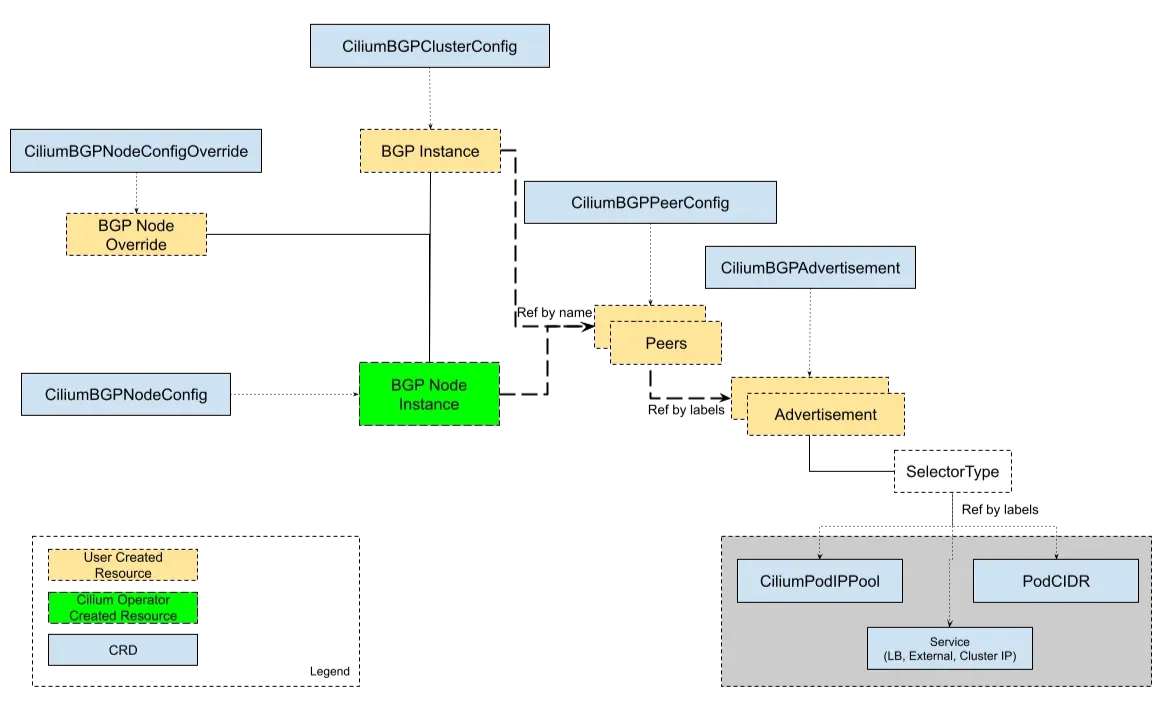
Cilium BGPv2의 전체적인 데이터 흐름을 보여줍니다. 먼저 사용자가 kubectl 명령어를 통해 BGP 설정을 Kubernetes CRD(Custom Resource Definition)로 생성합니다.
이 설정은 Cilium Operator가 감지하여 각 노드의 Cilium Agent에게 전달합니다. Cilium Agent는 받은 BGP 설정을 기반으로 로컬 BGP 데몬을 구성하고, 이를 통해 외부 라우터와 BGP 세션을 설정합니다.
이 과정을 통해 LoadBalancer 서비스의 외부 IP 주소가 외부 라우터의 라우팅 테이블에 자동으로 광고되어, 클러스터 외부에서 서비스에 접근할 수 있게 됩니다.
v1 Legacy 방식과의 차이
기존 v1legacy 방식에서는 각 노드의 Cilium 에이전트 설정 파일에 BGP 설정을 직접 작성해야 했습니다. 이는 수동 작업이 많고 설정 변경 시 모든 노드를 개별적으로 업데이트해야 하는 번거로움이 있었습니다.
반면 BGPv2는 Kubernetes CRD를 통해 선언적으로 BGP 설정을 관리하므로, 설정 변경 시 자동으로 모든 노드에 적용됩니다. 또한 v1legacy는 수동 설정으로 인해 확장이 어려웠지만, BGPv2는 자동화된 설정 관리로 대규모 클러스터에서도 효율적으로 운영할 수 있습니다.
마지막으로 kubectl 명령어를 통해 BGP 상태와 설정을 쉽게 확인할 수 있어 가시성이 크게 향상되었습니다.
주요 옵션
CiliumBGPClusterConfig: 여러 노드에 적용되는 BGP 인스턴스와 피어 설정을 정의합니다.CiliumBGPPeerConfig: 여러 피어에서 공통으로 사용할 수 있는 BGP 피어링 설정 집합입니다.CiliumBGPAdvertisement: BGP 라우팅 테이블에 주입되는 프리픽스를 정의합니다.CiliumBGPNodeConfigOverride: 더 세밀한 제어를 위한 노드별 BGP 설정을 정의합니다.
주의사항
Cilium의 BGP는 기본적으로 외부 경로를 커널 라우팅 테이블에 주입하지 않습니다. 그렇기 때문에 BGP 사용시 2개 이상의 NIC을 사용할 경우에는 직접 라우팅을 설정하고 관리해야 합니다.
이 문제는 실습을 통해 확인해 보도록 합니다.
BGP 설정 후 통신 확인
router 접속 후 설정 : sshpass -p 'vagrant' ssh vagrant@router
sshpass -p 'vagrant' ssh vagrant@router

# FRR 데몬 프로세스 확인 - BGP 라우팅 데몬 실행 상태
ss -tnlp | grep -iE 'zebra|bgpd'
ps -ef |grep frr

# FRR 현재 설정 확인 - BGP 라우터 설정 상태
vtysh -c 'show running'
cat /etc/frr/frr.conf
...
log syslog informational
!
router bgp 65000
  bgp router-id 192.168.10.200
  bgp graceful-restart
  no bgp ebgp-requires-policy
  bgp bestpath as-path multipath-relax
  maximum-paths 4

# BGP 상태 확인 - BGP 세션 및 라우팅 테이블 상태
vtysh -c 'show running'
vtysh -c 'show ip bgp summary'
vtysh -c 'show ip bgp'

# Cilium 노드 연동 설정 방안 1 - 파일 직접 편집 방식
cat << EOF >> /etc/frr/frr.conf
  neighbor CILIUM peer-group
  neighbor CILIUM remote-as external
  neighbor 192.168.10.100 peer-group CILIUM  # k8s-ctr 노드
  neighbor 192.168.10.101 peer-group CILIUM  # k8s-w1 노드
  neighbor 192.168.20.100 peer-group CILIUM  # k8s-w0 노드
EOF

cat /etc/frr/frr.conf

systemctl daemon-reexec && systemctl restart frr  # FRR 서비스 재시작
systemctl status frr --no-pager --full            # FRR 서비스 상태 확인

# 모니터링 걸어두기!
journalctl -u frr -f


# Cilium 노드 연동 설정 방안 2 - vtysh 대화형 설정 방식
vtysh
---------------------------
?
show ?
show running
show ip route

# config 모드 진입
conf
?

## bgp 65000 설정 진입
router bgp 65000
?
neighbor CILIUM peer-group
neighbor CILIUM remote-as external
neighbor 192.168.10.100 peer-group CILIUM  # k8s-ctr 노드
neighbor 192.168.10.101 peer-group CILIUM  # k8s-w1 노드
neighbor 192.168.20.100 peer-group CILIUM  # k8s-w0 노드
end

# Write configuration to the file (same as write file)
write memory

exit
---------------------------

cat /etc/frr/frr.conf
# FRR 데몬 포트 및 프로세스 상태 확인
root@router:~# ss -tnlp | grep -iE 'zebra|bgpd'
LISTEN 0 3 127.0.0.1:2605 0.0.0.0:* users:(("bgpd",pid=4148,fd=18)) # BGP 데몬 관리 포트
LISTEN 0 3 127.0.0.1:2601 0.0.0.0:* users:(("zebra",pid=4143,fd=23)) # Zebra 라우팅 데몬 포트
LISTEN 0 4096 0.0.0.0:179 0.0.0.0:* users:(("bgpd",pid=4148,fd=22)) # BGP 표준 포트 179
LISTEN 0 4096 [::]:179 [::]:* users:(("bgpd",pid=4148,fd=23)) # BGP IPv6 포트
root@router:~# ps -ef |grep frr
root 4130 1 0 17:05 ? 00:00:00 /usr/lib/frr/watchfrr -d -F traditional zebra bgpd staticd # FRR 감시 프로세스
frr 4143 1 0 17:05 ? 00:00:00 /usr/lib/frr/zebra -d -F traditional -A 127.0.0.1 -s 90000000 # Zebra 라우팅 데몬
frr 4148 1 0 17:05 ? 00:00:00 /usr/lib/frr/bgpd -d -F traditional -A 127.0.0.1 # BGP 데몬
frr 4155 1 0 17:05 ? 00:00:00 /usr/lib/frr/staticd -d -F traditional -A 127.0.0.1 # 정적 라우팅 데몬
...
root@router:~# vtysh -c 'show running'
Building configuration...
Current configuration:
!
frr version 8.4.4
frr defaults traditional
hostname router
log syslog informational
no ipv6 forwarding
service integrated-vtysh-config
!
router bgp 65000
bgp router-id 192.168.10.200
no bgp ebgp-requires-policy
bgp graceful-restart
bgp bestpath as-path multipath-relax
!
address-family ipv4 unicast
network 10.10.1.0/24
maximum-paths 4
exit-address-family
exit
!
end
# FRR 설정 파일 확인
root@router:~# cat /etc/frr/frr.conf
# default to using syslog. /etc/rsyslog.d/45-frr.conf places the log in
# /var/log/frr/frr.log
...
log syslog informational
!
router bgp 65000
bgp router-id 192.168.10.200 # BGP 라우터 ID
bgp graceful-restart
no bgp ebgp-requires-policy
bgp bestpath as-path multipath-relax
maximum-paths 4
network 10.10.1.0/24 # 광고할 네트워크
root@router:~# vtysh -c 'show running'
Building configuration...
Current configuration:
!
frr version 8.4.4
frr defaults traditional
hostname router
log syslog informational
no ipv6 forwarding
service integrated-vtysh-config
!
router bgp 65000
bgp router-id 192.168.10.200
no bgp ebgp-requires-policy
bgp graceful-restart
bgp bestpath as-path multipath-relax
!
address-family ipv4 unicast
network 10.10.1.0/24
maximum-paths 4
exit-address-family
exit
!
end
# BGP 상태 확인 - 피어 및 라우팅 테이블
root@router:~# vtysh -c 'show ip bgp summary'
% No BGP neighbors found in VRF default # 아직 BGP 피어가 설정되지 않음
# 65000-65534: Private ASN 범위
# 인터넷에 직접 연결되지 않는 내부 네트워크에서 사용
# RFC 6996에서 정의된 예약된 범위
# 외부 인터넷과 연결할 때는 다른 ASN으로 교체해야 함
# 실제 운영 환경에서
# 공용 ASN: 1-64511, 65536-4294967295 (인터넷 연결용)
# Private ASN: 64512-65534 (내부 네트워크용)
# 예약된 ASN: 65535 (예약됨)
root@router:~# vtysh -c 'show ip bgp'
BGP table version is 1, local router ID is 192.168.10.200, vrf id 0
Default local pref 100, local AS 65000
Status codes: s suppressed, d damped, h history, * valid, > best, = multipath,
i internal, r RIB-failure, S Stale, R Removed
Nexthop codes: @NNN nexthop's vrf id, < announce-nh-self
Origin codes: i - IGP, e - EGP, ? - incomplete
RPKI validation codes: V valid, I invalid, N Not found
Network Next Hop Metric LocPrf Weight Path
*> 10.10.1.0/24 0.0.0.0 0 32768 i # 로컬에서 광고하는 네트워크
Displayed 1 routes and 1 total paths
# 라우터의 라우팅 테이블 확인
root@router:~#
ip -c route
default via 10.0.2.2 dev eth0 proto dhcp src 10.0.2.15 metric 100 # 기본 게이트웨이
10.0.2.0/24 dev eth0 proto kernel scope link src 10.0.2.15 metric 100 # 외부 네트워크
10.0.2.2 dev eth0 proto dhcp scope link src 10.0.2.15 metric 100 # DHCP 서버
10.0.2.3 dev eth0 proto dhcp scope link src 10.0.2.15 metric 100 # DHCP 서버
10.10.1.0/24 dev loop1 proto kernel scope link src 10.10.1.200 # BGP 광고 네트워크
10.10.2.0/24 dev loop2 proto kernel scope link src 10.10.2.200 # 추가 네트워크
192.168.10.0/24 dev eth1 proto kernel scope link src 192.168.10.200
192.168.20.0/24 dev eth2 proto kernel scope link src 192.168.20.200
root@router:~# cat << EOF >> /etc/frr/frr.conf
neighbor CILIUM peer-group
neighbor CILIUM remote-as external
neighbor 192.168.10.100 peer-group CILIUM
neighbor 192.168.10.101 peer-group CILIUM
neighbor 192.168.20.100 peer-group CILIUM
EOF
root@router:~# cat /etc/frr/frr.conf
# default to using syslog. /etc/rsyslog.d/45-frr.conf places the log in
# /var/log/frr/frr.log
#
# Note:
# FRR's configuration shell, vtysh, dynamically edits the live, in-memory
# configuration while FRR is running. When instructed, vtysh will persist the
# live configuration to this file, overwriting its contents. If you want to
# avoid this, you can edit this file manually before starting FRR, or instruct
# vtysh to write configuration to a different file.
log syslog informational
!
router bgp 65000
bgp router-id 192.168.10.200
bgp graceful-restart
no bgp ebgp-requires-policy
bgp bestpath as-path multipath-relax
maximum-paths 4
network 10.10.1.0/24
neighbor CILIUM peer-group
neighbor CILIUM remote-as external
neighbor 192.168.10.100 peer-group CILIUM
neighbor 192.168.10.101 peer-group CILIUM
neighbor 192.168.20.100 peer-group CILIUM
root@router:~# systemctl daemon-reexec && systemctl restart frr
root@router:~# systemctl status frr --no-pager --full
● frr.service - FRRouting
Loaded: loaded (/usr/lib/systemd/system/frr.service; enabled; preset: enabled)
Active: active (running) since Fri 2025-08-15 19:40:37 KST; 7s ago
Docs: https://frrouting.readthedocs.io/en/latest/setup.html
Process: 4913 ExecStart=/usr/lib/frr/frrinit.sh start (code=exited, status=0/SUCCESS)
Main PID: 4925 (watchfrr)
Status: "FRR Operational"
Tasks: 13 (limit: 553)
Memory: 19.3M (peak: 27.0M)
CPU: 76ms
CGroup: /system.slice/frr.service
├─4925 /usr/lib/frr/watchfrr -d -F traditional zebra bgpd staticd
├─4938 /usr/lib/frr/zebra -d -F traditional -A 127.0.0.1 -s 90000000
├─4943 /usr/lib/frr/bgpd -d -F traditional -A 127.0.0.1
└─4950 /usr/lib/frr/staticd -d -F traditional -A 127.0.0.1
Aug 15 19:40:37 router watchfrr[4925]: [YFT0P-5Q5YX] Forked background command [pid 4926]: /usr/lib/frr/watchfrr.sh restart all
...
Aug 15 19:40:37 router systemd[1]: Started frr.service - FRRouting.Cilium예 BGP 설정
# BGP 모니터링 및 테스트 - 실시간 로그 확인 및 통신 테스트
# 신규 터미널 1 (router) : 모니터링 걸어두기!
journalctl -u frr -f

# 신규 터미널 2 (k8s-ctr) : 반복 호출
kubectl exec -it curl-pod -- sh -c 'while true; do curl -s --connect-timeout 1 webpod | grep Hostname; echo "---" ; sleep 1; done'


# BGP 동작할 노드를 위한 라벨 설정 - BGP 활성화 노드 지정
kubectl label nodes k8s-ctr k8s-w0 k8s-w1 enable-bgp=true
kubectl get node -l enable-bgp=true


# Cilium BGP 설정 - BGP 광고 정책 생성
cat << EOF | kubectl apply -f -
apiVersion: cilium.io/v2
kind: CiliumBGPAdvertisement
metadata:
  name: bgp-advertisements
  labels:
    advertise: bgp
spec:
  advertisements:
    - advertisementType: "PodCIDR"
---
apiVersion: cilium.io/v2
kind: CiliumBGPPeerConfig #피어 세팅
metadata:
  name: cilium-peer
spec:
  timers:
    holdTimeSeconds: 9
    keepAliveTimeSeconds: 3
  ebgpMultihop: 2
  gracefulRestart:
    enabled: true
    restartTimeSeconds: 15
  families:
    - afi: ipv4
      safi: unicast
      advertisements:
        matchLabels:
          advertise: "bgp"
---
apiVersion: cilium.io/v2
kind: CiliumBGPClusterConfig # 피어들을 클러스터로 묶는 역할
metadata:
  name: cilium-bgp
spec:
  nodeSelector:
    matchLabels:
      "enable-bgp": "true" # 노드에서 bgp를 적용
  bgpInstances:
  - name: "instance-65001"
    localASN: 65001
    peers:
    - name: "tor-switch"
      peerASN: 65000
      peerAddress: 192.168.10.200  # router ip address
      peerConfigRef:
        name: "cilium-peer"
EOF
통신 확인
# 세팅후 업데이트 수신 정보 확인
Aug 15 19:43:26 router bgpd[4943]: [M59KS-A3ZXZ] bgp_update_receive: rcvd End-of-RIB for IPv4 Unicast from 192.168.10.101 in vrf default
Aug 15 19:43:26 router bgpd[4943]: [M59KS-A3ZXZ] bgp_update_receive: rcvd End-of-RIB for IPv4 Unicast from 192.168.20.100 in vrf default
Aug 15 19:43:26 router bgpd[4943]: [M59KS-A3ZXZ] bgp_update_receive: rcvd End-of-RIB for IPv4 Unicast from 192.168.10.100 in vrf default

# BGP 연결 확인
ss -tnlp | grep 179
ss -tnp | grep 179

# cilium bgp 정보 확인
cilium bgp peers
cilium bgp routes available ipv4 unicast

kubectl get ciliumbgpadvertisements,ciliumbgppeerconfigs,ciliumbgpclusterconfigs
kubectl get ciliumbgpnodeconfigs -o yaml | yq
...
                "peeringState": "established",
                "routeCount": [
                  {
                    "advertised": 2,
                    "afi": "ipv4",
                    "received": 1,
                    "safi": "unicast"
                  }
...


# 신규 터미널 1 (router) : 모니터링 걸어두기!
journalctl -u frr -f

ip -c route | grep bgp

vtysh -c 'show ip bgp summary'

vtysh -c 'show ip bgp'
✅ 실행 결과 요약
(⎈|HomeLab:N/A) root@k8s-ctr:~# ss -tnlp | grep 179 #컨트롤 플레인에는 없음
(⎈|HomeLab:N/A) root@k8s-ctr:~# ss -tnp | grep 179 #컨트롤 플레인이 BGP를 라우터에서 접근
ESTAB 0      0               192.168.10.100:52899          192.168.10.200:179   users:(("cilium-agent",pid=5576,fd=198))

(⎈|HomeLab:N/A) root@k8s-ctr:~# cilium bgp peers #라우터를 통해 frr과 잘 연결 됨
Node      Local AS   Peer AS   Peer Address     Session State   Uptime     Family         Received   Advertised
k8s-ctr   65001      65000     192.168.10.200   established     1h26m59s   ipv4/unicast   4          2
k8s-w0    65001      65000     192.168.10.200   established     1h26m59s   ipv4/unicast   4          2
k8s-w1    65001      65000     192.168.10.200   established     1h26m59s   ipv4/unicast   4          2

(⎈|HomeLab:N/A) root@k8s-ctr:~# cilium bgp routes available ipv4 unicast #각각 자신의 pod cidr를 bgp로 광고
Node      VRouter   Prefix          NextHop   Age       Attrs
k8s-ctr   65001     172.20.0.0/24   0.0.0.0   1h27m5s   [{Origin: i} {Nexthop: 0.0.0.0}]
k8s-w0    65001     172.20.2.0/24   0.0.0.0   1h27m5s   [{Origin: i} {Nexthop: 0.0.0.0}]
k8s-w1    65001     172.20.1.0/24   0.0.0.0   1h27m5s   [{Origin: i} {Nexthop: 0.0.0.0}]

(⎈|HomeLab:N/A) root@k8s-ctr:~# kubectl get ciliumbgpadvertisements,ciliumbgppeerconfigs,ciliumbgpclusterconfigs
NAME                                                  AGE
ciliumbgpadvertisement.cilium.io/bgp-advertisements   87m

NAME                                        AGE
ciliumbgppeerconfig.cilium.io/cilium-peer   87m

NAME                                          AGE
ciliumbgpclusterconfig.cilium.io/cilium-bgp   87m

root@router:~# ip -c route | grep bgp #광고 정보가 BGP로 등록됨
172.20.0.0/24 nhid 32 via 192.168.10.100 dev eth1 proto bgp metric 20
172.20.1.0/24 nhid 30 via 192.168.10.101 dev eth1 proto bgp metric 20
172.20.2.0/24 nhid 31 via 192.168.20.100 dev eth2 proto bgp metric 20

root@router:~# vtysh -c 'show ip bgp summary'

IPv4 Unicast Summary (VRF default):
BGP router identifier 192.168.10.200, local AS number 65000 vrf-id 0
BGP table version 4
RIB entries 7, using 1344 bytes of memory
Peers 3, using 2172 KiB of memory
Peer groups 1, using 64 bytes of memory

Neighbor        V         AS   MsgRcvd   MsgSent   TblVer  InQ OutQ  Up/Down State/PfxRcd   PfxSnt Desc
192.168.10.100  4      65001      1825      1828        0    0    0 01:31:06            1        4 N/A
192.168.10.101  4      65001      1826      1828        0    0    0 01:31:07            1        4 N/A
192.168.20.100  4      65001      1825      1828        0    0    0 01:31:06            1        4 N/A

Total number of neighbors 3

root@router:~# vtysh -c 'show ip bgp'
BGP table version is 4, local router ID is 192.168.10.200, vrf id 0
Default local pref 100, local AS 65000
Status codes:  s suppressed, d damped, h history, * valid, > best, = multipath,
               i internal, r RIB-failure, S Stale, R Removed
Nexthop codes: @NNN nexthop's vrf id, < announce-nh-self
Origin codes:  i - IGP, e - EGP, ? - incomplete
RPKI validation codes: V valid, I invalid, N Not found

   Network          Next Hop            Metric LocPrf Weight Path
*> 10.10.1.0/24     0.0.0.0                  0         32768 i
*> 172.20.0.0/24    192.168.10.100                         0 65001 i
*> 172.20.1.0/24    192.168.10.101                         0 65001 i
*> 172.20.2.0/24    192.168.20.100                         0 65001 i

Displayed  4 routes and 4 total paths
그럼에도 불구하고 여전히 Pod간 통신이 되지 않습니다.
---
Hostname: webpod-697b545f57-hchf7
---
---
---
Hostname: webpod-697b545f57-hchf7
---
---
---
BGP 정보전달 확인
# k8s-ctr tcpdump 해두기
tcpdump -i eth1 tcp port 179 -w /tmp/bgp.pcap

# router : frr 재시작
systemctl restart frr && journalctl -u frr -f


# bgp.type == 2
termshark -r /tmp/bgp.pcap

# 분명 Router 장비를 통해 BGP UPDATE로 받음을 확인.
cilium bgp routes
ip -c route
root@router:~# systemctl restart frr && journalctl -u frr -f
Aug 15 21:16:22 router watchfrr[5128]: [YFT0P-5Q5YX] Forked background command [pid 5129]: /usr/lib/frr/watchfrr.sh restart all
Aug 15 21:16:22 router zebra[5141]: [VTVCM-Y2NW3] Configuration Read in Took: 00:00:00
Aug 15 21:16:22 router bgpd[5146]: [VTVCM-Y2NW3] Configuration Read in Took: 00:00:00
Aug 15 21:16:22 router staticd[5153]: [VTVCM-Y2NW3] Configuration Read in Took: 00:00:00
Aug 15 21:16:22 router watchfrr[5128]: [QDG3Y-BY5TN] zebra state -> up : connect succeeded
Aug 15 21:16:22 router watchfrr[5128]: [QDG3Y-BY5TN] bgpd state -> up : connect succeeded
Aug 15 21:16:22 router watchfrr[5128]: [QDG3Y-BY5TN] staticd state -> up : connect succeeded
Aug 15 21:16:22 router watchfrr[5128]: [KWE5Q-QNGFC] all daemons up, doing startup-complete notify
Aug 15 21:16:22 router frrinit.sh[5117]: * Started watchfrr
Aug 15 21:16:22 router systemd[1]: Started frr.service - FRRouting.
Aug 15 21:16:28 router bgpd[5146]: [M59KS-A3ZXZ] bgp_update_receive: rcvd End-of-RIB for IPv4 Unicast from 192.168.20.100 in vrf default
Aug 15 21:16:29 router bgpd[5146]: [M59KS-A3ZXZ] bgp_update_receive: rcvd End-of-RIB for IPv4 Unicast from 192.168.10.100 in vrf default
Aug 15 21:16:29 router bgpd[5146]: [M59KS-A3ZXZ] bgp_update_receive: rcvd End-of-RIB for IPv4 Unicast from 192.168.10.101 in vrf default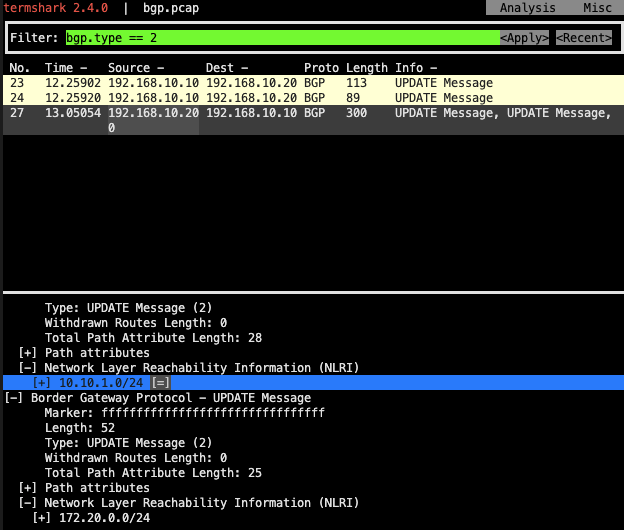
BGP 광고 패킷의 구조와 흐름을 보여줍니다. Cilium BGP Agent가 Kubernetes Pod CIDR 정보를 BGP UPDATE 메시지로 외부 라우터에 광고하는 과정을 나타냅니다.
주요 구성 요소
- BGP UPDATE 메시지: Pod CIDR 네트워크 정보(172.20.0.0/24, 172.20.1.0/24, 172.20.2.0/24)를 포함
- Next Hop 정보: 각 Pod CIDR에 대한 다음 홉 라우터 주소
- AS Path: BGP 경로 정보 (65001 i - 내부 경로)
- Origin: IGP(Internal Gateway Protocol)로 표시
문제점
라우터는 BGP UPDATE 메시지를 정상적으로 수신하고 라우팅 테이블에 등록하지만, 실제 OS 커널 라우팅 테이블에 주입하지 않아 Pod 간 통신이 실패하는 상황을 보여줍니다.
#라우팅 정보는 받았지만, 통신은 되지 않음
(⎈|HomeLab:N/A) root@k8s-ctr:~# cilium bgp routes
(Defaulting to `available ipv4 unicast` routes, please see help for more options)

Node      VRouter   Prefix          NextHop   Age        Attrs
k8s-ctr   65001     172.20.0.0/24   0.0.0.0   1h41m34s   [{Origin: i} {Nexthop: 0.0.0.0}]
k8s-w0    65001     172.20.2.0/24   0.0.0.0   1h41m34s   [{Origin: i} {Nexthop: 0.0.0.0}]
k8s-w1    65001     172.20.1.0/24   0.0.0.0   1h41m33s   [{Origin: i} {Nexthop: 0.0.0.0}]

(⎈|HomeLab:N/A) root@k8s-ctr:~# ip -c route
default via 10.0.2.2 dev eth0 proto dhcp src 10.0.2.15 metric 100
10.0.2.0/24 dev eth0 proto kernel scope link src 10.0.2.15 metric 100
10.0.2.2 dev eth0 proto dhcp scope link src 10.0.2.15 metric 100
10.0.2.3 dev eth0 proto dhcp scope link src 10.0.2.15 metric 100
172.20.0.0/24 via 172.20.0.123 dev cilium_host proto kernel src 172.20.0.123
172.20.0.123 dev cilium_host proto kernel scope link
192.168.10.0/24 dev eth1 proto kernel scope link src 192.168.10.100
192.168.20.0/24 via 192.168.10.200 dev eth1 proto static
문제 해결 후 통신 확인
Cilium 으로 BGP 사용 시, 2개 이상의 NIC 사용할 경우에는 Node에 직접 라우팅 설정 및 관리가 필요합니다.
- 현재 실습 환경은 2개의 NIC(eth0, eth1)을 사용하고 있는 상황으로, default GW가 eth0 경로로 설정 되어 있습니다.
- eth1은 k8s 통신 용도로 사용 중. 즉, 현재 k8s 파드 사용 대역 통신 전체는 eth1을 통해서 라우팅 설정하면됩니다.
- 해당 라우팅을 상단에 네트워크 장비가 받게 되고, 해당 장비는 Cilium Node를 통해 모든 PodCIDR 정보를 알고 있기에, 목적지로 전달이 가능해 집니다.
- 결론은 Cilium 으로 BGP 사용 시, 2개 이상의 NIC 사용할 경우에는 Node별로 직접 라우팅 설정 및 관리가 필요합니다.
#노드에 직접 라우팅 설정
# k8s 파드 사용 대역 통신 전체는 eth1을 통해서 라우팅 설정
ip route add 172.20.0.0/16 via 192.168.10.200
sshpass -p 'vagrant' ssh vagrant@k8s-w1 sudo ip route add 172.20.0.0/16 via 192.168.10.200
sshpass -p 'vagrant' ssh vagrant@k8s-w0 sudo ip route add 172.20.0.0/16 via 192.168.20.200

# router 가 bgp로 학습한 라우팅 정보 한번 더 확인 :
sshpass -p 'vagrant' ssh vagrant@router ip -c route | grep bgp
172.20.0.0/24 nhid 64 via 192.168.10.100 dev eth1 proto bgp metric 20
172.20.1.0/24 nhid 60 via 192.168.10.101 dev eth1 proto bgp metric 20
172.20.2.0/24 nhid 62 via 192.168.20.100 dev eth2 proto bgp metric 20

# 정상 통신 확인!
kubectl exec -it curl-pod -- sh -c 'while true; do curl -s --connect-timeout 1 webpod | grep Hostname; echo "---" ; sleep 1; done'

# hubble relay 포트 포워딩 실행
cilium hubble port-forward&
hubble status

# flow log 모니터링
hubble observe -f --protocol tcp --pod curl-pod
✅ 실행 결과 요약
(⎈|HomeLab:N/A) root@k8s-ctr:~# ip -c route
default via 10.0.2.2 dev eth0 proto dhcp src 10.0.2.15 metric 100
10.0.2.0/24 dev eth0 proto kernel scope link src 10.0.2.15 metric 100
10.0.2.2 dev eth0 proto dhcp scope link src 10.0.2.15 metric 100
10.0.2.3 dev eth0 proto dhcp scope link src 10.0.2.15 metric 100
172.20.0.0/24 via 172.20.0.123 dev cilium_host proto kernel src 172.20.0.123
172.20.0.123 dev cilium_host proto kernel scope link
192.168.10.0/24 dev eth1 proto kernel scope link src 192.168.10.100
192.168.20.0/24 via 192.168.10.200 dev eth1 proto static
(⎈|HomeLab:N/A) root@k8s-ctr:~# ip route add 172.20.0.0/16 via 192.168.10.200

(⎈|HomeLab:N/A) root@k8s-ctr:~# sshpass -p 'vagrant' ssh vagrant@k8s-w1 sudo ip route add 172.20.0.0/16 via 192.168.10.200

(⎈|HomeLab:N/A) root@k8s-ctr:~# sshpass -p 'vagrant' ssh vagrant@k8s-w0 sudo ip route add 172.20.0.0/16 via 192.168.20.200

(⎈|HomeLab:N/A) root@k8s-ctr:~# sshpass -p 'vagrant' ssh vagrant@router ip -c route | grep bgp
172.20.0.0/24 nhid 62 via 192.168.10.100 dev eth1 proto bgp metric 20
172.20.1.0/24 nhid 64 via 192.168.10.101 dev eth1 proto bgp metric 20
172.20.2.0/24 nhid 60 via 192.168.20.100 dev eth2 proto bgp metric 20

# 정상 통신 확인
(⎈|HomeLab:N/A) root@k8s-ctr:~# kubectl exec -it curl-pod -- sh -c 'while true; do curl -s --connect-timeout 1 webpod | grep Hostname; echo "---" ; sleep 1; done'
---
Hostname: webpod-697b545f57-cmftm
---
Hostname: webpod-697b545f57-hchf7
---
Hostname: webpod-697b545f57-hchf7
---
Hostname: webpod-697b545f57-cmftm
---
Hostname: webpod-697b545f57-hchf7
---
Hostname: webpod-697b545f57-smclf
Node 유지보수시
지금 현재 BGP로 동작하고 있는데, w0의 유지보수 시, 자원들을 옮기는 과정을 실습해 봅니다.
drain 설정 및 label 조정을 통해 pod가 배포되는 현상을 막고, bgp 라우팅을 조정합니다.
# 모니터링 : 반복 호출
kubectl exec -it curl-pod -- sh -c 'while true; do curl -s --connect-timeout 1 webpod | grep Hostname; echo "---" ; sleep 1; done'

# (참고) BGP Control Plane logs
kubectl logs -n kube-system -l name=cilium-operator -f | grep "subsys=bgp-cp-operator"
kubectl logs -n kube-system -l k8s-app=cilium -f | grep "subsys=bgp-control-plane"


# 유지보수를 위한 설정
kubectl drain k8s-w0 --ignore-daemonsets
kubectl label nodes k8s-w0 enable-bgp=false --overwrite

# 확인
kubectl get node
kubectl get ciliumbgpnodeconfigs
cilium bgp routes
cilium bgp peers
Node      Local AS   Peer AS   Peer Address     Session State   Uptime     Family         Received   Advertised
k8s-ctr   65001      65000     192.168.10.200   established     2h13m35s   ipv4/unicast   3          2
k8s-w1    65001      65000     192.168.10.200   established     2h13m36s   ipv4/unicast   3          2

sshpass -p 'vagrant' ssh vagrant@router "sudo vtysh -c 'show ip bgp summary'"
sshpass -p 'vagrant' ssh vagrant@router "sudo vtysh -c 'show ip bgp'"
sshpass -p 'vagrant' ssh vagrant@router "sudo vtysh -c 'show ip route bgp'"
sshpass -p 'vagrant' ssh vagrant@router ip -c route | grep bgp
172.20.0.0/24 nhid 64 via 192.168.10.100 dev eth1 proto bgp metric 20
172.20.1.0/24 nhid 60 via 192.168.10.101 dev eth1 proto bgp metric 20
(⎈|HomeLab:N/A) root@k8s-ctr:~# kubectl logs -n kube-system -l k8s-app=cilium -f | grep "subsys=bgp-control-plane"
time=2025-08-15T12:35:31.990653078Z level=debug source=/go/src/github.com/cilium/cilium/pkg/bgpv1/gobgp/logger.go:137 msg=sent module=agent.controlplane.bgp-control-plane instance=instance-65001 Topic=Peer Key=192.168.10.200 State=BGP_FSM_ESTABLISHED data="&{Header:{Marker:[] Len:19 Type:4} Body:0x7abcd00}" asn=65001 component=gobgp.BgpServerInstance subsys=bgp-control-plane
time=2025-08-15T12:35:34.99108071Z level=debug source=/go/src/github.com/cilium/cilium/pkg/bgpv1/gobgp/logger.go:137 msg=sent module=agent.controlplane.bgp-control-plane instance=instance-65001 Key=192.168.10.200 State=BGP_FSM_ESTABLISHED data="&{Header:{Marker:[] Len:19 Type:4} Body:0x7abcd00}" Topic=Peer asn=65001 component=gobgp.BgpServerInstance subsys=bgp-control-plane
time=2025-08-15T12:35:37.991174592Z level=debug source=/go/src/github.com/cilium/cilium/pkg/bgpv1/gobgp/logger.go:137 msg=sent module=agent.controlplane.bgp-control-plane instance=instance-65001 Topic=Peer Key=192.168.10.200 State=BGP_FSM_ESTABLISHED data="&{Header:{Marker:[] Len:19 Type:4} Body:0x7abcd00}" asn=65001 component=gobgp.BgpServerInstance subsys=bgp-control-plane
(⎈|HomeLab:N/A) root@k8s-ctr:~# kubectl drain k8s-w0 --ignore-daemonsets
node/k8s-w0 cordoned
Warning: ignoring DaemonSet-managed Pods: kube-system/cilium-envoy-lv7dw, kube-system/cilium-mkrkd, kube-system/kube-proxy-fm6q9
evicting pod default/webpod-697b545f57-cmftm
pod/webpod-697b545f57-cmftm evicted
node/k8s-w0 drained
(⎈|HomeLab:N/A) root@k8s-ctr:~# kubectl label nodes k8s-w0 enable-bgp=false --overwrite
node/k8s-w0 labeled
(⎈|HomeLab:N/A) root@k8s-ctr:~# kubectl get node
NAME STATUS ROLES AGE VERSION
k8s-ctr Ready control-plane 8h v1.33.2
k8s-w0 Ready,SchedulingDisabled <none> 8h v1.33.2
k8s-w1 Ready <none> 8h v1.33.2
(⎈|HomeLab:N/A) root@k8s-ctr:~# kubectl get ciliumbgpnodeconfigs
NAME AGE
k8s-ctr 113m
k8s-w1 113m
(⎈|HomeLab:N/A) root@k8s-ctr:~# cilium bgp routes
(Defaulting to `available ipv4 unicast` routes, please see help for more options)
Node VRouter Prefix NextHop Age Attrs
k8s-ctr 65001 172.20.0.0/24 0.0.0.0 1h53m28s [{Origin: i} {Nexthop: 0.0.0.0}]
k8s-w1 65001 172.20.1.0/24 0.0.0.0 1h53m28s [{Origin: i} {Nexthop: 0.0.0.0}]
(⎈|HomeLab:N/A) root@k8s-ctr:~# cilium bgp peers
Node Local AS Peer AS Peer Address Session State Uptime Family Received Advertised
k8s-ctr 65001 65000 192.168.10.200 established 20m29s ipv4/unicast 3 2
k8s-w1 65001 65000 192.168.10.200 established 20m29s ipv4/unicast 3 2
(⎈|HomeLab:N/A) root@k8s-ctr:~# sshpass -p 'vagrant' ssh vagrant@router "sudo vtysh -c 'show ip bgp summary'"
IPv4 Unicast Summary (VRF default):
BGP router identifier 192.168.10.200, local AS number 65000 vrf-id 0
BGP table version 5
RIB entries 5, using 960 bytes of memory
Peers 3, using 2172 KiB of memory
Peer groups 1, using 64 bytes of memory
Neighbor V AS MsgRcvd MsgSent TblVer InQ OutQ Up/Down State/PfxRcd PfxSnt Desc
192.168.10.100 4 65001 426 430 0 0 0 00:21:07 1 3 N/A
192.168.10.101 4 65001 426 430 0 0 0 00:21:07 1 3 N/A
192.168.20.100 4 65001 406 407 0 0 0 00:01:06 Active 0 N/A
Total number of neighbors 3
(⎈|HomeLab:N/A) root@k8s-ctr:~# sshpass -p 'vagrant' ssh vagrant@router "sudo vtysh -c 'show ip bgp'"
BGP table version is 5, local router ID is 192.168.10.200, vrf id 0
Default local pref 100, local AS 65000
Status codes: s suppressed, d damped, h history, * valid, > best, = multipath,
i internal, r RIB-failure, S Stale, R Removed
Nexthop codes: @NNN nexthop's vrf id, < announce-nh-self
Origin codes: i - IGP, e - EGP, ? - incomplete
RPKI validation codes: V valid, I invalid, N Not found
Network Next Hop Metric LocPrf Weight Path
*> 10.10.1.0/24 0.0.0.0 0 32768 i
*> 172.20.0.0/24 192.168.10.100 0 65001 i
*> 172.20.1.0/24 192.168.10.101 0 65001 i
Displayed 3 routes and 3 total paths
(⎈|HomeLab:N/A) root@k8s-ctr:~# sshpass -p 'vagrant' ssh vagrant@router "sudo vtysh -c 'show ip route bgp'"
Codes: K - kernel route, C - connected, S - static, R - RIP,
O - OSPF, I - IS-IS, B - BGP, E - EIGRP, N - NHRP,
T - Table, v - VNC, V - VNC-Direct, A - Babel, F - PBR,
f - OpenFabric,
> - selected route, * - FIB route, q - queued, r - rejected, b - backup
t - trapped, o - offload failure
B>* 172.20.0.0/24 [20/0] via 192.168.10.100, eth1, weight 1, 00:21:15
B>* 172.20.1.0/24 [20/0] via 192.168.10.101, eth1, weight 1, 00:21:15
(⎈|HomeLab:N/A) root@k8s-ctr:~# sshpass -p 'vagrant' ssh vagrant@router ip -c route | grep bgp
172.20.0.0/24 nhid 62 via 192.168.10.100 dev eth1 proto bgp metric 20
172.20.1.0/24 nhid 64 via 192.168.10.101 dev eth1 proto bgp metric 20 복원
# 원복 설정
kubectl label nodes k8s-w0 enable-bgp=true --overwrite
kubectl uncordon k8s-w0

# 확인
kubectl get node
kubectl get ciliumbgpnodeconfigs
cilium bgp routes
cilium bgp peers

sshpass -p 'vagrant' ssh vagrant@router "sudo vtysh -c 'show ip bgp summary'"
sshpass -p 'vagrant' ssh vagrant@router "sudo vtysh -c 'show ip bgp'"
sshpass -p 'vagrant' ssh vagrant@router "sudo vtysh -c 'show ip route bgp'"
sshpass -p 'vagrant' ssh vagrant@router ip -c route | grep bgp

# 노드별 파드 분배 실행
kubectl get pod -owide
kubectl scale deployment webpod --replicas 0
kubectl scale deployment webpod --replicas 3
✅ 실행 결과 요약
(⎈|HomeLab:N/A) root@k8s-ctr:~# kubectl get node
kubectl get ciliumbgpnodeconfigs
cilium bgp routes
cilium bgp peers
NAME      STATUS   ROLES           AGE   VERSION
k8s-ctr   Ready    control-plane   8h    v1.33.2
k8s-w0    Ready    <none>          8h    v1.33.2
k8s-w1    Ready    <none>          8h    v1.33.2
NAME      AGE
k8s-ctr   115m
k8s-w0    10s
k8s-w1    115m
(Defaulting to `available ipv4 unicast` routes, please see help for more options)

Node      VRouter   Prefix          NextHop   Age        Attrs
k8s-ctr   65001     172.20.0.0/24   0.0.0.0   1h55m25s   [{Origin: i} {Nexthop: 0.0.0.0}]
k8s-w0    65001     172.20.2.0/24   0.0.0.0   11s        [{Origin: i} {Nexthop: 0.0.0.0}]
k8s-w1    65001     172.20.1.0/24   0.0.0.0   1h55m25s   [{Origin: i} {Nexthop: 0.0.0.0}]
Node      Local AS   Peer AS   Peer Address     Session State   Uptime   Family         Received   Advertised
k8s-ctr   65001      65000     192.168.10.200   established     22m21s   ipv4/unicast   4          2
k8s-w0    65001      65000     192.168.10.200   established     9s       ipv4/unicast   4          2
k8s-w1    65001      65000     192.168.10.200   established     22m20s   ipv4/unicast   4          2
CRD Status Report
노드가 많은 대규모 클러스터의 경우, api 서버에 부하 유발할 수 있으니, bgp status reporting off 권장
# 확인
kubectl get ciliumbgpnodeconfigs -o yaml | yq
(⎈|HomeLab:N/A) root@k8s-ctr:~# kubectl get ciliumbgpnodeconfigs -o yaml | yq
{
  "apiVersion": "v1",
  "items": [
    {
      ...
      "status": {
        "bgpInstances": [
          {
            "localASN": 65001,
            "name": "instance-65001",
            "peers": [
              {
                "establishedTime": "2025-08-15T12:16:28Z",
                "name": "tor-switch",
                "peerASN": 65000,
                "peerAddress": "192.168.10.200",
                "peeringState": "established",
                "routeCount": [
                  {
                    "advertised": 2,
                    "afi": "ipv4",
                    "received": 3,
                    "safi": "unicast"
                  }
                ],
                "timers": {
                  "appliedHoldTimeSeconds": 9,
                  "appliedKeepaliveSeconds": 3
                }
              }
            ]
          }
        ]
      }
    },
    ...
# 설정
helm upgrade cilium cilium/cilium --version 1.18.0 --namespace kube-system --reuse-values \
  --set bgpControlPlane.statusReport.enabled=false

kubectl -n kube-system rollout restart ds/cilium


# 확인 : CiliumBGPNodeConfig Status 정보가 없다!
kubectl get ciliumbgpnodeconfigs -o yaml | yq
(⎈|HomeLab:N/A) root@k8s-ctr:~# kubectl get ciliumbgpnodeconfigs -o yaml | yq
{
  "apiVersion": "v1",
  "items": [
    {
      "apiVersion": "cilium.io/v2",
      ...
      "status": {}
Service(LoadBalancer - ExternalIP) IPs 를 BGP로 광고
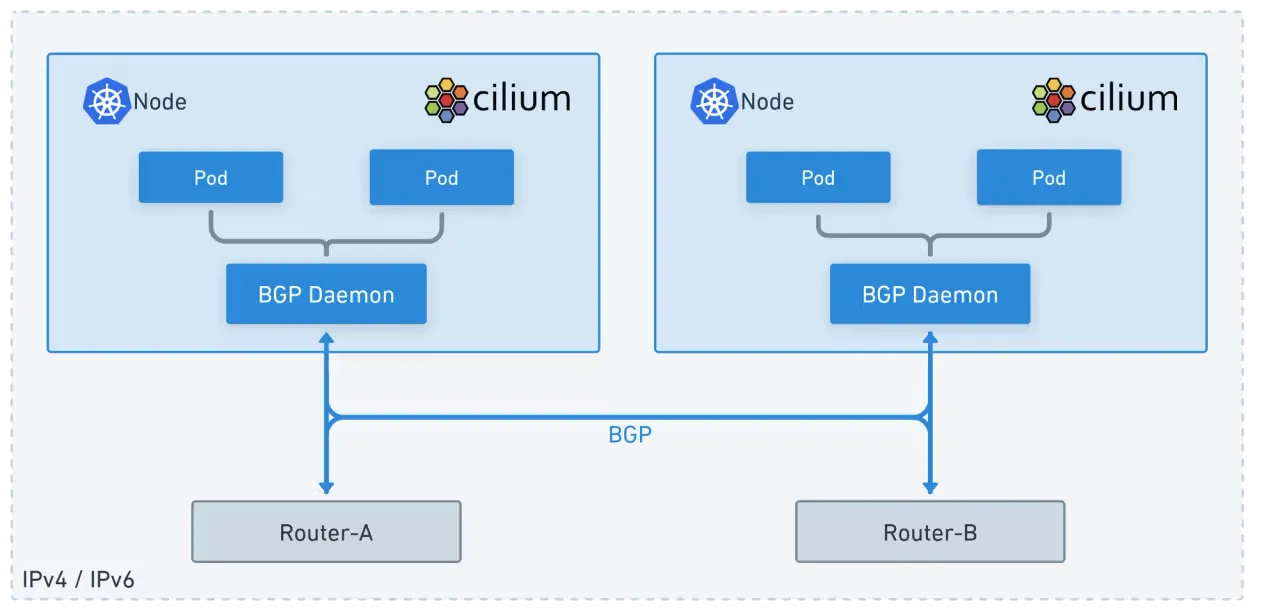
k8s 외부에 진입시에도 BGP로 광고 하는 예제입니다.
# LB IPAM Announcement over BGP 설정 예정으로, 노드의 네트워크 대역이 아니여도 가능!
cat << EOF | kubectl apply -f -
apiVersion: "cilium.io/v2"
kind: CiliumLoadBalancerIPPool
metadata:
  name: "cilium-pool"
spec:
  allowFirstLastIPs: "No"
  blocks:
  - cidr: "172.16.1.0/24"
EOF

kubectl get ippool
NAME          DISABLED   CONFLICTING   IPS AVAILABLE   AGE
cilium-pool   false      False         254             8s


#
kubectl patch svc webpod -p '{"spec": {"type": "LoadBalancer"}}'
kubectl get svc webpod
NAME     TYPE           CLUSTER-IP    EXTERNAL-IP   PORT(S)        AGE
webpod   LoadBalancer   10.96.39.92   172.16.1.1    80:30800/TCP   3h56m

kubectl get ippool
NAME          DISABLED   CONFLICTING   IPS AVAILABLE   AGE
cilium-pool   false      False         253             2m23s

kubectl describe svc webpod | grep 'Traffic Policy'
External Traffic Policy:  Cluster
Internal Traffic Policy:  Cluster

kubectl -n kube-system exec ds/cilium -c cilium-agent -- cilium-dbg service list


# LBIP로 curl 요청 확인
kubectl get svc webpod -o jsonpath='{.status.loadBalancer.ingress[0].ip}'
LBIP=$(kubectl get svc webpod -o jsonpath='{.status.loadBalancer.ingress[0].ip}')
curl -s $LBIP
curl -s $LBIP | grep Hostname
curl -s $LBIP | grep RemoteAddr
✅ 실행 결과 요약
(⎈|HomeLab:N/A) root@k8s-ctr:~# cat << EOF | kubectl apply -f -
apiVersion: "cilium.io/v2"
kind: CiliumLoadBalancerIPPool
metadata:
  name: "cilium-pool"
spec:
  allowFirstLastIPs: "No"
  blocks:
  - cidr: "172.16.1.0/24"
EOF
ciliumloadbalancerippool.cilium.io/cilium-pool created

(⎈|HomeLab:N/A) root@k8s-ctr:~# kubectl get ippool
NAME          DISABLED   CONFLICTING   IPS AVAILABLE   AGE
cilium-pool   false      False         254             4s

(⎈|HomeLab:N/A) root@k8s-ctr:~# kubectl patch svc webpod -p '{"spec": {"type": "LoadBalancer"}}'
service/webpod patched

(⎈|HomeLab:N/A) root@k8s-ctr:~# kubectl get svc webpod
NAME     TYPE           CLUSTER-IP      EXTERNAL-IP   PORT(S)        AGE
webpod   LoadBalancer   10.96.150.245   172.16.1.1    80:32528/TCP   7h51m

(⎈|HomeLab:N/A) root@k8s-ctr:~# kubectl get ippool
NAME          DISABLED   CONFLICTING   IPS AVAILABLE   AGE
cilium-pool   false      False         253             21s #IP 풀에서 IP하나가 없어짐
(⎈|HomeLab:N/A) root@k8s-ctr:~# kubectl describe svc webpod | grep 'Traffic Policy'
External Traffic Policy:  Cluster
Internal Traffic Policy:  Cluster
(⎈|HomeLab:N/A) root@k8s-ctr:~# kubectl -n kube-system exec ds/cilium -c cilium-agent -- cilium-dbg service list
ID   Frontend                Service Type   Backend
1    10.96.45.94:443/TCP     ClusterIP      1 => 172.20.0.174:10250/TCP (active)
2    10.96.64.238:80/TCP     ClusterIP      1 => 172.20.0.210:4245/TCP (active)
...
16   172.16.1.1:80/TCP       LoadBalancer   1 => 172.20.0.185:80/TCP (active)  #서비스 타입 LoadBalancer 추가됨
                                            2 => 172.20.1.63:80/TCP (active)
                                            3 => 172.20.2.38:80/TCP (active)

(⎈|HomeLab:N/A) root@k8s-ctr:~# kubectl get svc webpod -o jsonpath='{.status.loadBalancer.ingress[0].ip}'

(⎈|HomeLab:N/A) root@k8s-ctr:~# LBIP=$(kubectl get svc webpod -o jsonpath='{.status.loadBalancer.ingress[0].ip}')s[0].ip}')

(⎈|HomeLab:N/A) root@k8s-ctr:~# curl -s $LBIP
Hostname: webpod-697b545f57-mf4ns
IP: 127.0.0.1
IP: ::1
IP: 172.20.1.63
IP: fe80::54a8:4ff:fe71:e107
RemoteAddr: 192.168.10.100:53648
GET / HTTP/1.1
Host: 172.16.1.1
User-Agent: curl/8.5.0
Accept: */*
# 모니터링
watch "sshpass -p 'vagrant' ssh vagrant@router ip -c route"
# LB EX-IP를 BGP로 광고 설정
cat << EOF | kubectl apply -f -
apiVersion: cilium.io/v2
kind: CiliumBGPAdvertisement
metadata:
name: bgp-advertisements-lb-exip-webpod
labels:
advertise: bgp
spec:
advertisements:
- advertisementType: "Service"
service:
addresses:
- LoadBalancerIP
selector:
matchExpressions:
- { key: app, operator: In, values: [ webpod ] }
EOF
kubectl get CiliumBGPAdvertisement
# 확인
kubectl exec -it -n kube-system ds/cilium -- cilium-dbg bgp route-policies
# 현재 BGP가 동작하는 모든 노드로 전달 가능!
sshpass -p 'vagrant' ssh vagrant@router ip -c route
sshpass -p 'vagrant' ssh vagrant@router "sudo vtysh -c 'show ip route bgp'"
sshpass -p 'vagrant' ssh vagrant@router "sudo vtysh -c 'show ip bgp summary'"
sshpass -p 'vagrant' ssh vagrant@router "sudo vtysh -c 'show ip bgp'"
sshpass -p 'vagrant' ssh vagrant@router "sudo vtysh -c 'show ip bgp 172.16.1.1/32'"✅ 실행 결과 요약
모든 노드들로 LoadBalancer External IP로 로드벨런싱되어 라우팅가능하도록 노드와 라우터에 BGP정보가 추가됩니다.
(⎈|HomeLab:N/A) root@k8s-ctr:~# cat << EOF | kubectl apply -f -
apiVersion: cilium.io/v2
kind: CiliumBGPAdvertisement
metadata:
  name: bgp-advertisements-lb-exip-webpod
  labels:
    advertise: bgp
spec:
  advertisements:
    - advertisementType: "Service"
      service:
        addresses:
          - LoadBalancerIP
      selector:
        matchExpressions:
          - { key: app, operator: In, values: [ webpod ] }
EOF
ciliumbgpadvertisement.cilium.io/bgp-advertisements-lb-exip-webpod created

(⎈|HomeLab:N/A) root@k8s-ctr:~# kubectl get CiliumBGPAdvertisement
NAME                                AGE
bgp-advertisements                  131m
bgp-advertisements-lb-exip-webpod   4s
(⎈|HomeLab:N/A) root@k8s-ctr:~# kubectl exec -it -n kube-system ds/cilium -- cilium-dbg bgp route-policies
VRouter   Policy Name                                             Type     Match Peers         Match Families   Match Prefixes (Min..Max Len)   RIB Action   Path Actions
65001     allow-local                                             import                                                                        accept
65001     tor-switch-ipv4-PodCIDR                                 export   192.168.10.200/32                    172.20.0.0/24 (24..24)          accept
65001     tor-switch-ipv4-Service-webpod-default-LoadBalancerIP   export   192.168.10.200/32                    172.16.1.1/32 (32..32)          accept
(⎈|HomeLab:N/A) root@k8s-ctr:~# sshpass -p 'vagrant' ssh vagrant@router ip -c route
default via 10.0.2.2 dev eth0 proto dhcp src 10.0.2.15 metric 100
...
172.16.1.1 nhid 70 proto bgp metric 20
        nexthop via 192.168.20.100 dev eth2 weight 1
        nexthop via 192.168.10.100 dev eth1 weight 1
        nexthop via 192.168.10.101 dev eth1 weight 1
...
(⎈|HomeLab:N/A) root@k8s-ctr:~# sshpass -p 'vagrant' ssh vagrant@router "sudo vtysh -c 'show ip bgp 172.16.1.1/32'"
BGP routing table entry for 172.16.1.1/32, version 7
Paths: (3 available, best #1, table default)
  Advertised to non peer-group peers:
  192.168.10.100 192.168.10.101 192.168.20.100
  65001
    192.168.10.100 from 192.168.10.100 (192.168.10.100)
      Origin IGP, valid, external, multipath, best (Router ID)
      Last update: Fri Aug 15 21:55:10 2025
  65001
    192.168.20.100 from 192.168.20.100 (192.168.20.100)
      Origin IGP, valid, external, multipath
      Last update: Fri Aug 15 21:55:10 2025
  65001
    192.168.10.101 from 192.168.10.101 (192.168.10.101)
      Origin IGP, valid, external, multipath
      Last update: Fri Aug 15 21:55:10 2025
Router에서 LB EX-IP 호출
#
LBIP=172.16.1.1
curl -s $LBIP
curl -s $LBIP | grep Hostname
curl -s $LBIP | grep RemoteAddr

# 반복 접속
for i in {1..100};  do curl -s $LBIP | grep Hostname; done | sort | uniq -c | sort -nr
while true; do curl -s $LBIP | egrep 'Hostname|RemoteAddr' ; sleep 0.1; done


# k8s-ctr 에서 replicas=2 로 줄여보자
kubectl scale deployment webpod --replicas 2
kubectl get pod -owide
cilium bgp routes


# router 에서 정보 확인 : k8s-ctr 노드에 대상 파드가 배치되지 않았지만, 라우팅 경로 설정이 되어 있다.
ip -c route
vtysh -c 'show ip bgp summary'
vtysh -c 'show ip bgp'
vtysh -c 'show ip bgp 172.16.1.1/32'
vtysh -c 'show ip route bgp'

# 반복 접속 : ??? RemoteAddr 이 왜 10.100???
for i in {1..100};  do curl -s $LBIP | grep Hostname; done | sort | uniq -c | sort -nr
while true; do curl -s $LBIP | egrep 'Hostname|RemoteAddr' ; sleep 0.1; done
Hostname: webpod-697b545f57-swtdz
RemoteAddr: 192.168.10.100:40460
Hostname: webpod-697b545f57-87lf2
RemoteAddr: 192.168.10.100:40474
...


# 신규터미널 (3개) : k8s-w1, k8s-w2, k8s-w0
tcpdump -i eth1 -A -s 0 -nn 'tcp port 80'

# k8s-ctr 를 경유하거나 등 확인 : ExternalTrafficPolicy 설정 확인
LBIP=172.16.1.1
curl -s $LBIP
curl -s $LBIP
curl -s $LBIP
curl -s $LBIP
(⎈|HomeLab:N/A) root@k8s-ctr:~# LBIP=172.16.1.1
(⎈|HomeLab:N/A) root@k8s-ctr:~# kubectl scale deployment webpod --replicas 2
deployment.apps/webpod scaled
(⎈|HomeLab:N/A) root@k8s-ctr:~# kubectl get pod -owide
NAME READY STATUS RESTARTS AGE IP NODE NOMINATED NODE READINESS GATES
curl-pod 1/1 Running 0 8h 172.20.0.100 k8s-ctr <none> <none>
webpod-697b545f57-9tlzl 1/1 Running 0 24m 172.20.0.185 k8s-ctr <none> <none>
webpod-697b545f57-mf4ns 1/1 Running 0 24m 172.20.1.63 k8s-w1 <none> <none>
# Pod가 ctr, w1에 배포되어있음에도 광고를 ctr, w0, w1 모두 하고있음을 확인 (Clster)
(⎈|HomeLab:N/A) root@k8s-ctr:~# cilium bgp routes
(Defaulting to `available ipv4 unicast` routes, please see help for more options)
Node VRouter Prefix NextHop Age Attrs
k8s-ctr 65001 172.16.1.1/32 0.0.0.0 9m1s [{Origin: i} {Nexthop: 0.0.0.0}]
65001 172.20.0.0/24 0.0.0.0 21m54s [{Origin: i} {Nexthop: 0.0.0.0}]
k8s-w0 65001 172.16.1.1/32 0.0.0.0 9m1s [{Origin: i} {Nexthop: 0.0.0.0}]
65001 172.20.2.0/24 0.0.0.0 21m43s [{Origin: i} {Nexthop: 0.0.0.0}]
k8s-w1 65001 172.16.1.1/32 0.0.0.0 9m1s [{Origin: i} {Nexthop: 0.0.0.0}]
65001 172.20.1.0/24 0.0.0.0 21m54s [{Origin: i} {Nexthop: 0.0.0.0}]
#w0 에 패킷이 도작하는 것을 확인
root@k8s-w0:~# tcpdump -i eth1 -A -s 0 -nn 'tcp port 80'
tcpdump: verbose output suppressed, use -v[v]... for full protocol decode
listening on eth1, link-type EN10MB (Ethernet), snapshot length 262144 bytes
22:07:33.135150 IP 192.168.20.200.50422 > 172.16.1.1.80: Flags [S], seq 1229700106, win 64240, options [mss 1460,sackOK,TS val 2925194849 ecr 0,nop,wscale 6], length 0
E..<..@.@..:...........PIK.
........c5.........
.Z.a........
22:07:33.135178 IP 192.168.20.100.50422 > 172.20.0.185.80: Flags [S], seq 1229700106, win 64240, options [mss 1460,sackOK,TS val 2925194849 ecr 0,nop,wscale 6], length 0
E..<..@.?......d.......PIK.
........c..........
.Z.a........ECMP
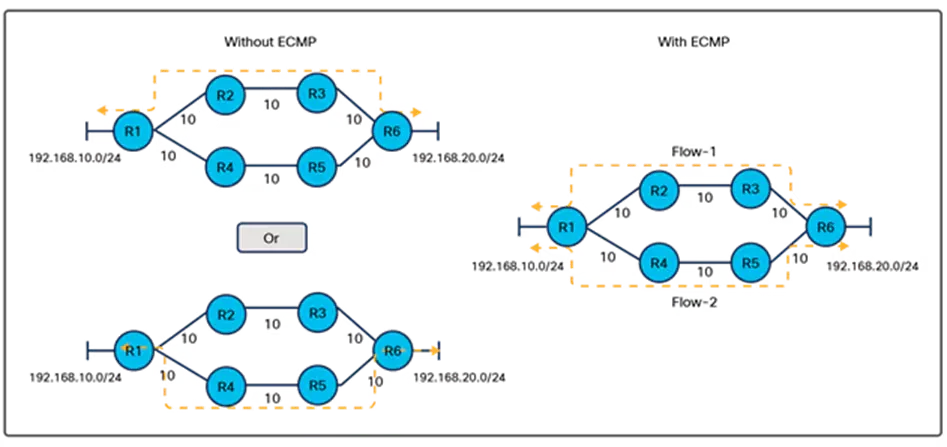
ECMP의 동작 원리는 외부 클라이언트에서 LoadBalancer 서비스(172.16.1.1)로 요청이 들어올 때, 라우터가 동일한 비용의 여러 경로를 통해 트래픽을 분산하는 과정을 나타냅니다.
주요 구성 요소
- 외부 클라이언트: 서비스에 접근하는 외부 사용자
- 라우터: BGP로 학습한 라우팅 정보를 바탕으로 트래픽 분산
- Kubernetes 노드들: k8s-ctr, k8s-w0, k8s-w1 노드
- LoadBalancer 서비스: 172.16.1.1 IP로 노출된 서비스
ECMP 동작 과정
- 라우팅 정보 학습: 라우터가 BGP를 통해 각 노드로의 경로 정보를 학습
- 경로 비용 계산: 모든 경로가 동일한 비용(metric 20)으로 계산됨
- 트래픽 분산: 해시 기반 알고리즘으로 트래픽을 여러 경로에 분산
- 로드밸런싱: 각 노드의 파드로 요청이 균등하게 분배됨
따라서, 모든 노드에서 광고를 하고 있게 되는 것입니다.
Pod가 배포된 노드들만 광고를 하려면 다음과 같이 설정합니다.
# 모니터링
watch "sshpass -p 'vagrant' ssh vagrant@router ip -c route"


# k8s-ctr
kubectl patch service webpod -p '{"spec":{"externalTrafficPolicy":"Local"}}'


# router(frr) : 서비스에 대상 파드가 배치된 노드만 BGP 경로에 출력!
vtysh -c 'show ip bgp'
vtysh -c 'show ip bgp 172.16.1.1/32'
vtysh -c 'show ip route bgp'
ip -c route


# 신규터미널 (3개) : k8s-w1, k8s-w2, k8s-w0
tcpdump -i eth1 -A -s 0 -nn 'tcp port 80'


# 현재 실습 환경 경우 반복 접속 시 한쪽 노드로 선택되고, 소스IP가 보존!
LBIP=172.16.1.1
curl -s $LBIP
for i in {1..100};  do curl -s $LBIP | grep Hostname; done | sort | uniq -c | sort -nr
while true; do curl -s $LBIP | egrep 'Hostname|RemoteAddr' ; sleep 0.1; done

## 아래 실행 시 tcpdump 에 다른 노드 선택되는지 확인! 안될수도 있음!
curl -s $LBIP --interface 10.10.1.200
curl -s $LBIP --interface 10.10.2.200
✅ 실행 결과 요약
# 172.16.1.1에서 라우팅 되는 정보가 실제 파드가 배포된 2개의 노드로 연결됨
Every 2.0s: sshpass -p 'vagrant' ssh vagrant@router ip...  k8s-ctr: Fri Aug 15 22:13:03 2025

...
172.16.1.1 nhid 74 proto bgp metric 20
        nexthop via 192.168.10.100 dev eth1 weight 1
        nexthop via 192.168.10.101 dev eth1 weight 1
...

root@router:~# vtysh -c 'show ip bgp'
BGP table version is 7, local router ID is 192.168.10.200, vrf id 0
...
   Network          Next Hop            Metric LocPrf Weight Path
*> 10.10.1.0/24     0.0.0.0                  0         32768 i
*> 172.16.1.1/32    192.168.10.100                         0 65001 i
*=                  192.168.10.101                         0 65001 i
...

Displayed  5 routes and 6 total paths
root@router:~# vtysh -c 'show ip bgp 172.16.1.1/32'
BGP routing table entry for 172.16.1.1/32, version 7
Paths: (2 available, best #1, table default)
  Advertised to non peer-group peers:
  192.168.10.100 192.168.10.101 192.168.20.100
  65001
    192.168.10.100 from 192.168.10.100 (192.168.10.100)
      Origin IGP, valid, external, multipath, best (Older Path)
      Last update: Fri Aug 15 21:55:10 2025
  65001
    192.168.10.101 from 192.168.10.101 (192.168.10.101)
      Origin IGP, valid, external, multipath
      Last update: Fri Aug 15 21:55:10 2025
root@router:~# vtysh -c 'show ip route bgp'
Codes: K - kernel route, C - connected, S - static, R - RIP,
       O - OSPF, I - IS-IS, B - BGP, E - EIGRP, N - NHRP,
       T - Table, v - VNC, V - VNC-Direct, A - Babel, F - PBR,
       f - OpenFabric,
       > - selected route, * - FIB route, q - queued, r - rejected, b - backup
       t - trapped, o - offload failure

B>* 172.16.1.1/32 [20/0] via 192.168.10.100, eth1, weight 1, 00:00:18
  *                      via 192.168.10.101, eth1, weight 1, 00:00:18
...

# 하지만, 로드밸런싱이 안됩니다.
root@router:~# for i in {1..100};  do curl -s $LBIP | grep Hostname; done | sort | uniq -c | sort -nr
    100 Hostname: webpod-697b545f57-mf4ns

# 이를 해결하려면 ECMP의 해싱 정책을 적용하여 로드밸런싱이 가능해지도록 합니다.
root@router:~# sudo sysctl -w net.ipv4.fib_multipath_hash_policy=1
net.ipv4.fib_multipath_hash_policy = 1
root@router:~# echo "net.ipv4.fib_multipath_hash_policy=1" >> /etc/sysctl.conf
root@router:~# for i in {1..100};  do curl -s $LBIP | grep Hostname; done | sort | uniq -c | sort -nr
     51 Hostname: webpod-697b545f57-9tlzl
     25 Hostname: webpod-697b545f57-d49hs
     24 Hostname: webpod-697b545f57-mf4ns
외부 인입 관련 다양한 기법들의 비교
1. BGP(ECMP) + Service(LB EX-IP, ExternalTrafficPolicy:Local) + SNAT + Random (권장 방식)
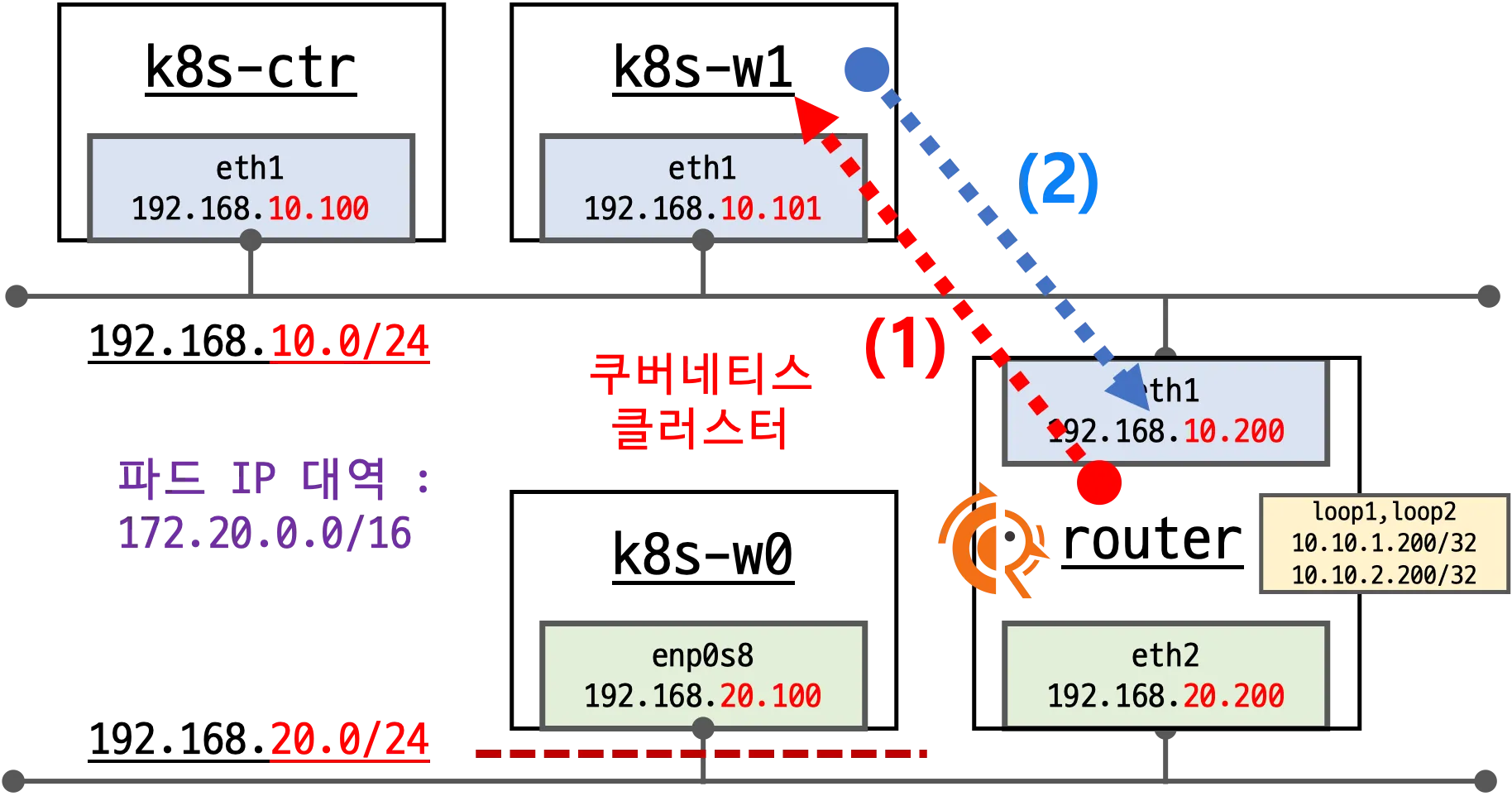
동작 방식:
- 1단계: 외부 클라이언트가 LoadBalancer IP로 요청
- 2단계: 라우터가 ECMP를 통해 실제 파드가 있는 노드로만 트래픽 분산
- 3단계: 노드에서 SNAT(Source NAT)를 수행하여 소스 IP를 노드 IP로 변경
- 4단계: 파드로 요청 전달 (소스 IP 보존 불가, 하지만 효율적)
장점:
- 실제 파드가 있는 노드로만 트래픽 전송 (효율성)
- 단순한 구조로 안정적
- 네트워크 오버헤드 최소화
2. BGP(ECMP) + Service(LB EX-IP, ExternalTrafficPolicy:Cluster) + SNAT (비권장 방식)
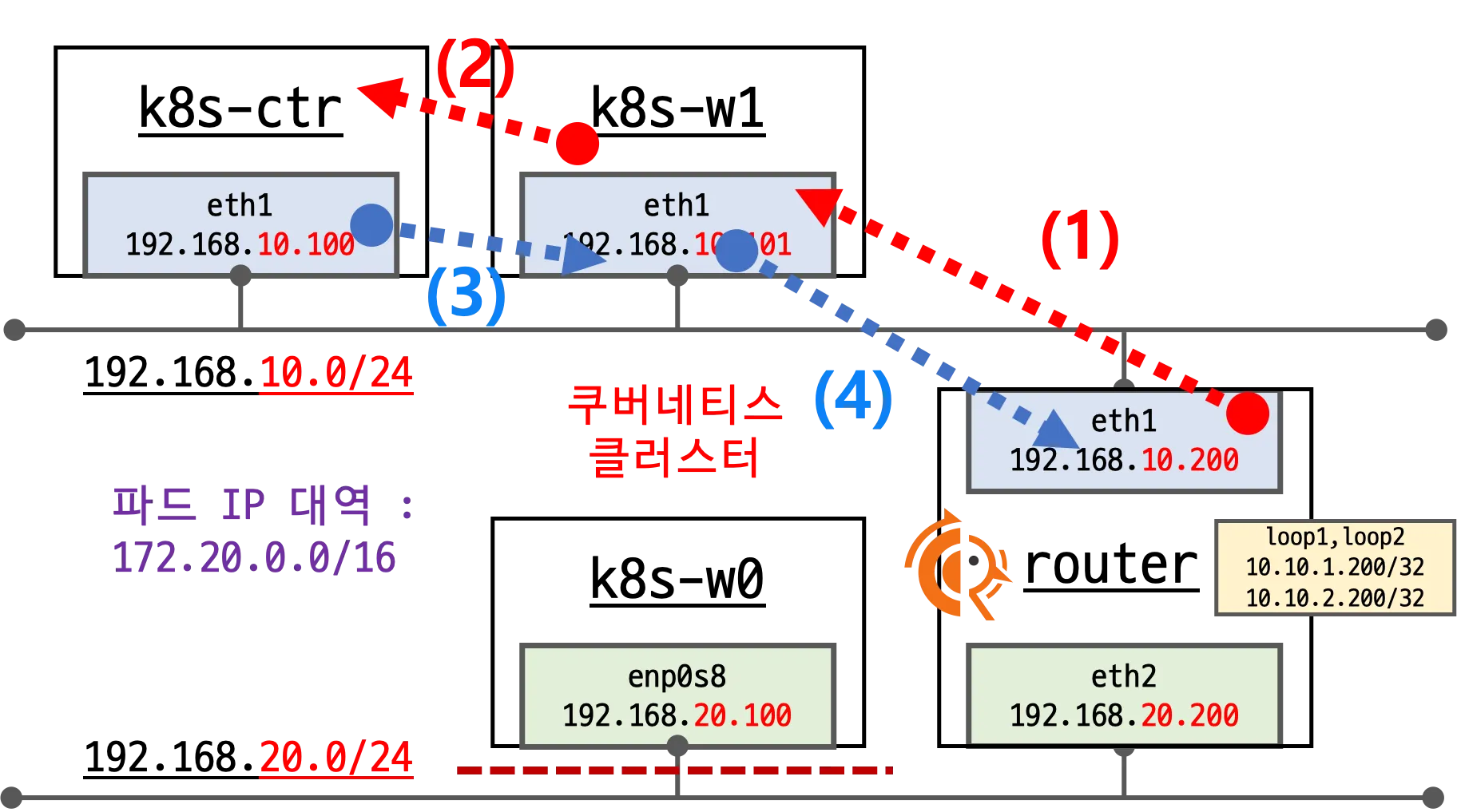
동작 방식:
- 1단계: 외부 클라이언트가 LoadBalancer IP로 요청
- 2단계: 라우터가 ECMP를 통해 모든 노드로 트래픽 분산
- 3단계: 파드가 없는 노드에서 다른 노드로 추가 라우팅 (비효율)
- 4단계: SNAT를 통해 소스 IP 변경 후 파드로 전달
단점:
- 불필요한 홉(hop) 증가로 지연 시간 증가
- 네트워크 대역폭 낭비
- 복잡한 라우팅 경로
3. BGP(ECMP) + Service(LB EX-IP, ExternalTrafficPolicy:Cluster) + DSR + Maglev (나름 괜찮은 방식)
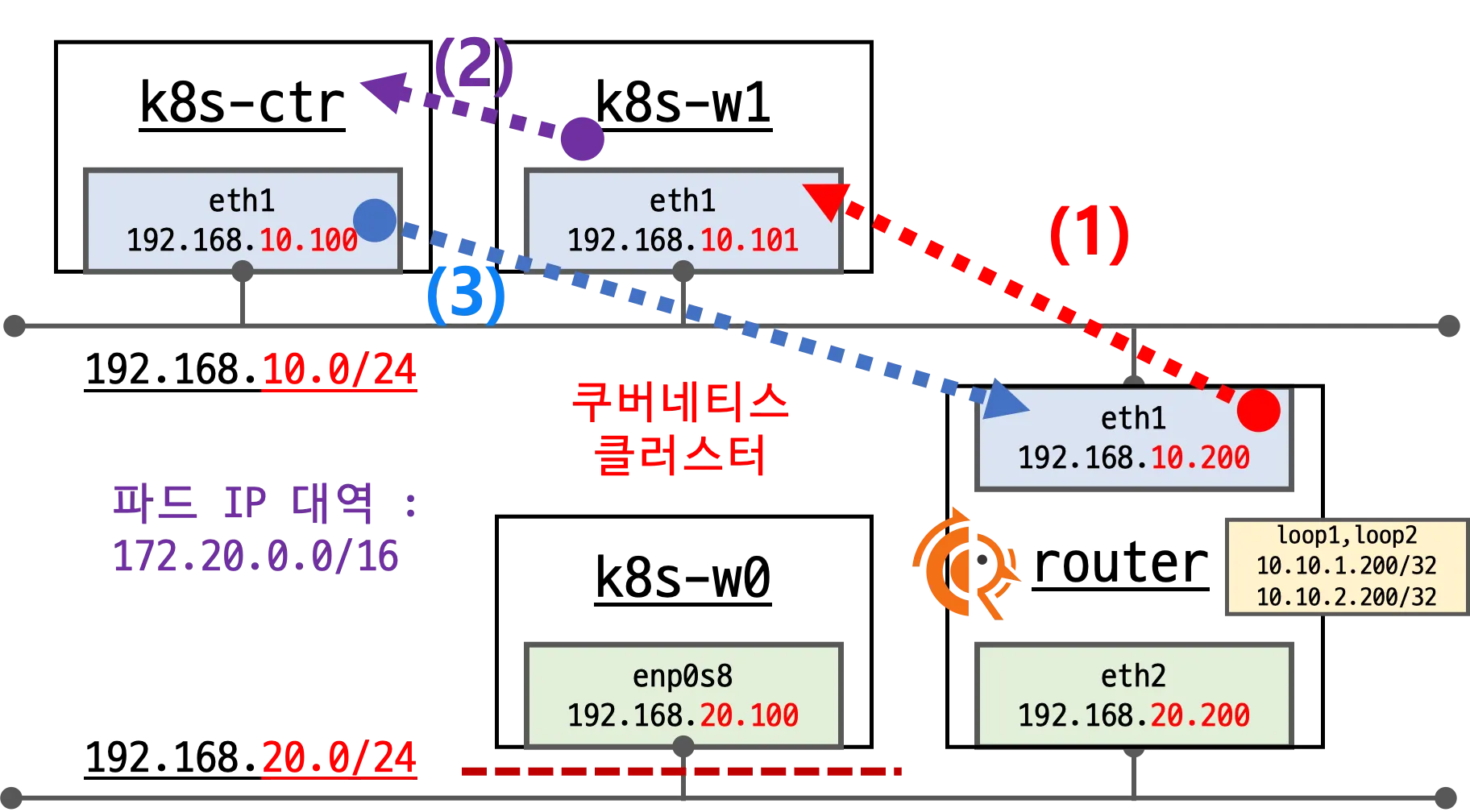
동작 방식:
- 1단계: 외부 클라이언트가 LoadBalancer IP로 요청
- 2단계: 라우터가 Maglev 해시 알고리즘으로 최적 경로 선택
- 3단계: DSR(Direct Server Return)을 통해 소스 IP 보존
- 4단계: 파드에서 직접 클라이언트로 응답 (라우터 경유 없음)
장점:
- 소스 IP 보존 가능
- 응답 트래픽의 효율적 처리
- Maglev 알고리즘으로 균등한 로드밸런싱
단점:
- 구현 복잡도 높음
- 추가적인 네트워크 설정 필요
BGP(ECMP) + Service(LB EX-IP, ExternalTrafficPolicy:Cluster) + DSR + Maglev 실습
# 현재 설정 확인
kubectl exec -it -n kube-system ds/cilium -- cilium status --verbose
...
  Mode:                 SNAT
  Backend Selection:    Random
  Session Affinity:     Enabled
...

# 현재 실습 환경에서 설정
modprobe geneve # modprobe geneve
lsmod | grep -E 'vxlan|geneve'
for i in w1 w0 ; do echo ">> node : k8s-$i <<"; sshpass -p 'vagrant' ssh vagrant@k8s-$i sudo modprobe geneve ; echo; done
for i in w1 w0 ; do echo ">> node : k8s-$i <<"; sshpass -p 'vagrant' ssh vagrant@k8s-$i sudo lsmod | grep -E 'vxlan|geneve' ; echo; done

helm upgrade cilium cilium/cilium --version 1.18.0 --namespace kube-system --reuse-values \
  --set tunnelProtocol=geneve --set loadBalancer.mode=dsr --set loadBalancer.dsrDispatch=geneve \
  --set loadBalancer.algorithm=maglev

kubectl -n kube-system rollout restart ds/cilium

# 설정 확인
kubectl exec -it -n kube-system ds/cilium -- cilium status --verbose
...
  Mode:                  DSR
    DSR Dispatch Mode:   Geneve
  Backend Selection:     Maglev (Table Size: 16381)
  Session Affinity:     Enabled
...

# Cluster 로 기본 설정 원복
kubectl patch svc webpod -p '{"spec":{"externalTrafficPolicy":"Cluster"}}'

# k8s-ctr, k8s-w1, k8s-w0 모두 tcpdump 실행
tcpdump -i eth1 -w /tmp/dsr.pcap

# router
curl -s $LBIP
curl -s $LBIP
curl -s $LBIP
curl -s $LBIP
curl -s $LBIP


# Host 에 pcap 다운로드 후 wireshark 로 열여서 확인
vagrant plugin install vagrant-scp
vagrant scp k8s-ctr:/tmp/dsr.pcap .
✅ 실행 결과 요약
(⎈|HomeLab:N/A) root@k8s-ctr:~# kubectl exec -it -n kube-system ds/cilium -- cilium status --verbose
...
KubeProxyReplacement Details:
  Status:               True
  Socket LB:            Enabled
  Socket LB Tracing:    Enabled
  Socket LB Coverage:   Full
  Devices:              eth0    10.0.2.15 fd17:625c:f037:2:a00:27ff:fe6f:f7c0 fe80::a00:27ff:fe6f:f7c0, eth1   192.168.10.100 fe80::a00:27ff:fe71:ba6e (Direct Routing)
  Mode:                 SNAT #확인
  Backend Selection:    Random #확인
  Session Affinity:     Enabled
...

(⎈|HomeLab:N/A) root@k8s-ctr:~# lsmod | grep -E 'vxlan|geneve'
geneve                 45056  0
ip6_udp_tunnel         16384  1 geneve
udp_tunnel             36864  1 geneve

(⎈|HomeLab:N/A) root@k8s-ctr:~# kubectl exec -it -n kube-system ds/cilium -- cilium status --verbose # 변경 완료
...
KubeProxyReplacement Details:
  Status:                True
  Socket LB:             Enabled
  Socket LB Tracing:     Enabled
  Socket LB Coverage:    Full
  Devices:               eth0    10.0.2.15 fd17:625c:f037:2:a00:27ff:fe6f:f7c0 fe80::a00:27ff:fe6f:f7c0, eth1   192.168.10.100 fe80::a00:27ff:fe71:ba6e (Direct Routing)
  Mode:                  DSR #확인
    DSR Dispatch Mode:   Geneve #확인
  Backend Selection:     Maglev (Table Size: 16381)
  Session Affinity:      Enabled
...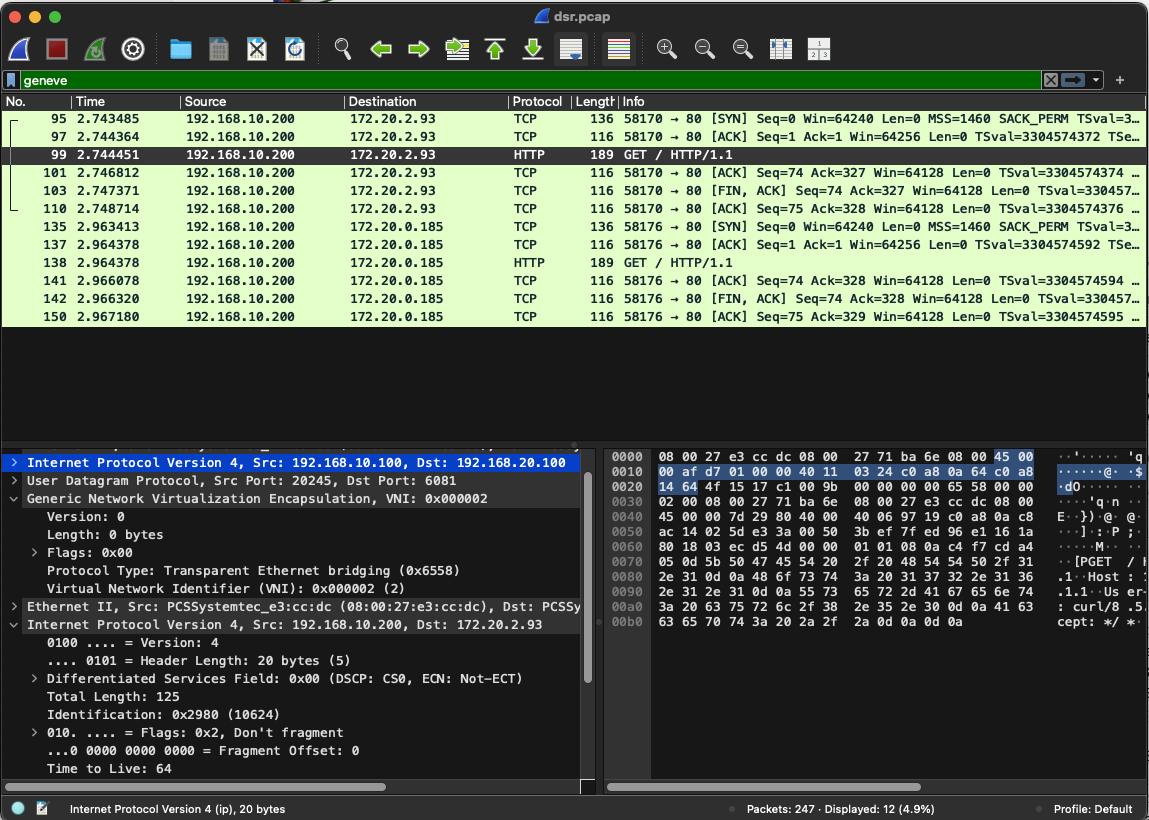
패킷 확인 결과 다음과 같이 Geneve가 적용되어 소스 IP가 캡슐화된 것을 확인할 수 있습니다. DSR(Direct Server Return) + Maglev 알고리즘 설정 후 캡처된 패킷을 Wireshark로 분석하면 다음과 같습니다.
Geneve 터널링 패킷 구조
- Outer IP Header: 실제 네트워크에서 전송되는 패킷의 IP 헤더 (라우터 → 노드)
- UDP Header: Geneve 터널링을 위한 UDP 포트 (기본 6081)
- Geneve Header: 터널링 메타데이터 및 DSR 정보 포함
- Inner IP Header: 원본 클라이언트의 IP 정보 보존 (클라이언트 → 서비스)
- TCP Payload: 실제 애플리케이션 데이터
패킷의 흐름은 다음과 같습니다.
- 클라이언트 요청: 클라이언트가 LoadBalancer IP(172.16.1.1)로 요청
- 라우터 라우팅: 라우터가 Maglev 해시로 최적 노드 선택
- Geneve 캡슐화: 원본 클라이언트 IP를 Geneve 터널로 캡슐화
- 노드 수신: 선택된 노드가 Geneve 패킷 수신 및 디캡슐화
- 파드 전달: 원본 IP 정보와 함께 파드로 전달
- 직접 응답: 파드에서 클라이언트로 직접 응답 (라우터 경유 없음)
Cluster Mesh
Cilium에 클러스터 여러대가 있을 때, 상대방 클러스터의 서비스 호출을 쉽게 해주는 기능입니다. 두개 클러스터의 부하분산도 가능합니다.
실습환경 구성
#
kind create cluster --name west --image kindest/node:v1.33.2 --config - <<EOF
kind: Cluster
apiVersion: kind.x-k8s.io/v1alpha4
nodes:
- role: control-plane
  extraPortMappings:
  - containerPort: 30000 # sample apps
    hostPort: 30000
  - containerPort: 30001 # hubble ui
    hostPort: 30001
- role: worker
  extraPortMappings:
  - containerPort: 30002 # sample apps
    hostPort: 30002
networking:
  podSubnet: "10.0.0.0/16"
  serviceSubnet: "10.2.0.0/16"
  disableDefaultCNI: true
  kubeProxyMode: none
EOF


# 설치 확인
kubectl ctx
kubectl get node
kubectl get pod -A

# 노드에 기본 툴 설치
docker exec -it west-control-plane sh -c 'apt update && apt install tree psmisc lsof wget net-tools dnsutils tcpdump ngrep iputils-ping git -y'
docker exec -it west-worker sh -c 'apt update && apt install tree psmisc lsof wget net-tools dnsutils tcpdump ngrep iputils-ping git -y'

#
kind create cluster --name east --image kindest/node:v1.33.2 --config - <<EOF
kind: Cluster
apiVersion: kind.x-k8s.io/v1alpha4
nodes:
- role: control-plane
  extraPortMappings:
  - containerPort: 31000 # sample apps
    hostPort: 31000
  - containerPort: 31001 # hubble ui
    hostPort: 31001
- role: worker
  extraPortMappings:
  - containerPort: 31002 # sample apps
    hostPort: 31002
networking:
  podSubnet: "10.1.0.0/16"
  serviceSubnet: "10.3.0.0/16"
  disableDefaultCNI: true
  kubeProxyMode: none
EOF

# 설치 확인
kubectl config get-contexts
CURRENT   NAME        CLUSTER     AUTHINFO    NAMESPACE
*         kind-east   kind-east   kind-east
          kind-west   kind-west   kind-west

kubectl config set-context kind-east
kubectl get node -v=6 --context kind-east
kubectl get node -v=6
kubectl get node -v=6 --context kind-west
cat ~/.kube/config

kubectl get pod -A
kubectl get pod -A --context kind-west

# 노드에 기본 툴 설치
docker exec -it east-control-plane sh -c 'apt update && apt install tree psmisc lsof wget net-tools dnsutils tcpdump ngrep iputils-ping git -y'
docker exec -it east-worker sh -c 'apt update && apt install tree psmisc lsof wget net-tools dnsutils tcpdump ngrep iputils-ping git -y'

# alias 설정
alias kwest='kubectl --context kind-west'
alias keast='kubectl --context kind-east'

# 확인
kwest get node -owide
keast get node -owide


# cilium cli 로 cilium cni 설치
cilium install --version 1.17.6 --set ipam.mode=kubernetes \
--set kubeProxyReplacement=true --set bpf.masquerade=true \
--set endpointHealthChecking.enabled=false --set healthChecking=false \
--set operator.replicas=1 --set debug.enabled=true \
--set routingMode=native --set autoDirectNodeRoutes=true --set ipv4NativeRoutingCIDR=10.0.0.0/16 \
--set ipMasqAgent.enabled=true --set ipMasqAgent.config.nonMasqueradeCIDRs='{10.1.0.0/16}' \
--set cluster.name=west --set cluster.id=1 \
--context kind-west

cilium install --version 1.17.6 --set ipam.mode=kubernetes \
--set kubeProxyReplacement=true --set bpf.masquerade=true \
--set endpointHealthChecking.enabled=false --set healthChecking=false \
--set operator.replicas=1 --set debug.enabled=true \
--set routingMode=native --set autoDirectNodeRoutes=true --set ipv4NativeRoutingCIDR=10.1.0.0/16 \
--set ipMasqAgent.enabled=true --set ipMasqAgent.config.nonMasqueradeCIDRs='{10.0.0.0/16}' \
--set cluster.name=east --set cluster.id=2 \
--context kind-east


# 확인
kwest get pod -A && keast get pod -A
cilium status --context kind-west
cilium status --context kind-east
cilium config view --context kind-west
cilium config view --context kind-east
kwest exec -it -n kube-system ds/cilium -- cilium status --verbose
keast exec -it -n kube-system ds/cilium -- cilium status --verbose

kwest -n kube-system exec ds/cilium -c cilium-agent -- cilium-dbg bpf ipmasq list
keast -n kube-system exec ds/cilium -c cilium-agent -- cilium-dbg bpf ipmasq list

# coredns 확인 : 둘 다, cluster.local 기본 도메인 네임 사용 중
kubectl describe cm -n kube-system coredns --context kind-west | grep kubernetes
    kubernetes cluster.local in-addr.arpa ip6.arpa {

kubectl describe cm -n kube-system coredns --context kind-west | grep kubernetes
    kubernetes cluster.local in-addr.arpa ip6.arpa {

# k9s 사용 시
k9s --context kind-west
k9s --context kind-east
Cluster Mesh 세팅
# 라우팅 정보 확인
docker exec -it west-control-plane ip -c route
docker exec -it west-worker ip -c route
docker exec -it east-control-plane ip -c route
docker exec -it east-worker ip -c route


# Specify the Cluster Name and ID : 이미 설정 되어 있음

# Shared Certificate Authority
keast get secret -n kube-system cilium-ca
keast delete secret -n kube-system cilium-ca

kubectl --context kind-west get secret -n kube-system cilium-ca -o yaml | \
kubectl --context kind-east create -f -

keast get secret -n kube-system cilium-ca


# 모니터링 : 신규 터미널 2개
cilium clustermesh status --context kind-west --wait
cilium clustermesh status --context kind-east --wait


# Enable Cluster Mesh : 간단한 실습 환경으로 NodePort 로 진행
cilium clustermesh enable --service-type NodePort --enable-kvstoremesh=false --context kind-west
cilium clustermesh enable --service-type NodePort --enable-kvstoremesh=false --context kind-east


# 32379 NodePort 정보 : clustermesh-apiserver 서비스 정보
kwest get svc,ep -n kube-system clustermesh-apiserver --context kind-west
NAME                            TYPE       CLUSTER-IP     EXTERNAL-IP   PORT(S)          AGE
service/clustermesh-apiserver   NodePort   10.2.216.182   <none>        2379:32379/TCP   65s

NAME                              ENDPOINTS         AGE
endpoints/clustermesh-apiserver   10.0.0.195:2379   65s # 대상 파드는 clustermesh-apiserver 파드 IP

kwest get pod -n kube-system -owide | grep clustermesh


keast get svc,ep -n kube-system clustermesh-apiserver --context kind-east
NAME                            TYPE       CLUSTER-IP     EXTERNAL-IP   PORT(S)          AGE
service/clustermesh-apiserver   NodePort   10.3.252.188   <none>        2379:32379/TCP   43s

NAME                              ENDPOINTS         AGE
endpoints/clustermesh-apiserver   10.1.0.206:2379   65s # 대상 파드는 clustermesh-apiserver 파드 IP

keast get pod -n kube-system -owide | grep clustermesh


# 모니터링 : 신규 터미널 2개
watch -d "cilium clustermesh status --context kind-west --wait"
watch -d "cilium clustermesh status --context kind-east --wait"


# Connect Clusters
cilium clustermesh connect --context kind-west --destination-context kind-east

# 확인
cilium clustermesh status --context kind-west --wait
cilium clustermesh status --context kind-east --wait

#
kubectl exec -it -n kube-system ds/cilium -c cilium-agent --context kind-west -- cilium-dbg troubleshoot clustermesh
kubectl exec -it -n kube-system ds/cilium -c cilium-agent --context kind-east -- cilium-dbg troubleshoot clustermesh

# 확인
kwest get pod -A && keast get pod -A
cilium status --context kind-west
cilium status --context kind-east
cilium clustermesh status --context kind-west
cilium clustermesh status --context kind-east
cilium config view --context kind-west
cilium config view --context kind-east
kwest exec -it -n kube-system ds/cilium -- cilium status --verbose
keast exec -it -n kube-system ds/cilium -- cilium status --verbose
ClusterMesh:   1/1 remote clusters ready, 0 global-services
   east: ready, 2 nodes, 4 endpoints, 3 identities, 0 services, 0 MCS-API service exports, 0 reconnections (last: never)
   └  etcd: 1/1 connected, leases=0, lock leases=0, has-quorum=true: endpoint status checks are disabled, ID: c6ba18866da7dfd8
   └  remote configuration: expected=true, retrieved=true, cluster-id=2, kvstoremesh=false, sync-canaries=true, service-exports=disabled
   └  synchronization status: nodes=true, endpoints=true, identities=true, services=true

#
helm get values -n kube-system cilium --kube-context kind-west
...
cluster:
  id: 1
  name: west
clustermesh:
  apiserver:
    kvstoremesh:
      enabled: false
    service:
      type: NodePort
    tls:
      auto:
        enabled: true
        method: cronJob
        schedule: 0 0 1 */4 *
  config:
    clusters:
    - ips:
      - 172.18.0.4
      name: east
      port: 32379
    enabled: true
  useAPIServer: true
...

helm get values -n kube-system cilium --kube-context kind-east
...
cluster:
  id: 2
  name: east
clustermesh:
  apiserver:
    kvstoremesh:
      enabled: false
    service:
      type: NodePort
    tls:
      auto:
        enabled: true
        method: cronJob
        schedule: 0 0 1 */4 *
  config:
    clusters:
    - ips:
      - 172.18.0.3
      name: west
      port: 32379
    enabled: true
  useAPIServer: true
...


# 라우팅 정보 확인 : 클러스터간 PodCIDR 라우팅 주입 확인!
docker exec -it west-control-plane ip -c route
docker exec -it west-worker ip -c route
docker exec -it east-control-plane ip -c route
docker exec -it east-worker ip -c route
각 클러스터 클러스터 메쉬 활성화 상태를 조회하였습니다.

클러스터 메쉬 설정을 하게 되면 다음과 같이 정상적으로 세팅됩니다.

각 클러스터의 클러스터 메쉬 상태를 확인해보면 connected를 확인할 수 있습니다.

cilium 명령어로 확인을 하면 클러스터 메쉬 활성화 상태를 확인할 수 있습니다.
❯ cilium status --context kind-west
    /¯¯\
 /¯¯\__/¯¯\    Cilium:             OK
 \__/¯¯\__/    Operator:           OK
 /¯¯\__/¯¯\    Envoy DaemonSet:    OK
 \__/¯¯\__/    Hubble Relay:       disabled
    \__/       ClusterMesh:        OK # 클러스터 매쉬 활성화

❯ helm get values -n kube-system cilium --kube-context kind-west | grep cluster -A10
cluster:
  id: 1
  name: west
clustermesh:
  apiserver:
    kvstoremesh:
      enabled: false
    service:
      type: NodePort
    tls:
      auto:
        enabled: true
        method: cronJob
        schedule: 0 0 1 */4 *
--
    clusters:
    - ips:
      - 172.18.0.5
      name: east
      port: 32379
    enabled: true
  useAPIServer: true
debug:
  enabled: true
endpointHealthChecking:
  enabled: false


❯ docker exec -it west-control-plane ip -c route
default via 172.18.0.1 dev eth0
10.0.0.0/24 via 10.0.0.233 dev cilium_host proto kernel src 10.0.0.233
10.0.0.233 dev cilium_host proto kernel scope link
10.0.1.0/24 via 172.18.0.2 dev eth0 proto kernel
10.1.0.0/24 via 172.18.0.5 dev eth0 proto kernel
10.1.1.0/24 via 172.18.0.4 dev eth0 proto kernel
172.18.0.0/16 dev eth0 proto kernel scope link src 172.18.0.3

What's next:
    Try Docker Debug for seamless, persistent debugging tools in any container or image → docker debug west-control-plane
    Learn more at https://docs.docker.com/go/debug-cli/
❯ docker exec -it west-worker ip -c route
default via 172.18.0.1 dev eth0
10.0.0.0/24 via 172.18.0.3 dev eth0 proto kernel
10.0.1.0/24 via 10.0.1.121 dev cilium_host proto kernel src 10.0.1.121
10.0.1.121 dev cilium_host proto kernel scope link
10.1.0.0/24 via 172.18.0.5 dev eth0 proto kernel
10.1.1.0/24 via 172.18.0.4 dev eth0 proto kernel
172.18.0.0/16 dev eth0 proto kernel scope link src 172.18.0.2

What's next:
    Try Docker Debug for seamless, persistent debugging tools in any container or image → docker debug west-worker
    Learn more at https://docs.docker.com/go/debug-cli/
❯ docker exec -it east-control-plane ip -c route
default via 172.18.0.1 dev eth0
10.0.0.0/24 via 172.18.0.3 dev eth0 proto kernel
10.0.1.0/24 via 172.18.0.2 dev eth0 proto kernel
10.1.0.0/24 via 10.1.0.126 dev cilium_host proto kernel src 10.1.0.126
10.1.0.126 dev cilium_host proto kernel scope link
10.1.1.0/24 via 172.18.0.4 dev eth0 proto kernel
172.18.0.0/16 dev eth0 proto kernel scope link src 172.18.0.5

What's next:
    Try Docker Debug for seamless, persistent debugging tools in any container or image → docker debug east-control-plane
    Learn more at https://docs.docker.com/go/debug-cli/
❯ docker exec -it east-worker ip -c route
default via 172.18.0.1 dev eth0
10.0.0.0/24 via 172.18.0.3 dev eth0 proto kernel
10.0.1.0/24 via 172.18.0.2 dev eth0 proto kernel
10.1.0.0/24 via 172.18.0.5 dev eth0 proto kernel
10.1.1.0/24 via 10.1.1.202 dev cilium_host proto kernel src 10.1.1.202
10.1.1.202 dev cilium_host proto kernel scope link
172.18.0.0/16 dev eth0 proto kernel scope link src 172.18.0.4

What's next:
    Try Docker Debug for seamless, persistent debugging tools in any container or image → docker debug east-worker
    Learn more at https://docs.docker.com/go/debug-cli/
hubble enable
# 항상 repository를 먼저 추가
helm repo add cilium https://helm.cilium.io/
helm repo update

helm upgrade cilium cilium/cilium --version 1.17.6 --namespace kube-system --reuse-values \
--set hubble.enabled=true --set hubble.relay.enabled=true --set hubble.ui.enabled=true \
--set hubble.ui.service.type=NodePort --set hubble.ui.service.nodePort=30001 --kube-context kind-west
kwest -n kube-system rollout restart ds/cilium

## 혹은 cilium hubble enable --ui --relay --context kind-west
## kubectl --context kind-west patch svc -n kube-system hubble-ui -p '{"spec": {"type": "NodePort", "ports": [{"port": 80, "targetPort": 8081, "nodePort": 30001}]}}'


# 설정
helm upgrade cilium cilium/cilium --version 1.17.6 --namespace kube-system --reuse-values \
--set hubble.enabled=true --set hubble.relay.enabled=true --set hubble.ui.enabled=true \
--set hubble.ui.service.type=NodePort --set hubble.ui.service.nodePort=31001 --kube-context kind-east
kwest -n kube-system rollout restart ds/cilium

## 혹은 cilium hubble enable --ui --relay --context kind-east
## kubectl --context kind-east patch svc -n kube-system hubble-ui -p '{"spec": {"type": "NodePort", "ports": [{"port": 80, "targetPort": 8081, "nodePort": 31001}]}}'


# 확인
kwest get svc,ep -n kube-system hubble-ui --context kind-west
keast get svc,ep -n kube-system hubble-ui --context kind-east

# hubble-ui 접속 시
open http://localhost:30001
open http://localhost:31001
✅ 실행 결과 요약
❯ kwest get svc,ep -n kube-system hubble-ui --context kind-west
Warning: v1 Endpoints is deprecated in v1.33+; use discovery.k8s.io/v1 EndpointSlice
NAME                TYPE       CLUSTER-IP     EXTERNAL-IP   PORT(S)        AGE
service/hubble-ui   NodePort   10.2.127.182   <none>        80:30001/TCP   55s

NAME                  ENDPOINTS         AGE
endpoints/hubble-ui   10.0.1.160:8081   55s
❯ keast get svc,ep -n kube-system hubble-ui --context kind-east
Warning: v1 Endpoints is deprecated in v1.33+; use discovery.k8s.io/v1 EndpointSlice
NAME                TYPE       CLUSTER-IP   EXTERNAL-IP   PORT(S)        AGE
service/hubble-ui   NodePort   10.3.9.198   <none>        80:31001/TCP   44s

NAME                  ENDPOINTS         AGE
endpoints/hubble-ui   10.1.1.170:8081   44s
❯ open http://localhost:30001
❯ open http://localhost:31001
Pod 배포
cat << EOF | kubectl apply --context kind-west -f -
apiVersion: v1
kind: Pod
metadata:
  name: curl-pod
  labels:
    app: curl
spec:
  containers:
  - name: curl
    image: nicolaka/netshoot
    command: ["tail"]
    args: ["-f", "/dev/null"]
  terminationGracePeriodSeconds: 0
EOF

cat << EOF | kubectl apply --context kind-east -f -
apiVersion: v1
kind: Pod
metadata:
  name: curl-pod
  labels:
    app: curl
spec:
  containers:
  - name: curl
    image: nicolaka/netshoot
    command: ["tail"]
    args: ["-f", "/dev/null"]
  terminationGracePeriodSeconds: 0
EOF


# 확인
kwest get pod -A && keast get pod -A
kwest get pod -owide && keast get pod -owide
NAME       READY   STATUS    RESTARTS   AGE   IP           NODE                 NOMINATED NODE   READINESS GATES
curl-pod   1/1     Running   0          43s   10.1.1.45   west-control-plane   <none>           <none>
NAME       READY   STATUS    RESTARTS   AGE   IP           NODE                 NOMINATED NODE   READINESS GATES
curl-pod   1/1     Running   0          36s   10.0.1.25   east-control-plane   <none>           <none>

#
kubectl exec -it curl-pod --context kind-west -- ping -c 1 10.0.1.25
64 bytes from 10.0.1.25: icmp_seq=1 ttl=62 time=0.877 ms

kubectl exec -it curl-pod --context kind-west -- ping 10.0.1.25

# 목적지 파드에서 tcpdump 로 확인 : NAT 없이 직접 라우팅.
kubectl exec -it curl-pod --context kind-east -- tcpdump -i eth0 -nn

# 목적지 k8s 노드?에서 icmp tcpdump 로 확인 : 다른곳 경유하지 않고 직접 노드에서 파드로 인입 확인
docker exec -it east-control-plane tcpdump -i any icmp -nn
docker exec -it east-worker tcpdump -i any icmp -nn

#
kubectl exec -it curl-pod --context kind-east -- ping -c 1 10.1.1.45
64 bytes from 10.1.1.45: icmp_seq=1 ttl=62 time=1.24 ms
✅ 실행 결과 요약
❯ kwest get pod -owide && keast get pod -owide
NAME       READY   STATUS    RESTARTS   AGE   IP          NODE          NOMINATED NODE   READINESS GATES
curl-pod   1/1     Running   0          43s   10.0.1.45   west-worker   <none>           <none>
NAME       READY   STATUS    RESTARTS   AGE   IP          NODE          NOMINATED NODE   READINESS GATES
curl-pod   1/1     Running   0          40s   10.1.1.25   east-worker   <none>           <none>
정상적으로 통신이 잘 됩니다.
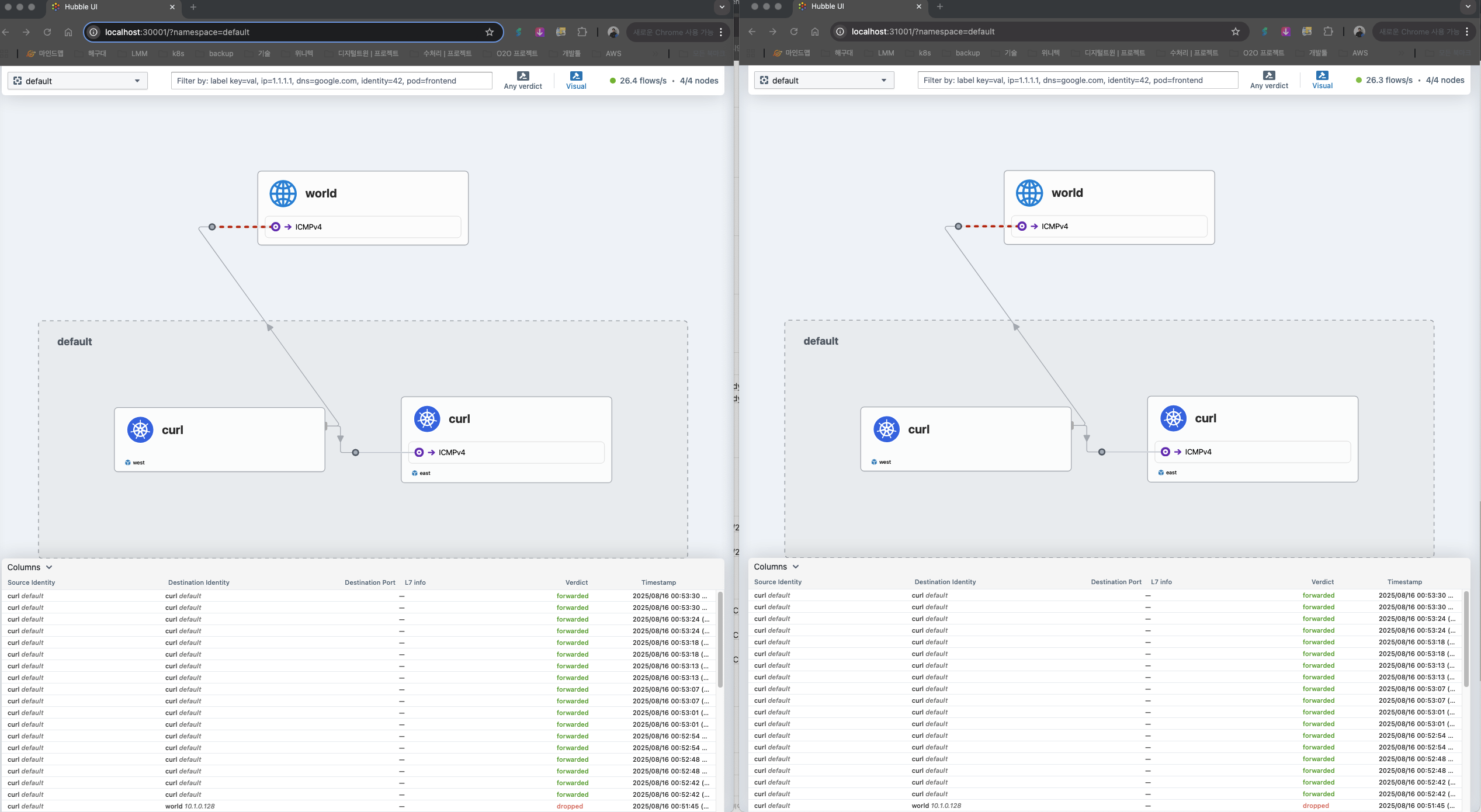
외부에서 크로스로 Load-balancing과 Service Descovery가 가능하도록 설정
#
cat << EOF | kubectl apply --context kind-west -f -
apiVersion: apps/v1
kind: Deployment
metadata:
  name: webpod
spec:
  replicas: 2
  selector:
    matchLabels:
      app: webpod
  template:
    metadata:
      labels:
        app: webpod
    spec:
      affinity:
        podAntiAffinity:
          requiredDuringSchedulingIgnoredDuringExecution:
          - labelSelector:
              matchExpressions:
              - key: app
                operator: In
                values:
                - sample-app
            topologyKey: "kubernetes.io/hostname"
      containers:
      - name: webpod
        image: traefik/whoami
        ports:
        - containerPort: 80
---
apiVersion: v1
kind: Service
metadata:
  name: webpod
  labels:
    app: webpod
  annotations:
    service.cilium.io/global: "true"
spec:
  selector:
    app: webpod
  ports:
  - protocol: TCP
    port: 80
    targetPort: 80
  type: ClusterIP
EOF


#
cat << EOF | kubectl apply --context kind-east -f -
apiVersion: apps/v1
kind: Deployment
metadata:
  name: webpod
spec:
  replicas: 2
  selector:
    matchLabels:
      app: webpod
  template:
    metadata:
      labels:
        app: webpod
    spec:
      affinity:
        podAntiAffinity:
          requiredDuringSchedulingIgnoredDuringExecution:
          - labelSelector:
              matchExpressions:
              - key: app
                operator: In
                values:
                - sample-app
            topologyKey: "kubernetes.io/hostname"
      containers:
      - name: webpod
        image: traefik/whoami
        ports:
        - containerPort: 80
---
apiVersion: v1
kind: Service
metadata:
  name: webpod
  labels:
    app: webpod
  annotations:
    service.cilium.io/global: "true"
spec:
  selector:
    app: webpod
  ports:
  - protocol: TCP
    port: 80
    targetPort: 80
  type: ClusterIP
EOF


# 확인
kwest get svc,ep webpod && keast get svc,ep webpod
Warning: v1 Endpoints is deprecated in v1.33+; use discovery.k8s.io/v1 EndpointSlice
NAME             TYPE        CLUSTER-IP     EXTERNAL-IP   PORT(S)   AGE
service/webpod   ClusterIP   10.2.147.197   <none>        80/TCP    14s

NAME               ENDPOINTS                    AGE
endpoints/webpod   10.0.1.162:80,10.0.1.92:80   14s
Warning: v1 Endpoints is deprecated in v1.33+; use discovery.k8s.io/v1 EndpointSlice
NAME             TYPE        CLUSTER-IP     EXTERNAL-IP   PORT(S)   AGE
service/webpod   ClusterIP   10.3.247.201   <none>        80/TCP    64s

NAME               ENDPOINTS                     AGE
endpoints/webpod   10.1.1.144:80,10.1.1.216:80   64s

kwest exec -it -n kube-system ds/cilium -c cilium-agent -- cilium service list --clustermesh-affinity
ID   Frontend               Service Type   Backend
...
13   10.2.147.197:80/TCP     ClusterIP      1 => 10.1.1.144:80/TCP (active)
                                            2 => 10.1.1.216:80/TCP (active)
                                            3 => 10.0.1.92:80/TCP (active)
                                            4 => 10.0.1.162:80/TCP (active)

keast exec -it -n kube-system ds/cilium -c cilium-agent -- cilium service list --clustermesh-affinity
ID   Frontend               Service Type   Backend
...
13   10.3.247.201:80/TCP    ClusterIP      1 => 10.1.1.144:80/TCP (active)
                                           2 => 10.1.1.216:80/TCP (active)
                                           3 => 10.0.1.92:80/TCP (active)
                                           4 => 10.0.1.162:80/TCP (active)
#
kubectl exec -it curl-pod --context kind-west -- ping -c 1 10.2.147.197
kubectl exec -it curl-pod --context kind-east -- ping -c 1 10.3.247.201

#
kubectl exec -it curl-pod --context kind-west -- sh -c 'while true; do curl -s --connect-timeout 1 webpod ; sleep 1; echo "---"; done;'
kubectl exec -it curl-pod --context kind-east -- sh -c 'while true; do curl -s --connect-timeout 1 webpod ; sleep 1; echo "---"; done;'

# 현재 Service Annotations 설정
kwest describe svc webpod | grep Annotations -A1
Annotations:              service.cilium.io/global: true
Selector:                 app=webpod

keast describe svc webpod | grep Annotations -A1
Annotations:              service.cilium.io/global: true
Selector:                 app=webpod


# 모니터링 : 반복 접속해두기
kubectl exec -it curl-pod --context kind-west -- sh -c 'while true; do curl -s --connect-timeout 1 webpod ; sleep 1; echo "---"; done;'


#
kwest scale deployment webpod --replicas 1
kwest exec -it -n kube-system ds/cilium -c cilium-agent -- cilium service list --clustermesh-affinity
keast exec -it -n kube-system ds/cilium -c cilium-agent -- cilium service list --clustermesh-affinity

# 로컬 k8s 에 목적지가 없을 경우 어떻게 되나요?
kwest scale deployment webpod --replicas 0
kwest exec -it -n kube-system ds/cilium -c cilium-agent -- cilium service list --clustermesh-affinity
keast exec -it -n kube-system ds/cilium -c cilium-agent -- cilium service list --clustermesh-affinity

#
kwest scale deployment webpod --replicas 2
kwest exec -it -n kube-system ds/cilium -c cilium-agent -- cilium service list --clustermesh-affinity
keast exec -it -n kube-system ds/cilium -c cilium-agent -- cilium service list --clustermesh-affinity


# tcpdump 확인 : dataplane flow 확인
docker exec -it west-control-plane tcpdump -i any tcp port 80 -nnq
docker exec -it west-worker tcpdump -i any tcp port 80 -nnq
docker exec -it east-control-plane tcpdump -i any tcp port 80 -nnq
docker exec -it east-worker tcpdump -i any tcp port 80 -nnq

# Session Affinity Local 설정 (동일한 클러스터에서 요청을 하면 클러스터 네부에서 수행하는 설정: affinity=local), 통신 비용을 절감하기 위해!
kwest annotate service webpod service.cilium.io/affinity=local --overwrite
kwest describe svc webpod | grep Annotations -A3

keast annotate service webpod service.cilium.io/affinity=local --overwrite
keast describe svc webpod | grep Annotations -A3
분산이 잘 됩니다. 한 클러스터에 Pod가 없어도 다른 클러스터에 Pod가 있으면 통신이 잘 됩니다.
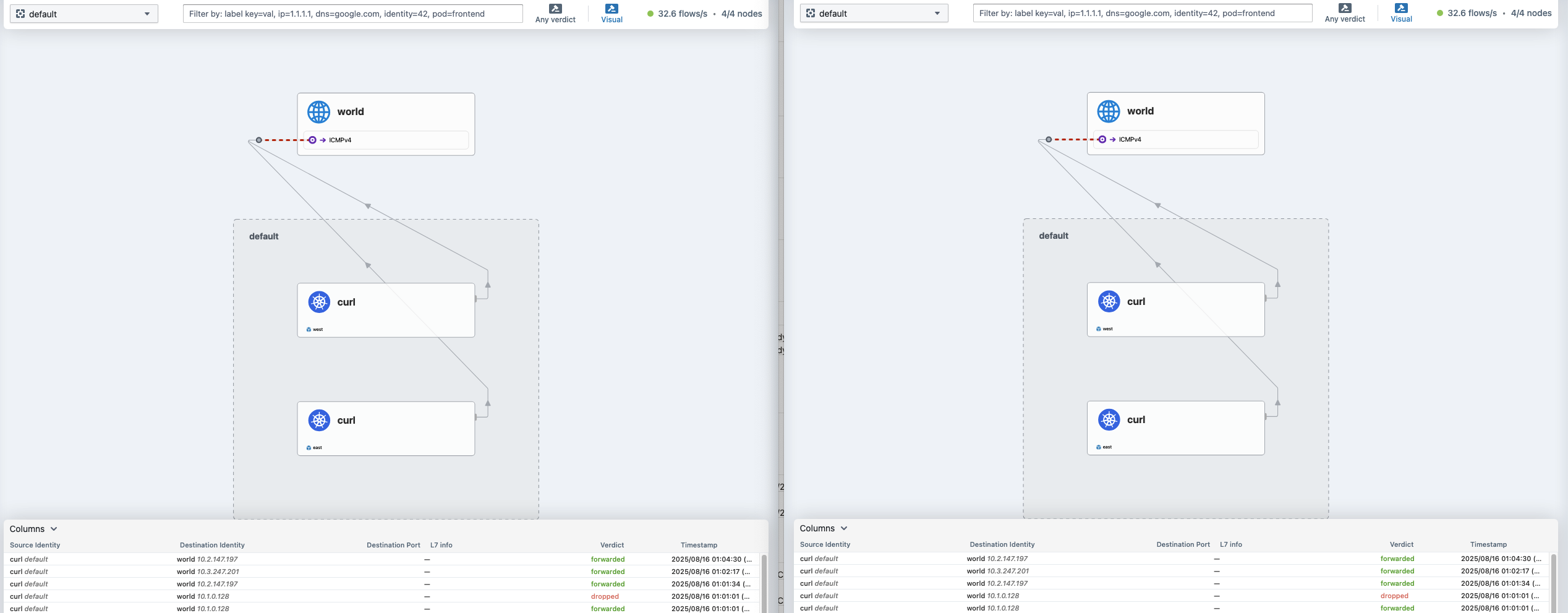
affinity local 설정을 해도, local에 pod가 없으면 다른 클러스터쪽으로 연결되어 통신합니다.
affinity remote를 설정하면, 무조건 다른 클러스터 부터 라우팅을 하게 됩니다.
Clustermesh-apiserver Pod 정보 확인
# 클러ㅅ터 메시로 연결했기 때문에 다른 클러스터에서 인지된 노드는 Source에 clustermesh에 표현됨
kwest exec -it -n kube-system ds/cilium -c cilium-agent -- cilium node list
Name                      IPv4 Address   Endpoint CIDR   IPv6 Address   Endpoint CIDR   Source
east/east-control-plane   172.18.0.5     10.1.0.0/24                                    clustermesh
east/east-worker          172.18.0.4     10.1.1.0/24                                    clustermesh
west/west-control-plane   172.18.0.3     10.0.0.0/24                                    custom-resource
west/west-worker          172.18.0.2     10.0.1.0/24                                    local

keast exec -it -n kube-system ds/cilium -c cilium-agent -- cilium node list
Name                      IPv4 Address   Endpoint CIDR   IPv6 Address   Endpoint CIDR   Source
east/east-control-plane   172.18.0.5     10.1.0.0/24                                    local
east/east-worker          172.18.0.4     10.1.1.0/24                                    custom-resource
west/west-control-plane   172.18.0.3     10.0.0.0/24                                    clustermesh
west/west-worker          172.18.0.2     10.0.1.0/24                                    clustermesh

# 다른 클러스터의 정보들이 표현이 됨
kwest exec -it -n kube-system ds/cilium -c cilium-agent -- cilium identity list
keast exec -it -n kube-system ds/cilium -c cilium-agent -- cilium identity list

kwest exec -it -n kube-system ds/cilium -c cilium-agent -- cilium bpf ipcache list
keast exec -it -n kube-system ds/cilium -c cilium-agent -- cilium bpf ipcache list
kwest exec -it -n kube-system ds/cilium -c cilium-agent -- cilium map get cilium_ipcache
keast exec -it -n kube-system ds/cilium -c cilium-agent -- cilium map get cilium_ipcache


kwest exec -it -n kube-system ds/cilium -c cilium-agent -- cilium service list
keast exec -it -n kube-system ds/cilium -c cilium-agent -- cilium service list

kwest exec -it -n kube-system ds/cilium -c cilium-agent -- cilium bpf lb list
10.2.127.79:443/TCP (0)     0.0.0.0:0 (2) (0) [ClusterIP, InternalLocal, non-routable]

keast exec -it -n kube-system ds/cilium -c cilium-agent -- cilium bpf lb list
10.3.196.180:443/TCP (0)   0.0.0.0:0 (2) (0) [ClusterIP, InternalLocal, non-routable]


#
kubectl describe pod -n kube-system -l k8s-app=clustermesh-apiserver
...
Containers:
  etcd:
    Container ID:  containerd://7668abdd87c354ab9295ff9f0aa047b3bd658a8671016c4564a1045f9e32cb9f
    Image:         quay.io/cilium/clustermesh-apiserver:v1.17.6@sha256:f619e97432db427e1511bf91af3be8ded418c53a353a09629e04c5880659d1df
    Image ID:      quay.io/cilium/clustermesh-apiserver@sha256:f619e97432db427e1511bf91af3be8ded418c53a353a09629e04c5880659d1df
    Ports:         2379/TCP, 9963/TCP
    Host Ports:    0/TCP, 0/TCP
    Command:
      /usr/bin/etcd
    Args:
      --data-dir=/var/run/etcd
      --name=clustermesh-apiserver
      --client-cert-auth
      --trusted-ca-file=/var/lib/etcd-secrets/ca.crt
      --cert-file=/var/lib/etcd-secrets/tls.crt
      --key-file=/var/lib/etcd-secrets/tls.key
      --listen-client-urls=https://127.0.0.1:2379,https://[$(HOSTNAME_IP)]:2379
      --advertise-client-urls=https://[$(HOSTNAME_IP)]:2379
      --initial-cluster-token=$(INITIAL_CLUSTER_TOKEN)
      --auto-compaction-retention=1
      --listen-metrics-urls=http://[$(HOSTNAME_IP)]:9963
      --metrics=basic
  ...
  apiserver:
    Container ID:  containerd://96da1c1ca39cb54d9e4def9333195f9a3812bf4978adcbe72bf47202b029e28d
    Image:         quay.io/cilium/clustermesh-apiserver:v1.17.6@sha256:f619e97432db427e1511bf91af3be8ded418c53a353a09629e04c5880659d1df
    Image ID:      quay.io/cilium/clustermesh-apiserver@sha256:f619e97432db427e1511bf91af3be8ded418c53a353a09629e04c5880659d1df
    Ports:         9880/TCP, 9962/TCP
    Host Ports:    0/TCP, 0/TCP
    Command:
      /usr/bin/clustermesh-apiserver
    Args:
      clustermesh
      --debug
      --cluster-name=$(CLUSTER_NAME)
      --cluster-id=$(CLUSTER_ID)
      --kvstore-opt=etcd.config=/var/lib/cilium/etcd-config.yaml
      --kvstore-opt=etcd.qps=20
      --kvstore-opt=etcd.bootstrapQps=10000
      --max-connected-clusters=255
      --health-port=9880
      --enable-external-workloads=false
      --prometheus-serve-addr=:9962
      --controller-group-metrics=all

# etcd 컨터이너 로그 확인
kubectl logs -n kube-system deployment/clustermesh-apiserver -c etcd

# apiserver 컨터이너 로그 확인
kubectl logs -n kube-system deployment/clustermesh-apiserver -c apiserver


#
kwest exec -it -n kube-system ds/cilium -c cilium-agent -- cilium status --all-clusters
ClusterMesh:            1/1 remote clusters ready, 1 global-services
   west: ready, 2 nodes, 9 endpoints, 7 identities, 1 services, 0 MCS-API service exports, 0 reconnections (last: never)
   └  etcd: 1/1 connected, leases=0, lock leases=0, has-quorum=true: endpoint status checks are disabled, ID: da1e6d481fd94dd
   └  remote configuration: expected=true, retrieved=true, cluster-id=1, kvstoremesh=false, sync-canaries=true, service-exports=disabled
   └  synchronization status: nodes=true, endpoints=true, identities=true, services=true

keast exec -it -n kube-system ds/cilium -c cilium-agent -- cilium status --all-clusters
ClusterMesh:            1/1 remote clusters ready, 1 global-services
   west: ready, 2 nodes, 9 endpoints, 7 identities, 1 services, 0 MCS-API service exports, 0 reconnections (last: never)
   └  etcd: 1/1 connected, leases=0, lock leases=0, has-quorum=true: endpoint status checks are disabled, ID: da1e6d481fd94dd
   └  remote configuration: expected=true, retrieved=true, cluster-id=1, kvstoremesh=false, sync-canaries=true, service-exports=disabled
   └  synchronization status: nodes=true, endpoints=true, identities=true, services=true


# etcd 컨테이너 bash 진입 후 확인
# krew pexec 플러그인 활용 https://github.com/ssup2/kpexec
kubectl krew install pexec
kubectl get pod -n kube-system -l k8s-app=clustermesh-apiserver


DPOD=clustermesh-apiserver-5cf45db9cc-v6ffp
kubectl pexec $DPOD -it -T -n kube-system -c etcd -- bash
------------------------------------------------
ps -ef
ps -ef -T -o pid,ppid,comm,args
ps -ef -T -o args
COMMAND
/usr/bin/etcd --data-dir=/var/run/etcd --name=clustermesh-apiserver --client-cert-auth --trusted-ca-file=/var/lib/etcd-se

cat /proc/1/cmdline ; echo
/usr/bin/etcd--data-dir=/var/run/etcd--name=clustermesh-apiserver--client-cert-auth--trusted-ca-file=/var/lib/etcd-secrets/ca.crt--cert-file=/var/lib/etcd-secrets/tls.crt--key-file=/var/lib/etcd-secrets/tls.key--listen-client-urls=https://127.0.0.1:2379,https://[10.1.1.72]:2379--advertise-client-urls=https://[10.1.1.72]:2379--initial-cluster-token=d8a7a9f9-b67d-45ad-8a84-feb6769fb6db--auto-compaction-retention=1--listen-metrics-urls=http://[10.1.1.72]:9963--metrics=basic

bash-5.1# ss -tnlp
bash-5.1# ss -tnp
ESTAB     0          0                 10.1.1.243:2379             172.18.0.5:51880      users:(("etcd",pid=1,fd=15))
ESTAB     0          0                 10.1.1.243:2379             172.18.0.5:59850      users:(("etcd",pid=1,fd=14))

exit
------------------------------------------------

kubectl pexec $DPOD -it -T -n kube-system -c apiserver -- bash
------------------------------------------------
bash-5.1# ps -ef
bash-5.1# ps -ef -T -o pid,ppid,comm,args
bash-5.1# ps -ef -T -o args
bash-5.1# cat /proc/1/cmdline ; echo
usr/bin/clustermesh-apiserverclustermesh--debug--cluster-name=east--cluster-id=2--kvstore-opt=etcd.config=/var/lib/cilium/etcd-config.yaml--kvstore-opt=etcd.qps=20--kvstore-opt=etcd.bootstrapQps=10000--max-connected-clusters=255--health-port=9880--enable-external-workloads=false--prometheus-serve-addr=:9962--controller-group-metrics=all

bash-5.1# ss -tnlp
State  Recv-Q Send-Q Local Address:Port  Peer Address:Port Process
LISTEN 0      4096       127.0.0.1:9892       0.0.0.0:*
LISTEN 0      4096       127.0.0.1:2380       0.0.0.0:*     users:(("etcd",pid=1,fd=6))
LISTEN 0      4096       127.0.0.1:2379       0.0.0.0:*     users:(("etcd",pid=1,fd=7))
LISTEN 0      4096       10.1.1.72:9963       0.0.0.0:*     users:(("etcd",pid=1,fd=13))
LISTEN 0      4096       10.1.1.72:2379       0.0.0.0:*     users:(("etcd",pid=1,fd=8))
LISTEN 0      4096               *:9962             *:*
LISTEN 0      4096               *:9880             *:*

bash-5.1# ss -tnp
ESTAB    0         0                127.0.0.1:42286          127.0.0.1:2379     users:(("clustermesh-api",pid=1,fd=7))
ESTAB    0         0               10.1.1.243:38300         172.18.0.5:6443     users:(("clustermesh-api",pid=1,fd=6))

exit
------------------------------------------------
마치며
이번 5주차 실습을 통해 Cilium BGP을 기반으로 Cluster Mesh를 구축하는 다양한 방법에 대해 학습했습니다.
이번 실습에서는 Cilium의 Cluster Mesh 기능을 활용하여 여러 Kubernetes 클러스터 간에 네트워크를 연결하고, 서비스가 클러스터를 넘나들며 통신할 수 있도록 구성해보았습니다.
특히 BGP와 FRR을 이용한 라우팅, 그리고 글로벌 서비스(Cluster-wide Service) 설정을 통해 클러스터 간 부하분산 및 서비스 디스커버리가 실제로 어떻게 동작하는지 직접 확인할 수 있었습니다.
실습을 통해 Cilium Cluster Mesh의 구조와 동작 원리를 이해하고, 멀티 클러스터 환경에서 발생할 수 있는 네트워크 이슈와 해결 방안에 대해 고민해볼 수 있는 유익한 시간이었습니다. (구성 과정이 쉽진 않지만, 그만큼 얻는 인사이트도 컸던 것 같습니다..!)
긴 글 읽어주셔서 감사합니다 :)
'클라우드 컴퓨팅 & NoSQL > [Cilium Study] 실리움 스터디' 카테고리의 다른 글
| [7주차 - Cilium 스터디] K8S/Cilium Performance (25.08.24) (1) | 2025.08.30 |
|---|---|
| [6주차 - Cilium 스터디] Cilium ServiceMesh (25.08.17) (1) | 2025.08.23 |
| [4주차 - Cilium 스터디] Networking - 노드에 파드들간 통신 2 & K8S 외부 노출 (25.08.03) (4) | 2025.08.08 |
| [3주차 - Cilium 스터디] Networking (25.07.27) (0) | 2025.08.02 |
| [2주차 - Cilium 스터디] (Observabilty) Hubbkem Prometheus/Grafana (25.07.20) (3) | 2025.07.26 |