![[6주차 - Ingress & Gateway API] KANS 스터디 (24.10.06)](https://img1.daumcdn.net/thumb/R750x0/?scode=mtistory2&fname=https%3A%2F%2Fblog.kakaocdn.net%2Fdna%2FbuTJof%2FbtsJWr1myIJ%2FAAAAAAAAAAAAAAAAAAAAALc7IeFIhCK2PoO5gZem4JYflF0saOwPWv8zAl0lyRgx%2Fimg.png%3Fcredential%3DyqXZFxpELC7KVnFOS48ylbz2pIh7yKj8%26expires%3D1788188399%26allow_ip%3D%26allow_referer%3D%26signature%3Df5NmE8bEQ%252FGsO5lZIZ%252BaZ6aZYRM%253D)
들어가며
이번 포스팅은 CloudNet@ 커뮤니티에서 주최하는 KANS 스터디 6주 차 주제인 "Ingress & Gateway API"에 대해서 정리한 내용입니다.
* Ingress 실습에서 사용하는 k3s(1.30.5 version)는 기본으로 flannel CNI(Container Network Interface)를 사용하는 경량화된 쿠버네티스입니다.
Kubernetes - Ingress
Ingress는 클러스터 외부에서 HTTP(s) 통신 요청을 받아서 처리해주는 Layer 7 계층 동작을 합니다. 인그레스는 경로(path) 기반 또는 호스트 기반 라우팅을 통해 HTTP(s) 요청 트래픽을 부하분산하여 내부의 파드로 전달하는 역할을 합니다. 또한 Canary 배포를 자체적으로 제공하여 유연한 업데이트 전략을 사용할 수 있으며, SSL/TLS 종료를 통해 외부에서 ingress controller pod로 안전한 HTTPS 접속을 하고, 이후 인그레스 컨트롤러는 내부에서 목적지 파드로 HTTP 통신을 하게 됩니다.
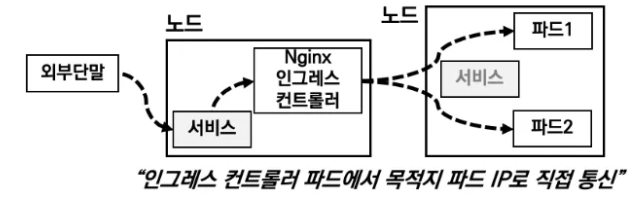
인그레스는 위 그림과 같이 인그레스 컨트롤러를 사용하고, 외부 요청 트래픽은 역로 인입됩니다. 인입시 kubernetes의 NordPort 또는 LoadBalancer service를 사용할 수 있습니다.
Nginx 인그레스 컨트롤러에 인입된 요청 트래픽은 연동된 Pod들로 전달되게 되는데, 이 때 중요한 것은 내부적으로 트래픽을 전달할 때 Service를 경유하지 않고 목적지의 Pod로 바로 통신이 된다는 것입니다. 이를 위해 인그레스 컨트롤러 파드는 서비스에 연동된 파드의 정보를 알아야 합니다. 이를 위해서 인그레스 컨트롤러 파드는 쿠버네티스 API에 해당 정보를 요청하고 획득할 수 있는 권한이 설정되어 있습니다.
인그레스를 사용하는 예시는 다음과 같습니다.
apiVersion: networking.k8s.io/v1
kind: Ingress
metadata:
  name: example-ingress
spec:
  rules:
  - host: my-app.com
    http:
      paths:
      - pathType: Prefix
        path: "/"
        backend:
          service:
            name: my-service
            port:
              number: 80
쿠버네티스에서는 Ingress API만 정의를 하고, 실제 동작은 API와 호환되도록 구현된 add-on에서 처리합니다. 이 add-on은 인그레스컨트롤러(Nginx, Kong 등)라고 합니다. 이러한 컨트롤러는 주로 helm 등으로 설치하여 동작시키고, ingress 사용 시 연결됩니다.
Ingress 특징 기능에 대한 간략 소개
Ingress의 호스트 기반 라우팅
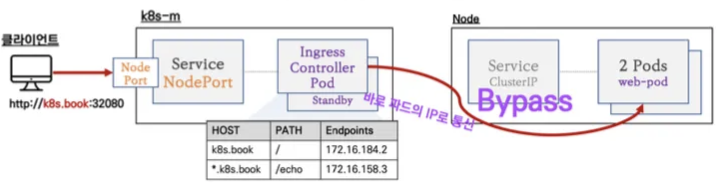
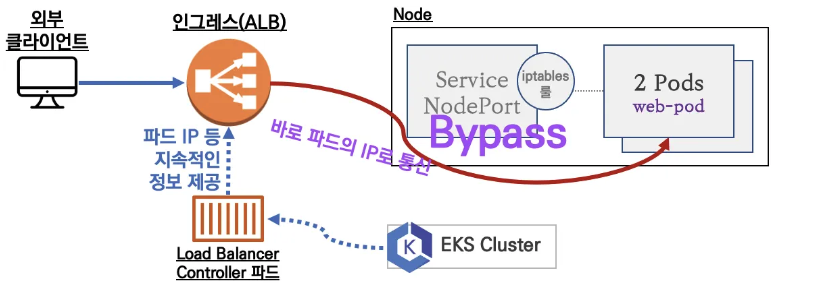
인그레스에 IP가 아닌 도메인 주소가 연결되어 있으면, 외일드카드를 이용하여 특정 디플로이먼트에 연결이 가능합니다. 실습에서는 기본적으로 Nginx Ingress Controller를 사용합니다. 또한 순서상으로는 Node의 Node Port를 통해 Pod에 접속해야하지만, 효율성을 높이기 위해 Ingress Controller Pod에서 각 노드의 Pod로 Bypass 하도록 개선되었습니다.
Ingress의 카나리 배포
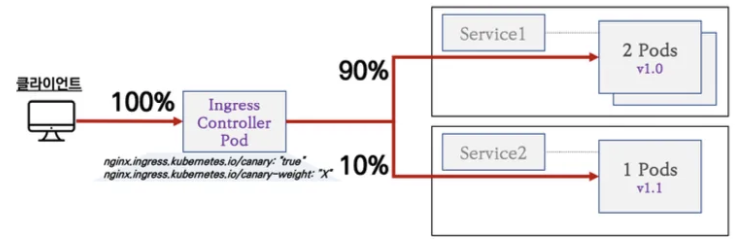
Ingress는 카나리 배포를 지원합니다. 카나리 배포는 신규 버전의 애플리케이션을 실제 운영 환경에 적용하여 이상 동작을 모니터링 하고 문제가 없다면 인입량을 신규 버전에 증가시키고, 그렇지않으면 기존 버전으로 트래픽을 전달하여 사용하는 방법입니다.
Ingress의 TLS 종료
인그래스는 SSL/TLS 종료를 지원하여, 외부에서 인그레스 컨트롤러 파드로는 HTTPS로 접속하고, 이후 내부망의 목적지 Pod로는 HTTP 통신을 합니다.

앞서 설명드린 세가지에 대한 예시를 위해 김태민 님의 기술블로그의 도식을 소개합니다.
출처 - https://kubetm.github.io/k8s/08-intermediate-controller/ingress/
Ingress
Service Loadbalancing, Canary Upgrade
kubetm.github.io

첫 번째 그림인 Service Loadbalancing은 클라이언트의 요청을 Ingress의 path 기반라우팅을 통해 여러 개의 서비스로 분리하는 과정을 표현한 것입니다.
두 번째 그림은 새로운 버전의 서비스를 테스트하기 위해 트래픽 일부를 weight를 통해 신규 서비스를 테스트 하는 내용입니다. 그림에서는 대부분의 트래픽(90%)을 v1로 전달하고, 나머지 10%의 트래픽만 svc-v2로 전달합니다.
세 번째 그림은tls.key, tls.crt를 포함하는 secret(secret-https)를 사용하여 TLS인증기반 HTTPS 암호화 통신을 수행하는 것을 보여줍니다.
Ingress 실습
Ingress 실습 환경 설치
실습환경은 Cloudformation 스택을 통해 EC2 인스턴스 4대(Control 1대, Worker 3대)로 kubernetes 클러스터를 구축합니다. 또한 Nginx 컨트롤러는 30080, 30443으로 연결되도록 세팅합니다.
curl -O https://s3.ap-northeast-2.amazonaws.com/cloudformation.cloudneta.net/kans/kans-6w.yaml
aws cloudformation deploy --template-file kans-6w.yaml --stack-name mylab --parameter-overrides KeyName=jhpark SgIngressSshCidr=$(curl -s ipinfo.io/ip)/32 --region ap-northeast-2
ssh -i [xxx.pem] ubuntu@$(aws cloudformation describe-stacks --stack-name mylab --query 'Stacks[*].Outputs[0].OutputValue' --output text --region ap-northeast-2)

# Ingress-Nginx 컨트롤러 생성
cat <<EOT> ingress-nginx-values.yaml
controller:
  service:
    type: NodePort
    nodePorts:
      http: 30080
      https: 30443
  nodeSelector:
    kubernetes.io/hostname: "k3s-s"
  metrics:
    enabled: true
  serviceMonitor:
      enabled: true
EOT

helm repo add ingress-nginx https://kubernetes.github.io/ingress-nginx
helm repo update

kubectl create ns ingress
helm install ingress-nginx ingress-nginx/ingress-nginx -f ingress-nginx-values.yaml --namespace ingress --version 4.11.2

# 확인
kubectl get all -n ingress
kc describe svc -n ingress ingress-nginx-controller

# externalTrafficPolicy 설정
kubectl patch svc -n ingress ingress-nginx-controller -p '{"spec":{"externalTrafficPolicy": "Local"}}'

# 기본 nginx conf 파일 확인
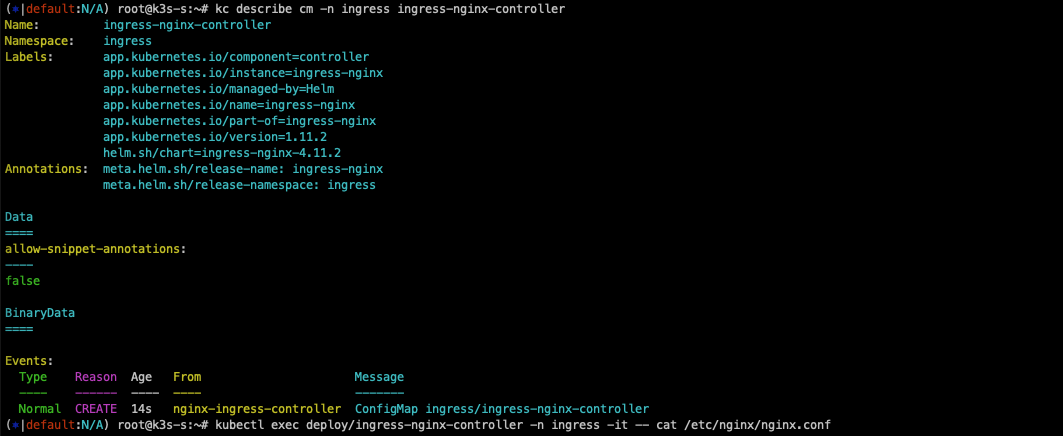
kc describe cm -n ingress ingress-nginx-controller
kubectl exec deploy/ingress-nginx-controller -n ingress -it -- cat /etc/nginx/nginx.conf

# 관련된 정보 확인 : 포드(Nginx 서버), 서비스, 디플로이먼트, 리플리카셋, 컨피그맵, 롤, 클러스터롤, 서비스 어카운트 등
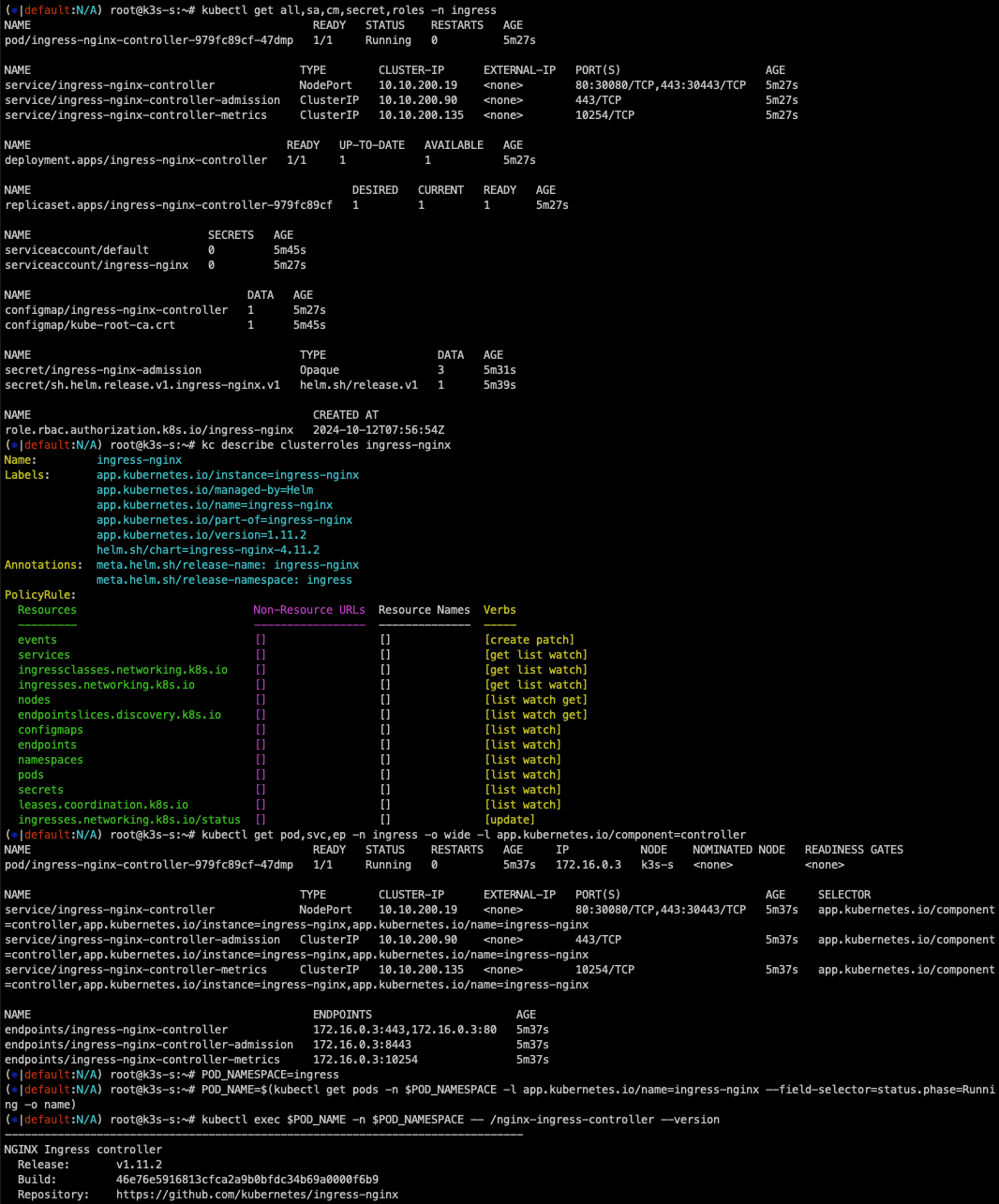
kubectl get all,sa,cm,secret,roles -n ingress
kc describe clusterroles ingress-nginx
kubectl get pod,svc,ep -n ingress -o wide -l app.kubernetes.io/component=controller

# 버전 정보 확인
POD_NAMESPACE=ingress
POD_NAME=$(kubectl get pods -n $POD_NAMESPACE -l app.kubernetes.io/name=ingress-nginx --field-selector=status.phase=Running -o name)
kubectl exec $POD_NAME -n $POD_NAMESPACE -- /nginx-ingress-controller --version
디플로이먼트와 서비스를 생성
#svc1-pod.yaml
apiVersion: apps/v1
kind: Deployment
metadata:
  name: deploy1-websrv
spec:
  replicas: 1
  selector:
    matchLabels:
      app: websrv
  template:
    metadata:
      labels:
        app: websrv
    spec:
      containers:
      - name: pod-web
        image: nginx
---
apiVersion: v1
kind: Service
metadata:
  name: svc1-web
spec:
  ports:
    - name: web-port
      port: 9001
      targetPort: 80
  selector:
    app: websrv
  type: ClusterIP

  #svc2-pod.yaml
  apiVersion: apps/v1
kind: Deployment
metadata:
  name: deploy2-guestsrv
spec:
  replicas: 2
  selector:
    matchLabels:
      app: guestsrv
  template:
    metadata:
      labels:
        app: guestsrv
    spec:
      containers:
      - name: pod-guest
        image: gcr.io/google-samples/kubernetes-bootcamp:v1
        ports:
        - containerPort: 8080
---
apiVersion: v1
kind: Service
metadata:
  name: svc2-guest
spec:
  ports:
    - name: guest-port
      port: 9002
      targetPort: 8080
  selector:
    app: guestsrv
  type: NodePort

 #svc3-pod.yaml
 apiVersion: apps/v1
kind: Deployment
metadata:
  name: deploy3-adminsrv
spec:
  replicas: 3
  selector:
    matchLabels:
      app: adminsrv
  template:
    metadata:
      labels:
        app: adminsrv
    spec:
      containers:
      - name: pod-admin
        image: k8s.gcr.io/echoserver:1.5
        ports:
        - containerPort: 8080
---
apiVersion: v1
kind: Service
metadata:
  name: svc3-admin
spec:
  ports:
    - name: admin-port
      port: 9003
      targetPort: 8080
  selector:
    app: adminsrv

 # 모니터링
watch -d 'kubectl get ingress,svc,ep,pod -owide'

# 생성
kubectl taint nodes k3s-s role=controlplane:NoSchedule
curl -s -O https://raw.githubusercontent.com/gasida/NDKS/main/7/svc1-pod.yaml
curl -s -O https://raw.githubusercontent.com/gasida/NDKS/main/7/svc2-pod.yaml
curl -s -O https://raw.githubusercontent.com/gasida/NDKS/main/7/svc3-pod.yaml
kubectl apply -f svc1-pod.yaml,svc2-pod.yaml,svc3-pod.yaml

# 확인 : svc1, svc3 은 ClusterIP 로 클러스터 외부에서는 접속할 수 없다 >> Ingress 는 연결 가능!
kubectl get pod,svc,ep
인그레스(정책) 생성
# ingress1.yaml
cat <<EOT> ingress1.yaml
apiVersion: networking.k8s.io/v1
kind: Ingress
metadata:
  name: ingress-1
  annotations:
    #nginx.ingress.kubernetes.io/upstream-hash-by: "true"
spec:
  ingressClassName: nginx
  rules:
  - http:
      paths:
      - path: /
        pathType: Prefix
        backend:
          service:
            name: svc1-web
            port:
              number: 80
      - path: /guest
        pathType: Prefix
        backend:
          service:
            name: svc2-guest
            port:
              number: 8080
      - path: /admin
        pathType: Prefix
        backend:
          service:
            name: svc3-admin
            port:
              number: 8080
EOT

# 모니터링
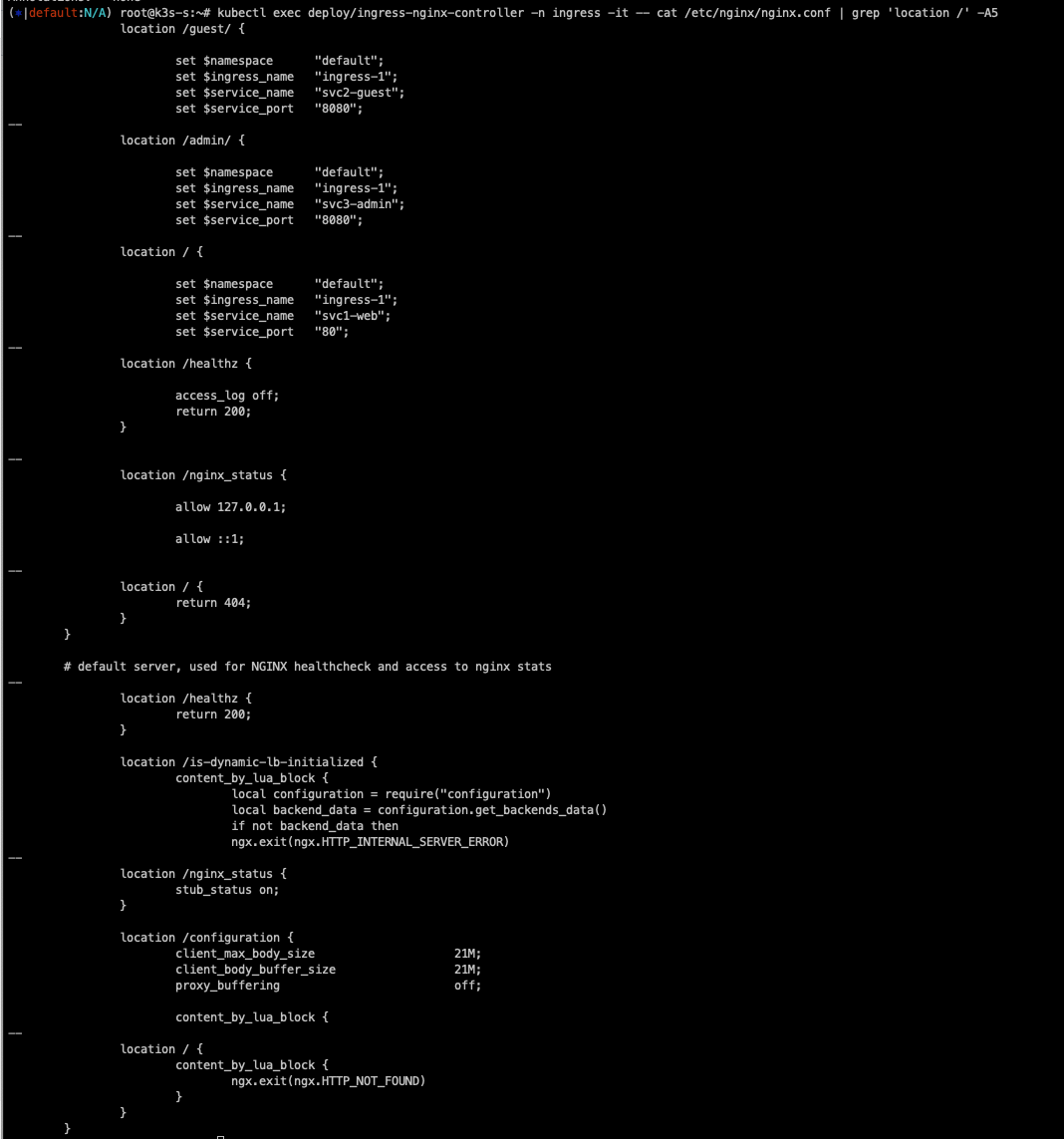
watch -d 'kubectl get ingress,svc,ep,pod -owide'

# 생성
kubectl apply -f ingress1.yaml

# 확인
kubectl get ingress
kc describe ingress ingress-1

kubectl exec deploy/ingress-nginx-controller -n ingress -it -- cat /etc/nginx/nginx.conf | grep 'location /' -A5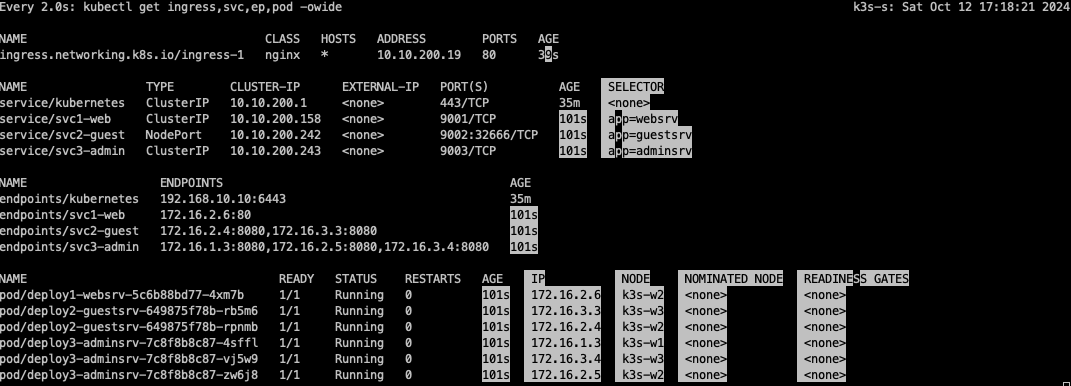
디폴트 backend가 없는 상황에서 호스트 IP가 어떻든 간에, 패스 기반으로 라벨 셀렉터의 Pod로 트래픽을 라우팅 합니다.

nginx-ingress controller는 ingress에 세팅된 api를 실제 nginx server에 config를 적용시킵니다.
접속 테스트
kubetail -n ingress -l app.kubernetes.io/component=controller

-------------------------------
# 자신의 집 PC에서 인그레스를 통한 접속 : 각각
echo -e "Ingress1 sv1-web URL = http://$(curl -s ipinfo.io/ip):30080"
echo -e "Ingress1 sv2-guest URL = http://$(curl -s ipinfo.io/ip):30080/guest"
echo -e "Ingress1 sv3-admin URL = http://$(curl -s ipinfo.io/ip):30080/admin"

# svc1-web 접속
MYIP=<EC2 공인 IP>
MYIP=13.124.93.150
curl -s $MYIP:30080

# svvc2-guest 접속
curl -s $MYIP:30080/guest
curl -s $MYIP:30080/guest
for i in {1..100}; do curl -s $MYIP:30080/guest ; done | sort | uniq -c | sort -nr

# svc3-admin 접속 > 기본적으로 Nginx 는 라운드로빈 부하분산 알고리즘을 사용 >> Client_address 와 XFF 주소는 어떤 주소인가요?
curl -s $MYIP:30080/admin
curl -s $MYIP:30080/admin | egrep '(client_address|x-forwarded-for)'
for i in {1..100}; do curl -s $MYIP:30080/admin | grep Hostname ; done | sort | uniq -c | sort -nr

정상적으로 접속이 잘 되는 것을 확인할 수 있습니다.

다음과같이 부하분산도 잘 동작합니다.


다음과 같이 패킷 캡처도 가능합니다.
통신 내용을 확인해보면 ingress-controller(172.16.0.3)가 nodeport로 접근되는 것이 아니라 pod로 다이렉트 통신을 하는 것을 확인할 수 있습니다.
즉 ingress-nginx가 대상 pod들의 ip를 알고 바로 bypass 된다는 사실을 알 수 있습니다.

AWS Ingresss(ALB) IP 모드
AWS LoadBalancer Controller 를 사용하면 pod가 kube api를 통해서 파드의 IP를 알아서 위와 같이 Bypass로 동작합니다.
Nginx IP-Hash 변경 실습
기본 LoadBalacner rr 모드로 동작시킬 때는 pod가 3개이므로 33%로 동작하는데, 이를 IP-Hash모드로 변경하면 다음과 같이 최초 접속한 Pod로만 접근을 합니다.
# mypc
for i in {1..100}; do curl -s $MYIP:30080/admin | grep Hostname ; done | sort | uniq -c | sort -nr
while true; do curl -s --connect-timeout 1 $MYIP:30080/admin | grep Hostname ; date "+%Y-%m-%d %H:%M:%S" ; echo "--------------" ; sleep 1; done

# 아래 ingress 설정 중 IP-Hash 설정 > # 주석 제거
sed -i 's/#nginx.ingress/nginx.ingress/g' ingress1.yaml
kubectl apply -f ingress1.yaml

# 접속 확인
for i in {1..100}; do curl -s $MYIP:30080/admin | grep Hostname ; done | sort | uniq -c | sort -nr
while true; do curl -s --connect-timeout 1 $MYIP:30080/admin | grep Hostname ; date "+%Y-%m-%d %H:%M:%S" ; echo "--------------" ; sleep 1; done

# 다시 원복(라운드 로빈) > # 주석 추가
sed -i 's/nginx.ingress/#nginx.ingress/g' ingress1.yaml
kubectl apply -f ingress1.yaml

# 접속 확인
for i in {1..100}; do curl -s $MYIP:30080/admin | grep Hostname ; done | sort | uniq -c | sort -nr
while true; do curl -s --connect-timeout 1 $MYIP:30080/admin | grep Hostname ; date "+%Y-%m-%d %H:%M:%S" ; echo "--------------" ; sleep 1; done


Nginx Host 기반 라우팅
호스트의 도메인을 보고 매칭하여 접속하는 방법입니다. 실습에서는 kans.com과 *.kans.com으로 구분하여 라우팅이 되도록 합니다.
cat <<EOT> ingress2.yaml
apiVersion: networking.k8s.io/v1
kind: Ingress
metadata:
  name: ingress-2
spec:
  ingressClassName: nginx
  rules:
  - host: devlos.com
    http:
      paths:
      - path: /
        pathType: Prefix
        backend:
          service:
            name: svc3-admin
            port:
              number: 8080
  - host: "*.devlos.com"
    http:
      paths:
      - path: /echo
        pathType: Prefix
        backend:
          service:
            name: svc3-admin
            port:
              number: 8080
EOT

MYDOMAIN1=devlos.com
MYDOMAIN2=test.devlos.com
echo $MYIP $MYDOMAIN1 $MYDOMAIN2

echo "$MYIP $MYDOMAIN1" | sudo tee -a /etc/hosts
echo "$MYIP $MYDOMAIN2" | sudo tee -a /etc/hosts
cat /etc/hosts | grep $MYDOMAIN1

# svc3-admin 접속 > 결과 확인
curl $MYDOMAIN1:30080 -v
curl $MYDOMAIN1:30080/admin
curl $MYDOMAIN1:30080/echo
curl $MYDOMAIN1:30080/echo/1

curl $MYDOMAIN2:30080 -v
curl $MYDOMAIN2:30080/admin
curl $MYDOMAIN2:30080/echo
curl $MYDOMAIN2:30080/echo/1
curl $MYDOMAIN2:30080/echo/1/2

## (옵션) /etc/hosts 파일 변경 없이 접속 방안
curl -H "host: $MYDOMAIN1" $MYIP:30080
다음과 같이 도메인을 기반으로 잘 라우팅 되는 것을 확인할 수 있습니다.

카나리 업그레이드 실습
애플리케이션이 2개 이상의 replica로 구성되어 있을 때 여러 가지 업데이트 방법을 사용할 수 있습니다.
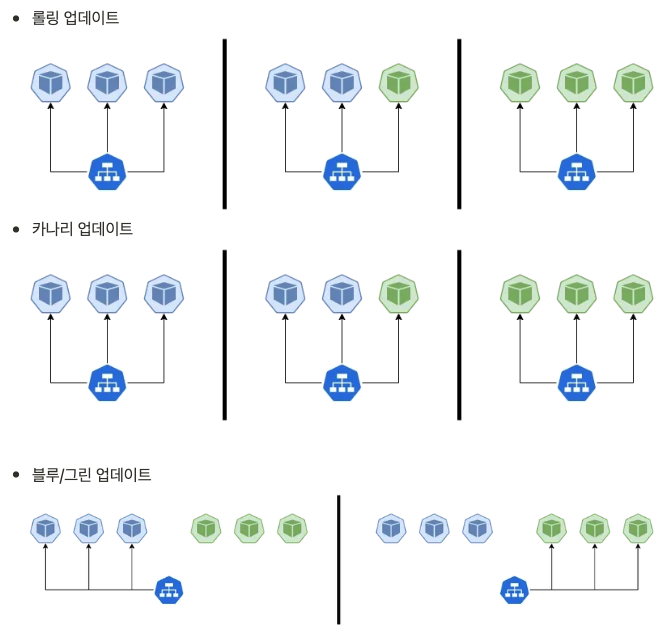
Ingress 컨트롤러를 사용한 배포 방식은 canary업데이트를 하는데 유리합니다. Ingress 컨트롤러는 트래픽을 다양한 백엔드 서비스로 라우팅 할 수 있는 규칙을 설정할 수 있고, 트래픽의 일정 비율을 특정 서비스로 전달하도록 설정할 수 있으며, 이전버전으로 복원하기 편리하기 때문입니다.
다음과 같이 두 개 버전의 애플리케이션을 이용하여 canary 배포 실습을 진행했습니다.
# canary-svc1-pod.yaml
apiVersion: apps/v1
kind: Deployment
metadata:
  name: dp-v1
spec:
  replicas: 3
  selector:
    matchLabels:
      app: svc-v1
  template:
    metadata:
      labels:
        app: svc-v1
    spec:
      containers:
      - name: pod-v1
        image: k8s.gcr.io/echoserver:1.5
        ports:
        - containerPort: 8080
      terminationGracePeriodSeconds: 0
---
apiVersion: v1
kind: Service
metadata:
  name: svc-v1
spec:
  ports:
    - name: web-port
      port: 9001
      targetPort: 8080
  selector:
    app: svc-v1

# canary-svc2-pod.yaml
apiVersion: apps/v1
kind: Deployment
metadata:
  name: dp-v2
spec:
  replicas: 3
  selector:
    matchLabels:
      app: svc-v2
  template:
    metadata:
      labels:
        app: svc-v2
    spec:
      containers:
      - name: pod-v2
        image: k8s.gcr.io/echoserver:1.6
        ports:
        - containerPort: 8080
      terminationGracePeriodSeconds: 0
---
apiVersion: v1
kind: Service
metadata:
  name: svc-v2
spec:
  ports:
    - name: web-port
      port: 9001
      targetPort: 8080
  selector:
    app: svc-v2

# 터미널1
watch -d 'kubectl get ingress,svc,ep,pod -owide'

# 생성
curl -s -O https://raw.githubusercontent.com/gasida/NDKS/main/7/canary-svc1-pod.yaml
curl -s -O https://raw.githubusercontent.com/gasida/NDKS/main/7/canary-svc2-pod.yaml
kubectl apply -f canary-svc1-pod.yaml,canary-svc2-pod.yaml

# 확인
kubectl get svc,ep,pod

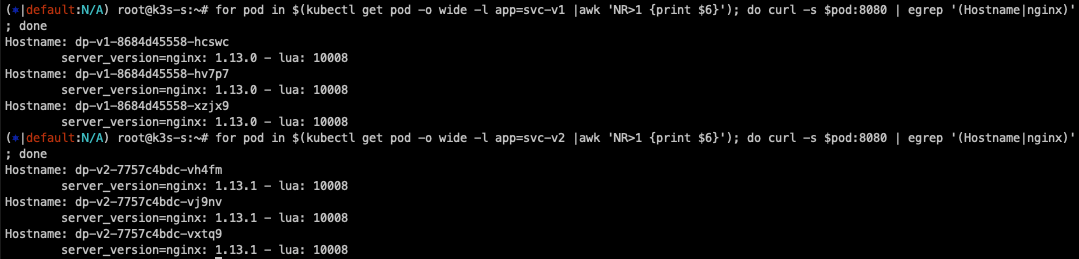
# 파드 버전 확인: 1.13.0 vs 1.13.1
for pod in $(kubectl get pod -o wide -l app=svc-v1 |awk 'NR>1 {print $6}'); do curl -s $pod:8080 | egrep '(Hostname|nginx)'; done
	Hostname: dp-v1-cdd8dc687-gcgsz
		server_version=nginx: 1.13.0 - lua: 10008
for pod in $(kubectl get pod -o wide -l app=svc-v2 |awk 'NR>1 {print $6}'); do curl -s $pod:8080 | egrep '(Hostname|nginx)'; done
	Hostname: dp-v2-785f69bd6-hh624
		server_version=nginx: 1.13.1 - lua: 10008

배포 후 nginx 버전을 살펴보면 디플로이먼트 서비스 1은 1.13.0 버전, 서비스 2는 1.13.1로 구성되어 있습니다.

10% 비율로 ingress 매칭 서비스에 등록된 것을 확인할 수 있습니다.


비율을 다시 50%으로 적용하면 다음과 같이 바로 비율이 조정됩니다.
# 비율 조정 >> 개발 배포 버전 전략에 유용하다!
kubectl annotate --overwrite ingress ingress-canary-v2 nginx.ingress.kubernetes.io/canary-weight=50

# 접속 테스트
for i in {1..100};  do curl -s $MYDOMAIN1:30080 | grep nginx ; done | sort | uniq -c | sort -nr
for i in {1..1000}; do curl -s $MYDOMAIN1:30080 | grep nginx ; done | sort | uniq -c | sort -nr

HTTPS 처리
# svc-pod.yaml
apiVersion: v1
kind: Pod
metadata:
  name: pod-https
  labels:
    app: https
spec:
  containers:
  - name: container
    image: k8s.gcr.io/echoserver:1.6
  terminationGracePeriodSeconds: 0
---
apiVersion: v1
kind: Service
metadata:
  name: svc-https
spec:
  selector:
    app: https
  ports:
  - port: 8080

  #ssl-termination-ingress.yaml
cat <<EOT> ssl-termination-ingress.yaml
apiVersion: networking.k8s.io/v1
kind: Ingress
metadata:
  name: https
spec:
  ingressClassName: nginx
  tls:
  - hosts:
    - kans.com
    secretName: secret-https
  rules:
  - host: kans.com
    http:
      paths:
      - path: /
        pathType: Prefix
        backend:
          service:
            name: svc-https
            port:
              number: 8080
EOT

# 서비스와 파드 생성
curl -s -O https://raw.githubusercontent.com/gasida/NDKS/main/7/svc-pod.yaml
kubectl apply -f svc-pod.yaml

# 도메인 변경
MYDOMAIN1=<각자 자신의 닉네임의 도메인> 예시) gasida.com
MYDOMAIN1=kans.com
echo $MYDOMAIN1
sed -i "s/kans.com/$MYDOMAIN1/g" ssl-termination-ingress.yaml

# 인그레스 생성
kubectl apply -f ssl-termination-ingress.yaml

# 인증서 생성
# openssl req -x509 -nodes -days 365 -newkey rsa:2048 -keyout tls.key -out tls.crt -subj "/CN=dkos.com/O=dkos.com"mkdir key && cd key
MYDOMAIN1=kans.com
openssl req -x509 -nodes -days 365 -newkey rsa:2048 -keyout tls.key -out tls.crt -subj "/CN=$MYDOMAIN1/O=$MYDOMAIN1"
tree

# Secret 생성
kubectl create secret tls secret-https --key tls.key --cert tls.crt

# Secret 확인
kubectl get secrets secret-https
kubectl get secrets secret-https -o yaml

-------------------
# 자신의 PC 에서 접속 확인 : PC 웹브라우저
# 접속 확인 : -k 는 https 접속 시 : 접속 포트 정보 확인
curl -Lk https://$MYDOMAIN1:30443

## (옵션) /etc/hosts 파일 변경 없이 접속 방안
curl -Lk -H "host: $MYDOMAIN1" https://$MYDOMAIN1:30443
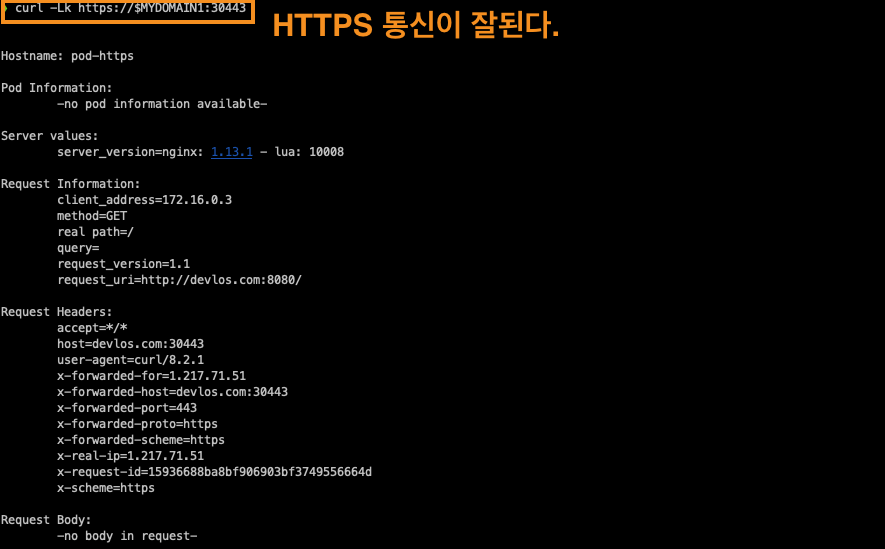
nginx pod에 node port를 통해 연결되기 때문에 30443 포트로 들어옵니다.
Kubernetes - Gateway API
기존의 Kubernetes Ingress는 다음과 같은 문제점이 있었습니다.
1. 복잡한 라우팅 시나리오에 대한 제한적인 지원
2. HTTP가 아닌 프로토콜에 대한 지원 부족
3. 다양한 구현에 걸쳐 기능을 확장하는데 어려움
이를 통해 Gateway API가 만들어졌고, 주요 기능은 다음과 같습니다.
출처 - https://medium.com/@disha.20.10/introduction-to-the-gateway-api-revolutionizing-kubernetes-networking-7b0c9a696038
Introduction to the Gateway API: Revolutionizing Kubernetes Networking
As Kubernetes continues to evolve, so do the networking challenges that come with managing complex, distributed microservices at scale…
medium.com
개선된 리소스 모델
API는 GatewayClass, Gateway 및 Route와 같은 새로운 사용자 정의 리소스를 도입하여 라우팅 규칙을 더욱 세부적으로 정의할 수 있도록 했습니다.
프로토콜 독립적
Ingress는 주로 HTTP(s)용으로 만들어졌지만, GatewayAPI는 TCP, UDP, TLS를 포함한 여러 프로토콜을 지원하도록 했습니다.
강화된 보안
TLS 구성 및 보다 세부적인 액세스 제어가 가능하도록 지원합니다.
교차 namespace지원
서로 다른 네임스페이스의 서비스로 트래픽을 라우팅 합니다.
아래의 그림과 같이 각각의 namespace별로 개발자들이 path 기반 routing을 스스로 관리할 수 있는 장점이 있습니다.

확장성 지원
Gateway API느 사용자 정의 리소스 및 정책으로 쉽게 확장할 수 있도록 설계되었습니다.
또한 Gateway API는 기존의 일반적인 API Gateway와는 스코프, 설치 및 사용, 제공 기능 면에서 같은 차이를 가집니다.
스코프
쿠버네티스 Gateway API는 클러스터 내부의 네트워크 트래픽을 관리하는 데 중점을 두고, API Gateway는 서비스와 외부 클라이언트 간
의 API 트래픽을 더 포괄적으로 관리합니다.
설치 및 사용
Gateway API는 쿠버네티스의 리소스로서 정의되며, API Gateway는 독립적인 서비스로 구성됩니다.
제공 기능
API Gateway는 더 많은 기능을 제공하지만, Gateway API는 쿠버네티스 네이티브 환경에서 일관된 관리와 확장성을 제공합니다.
공식문서에서는 ingress를 이제 더 확장하지 않고, Gateway API를 확장시킨다는 언급이 있어, 향후에는 Gateway API가 더 활성화될 것 같습니다.
GatewayAPI의 구성요소

출처: https://kubernetes.io/docs/concepts/services-networking/gateway/
Gateway API
Gateway API is a family of API kinds that provide dynamic infrastructure provisioning and advanced traffic routing.
kubernetes.io
1. GatewayClass
Gateway의 동작 방식을 정의하는 템플릿 역할을 합니다. 인그레스 컨트롤러의 유형이나 특성을 정의하여, 해당 Gateway가 어떤 방식으로 트래픽을 처리할지 결정합니다. HTTP, HTTPS, TCP 등의 특정 프로토콜을 처리하는 GatewayClass를 정의할 수 있습니다.
2. Gateway
네트워크 트래픽을 수신하는 진입점으로, 실제로 클러스터 내부로 들어오는 트래픽을 처리합니다. GatewayClass에 따라 동작하며, 특정 IP 주소나 호스트, 포트로 들어오는 트래픽을 받아 Route 객체로 연결합니다. 특정 도메인 이름과 포트로 들어오는 HTTP 요청을 처리하는 Gateway를 설정할 수 있습니다.
3. HTTPRoute
HTTP/HTTPS 트래픽의 라우팅 규칙을 정의합니다. HTTP 요청을 특정 서비스로 라우팅 하는 규칙을 설정하며, 경로(path), 호스트, 헤더 등의 조건을 기반으로 트래픽을 전달합니다. /api로 시작하는 요청을 특정 백엔드 서비스로 라우팅 할 수 있습니다.
4. TCPRoute
TCP 프로토콜을 사용하는 트래픽의 라우팅 규칙을 정의합니다. TCP 트래픽을 특정 서비스로 라우팅 하며, HTTP/HTTPS가 아닌 TCP 기반의 애플리케이션 트래픽에 사용됩니다.
5. Service
쿠버네티스의 기본 리소스로, 클러스터 내에서 실행 중인 애플리케이션을 네트워크적으로 노출합니다. Gateway나 Route가 최종적으로 트래픽을 전달할 대상입니다. 클러스터 내부의 Pods를 추상화하여 외부 트래픽을 전달받을 수 있는 방식으로 제공됩니다. HTTPRoute가 트래픽을 Service로 라우팅 하면, 해당 Service는 이를 받아 내부의 Pods로 전달합니다.
Gateway API를 이용한 요청의 흐름

클라이언트가 HTTP 요청을 준비
클라이언트는 http://www.example.com과 같은 URL로 HTTP 요청을 보낼 준비를 합니다.
DNS 조회
클라이언트의 DNS 리졸버가 요청된 도메인 이름에 대한 IP 주소를 조회합니다. 이 과정에서 http://www.example.com이 Gateway에 연결된 IP 주소와 매핑됩니다.
요청 전송
클라이언트는 DNS 조회 결과를 바탕으로 Gateway의 IP 주소로 HTTP 요청을 보냅니다. 이때 Gateway는 리버스 프록시 역할을 하여 클라이언트의 요청을 수신합니다.
Host 헤더 기반 매칭
Gateway(리버스 프록시)는 HTTP 요청의 Host 헤더를 사용하여 Gateway와 연결된 HTTPRoute 설정과 매칭을 시도합니다. 이 매칭 결과에 따라 트래픽이 어느 서비스로 라우팅될지 결정됩니다.
요청 매칭 및 수정(옵션)
Gateway는 HTTPRoute에 정의된 매칭 규칙(예: 특정 헤더, 경로 등)을 기반으로 요청을 더 세밀하게 필터링하거나 매칭할 수 있습니다.
또한, HTTPRoute의 필터 규칙에 따라 요청의 헤더를 추가하거나 제거하는 등의 요청 수정 작업도 가능합니다.
백엔드로 요청 전달
최종적으로 Gateway는 요청을 백엔드 서비스(하나 이상의 Service)로 전달합니다. 해당 서비스는 요청을 받아 연결된 Deployment (Pod)에 전달하여 실제 애플리케이션에서 처리가 이루어집니다.
Gateway API 실습
실습환경 구성
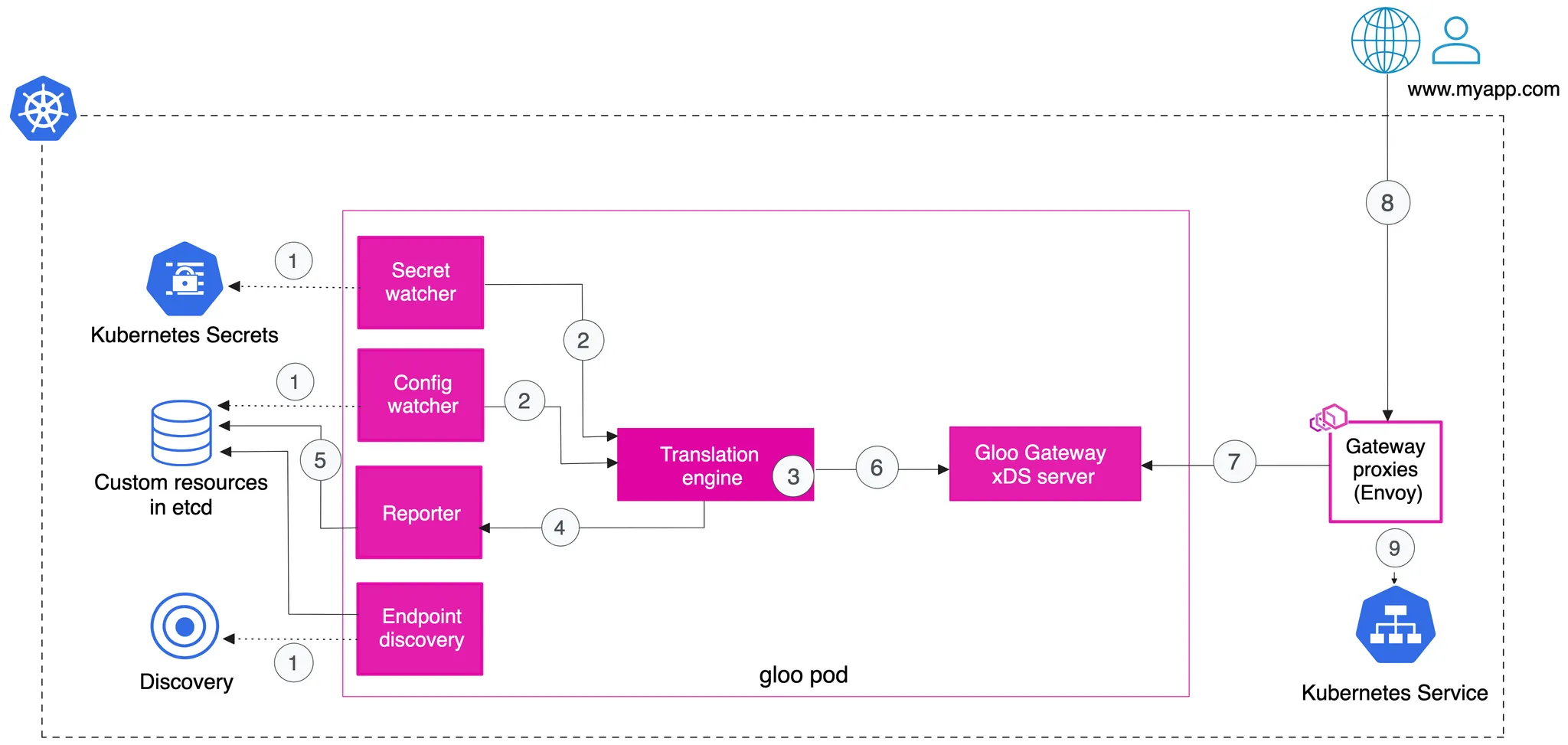
Gloo Gateway는 Envoy 프록시 위에 구축된 기능이 풍부하고 빠르며 유연한 Kubernetes 네이티브 인그레스 컨트롤러이자 차세대 API 게이트웨이입니다. API Gateway는 클라이언트와 앱을 구성하는 마이크로서비스 간의 보안 장벽 역할을 하는 역방향 프락시입니다.
Envoy proxy - home
"At Lyft, we've made tremendous strides in our resilience and observability since we started deploying Envoy. We're excited to be open sourcing Envoy, and the community that's growing around Envoy will help both Lyft and others adopting a microservices arc
www.envoyproxy.io
Gateway 역할을 하는 pod의 구조입니다.
설치
우선 Kind 클러스터를 설치합니다.
cat <<EOT> kind-1node.yaml
kind: Cluster
apiVersion: kind.x-k8s.io/v1alpha4
nodes:
- role: control-plane
  extraPortMappings:
  - containerPort: 30000
    hostPort: 30000
  - containerPort: 30001
    hostPort: 30001
  - containerPort: 30002
    hostPort: 30002
EOT

# Install KinD Cluster
kind create cluster --image kindest/node:v1.30.0 --config kind-1node.yaml --name myk8s

# 노드에 기본 툴 설치
docker exec -it myk8s-control-plane sh -c 'apt update && apt install tree psmisc lsof wget bsdmainutils bridge-utils net-tools dnsutils tcpdump ngrep iputils-ping git vim -y'

# 노드/파드 확인
kubectl get nodes -o wide
kubectl get pod -A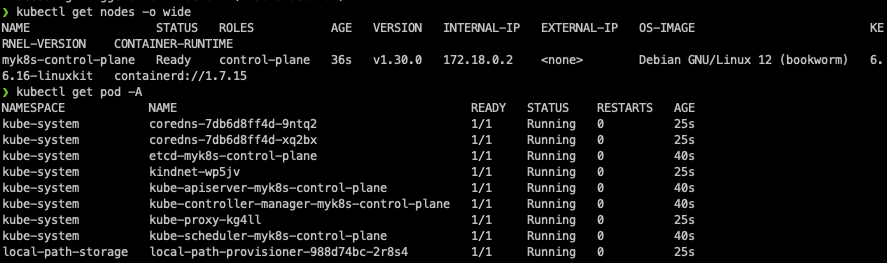
다음으로 Gateway API를 설치합니다.
# CRDs 설치 및 확인
kubectl apply -f https://github.com/kubernetes-sigs/gateway-api/releases/download/v1.0.0/standard-install.yaml
kubectl get crd
docker exec -it myk8s-control-plane bash
----------------------------------------
# Install Glooctl Utility
## glooctl install gateway     # install gloo's function gateway functionality into the 'gloo-system' namespace
## glooctl install ingress     # install very basic Kubernetes Ingress support with Gloo into namespace gloo-system
## glooctl install knative     # install Knative serving with Gloo configured as the default cluster ingress
## curl -sL https://run.solo.io/gloo/install | sh
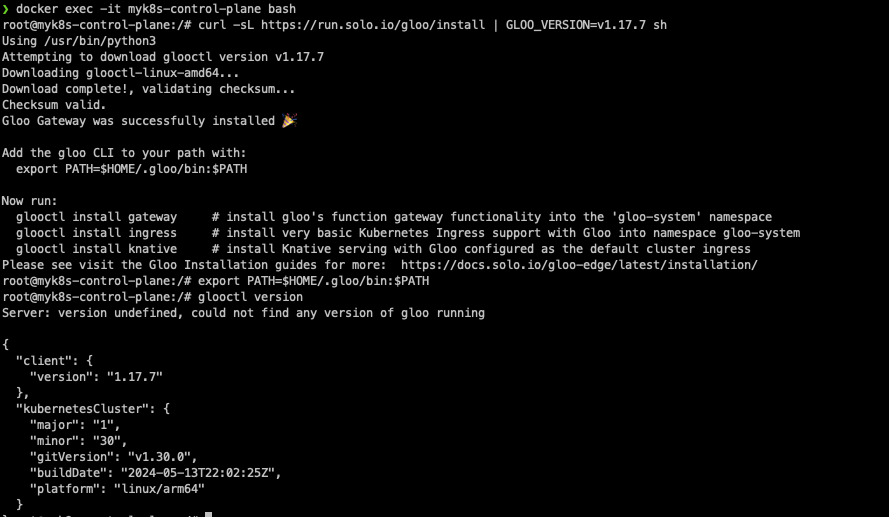
curl -sL https://run.solo.io/gloo/install | GLOO_VERSION=v1.17.7 sh
export PATH=$HOME/.gloo/bin:$PATH

# 버전 확인
glooctl version
# [신규 터미널] 모니터링
watch -d kubectl get pod,svc,endpointslices,ep -n gloo-system

# Install Gloo Gateway
## --set kubeGateway.enabled=true: Kubernetes Gateway 기능을 활성화합니다.
## --set gloo.disableLeaderElection=true: Gloo의 리더 선출 기능을 비활성화합니다. (단일 인스턴스에서 Gloo를 실행 시 유용)
## --set discovery.enabled=false: 서비스 디스커버리 기능을 비활성화합니다.
helm repo add gloo https://storage.googleapis.com/solo-public-helm
helm repo update
helm install -n gloo-system gloo-gateway gloo/gloo \
--create-namespace \
--version 1.17.7 \
--set kubeGateway.enabled=true \
--set gloo.disableLeaderElection=true \
--set discovery.enabled=false

# Confirm that the Gloo control plane has successfully been deployed using this command
kubectl rollout status deployment/gloo -n gloo-system

# 설치 확인
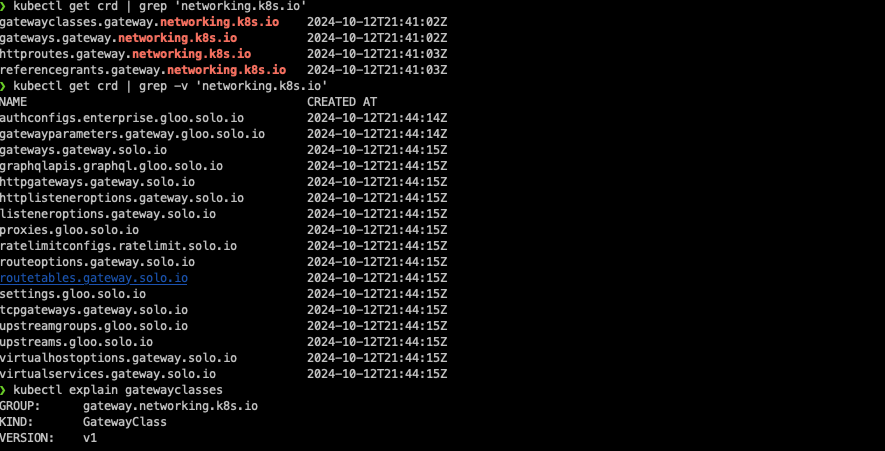
kubectl get crd | grep 'networking.k8s.io'
kubectl get crd | grep -v 'networking.k8s.io'
kubectl get pod,svc,endpointslices -n gloo-system

#
kubectl explain gatewayclasses
kubectl get gatewayclasses
NAME           CONTROLLER             ACCEPTED   AGE
gloo-gateway   solo.io/gloo-gateway   True       21m

kubectl get gatewayclasses -o yaml
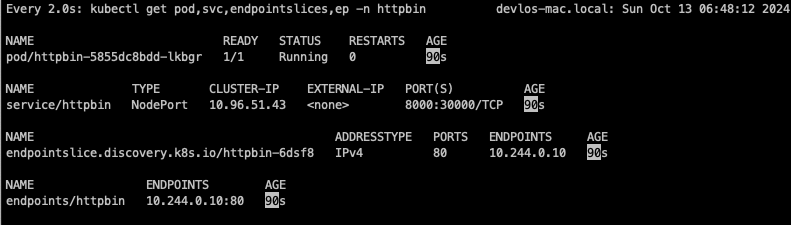
watch -d kubectl get pod,svc,endpointslices,ep -n httpbin

# Install Httpbin Application
kubectl apply -f https://raw.githubusercontent.com/solo-io/solo-blog/main/gateway-api-tutorial/01-httpbin-svc.yaml

# 설치 확인
kubectl get deploy,pod,svc,endpointslices,sa -n httpbin
kubectl rollout status deploy/httpbin -n httpbin

# (옵션) NodePort 설정
cat <<EOF | kubectl apply -f -
apiVersion: v1
kind: Service
metadata:
  labels:
    app: httpbin
    service: httpbin
  name: httpbin
  namespace: httpbin
spec:
  type: NodePort
  ports:
  - name: http
    port: 8000
    targetPort: 80
    nodePort: 30000
  selector:
    app: httpbin
EOF

# (옵션) 로컬 접속 확인
echo "httpbin web - http://localhost:30000"     # macOS 사용자
# gateway 리소스 생성
kubectl apply -f https://raw.githubusercontent.com/solo-io/gloo-gateway-use-cases/main/gateway-api-tutorial/02-gateway.yaml

# 확인 : Now we can confirm that the Gateway has been activated
kubectl get gateway -n gloo-system
kubectl get gateway -n gloo-system -o yaml | k neat
apiVersion: v1
items:
- apiVersion: gateway.networking.k8s.io/v1
  kind: Gateway
  metadata:
    name: http
    namespace: gloo-system
  spec:
    gatewayClassName: gloo-gateway
    listeners:
    - allowedRoutes:
        namespaces:
          from: All
      name: http
      port: 8080
      protocol: HTTP
...

# You can also confirm that Gloo Gateway has spun up an Envoy proxy instance in response to the creation of this Gateway object by deploying gloo-proxy-http:
kubectl get deployment gloo-proxy-http -n gloo-system
NAME              READY   UP-TO-DATE   AVAILABLE   AGE
gloo-proxy-http   1/1     1            1           5m22s

# envoy 사용 확인
kubectl get pod -n gloo-system
kubectl describe pod -n gloo-system  |grep Image:
    Image:         quay.io/solo-io/gloo-envoy-wrapper:1.17.7
    Image:          quay.io/solo-io/gloo:1.17.7
    Image:         quay.io/solo-io/gloo-envoy-wrapper:1.17.7


# gloo-proxy-http 서비스는 External-IP는 Pending 상태
kubectl get svc -n gloo-system gloo-proxy-http
NAME              TYPE           CLUSTER-IP    EXTERNAL-IP   PORT(S)          AGE
gloo-proxy-http   LoadBalancer   10.96.71.22   <pending>     8080:31555/TCP   2m4s

# gloo-proxy-http NodePort 30001 설정
cat <<EOF | kubectl apply -f -
apiVersion: v1
kind: Service
metadata:
  labels:
    app.kubernetes.io/instance: http
    app.kubernetes.io/managed-by: Helm
    app.kubernetes.io/name: gloo-proxy-http
    app.kubernetes.io/version: 1.17.7
    gateway.networking.k8s.io/gateway-name: http
    gloo: kube-gateway
    helm.sh/chart: gloo-gateway-1.17.7
  name: gloo-proxy-http
  namespace: gloo-system
spec:
  ports:
  - name: http
    nodePort: 30001
    port: 8080
  selector:
    app.kubernetes.io/instance: http
    app.kubernetes.io/name: gloo-proxy-http
    gateway.networking.k8s.io/gateway-name: http
  type: LoadBalancer
EOF

kubectl get svc -n gloo-system gloo-proxy-http
envoy 데이터 플레인을 이용합니다.


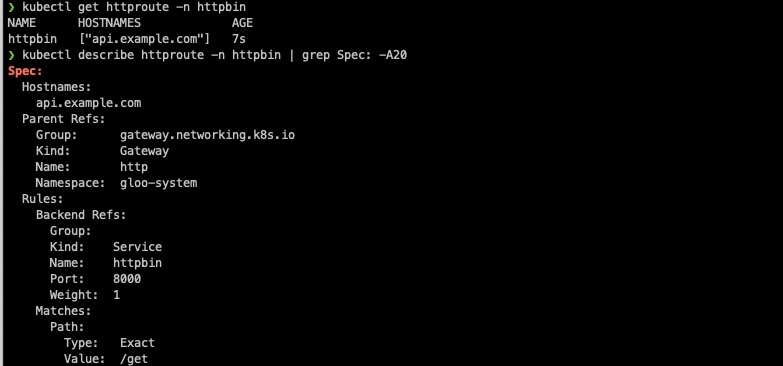
# Our route watches for HTTP requests directed at the host api.example.com with the request path /get and then forwards the request to the httpbin service on port 8000.
# Let’s establish this route now:
kubectl apply -f https://raw.githubusercontent.com/solo-io/gloo-gateway-use-cases/main/gateway-api-tutorial/03-httpbin-route.yaml

#
kubectl get httproute -n httpbin
NAME      HOSTNAMES             AGE
httpbin   ["api.example.com"]   3m15s

kubectl describe httproute -n httpbin
...
Spec:
  Hostnames:
    api.example.com
  Parent Refs:
    Group:      gateway.networking.k8s.io
    Kind:       Gateway
    Name:       http
    Namespace:  gloo-system
  Rules:
    Backend Refs:
      Group:
      Kind:    Service
      Name:    httpbin
      Port:    8000
      Weight:  1
    Matches:
      Path:
        Type:   Exact
        Value:  /get
...
Gateway API 통신테스트
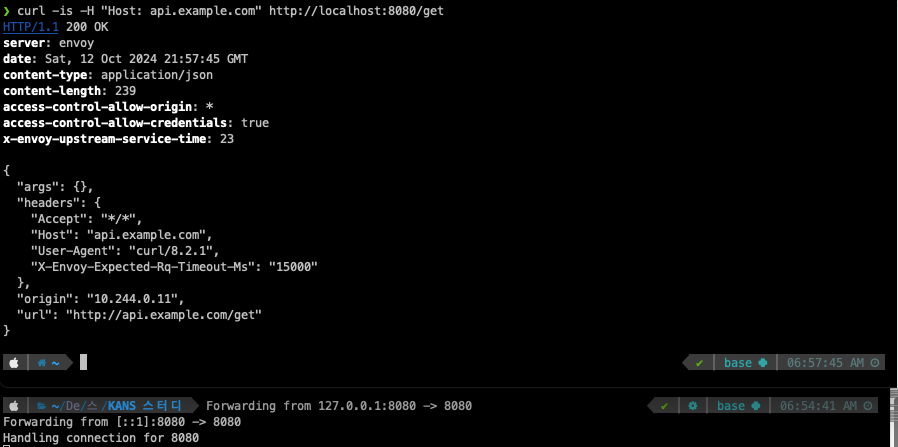
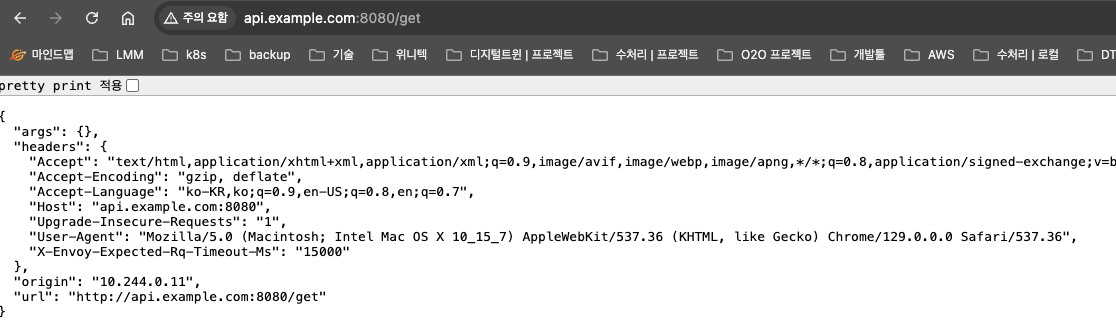
통신 테스트를 진행해 봅니다.
# let’s use curl to display the response with the -i option to additionally show the HTTP response code and headers.
echo "127.0.0.1 api.example.com" | sudo tee -a /etc/hosts
echo "httproute - http://api.example.com:30001/get" # 웹브라우저
혹은
curl -is -H "Host: api.example.com" http://localhost:8080/get # kubectl port-forward 사용 시
HTTP/1.1 200 OK
server: envoy
date: Sun, 06 Oct 2024 07:55:34 GMT
content-type: application/json
content-length: 239
access-control-allow-origin: *
access-control-allow-credentials: true
x-envoy-upstream-service-time: 25

{
  "args": {},
  "headers": {
    "Accept": "*/*",
    "Host": "api.example.com",
    "User-Agent": "curl/8.7.1",
    "X-Envoy-Expected-Rq-Timeout-Ms": "15000"
  },
  "origin": "10.244.0.11",
  "url": "http://api.example.com/get"
}
정규식 패턴 매칭
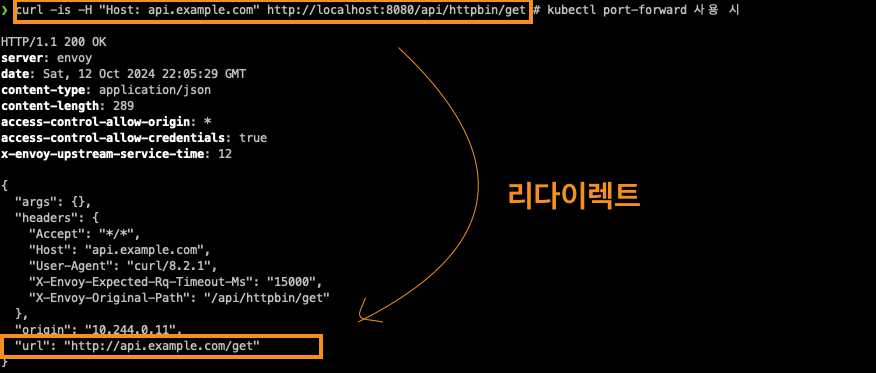
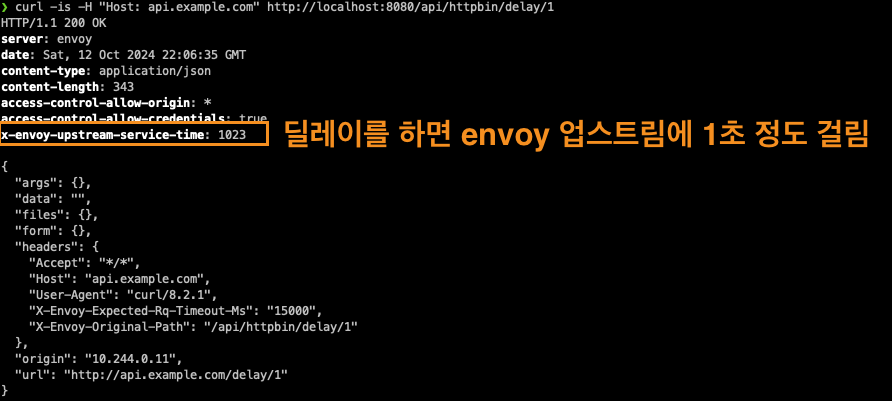
http 라우터에서 경로기반 라우팅 및 필터 설정을 modify 하는 실습입니다. (예시) /api/httpbin/delay/1 ⇒ /delay/1
curl -is -H "Host: api.example.com" http://localhost:8080/api/httpbin/get # kubectl port-forward 사용 시


# 아래 NodePort 와 GW API 통한 접속 비교
echo "httproute - http://api.example.com:30001/api/httpbin/get"
echo "httproute - http://api.example.com:30000/api/httpbin/get" # NodePort 직접 접근

---
#
echo "httproute - http://api.example.com:30001/api/httpbin/delay/1" # 웹브라우저
혹은
curl -is -H "Host: api.example.com" http://localhost:8080/api/httpbin/delay/1 # kubectl port-forward 사용 시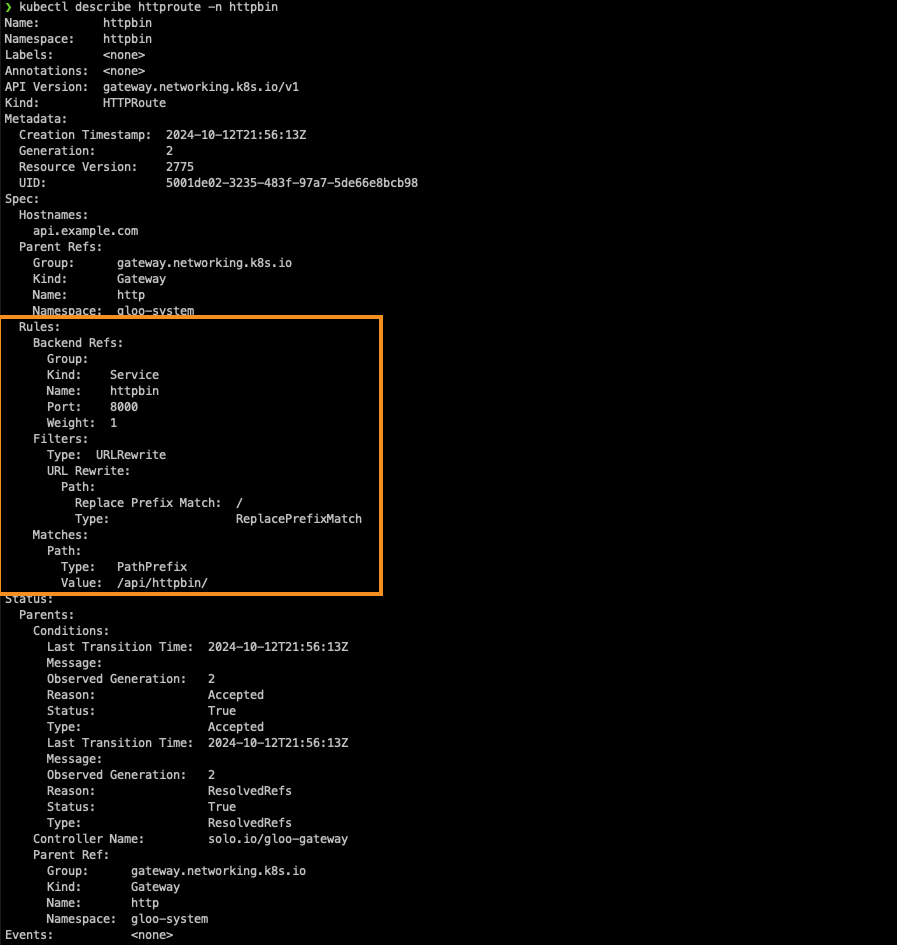
Upstream Bearer Tokens 테스트
이 업스트림 시스템에는 권한 부여를 위한 API 키가 필요하고, 이를 소비하는 클라이언트에 직접 노출하고 싶지 않을 때 프록시 계층에서 요청에 주입할 간단한 베어러 토큰을 구성합니다.
#
kubectl apply -f https://raw.githubusercontent.com/solo-io/gloo-gateway-use-cases/main/gateway-api-tutorial/05-httpbin-rewrite-xform.yaml

#
kubectl describe httproute -n httpbin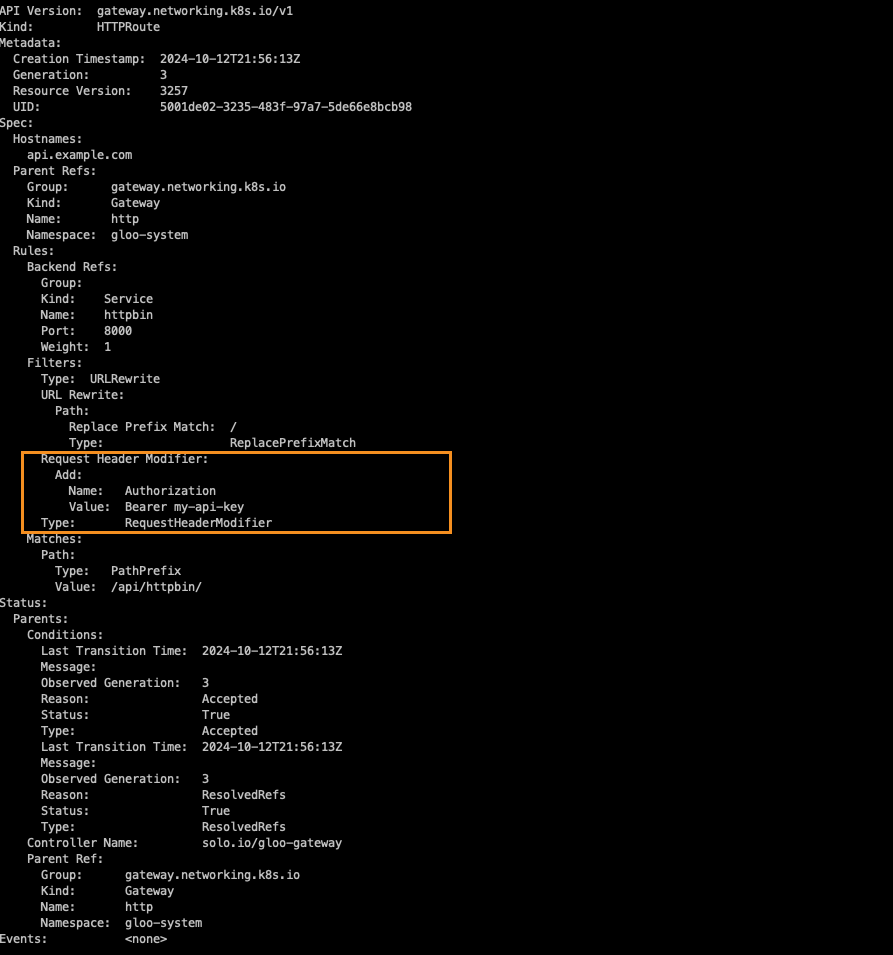

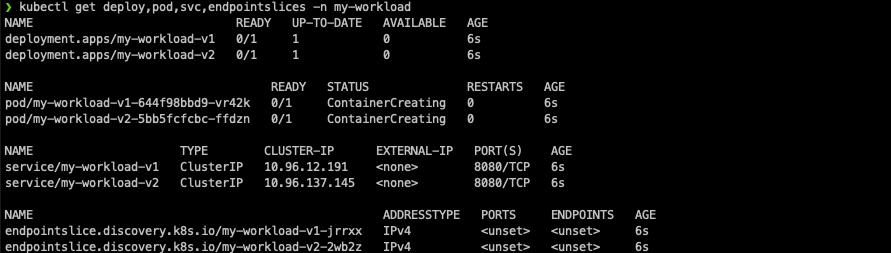
# You should see the response below, indicating deployments for both v1 and v2 of my-workload have been created in the my-workload namespace.
kubectl apply -f https://raw.githubusercontent.com/solo-io/gloo-gateway-use-cases/main/gateway-api-tutorial/06-workload-svcs.yaml

# v1,v2 2가지 버전 워크로드 확인
kubectl get deploy,pod,svc,endpointslices -n my-workload
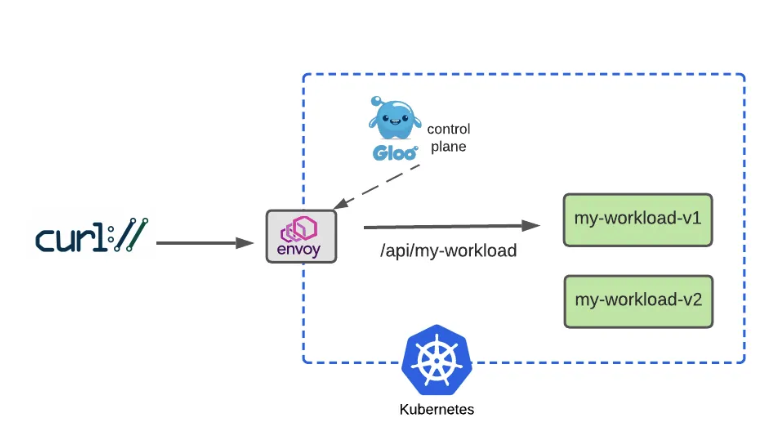
kubectl apply -f https://raw.githubusercontent.com/solo-io/gloo-gateway-use-cases/main/gateway-api-tutorial/07-workload-route.yaml

#
kubectl get httproute -A
NAMESPACE     NAME          HOSTNAMES             AGE
httpbin       httpbin       ["api.example.com"]   41m
my-workload   my-workload   ["api.example.com"]   39s

#
kubectl describe httproute -n my-workload

curl -is -H "Host: api.example.com" http://localhost:8080/api/my-workload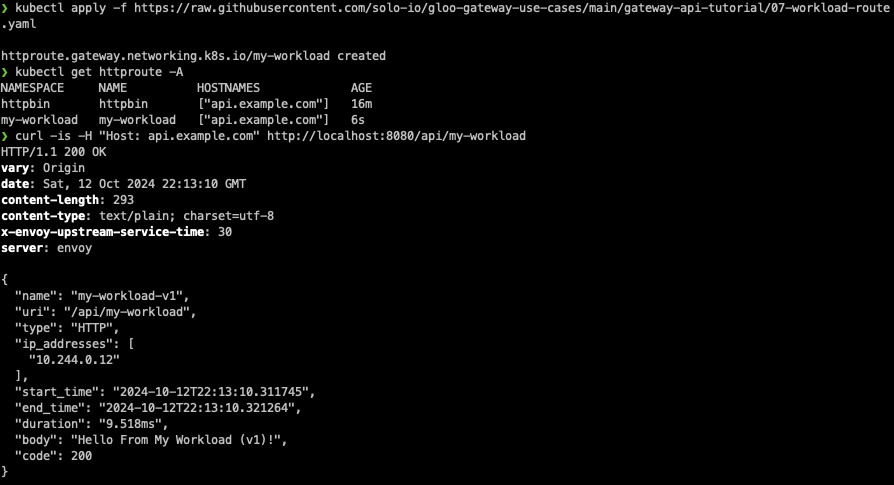
이번에는 버전 2를 올립니다. (Dark Launch with Header-ABased Routing)
헤더에 서비스 버전을 확인하여 version=v2가 있는 사용자만 라우팅 처리를 합니다.
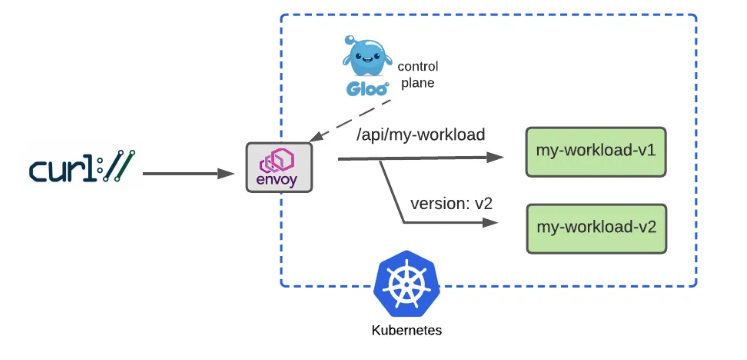
  rules:
    - matches:
      - path:
          type: PathPrefix
          value: /api/my-workload
        # Add a matcher to route requests with a v2 version header to v2
        # version=v2 헤더값이 있는 사용자만 v2 라우팅
        headers:
        - name: version
          value: v2
      backendRefs:
        - name: my-workload-v2
          namespace: my-workload
          port: 8080
    - matches:
      # Route requests without the version header to v1 as before
      # 대다수 일반 사용자는 기존 처럼 v1 라우팅
      - path:
          type: PathPrefix
          value: /api/my-workload
      backendRefs:
        - name: my-workload-v1
          namespace: my-workload
          port: 8080
# 헤더와 매치조건 업데이트
kubectl apply -f https://raw.githubusercontent.com/solo-io/gloo-gateway-use-cases/main/gateway-api-tutorial/08-workload-route-header.yaml
#
kubectl describe httproute -n my-workload
# Now we’ll test the original route, with no special headers supplied, and confirm that traffic still goes to v1:
curl -is -H "Host: api.example.com" http://localhost:8080/api/my-workload
curl -is -H "Host: api.example.com" http://localhost:8080/api/my-workload | grep body
"body": "Hello From My Workload (v1)!",
# But it we supply the version: v2 header, note that our gateway routes the request to v2 as expected:
curl -is -H "Host: api.example.com" -H "version: v2" http://localhost:8080/api/my-workload
curl -is -H "Host: api.example.com" -H "version: v2" http://localhost:8080/api/my-workload | grep body

Percentage-Based Routing 실습
  rules:
    - matches:
      - path:
          type: PathPrefix
          value: /api/my-workload
      # Configure a 50-50 traffic split across v1 and v2 : 버전 1,2 50:50 비율
      backendRefs:
        - name: my-workload-v1
          namespace: my-workload
          port: 8080
          weight: 50
        - name: my-workload-v2
          namespace: my-workload
          port: 8080
          weight: 50
# Apply this 50-50 routing policy with kubectl:
kubectl apply -f https://raw.githubusercontent.com/solo-io/gloo-gateway-use-cases/main/gateway-api-tutorial/09-workload-route-split.yaml
#
kubectl describe httproute -n my-workload
Observie 실습
#
kubectl -n gloo-system port-forward deployment/gloo-proxy-http 19000 &

# 아래 관리 페이지에서 각각 메뉴 링크 클릭 확인
echo "Envoy Proxy Admin - http://localhost:19000"
echo "Envoy Proxy Admin - http://localhost:19000/stats/prometheus"

#
curl -s http://localhost:19000/stats | grep -E "(^cluster.kube-svc_httpbin-httpbin-8000_httpbin.upstream.*(2xx|5xx))"
cluster.kube-svc_httpbin-httpbin-8000_httpbin.upstream_rq_2xx: 32
cluster.kube-svc_httpbin-httpbin-8000_httpbin.upstream_rq_5xx: 7

# If we apply a curl request that forces a 500 failure from the httpbin backend, using the /status/500 endpoint, I’d expect the number of 2xx requests to remain the same, and the number of 5xx requests to increment by one:
curl -is -H "Host: api.example.com" http://localhost:8080/api/httpbin/status/500
HTTP/1.1 500 Internal Server Error
server: envoy
date: Wed, 03 Jul 2024 08:30:06 GMT
content-type: text/html; charset=utf-8
access-control-allow-origin: *
access-control-allow-credentials: true
content-length: 0
x-envoy-upstream-service-time: 28

#
curl -s http://localhost:19000/stats | grep -E "(^cluster.httpbin-httpbin-8000_httpbin.upstream.*(2xx|5xx))"
cluster.kube-svc_httpbin-httpbin-8000_httpbin.upstream_rq_2xx: 32
cluster.kube-svc_httpbin-httpbin-8000_httpbin.upstream_rq_5xx: 15

마치며
이번시간에는 Ingress와 gateway API에 대해 스터디하는 시간을 가졌습니다. GatewayAPI는 스터디를 통해 처음 알게 되었네요. 기존에 회사에서 TCP 트래픽을 처리하기 위해 다음과 같이 로드밸런서 서비스에 nlb를 연결하여 interface-facing으로 트래픽 처리를 하고 있었습니다.
apiVersion: v1
kind: Service
metadata:
  labels:
    app: service-collection-tcp
  name: service-collection-tcp
  annotations:
    service.beta.kubernetes.io/aws-load-balancer-type: "external"
    service.beta.kubernetes.io/aws-load-balancer-nlb-target-type: "instance"
    service.beta.kubernetes.io/aws-load-balancer-scheme: "internet-facing"
    external-dns.alpha.kubernetes.io/hostname: ***
spec:
  ports:
    - name: tcp-port
      protocol: TCP
      port: ***
      targetPort: ***
  selector:
    app: service-collection
  type: LoadBalancer
이번 스터디에서 배운 GatewayClass와 Gateway, TCPRoute를 이용하여 해당 구성 변경이 가능할 것 같네요. 아무래도 GatewayAPI를 사용하게 되면 고급 라우팅 기능을 사용하거나 인터페이스 표준화 등을 통해 멀티클라우드 환경에서의 관리 편의성을 높일 수 있을 것으로 보이네요.
테스트를 통해 적용 가능성을 검토해봐야 할 것 같아요.
이상으로 6주 차 스터디 정리를 마치겠습니다.
감사합니다 :)
다음 스터디에서 뵙겠습니다.
'클라우드 컴퓨팅 & NoSQL > [KANS] 쿠버네티스 네트워크 심화 스터디' 카테고리의 다른 글
| [8주차 - Cilium CNI] KANS 스터디 (24.10.20) (7) | 2024.10.25 |
|---|---|
| [7주차 - Service Mesh(Istio)] KANS 스터디 (24.10.13) (0) | 2024.10.17 |
| [5주차 - Service : LoadBalancer] KANS 스터디 (24.09.29) (3) | 2024.10.05 |
| [4주차 - Service : ClusterIP, NodePort] KANS 스터디 (24.09.22) (2) | 2024.09.26 |
| [3주차(2/2) - k8s Calico CNI mode & 운영] KANS 스터디 (24.09.08) (0) | 2024.09.18 |