![[4주차 - K8S Deploy] kubespray 배포 분석 (26.01.25)](https://img1.daumcdn.net/thumb/R750x0/?scode=mtistory2&fname=https%3A%2F%2Fblog.kakaocdn.net%2Fdna%2FchVtgU%2FdJMcadOklkv%2FAAAAAAAAAAAAAAAAAAAAAMvVGqhvr0S-3Qm1zw7GuKwzCyNE7hQ7hJRK-pUG-YA5%2Fimg.png%3Fcredential%3DyqXZFxpELC7KVnFOS48ylbz2pIh7yKj8%26expires%3D1788188399%26allow_ip%3D%26allow_referer%3D%26signature%3DCmMuL9b%252F437LaudKxJztsx1HUjY%253D)

들어가며
안녕하세요! Devlos입니다.
이번 포스팅은 CloudNet@ 커뮤니티에서 주최하는 K8S Deploy 4주 차 주제인 "Kubespray 배포 분석"에 대해서 정리한 내용입니다.
1주차에서는 Kubernetes The Hard Way를 통해 쿠버네티스 클러스터를 수동으로 구축하는 과정을 배웠고,
2주차에서는 Ansible을 사용하여 인프라 자동화의 기초를 배웠고,
3주차에서는 kubeadm을 사용하여 쿠버네티스 클러스터를 구축하고 업그레이드하는 방법을 배웠다면,
이번 4주차에서는 Kubespray를 사용하여 프로덕션 레벨의 쿠버네티스 클러스터를 자동화된 방식으로 구축하는 방법을 배워봅니다.
Kubespray의 기본 개념부터 클러스터 구축, kubeadm과의 차이점, 그리고 실제 배포 과정까지 전반적인 내용을 다뤄봅니다.
Kubespray란?

Kubespray는 Ansible 기반의 Kubernetes 설치 도구로, 복잡한 Kubernetes 클러스터 배포와 관리를 자동화해주는 도구입니다.
주요 특징
다양한 환경 지원
- 폐쇄망(Air-Gap) 환경에서도 Kubernetes 배포 가능
- 퍼블릭 클라우드와 온프레미스 환경 모두 지원
- 다양한 리눅스 배포판 지원
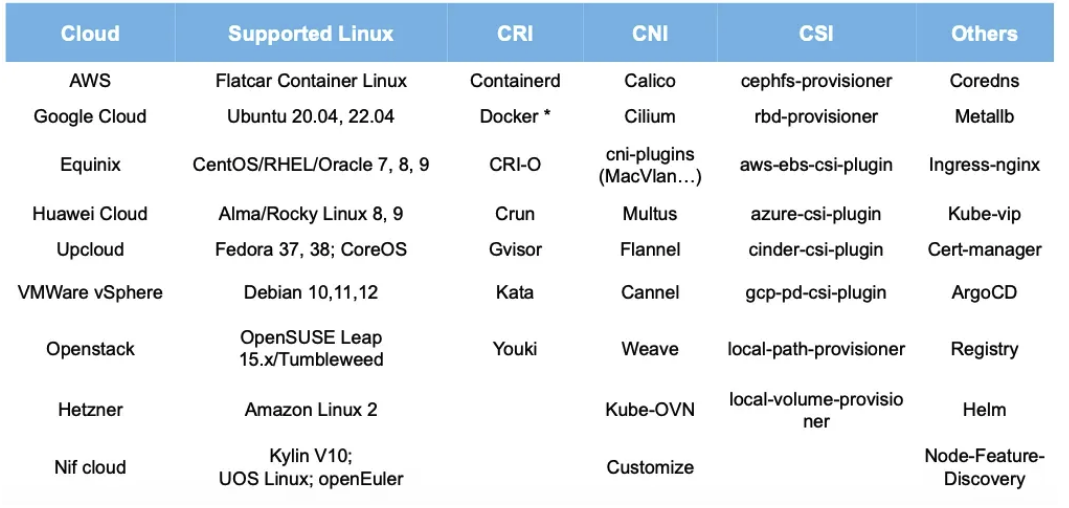
더욱 놀라운 사실은 CI를 통한 새로운 버전 연동 테스트를 자동으로 지원하여 버전 업시 호환성을 상시 체크 한다는 것입니다.
고가용성(HA) 지원
- 컨트롤 플레인에 대한 HA 환경을 자동으로 구성
- Client-Side LB 기능(Nginx) 자동 제공
완전한 클러스터 라이프사이클 관리
- 신규 클러스터 생성
- 업그레이드
- 스케일링
- 노드 관리
- 클러스터 재설정
- 설정 관리
- 백업/복구 및 etcd 스냅샷 수행
Kubespray vs kubeadm 설치 방식을 비교하자면 다음과 같습니다.
| 구분 | Kubespray | kubeadm |
|---|---|---|
| 설치 복잡도 | 자동화된 설치 (설정 파일 기반) | 수동 설치 (명령어 기반) |
| HA 구성 | 자동으로 HA 환경 구성 | 수동으로 쿼럼 연결 필요 |
| 로드밸런서 | Client-Side LB(Nginx) 자동 제공 | 수동으로 구성해야 함 |
| 환경 지원 | 폐쇄망, 다양한 클라우드/온프레미스 | 주로 표준 환경 |
| 운영 관리 | 전체 라이프사이클 자동 관리 | 개별 작업 수동 수행 |
| 학습 곡선 | Ansible 지식 필요, 설정 복잡 | Kubernetes 기본 지식으로 시작 가능 |
| 유연성 | 높은 자동화, 제한된 커스터마이징 | 높은 커스터마이징 가능 |
Kubespray 설치를 위한 필수 조건
- Ansible을 실행할 머신에 Ansible v2.14 이상, Jinja 2.11 이상, python-netaddr 패키지가 설치되어 있어야 합니다. 관련 문서
- 권장 버전: Ansible 2.17.3 이상, Python 3.10 ~ 3.12 호환성 문서
- 최소 사양: 컨트롤 플레인 메모리 2GB 이상, 워커 노드 메모리 1GB 이상
- 리눅스 커널 버전 5.8 이상 권장 커널 요구사항 문서
- Rocky Linux 9, 10 지원 (10 버전은 실험적) 운영체제 지원 문서 Rocky Linux 10 참고
실습 환경 배포
이번 실습은 kubespray 설치 스크립트를 분석을 디테일 하게 하기위하여 싱글 노드로 진행 됩니다.
# 실습용 디렉터리 생성
mkdir k8s-kubespary
cd k8s-kubespary

# 파일 다운로드
wget https://raw.githubusercontent.com/gasida/vagrant-lab/refs/heads/main/k8s-kubespary/Vagrantfile
wget https://raw.githubusercontent.com/gasida/vagrant-lab/refs/heads/main/k8s-kubespary/init_cfg.sh

# 실습 환경 배포
vagrant up
vagrant status
Vagrantfile
# Base Image  https://portal.cloud.hashicorp.com/vagrant/discover/bento/rockylinux-10.0
BOX_IMAGE = "bento/rockylinux-10.0"              # 사용할 Vagrant 박스 이미지
BOX_VERSION = "202510.26.0"                      # 사용할 이미지 버전 지정

Vagrant.configure("2") do |config|               # Vagrant 설정 시작, 버전 2 사용

# ControlPlane Nodes
    config.vm.define "k8s-ctr" do |subconfig|    # 'k8s-ctr'라는 컨트롤 플레인 노드 정의
      subconfig.vm.box = BOX_IMAGE               # 위에서 지정한 박스 이미지 사용
      subconfig.vm.box_version = BOX_VERSION     # 위에서 지정한 박스 버전 사용
      subconfig.vm.provider "virtualbox" do |vb| # VirtualBox용 설정 블록 시작
        vb.customize ["modifyvm", :id, "--groups", "/Kubespray-Lab"]       # 가상머신 그룹 지정 (VirtualBox 내에서 그룹)
        vb.customize ["modifyvm", :id, "--nicpromisc2", "allow-all"]       # 2번째 NIC를 프라미스 모드로(all 허용)
        vb.name = "k8s-ctr"                      # VM 이름을 'k8s-ctr'로 지정
        vb.cpus = 4                              # CPU 4개 할당
        vb.memory = 4096                         # 메모리 4GB 할당
        vb.linked_clone = true                   # 링크드 클론 방식으로 생성(빠른 복제)
      end
      subconfig.vm.host_name = "k8s-ctr"         # 호스트네임을 'k8s-ctr'로 설정
      subconfig.vm.network "private_network", ip: "192.168.10.10"          # 프라이빗 네트워크 할당, IP 지정
      subconfig.vm.network "forwarded_port", guest: 22, host: "60100", auto_correct: true, id: "ssh" # SSH 포트 포워딩(호스트:60100 → 게스트:22)
      subconfig.vm.synced_folder "./", "/vagrant", disabled: true          # 동기화 폴더 비활성화
      subconfig.vm.provision "shell", path: "init_cfg.sh"                  # 최초 셸 스크립트로 init_cfg.sh 실행(프로비저닝)
    end

end
init_cfg.sh
#!/usr/bin/env bash

echo ">>>> Initial Config Start <<<<"

# [TASK 1] 타임존 설정 및 NTP 활성화
echo "[TASK 1] Change Timezone and Enable NTP"
timedatectl set-local-rtc 0                                  # RTC(Local Hardware Clock)를 UTC 기준으로 설정
timedatectl set-timezone Asia/Seoul                          # 시스템 타임존을 Asia/Seoul로 변경

# [TASK 2] 방화벽과 SELinux 비활성화
echo "[TASK 2] Disable firewalld and selinux"
systemctl disable --now firewalld >/dev/null 2>&1            # firewalld 비활성화 및 즉시 중지
setenforce 0                                                 # SELinux를 Permissive 모드로 변경(일시적으로)
sed -i 's/^SELINUX=enforcing/SELINUX=permissive/' /etc/selinux/config   # SELinux 설정 파일 수정(영구 적용)

# [TASK 3] 스왑 비활성화 및 스왑 파티션 제거
echo "[TASK 3] Disable and turn off SWAP & Delete swap partitions"
swapoff -a                                                   # 모든 스왑 비활성화
sed -i '/swap/d' /etc/fstab                                  # fstab에서 swap 관련 라인 제거 (부팅시 적용 방지)
sfdisk --delete /dev/sda 2 >/dev/null 2>&1                   # sda의 두 번째 파티션(일반적으로 swap) 삭제
partprobe /dev/sda >/dev/null 2>&1                           # 파티션 테이블 즉시 재스캔

# [TASK 4] 커널 모듈 및 네트워크 커널 파라미터 설정
echo "[TASK 4] Config kernel & module"
cat << EOF > /etc/modules-load.d/k8s.conf
overlay
br_netfilter
EOF
modprobe overlay >/dev/null 2>&1                             # overlay 모듈 즉시 로드
modprobe br_netfilter >/dev/null 2>&1                        # br_netfilter 모듈 즉시 로드

cat << EOF >/etc/sysctl.d/k8s.conf
net.bridge.bridge-nf-call-iptables  = 1
net.bridge.bridge-nf-call-ip6tables = 1
net.ipv4.ip_forward                 = 1
EOF
sysctl --system >/dev/null 2>&1                              # 모든 sysctl 설정 적용

# [TASK 5] /etc/hosts 파일을 통한 로컬 DNS 구성
echo "[TASK 5] Setting Local DNS Using Hosts file"
sed -i '/^127\.0\.\(1\|2\)\.1/d' /etc/hosts                  # 127.0.1.1, 127.0.2.1로 시작하는 엔트리 삭제
cat << EOF >> /etc/hosts
192.168.10.10 k8s-ctr
EOF

# [TASK 6] enp0s9 NIC에 대해 기본 라우팅 비활성화 (Vagrant 네트워크 충돌 방지)
echo "[TASK 6] Delete default routing - enp0s9 NIC" # setenforce 0 설정 필요
nmcli connection modify enp0s9 ipv4.never-default yes        # 해당 NIC이 기본 라우트 잡지 않도록 설정
nmcli connection up enp0s9 >/dev/null 2>&1                  # 변경 적용

echo "sudo su -" >> /home/vagrant/.bashrc                   # vagrant 로그인 시 자동으로 root shell 진입

echo ">>>> Initial Config End <<<<"
vagrant ssh → 사전 설정 수행 & git clone
# user 확인
whoami
pwd

# Linux Kernel Requirements : 5.8+ 이상 권장
uname -a
Linux k8s-ctr 6.12.0-55.39.1.el10_0.aarch64 #1 SMP PREEMPT_DYNAMIC Wed Oct 15 11:18:23 EDT 2025 aarch64 GNU/Linux

# Python : 3.10 ~ 3.12 : (참고) bento/rockylinux-9 경우 3.9
which python  && python -V
which python3 && python3 -V
3.12.9

# pip , git 설치
dnf install -y python3-pip git
which pip  && pip -V
which pip3 && pip3 -V
pip 23.3.2 from /usr/lib/python3.12/site-packages/pip (python 3.12)


# /etc/hosts 확인
ip -br -c -4 addr
# lo               UNKNOWN        127.0.0.1/8
# enp0s8           UP             10.0.2.15/24
# enp0s9           UP             192.168.10.10/24
cat /etc/hosts
# # Loopback entries; do not change.
# # For historical reasons, localhost precedes localhost.localdomain:
# 127.0.0.1   localhost localhost.localdomain localhost4 localhost4.localdomain4
# ::1         localhost localhost.localdomain localhost6 localhost6.localdomain6
# # See hosts(5) for proper format and other examples:
# # 192.168.1.10 foo.example.org foo
# # 192.168.1.13 bar.example.org bar
# 192.168.10.10 k8s-ctr
ping -c 1 k8s-ctr
# PING k8s-ctr (192.168.10.10) 56(84) bytes of data.
# 64 bytes from k8s-ctr (192.168.10.10): icmp_seq=1 ttl=64 time=0.014 ms

# --- k8s-ctr ping statistics ---
# 1 packets transmitted, 1 received, 0% packet loss, time 0ms
# rtt min/avg/max/mdev = 0.014/0.014/0.014/0.000 ms

# SSH 접속을 위한 설정
# -----------------
echo "root:qwe123" | chpasswd

cat << EOF >> /etc/ssh/sshd_config
PermitRootLogin yes
PasswordAuthentication yes
EOF
systemctl restart sshd

# Setting SSH Key
ssh-keygen -t rsa -N "" -f /root/.ssh/id_rsa
# Generating public/private rsa key pair.
# Your identification has been saved in /root/.ssh/id_rsa
# Your public key has been saved in /root/.ssh/id_rsa.pub
# The key fingerprint is:
# SHA256:Jq72lML1NPUnA9JaWja8HVlSA8CAhh6ZXnQD8Jzs894 root@k8s-ctr
# The key's randomart image is:
# +---[RSA 3072]----+
# |    .*oo+o..oo+  |
# |    =++o +.  + . |
# |   o += . X o    |
# |    o.   O * .   |
# |      = S . = .  |
# |   . o O .   +   |
# |    o + o        |
# |    .+ . .       |
# |   .... . E      |
# +----[SHA256]-----+
# total 8
# -rw-------. 1 root root 2602 Jan 30 01:25 id_rsa
# -rw-r--r--. 1 root root  566 Jan 30 01:25 id_rsa.pub
ls -l ~/.ssh

# ssh-copy-id
ssh-copy-id -o StrictHostKeyChecking=no root@192.168.10.10
root@192.168.10.10's password: qwe123

# ssh 접속 확인 : IP, hostname
cat /root/.ssh/authorized_keys
ssh root@192.168.10.10 hostname
ssh -o StrictHostKeyChecking=no root@k8s-ctr hostname
ssh root@k8s-ctr hostname
# k8s-ctr

# -----------------

# Clone Kubespray Repository
git clone -b v2.29.1 https://github.com/kubernetes-sigs/kubespray.git /root/kubespray
cd /root/kubespray

# (옵션) IDE에서 VM SSH 접속(root/qwe123)해서 편집 창 열기

# Local PC(Macbook)
vim /Users/devlos/.ssh/config
Host admin-vm
    HostName 192.168.10.10
    User root

# 최상단 plybook 확인 -> 각각 import_playbook 확인
# 아래는 Kubespray 디렉토리의 최상단 yml 파일 목록입니다.
# 이 yml 파일들은 playbooks와 roles 내부의 다양한 yml, task, role들을 import하여 쿠버네티스 클러스터 설치 및 관리를 자동화합니다.
ls -l *.yml  # 현재 디렉토리의 최상단에 있는 yml 파일 리스트 출력

# 각 파일 설명 주석(간략)
# cluster.yml               : 클러스터 설치(메인 플레이북)
# _config.yml               : 설정 관련 파일
# galaxy.yml                : Ansible Galaxy 사용 관련 파일
# recover-control-plane.yml : 컨트롤 플레인 복구 플레이북
# remove-node.yml           : 노드 삭제 플레이북 (하이픈 표기)
# remove_node.yml           : 노드 삭제 플레이북 (언더스코어 표기, 호환용)
# reset.yml                 : 클러스터 리셋 플레이북
# scale.yml                 : 노드 추가/확장 플레이북
# upgrade-cluster.yml       : 클러스터 업그레이드 플레이북 (하이픈 표기)
# upgrade_cluster.yml       : 클러스터 업그레이드 플레이북 (언더스코어 표기, 호환용)

# 실제 파일 리스트 출력 결과 예시
# -rw-r--r--. 1 root root  88 Jan 30 01:27 cluster.yml
# -rw-r--r--. 1 root root  30 Jan 30 01:27 _config.yml
# -rw-r--r--. 1 root root 747 Jan 30 01:27 galaxy.yml
# -rw-r--r--. 1 root root 105 Jan 30 01:27 recover-control-plane.yml
# -rw-r--r--. 1 root root  85 Jan 30 01:27 remove-node.yml
# -rw-r--r--. 1 root root  85 Jan 30 01:27 remove_node.yml
# -rw-r--r--. 1 root root  85 Jan 30 01:27 reset.yml
# -rw-r--r--. 1 root root  85 Jan 30 01:27 scale.yml
# -rw-r--r--. 1 root root  93 Jan 30 01:27 upgrade-cluster.yml
# -rw-r--r--. 1 root root  93 Jan 30 01:27 upgrade_cluster.yml

tree -L 2
...
├── inventory
│   ├── local
│   └── sample
...
├── playbooks
│   ├── ansible_version.yml
│   ├── boilerplate.yml
│   ├── cluster.yml*
│   ├── facts.yml
│   ├── install_etcd.yml
│   ├── internal_facts.yml
│   ├── recover_control_plane.yml
│   ├── remove_node.yml
│   ├── reset.yml
│   ├── scale.yml
│   └── upgrade_cluster.yml
...
├── roles
│   ├── adduser
│   ├── bastion-ssh-config
│   ├── bootstrap-os
│   ├── bootstrap_os
│   ├── container-engine
│   ├── download
│   ├── dynamic_groups
│   ├── etcd
│   ├── etcdctl_etcdutl
│   ├── etcd_defaults
│   ├── helm-apps
│   ├── kubernetes
│   ├── kubernetes-apps
│   ├── kubespray-defaults
│   ├── kubespray_defaults
│   ├── network_facts
│   ├── network_plugin
│   ├── recover_control_plane
│   ├── remove-node
│   ├── remove_node
│   ├── reset
│   ├── system_packages
│   ├── upgrade
│   ├── validate_inventory
│   └── win_nodes
...

# Install Python Dependencies
cat requirements.txt
ansible==10.7.0
# Needed for community.crypto module
cryptography==46.0.3
# Needed for jinja2 json_query templating
jmespath==1.0.1
# Needed for ansible.utils.ipaddr
netaddr==1.3.0

pip3 install -r /root/kubespray/requirements.txt
Successfully installed MarkupSafe-3.0.3 ansible-10.7.0 ansible-core-2.17.14 cffi-2.0.0 cryptography-46.0.2 jinja2-3.1.6 jmespath-1.0.1 netaddr-1.3.0 pycparser-3.0 resolvelib-1.0.1

# ansible 버전 확인 : Ansible 2.17.3 이상
which ansible
ansible --version
ansible [core 2.17.14]
  config file = /root/kubespray/ansible.cfg
  ...
  python version = 3.12.9 (main, Aug 14 2025, 00:00:00) [GCC 14.2.1 20250110 (Red Hat 14.2.1-7)] (/usr/bin/python3)
  jinja version = 3.1.6
  libyaml = True

# pip list 확인
pip list
Package                   Version
------------------------- -----------
ansible                   10.7.0
ansible-core              2.17.14
...
Jinja2                    3.1.6
jmespath                  1.0.1
...
netaddr                   1.3.0
...

# 해당 폴더에서 ansible-playbook 실행 시 적용되는 ansible.cfg
cat ansible.cfg
[ssh_connection] # 통신 속도 및 안정성 최적화
pipelining=True  # SSH 세션을 여러 번 열지 않고 하나의 세션에서 여러 명령을 한꺼번에 실행
ssh_args = -o ControlMaster=auto -o ControlPersist=30m -o ConnectionAttempts=100 -o UserKnownHostsFile=/dev/null
## ControlMaster=auto -o ControlPersist=30m: 한 번 연결된 SSH 커넥션을 30분 동안 유지합니다. 매번 로그인할 필요가 없어 성능이 향상됩니다.
## ConnectionAttempts=100: 네트워크 불안정으로 연결 실패 시 100번까지 재시도합니다.
## UserKnownHostsFile=/dev/null: 접속 대상의 지문(fingerprint)을 저장하지 않아 관리가 편해집니다.
#control_path = ~/.ssh/ansible-%%r@%%h:%%p

[defaults]
# https://github.com/ansible/ansible/issues/56930 (to ignore group names with - and .)
force_valid_group_names = ignore  # Ansible은 원래 그룹 이름에 -나 . 사용을 제한하지만, 쿠버네티스 리소스 명칭 규칙상 이를 허용하도록 설정
host_key_checking=False # 새 서버 접속 시 "Are you sure you want to continue connecting?"이라는 확인 창이 뜨지 않게 합니다.
gathering = smart         # 대상 서버의 정보(Fact)를 한 번만 수집하고 /tmp에 JSON 파일로 저장합니다. (아래 설명 이어서)
fact_caching = jsonfile   # 재실행 시 서버 정보를 다시 수집하지 않아 시간이 단축됩니다. 86400(24시간) 동안 캐시를 유지합니다.
fact_caching_connection = /tmp
fact_caching_timeout = 86400
timeout = 300
stdout_callback = default
display_skipped_hosts = no
library = ./library
callbacks_enabled = profile_tasks # 각 Task가 실행되는 데 걸리는 시간을 표시해 줍니다. 어떤 단계에서 병목이 생기는지 확인할 때 매우 유용합니다.
roles_path = roles:$VIRTUAL_ENV/usr/local/share/kubespray/roles:$VIRTUAL_ENV/usr/local/share/ansible/roles:/usr/share/kubespray/roles
deprecation_warnings=False
inventory_ignore_extensions = ~, .orig, .bak, .ini, .cfg, .retry, .pyc, .pyo, .creds, .gpg # 백업용이나 임시 파일을 인벤토리로 인식하여 에러가 발생하는 것을 방지합니다.

[inventory]
ignore_patterns = artifacts, credentials # 배포 결과물(artifacts)이나 중요 정보(credentials) 폴더 내의 파일을 인벤토리 스캔 대상에서 제외합니다.

# (참고) Vagrantfile
cat Vagrantfile
Kubespary 를 통한 k8s 배포 (5분 정도 소요) : 목표 환경을 위한 파라미터 설정
# 기본 샘플 디렉토리를 복사하여 사용
cp -rfp /root/kubespray/inventory/sample /root/kubespray/inventory/mycluster

tree inventory/mycluster/
inventory/mycluster/
├── group_vars # 설정할 변수들을 설정
│   ├── all
│   │   ├── all.yml
│   │   ├── aws.yml
│   │   ├── azure.yml
│   │   ├── containerd.yml
│   │   ├── coreos.yml
│   │   ├── cri-o.yml
│   │   ├── docker.yml
│   │   ├── etcd.yml
│   │   ├── gcp.yml
│   │   ├── hcloud.yml
│   │   ├── huaweicloud.yml
│   │   ├── oci.yml
│   │   ├── offline.yml
│   │   ├── openstack.yml
│   │   ├── upcloud.yml
│   │   └── vsphere.yml
│   └── k8s_cluster
│       ├── addons.yml
│       ├── k8s-cluster.yml
│       ├── k8s-net-calico.yml
│       ├── k8s-net-cilium.yml
│       ├── k8s-net-custom-cni.yml
│       ├── k8s-net-flannel.yml
│       ├── k8s-net-kube-ovn.yml
│       ├── k8s-net-kube-router.yml
│       ├── k8s-net-macvlan.yml
│       └── kube_control_plane.yml
└── inventory.ini

# inventory.ini 작성
cat << EOF > /root/kubespray/inventory/mycluster/inventory.ini
k8s-ctr ansible_host=192.168.10.10 ip=192.168.10.10

[kube_control_plane]
k8s-ctr

[etcd:children]
kube_control_plane

[kube_node]
k8s-ctr
EOF
cat /root/kubespray/inventory/mycluster/inventory.ini
# k8s-ctr ansible_host=192.168.10.10 ip=192.168.10.10

# [kube_control_plane]
# k8s-ctr

# [etcd:children]
# kube_control_plane

# [kube_node]
# k8s-ctr

# 설치시 필요한 주요 옵션들을 이미 values로 만들어 놓았기 때문에, 필요에 맞게 수정하여 바로 사용할 수 있다는 장점이 있습니다.

# https://github.com/kubernetes-sigs/kubespray/blob/master/docs/ansible/vars.md
## <your-favorite-editor> inventory/mycluster/group_vars/all.yml # for every node, including etcd
grep "^[^#]" inventory/mycluster/group_vars/all/all.yml
---
bin_dir: /usr/local/bin                     # 바이너리 파일 설치 디렉토리
loadbalancer_apiserver_port: 6443           # LB를 통한 API 서버 포트 (기본 6443)
loadbalancer_apiserver_healthcheck_port: 8081  # LB healthcheck 포트
no_proxy_exclude_workers: false             # worker 노드 no_proxy 제외 여부
kube_webhook_token_auth: false              # 토큰 인증 webhook 사용 여부
kube_webhook_token_auth_url_skip_tls_verify: false   # webhook 인증 TLS 검증 생략
ntp_enabled: false                          # NTP 동기화 활성화 여부
ntp_manage_config: false                    # NTP 설정 파일 관리 여부
ntp_servers:                                # NTP 서버 목록
  - "0.pool.ntp.org iburst"
  - "1.pool.ntp.org iburst"
  - "2.pool.ntp.org iburst"
  - "3.pool.ntp.org iburst"
unsafe_show_logs: false                     # 로그 민감 정보 출력 허용 여부
allow_unsupported_distribution_setup: false # 비공식 지원 OS 설치 허용 여부

## <your-favorite-editor> inventory/mycluster/group_vars/k8s_cluster.yml # for every node in the cluster (not etcd when it's separate)
grep "^[^#]" inventory/mycluster/group_vars/k8s_cluster/k8s-cluster.yml
---
kube_config_dir: /etc/kubernetes            # 쿠버네티스 config 디렉토리
kube_script_dir: "{{ bin_dir }}/kubernetes-scripts"  # 부가 스크립트 경로
kube_manifest_dir: "{{ kube_config_dir }}/manifests" # 매니페스트 경로
kube_cert_dir: "{{ kube_config_dir }}/ssl"           # SSL 인증서 디렉토리
kube_token_dir: "{{ kube_config_dir }}/tokens"       # 토큰 저장 경로
kube_api_anonymous_auth: true                        # 익명 인증 허용
local_release_dir: "/tmp/releases"           # 로컬 릴리즈/이미지 보관 위치
retry_stagger: 5                            # 작업 재시도 간격(초)
kube_owner: kube                            # 파일/디렉토리 오너
kube_cert_group: kube-cert                  # 인증서 그룹
kube_log_level: 2                           # 로그 레벨
credentials_dir: "{{ inventory_dir }}/credentials"    # 크리덴셜 디렉토리
kube_network_plugin: calico                 # 네트워크 플러그인(calico/flannel 등)
kube_network_plugin_multus: false           # 멀티 네트워크(multus) 여부
kube_service_addresses: 10.233.0.0/18       # 서비스용 클러스터 IP 범위
kube_pods_subnet: 10.233.64.0/18            # 파드용 클러스터 IP 범위
kube_network_node_prefix: 24                # 노드 서브넷 프리픽스
kube_service_addresses_ipv6: fd85:ee78:d8a6:8607::1000/116    # 서비스 IPv6 네트워크
kube_pods_subnet_ipv6: fd85:ee78:d8a6:8607::1:0000/112        # 파드 IPv6 네트워크
kube_network_node_prefix_ipv6: 120          # 노드 IPv6 프리픽스
kube_apiserver_ip: "{{ kube_service_subnets.split(',') | first | ansible.utils.ipaddr('net') | ansible.utils.ipaddr(1) | ansible.utils.ipaddr('address') }}"   # API 서버 IP
kube_apiserver_port: 6443                   # 쿠버네티스 API 서버 포트(https)
kube_proxy_mode: ipvs                       # kube-proxy 모드(iptables/ipvs 등)
kube_proxy_strict_arp: false                # IPVS strict ARP 사용 여부
kube_proxy_nodeport_addresses: >-           # NodePort 서비스 IP 주소목록
  {%- if kube_proxy_nodeport_addresses_cidr is defined -%}
  [{{ kube_proxy_nodeport_addresses_cidr }}]
  {%- else -%}
  []
  {%- endif -%}
kube_encrypt_secret_data: false              # Secret 자료 암호화 활성화
cluster_name: cluster.local                  # 클러스터 도메인 이름
ndots: 2                                    # DNS 쿼리 ndots 설정 (권장 2)
dns_mode: coredns                           # DNS 모드(coredns 등)
enable_nodelocaldns: true                   # NodeLocal DNSCache (nodelocaldns) 사용
enable_nodelocaldns_secondary: false        # 2차 nodelocaldns 사용
nodelocaldns_ip: 169.254.25.10              # nodelocaldns 서비스 IP
nodelocaldns_health_port: 9254              # nodelocaldns 상태 포트
nodelocaldns_second_health_port: 9256       # 2차 nodelocaldns 상태 포트
nodelocaldns_bind_metrics_host_ip: false    # metrics 수집시 host IP 바인딩
nodelocaldns_secondary_skew_seconds: 5      # 2차 dns 스큐 시간(초)
enable_coredns_k8s_external: false          # 외부 DNS존 연동 여부
coredns_k8s_external_zone: k8s_external.local          # 외부존 네임
enable_coredns_k8s_endpoint_pod_names: false          # endpoint pod name 설정
resolvconf_mode: host_resolvconf                       # resolv.conf 관리 모드
deploy_netchecker: false                   # 네트워크 체크 도구 설치 여부
skydns_server: "{{ kube_service_subnets.split(',') | first | ansible.utils.ipaddr('net') | ansible.utils.ipaddr(3) | ansible.utils.ipaddr('address') }}"  # skydns 기본 IP
skydns_server_secondary: "{{ kube_service_subnets.split(',') | first | ansible.utils.ipaddr('net') | ansible.utils.ipaddr(4) | ansible.utils.ipaddr('address') }}" # skydns secondary IP
dns_domain: "{{ cluster_name }}"            # DNS 도메인 (클러스터 네임)
container_manager: containerd               # 컨테이너 런타임(containerd 등)
kata_containers_enabled: false              # KataContainers 사용 여부
kubeadm_certificate_key: "{{ lookup('password', credentials_dir + '/kubeadm_certificate_key.creds length=64 chars=hexdigits') | lower }}" # kubeadm 인증키
k8s_image_pull_policy: IfNotPresent         # 이미지 풀 정책
kubernetes_audit: false                     # 쿠버네티스 감사 기능 사용 여부
default_kubelet_config_dir: "{{ kube_config_dir }}/dynamic_kubelet_dir"    # kubelet 동적 config 경로
volume_cross_zone_attachment: false         # 다른 zone 간 볼륨 attach 허용 여부
persistent_volumes_enabled: false           # PV 기능 활성화 여부
event_ttl_duration: "1h0m0s"                # 이벤트 TTL 기간
auto_renew_certificates: false              # 인증서 자동 갱신 활성화
# auto_renew_certificates_systemd_calendar: "Mon *-*-1,2,3,4,5,6,7 03:00:00"  # (샘플) 인증서 갱신 스케줄 - 매월 첫 번째 월요일 03시
kubeadm_patches_dir: "{{ kube_config_dir }}/patches"  # kubeadm 패치 디렉토리
kubeadm_patches: []                                   # kubeadm에 적용할 patch 목록
remove_anonymous_access: false                        # 익명 접근 차단

# 테스트할 기능 관련 수정
sed -i 's|kube_network_plugin: calico|kube_network_plugin: flannel|g' inventory/mycluster/group_vars/k8s_cluster/k8s-cluster.yml
sed -i 's|kube_proxy_mode: ipvs|kube_proxy_mode: iptables|g' inventory/mycluster/group_vars/k8s_cluster/k8s-cluster.yml
sed -i 's|enable_nodelocaldns: true|enable_nodelocaldns: false|g' inventory/mycluster/group_vars/k8s_cluster/k8s-cluster.yml
sed -i 's|auto_renew_certificates: false|auto_renew_certificates: true|g' inventory/mycluster/group_vars/k8s_cluster/k8s-cluster.yml
sed -i 's|# auto_renew_certificates_systemd_calendar|auto_renew_certificates_systemd_calendar|g' inventory/mycluster/group_vars/k8s_cluster/k8s-cluster.yml
grep -iE 'kube_network_plugin:|kube_proxy_mode|enable_nodelocaldns:|^auto_renew_certificates' inventory/mycluster/group_vars/k8s_cluster/k8s-cluster.yml


## flannel 설정 수정  inventory/mycluster/group_vars/k8s_cluster/k8s-net-flannel.yml
cat inventory/mycluster/group_vars/k8s_cluster/k8s-net-flannel.yml
echo "flannel_interface: enp0s9" >> inventory/mycluster/group_vars/k8s_cluster/k8s-net-flannel.yml
# see roles/network_plugin/flannel/defaults/main.yml

# # interface that should be used for flannel operations
# # This is actually an inventory cluster-level item
# flannel_interface:

# # Select interface that should be used for flannel operations by regexp on Name or IP
# # This is actually an inventory cluster-level item
# # example: select interface with ip from net 10.0.0.0/23
# # single quote and escape backslashes
# flannel_interface_regexp: '10\\.0\\.[0-2]\\.\\d{1,3}'

# You can choose what type of flannel backend to use: 'vxlan',  'host-gw' or 'wireguard'
# please refer to flannel's docs : https://github.com/coreos/flannel/blob/master/README.md
# flannel_backend_type: "vxlan"
# flannel_vxlan_vni: 1
# flannel_vxlan_port: 8472
# flannel_vxlan_direct_routing: false
grep "^[^#]" inventory/mycluster/group_vars/k8s_cluster/k8s-net-flannel.yml
# flannel_interface: enp0s9


## <your-favorite-editor> inventory/mycluster/group_vars/kube_control_plane.yml # for the control plane
cat inventory/mycluster/group_vars/k8s_cluster/kube_control_plane.yml
# Reservation for control plane kubernetes components
# kube_memory_reserved: 512Mi
# kube_cpu_reserved: 200m
# kube_ephemeral_storage_reserved: 2Gi
# kube_pid_reserved: "1000"

# Reservation for control plane host system
# system_memory_reserved: 256Mi
# system_cpu_reserved: 250m
# system_ephemeral_storage_reserved: 2Gi
# system_pid_reserved: "1000"

## <your-favorite-editor> addons.yml
grep "^[^#]" inventory/mycluster/group_vars/k8s_cluster/addons.yml
---
helm_enabled: false                        # Helm 설치 비활성화
registry_enabled: false                    # 내장 Docker Registry 비활성화
metrics_server_enabled: false              # Metrics Server 비활성화
local_path_provisioner_enabled: false      # Local Path Provisioner 비활성화 (간단한 로컬 볼륨)
local_volume_provisioner_enabled: false    # Local Volume Provisioner 비활성화
gateway_api_enabled: false                 # Gateway API 비활성화 (인그레스 대체 표준)
ingress_nginx_enabled: false               # Nginx Ingress Controller 비활성화
ingress_publish_status_address: ""         # Ingress publish status address (미설정)
ingress_alb_enabled: false                 # ALB Ingress Controller 비활성화
cert_manager_enabled: false                # Cert Manager 비활성화 (인증서 관리)
metallb_enabled: false                     # MetalLB 비활성화 (로드밸런서)
metallb_speaker_enabled: "{{ metallb_enabled }}"   # MetalLB 스피커 설정 (metallb_enabled와 연동)
metallb_namespace: "metallb-system"        # MetalLB 네임스페이스 지정
argocd_enabled: false                      # ArgoCD 비활성화 (GitOps CD 도구)
kube_vip_enabled: false                    # kube-vip 비활성화 (HA VIP)
node_feature_discovery_enabled: false      # Node Feature Discovery 비활성화 (노드 특성 탐지)

# 테스트할 기능 관련 수정
sed -i 's|helm_enabled: false|helm_enabled: true|g' inventory/mycluster/group_vars/k8s_cluster/addons.yml
sed -i 's|metrics_server_enabled: false|metrics_server_enabled: true|g' inventory/mycluster/group_vars/k8s_cluster/addons.yml
sed -i 's|node_feature_discovery_enabled: false|node_feature_discovery_enabled: true|g' inventory/mycluster/group_vars/k8s_cluster/addons.yml
grep -iE 'helm_enabled:|metrics_server_enabled:|node_feature_discovery_enabled:' inventory/mycluster/group_vars/k8s_cluster/addons.yml
# helm_enabled: true
# metrics_server_enabled: true
# node_feature_discovery_enabled: true

# etcd.yml : 파드가 아닌 systemd unit
grep "^[^#]" inventory/mycluster/group_vars/all/etcd.yml
# ---
# etcd_data_dir: /var/lib/etcd
# etcd_deployment_type: host

# containerd.yml
cat inventory/mycluster/group_vars/all/containerd.yml
---
# Please see roles/container-engine/containerd/defaults/main.yml for more configuration options

# containerd_storage_dir: "/var/lib/containerd"
# containerd_state_dir: "/run/containerd"
# containerd_oom_score: 0

# containerd_default_runtime: "runc"
# containerd_snapshotter: "native"

# containerd_runc_runtime:
#   name: runc
#   type: "io.containerd.runc.v2"
#   engine: ""
...(생략)...

# 기본 환경 정보 출력 저장
ip addr | tee -a ip_addr-1.txt
ss -tnlp | tee -a ss-1.txt
df -hT | tee -a df-1.txt
findmnt | tee -a findmnt-1.txt
sysctl -a | tee -a sysctl-1.txt

# 지원 버전 정보 확인
cat roles/kubespray_defaults/vars/main/checksums.yml | grep -i kube -A40
# kubelet_checksums:
#   arm64:
#     1.33.7: sha256:3035c44e0d429946d6b4b66c593d371cf5bbbfc85df39d7e2a03c422e4fe404a
#     1.33.6: sha256:7d8b7c63309cfe2da2331a1ae13cce070b9ba01e487099e7881a4281667c131d
#     ...
# kubectl_checksums:
#   arm:
#     1.33.7: sha256:f6b9ac99f4efb406c5184d0a51d9ed896690c80155387007291309cbb8cdd847
#     1.33.6: sha256:89bcef827ac8662781740d092cff410744c0653d828b68cc14051294fcd717e6
#     ...
# kubeadm_checksums:
#   arm64:
#     1.33.7: sha256:b24eeeff288f9565e11a2527e5aed42c21386596110537adb805a5a2a7b3e9ce
#     1.33.6: sha256:ef80c198ca15a0850660323655ebf5c32cc4ab00da7a5a59efe95e4bcf8503ab

# 배포: 아래처럼 반드시 ~/kubespray 디렉토리에서 ansible-playbook 를 실행하자!
# Deploy Kubespray with Ansible Playbook - run the playbook as root
# The option `--become` is required, as for example writing SSL keys in /etc/,
# installing packages and interacting with various systemd daemons.
ansible-playbook -i inventory/mycluster/inventory.ini -v cluster.yml -e kube_version="1.33.3" --list-tasks # 배포 전, Task 목록 확인
ANSIBLE_FORCE_COLOR=true ansible-playbook -i inventory/mycluster/inventory.ini -v cluster.yml -e kube_version="1.33.3" | tee kubespray_install.log

# 설치 확인 : /root/.kube/config
more kubespray_install.log
# Using /root/kubespray/ansible.cfg as config file

# PLAY [Check Ansible version] ***************************************************
# Friday 30 January 2026  01:50:43 +0900 (0:00:00.007)       0:00:00.007 ********

# TASK [Check 2.17.3 <= Ansible version < 2.18.0] ********************************
# ok: [k8s-ctr] => {
#     "changed": false,
#     "msg": "All assertions passed"
# }
# Friday 30 January 2026  01:50:43 +0900 (0:00:00.010)       0:00:00.018 ********

# TASK [Check that python netaddr is installed] **********************************
# ok: [k8s-ctr] => {
#     "changed": false,
#     "msg": "All assertions passed"
# }
# Friday 30 January 2026  01:50:43 +0900 (0:00:00.034)       0:00:00.052 ********

# TASK [Check that jinja is not too old (install via pip)] ***********************
# ok: [k8s-ctr] => {
#     "changed": false,
#     "msg": "All assertions passed"
# }

# PLAY [Inventory setup and validation] ******************************************
# Friday 30 January 2026  01:50:43 +0900 (0:00:00.015)       0:00:00.068 ********

# TASK [dynamic_groups : Match needed groups by their old names or definition] ***
# ...
kubectl get node -v=6
# I0130 02:05:16.725527   43659 loader.go:402] Config loaded from file:  /root/.kube/config
# I0130 02:05:16.725822   43659 envvar.go:172] "Feature gate default state" feature="InOrderInformers" enabled=true
# I0130 02:05:16.725862   43659 envvar.go:172] "Feature gate default state" feature="WatchListClient" enabled=false
# I0130 02:05:16.725866   43659 envvar.go:172] "Feature gate default state" feature="ClientsAllowCBOR" enabled=false
# I0130 02:05:16.725870   43659 envvar.go:172] "Feature gate default state" feature="ClientsPreferCBOR" enabled=false
# I0130 02:05:16.725874   43659 envvar.go:172] "Feature gate default state" feature="InformerResourceVersion" enabled=false
# I0130 02:05:16.737132   43659 round_trippers.go:632] "Response" verb="GET" url="https://127.0.0.1:6443/api/v1/nodes?limit=500" status="200 OK" milliseconds=6
# NAME      STATUS   ROLES           AGE   VERSION
# k8s-ctr   Ready    control-plane   93s   v1.33.3
cat /root/.kube/config

# k8s
kubectl get node -owide
# NAME      STATUS   ROLES           AGE    VERSION   INTERNAL-IP     EXTERNAL-IP   OS-IMAGE                        KERNEL-VERSION                  CONTAINER-RUNTIME
# k8s-ctr   Ready    control-plane   113s   v1.33.3   192.168.10.10   <none>        Rocky Linux 10.0 (Red Quartz)   6.12.0-55.39.1.el10_0.aarch64   containerd://2.1.5

kubectl get pod -A
# NAMESPACE                NAME                                             READY   STATUS    RESTARTS   AGE
# kube-system              coredns-5d784884df-dpnrk                         1/1     Running   0          82s
# kube-system              dns-autoscaler-676999957f-2xfxs                  1/1     Running   0          81s
# kube-system              kube-apiserver-k8s-ctr                           1/1     Running   1          115s
# kube-system              kube-controller-manager-k8s-ctr                  1/1     Running   2          115s
# kube-system              kube-flannel-ds-arm64-g62qv                      1/1     Running   0          90s
# kube-system              kube-proxy-45lgv                                 1/1     Running   0          90s
# kube-system              kube-scheduler-k8s-ctr                           1/1     Running   1          115s
# kube-system              metrics-server-7cd7f9897-9xjdj                   1/1     Running   0          71s
# node-feature-discovery   node-feature-discovery-gc-6c9b8f4657-tnsw9       1/1     Running   0          63s
# node-feature-discovery   node-feature-discovery-master-6989794b78-nj7xb   1/1     Running   0          63s
# node-feature-discovery   node-feature-discovery-worker-lgsxk              1/1     Running   0          62s
...

# 기본 환경 정보 출력 저장
ip addr | tee -a ip_addr-2.txt
ss -tnlp | tee -a ss-2.txt
df -hT | tee -a df-2.txt
findmnt | tee -a findmnt-2.txt
sysctl -a | tee -a sysctl-2.txt

# 파일 출력 비교 : 빠져나오기 ':q' -> ':q' => 변경된 부분이 어떤 동작과 역할인지 조사해보기! , ctrl + f / b
vi -d ip_addr-1.txt ip_addr-2.txt
vi -d ss-1.txt ss-2.txt
vi -d df-1.txt df-2.txt
vi -d findmnt-1.txt findmnt-2.txt
vi -d sysctl-1.txt sysctl-2.txt
네트워크 인터페이스 변경사항
| 구분 | 인터페이스명 | IP 주소 | 설명 |
|---|---|---|---|
| 신규 추가 | flannel.1 | 10.233.64.0/32 | Flannel CNI VXLAN 오버레이 네트워크 |
| 신규 추가 | cni0 | 10.233.64.1/24 | CNI 브리지 인터페이스 (파드 연결) |
| 신규 추가 | vethbb82301d | - | 파드용 가상 이더넷 인터페이스 |
| 신규 추가 | vethc61e9549 | - | 파드용 가상 이더넷 인터페이스 |
| 신규 추가 | veth0b9320fb | - | 파드용 가상 이더넷 인터페이스 |
| 신규 추가 | veth126184a2 | - | 파드용 가상 이더넷 인터페이스 |
| 신규 추가 | veth8b25e577 | - | 파드용 가상 이더넷 인터페이스 |
| 신규 추가 | veth7393c8bf | - | 파드용 가상 이더넷 인터페이스 |
포트 및 서비스 변경사항
| 포트 | 바인드 주소 | 서비스 | 설명 |
|---|---|---|---|
| 45779 | 127.0.0.1 | containerd | 컨테이너 런타임 서비스 |
| 10250 | 192.168.10.10 | kubelet | Kubelet API 서버 |
| 2380 | 192.168.10.10 | etcd | etcd 피어 통신 포트 |
| 2379 | 192.168.10.10 | etcd | etcd 클라이언트 통신 (외부) |
| 2379 | 127.0.0.1 | etcd | etcd 클라이언트 통신 (로컬) |
| 10249 | 127.0.0.1 | kube-proxy | kube-proxy 메트릭 포트 |
| 10248 | 127.0.0.1 | kubelet | kubelet 헬스체크 포트 |
| 10257 | * | kube-controller-manager | 컨트롤러 매니저 |
| 10256 | * | kube-proxy | kube-proxy 서비스 |
| 10259 | * | kube-scheduler | 스케줄러 |
| 6443 | * | kube-apiserver | Kubernetes API 서버 |
파일시스템 변경사항
| 항목 | 설치 전 | 설치 후 | 변화량 |
|---|---|---|---|
| 루트 파티션 사용량 | 3.4G | 5.7G | +2.3G |
| 루트 파티션 사용률 | 6% | 10% | +4% |
| tmpfs /run 사용량 | 17M | 22M | +5M |
| tmpfs /run/user/0 | 36K | 44K | +8K |
새로 추가된 마운트 포인트
| 마운트 포인트 유형 | 개수 | 설명 |
|---|---|---|
| 컨테이너 샌드박스 | 8개 | /run/containerd/io.containerd.grpc.v1.cri/sandboxes/* |
| 컨테이너 런타임 태스크 | 15개 | /run/containerd/io.containerd.runtime.v2.task/k8s.io/* |
| 파드 볼륨 | 6개 | /var/lib/kubelet/pods/*/volumes/* |
| 네트워크 네임스페이스 | 6개 | /run/netns/cni-* |
커널 파라미터 변경사항
| 파라미터 | 설치 전 | 설치 후 | 설명 |
|---|---|---|---|
| kernel.ns_last_pid | 8,169 | 44,006 | 프로세스 수 대폭 증가 |
| kernel.panic | 0 | 10 | 패닉 시 10초 후 재부팅 |
| net.ipv4.conf.all.route_localnet | 0 | 1 | 로컬 네트워크 라우팅 활성화 |
| fs.file-nr | 1,664 | 2,688 | 열린 파일 디스크립터 수 증가 |
| fs.inode-nr | 79,498 | 85,199 | 사용 중인 inode 수 증가 |
alias, 자동 완성 및 k9s 설치
source <(kubectl completion bash)
source <(kubeadm completion bash)

# Alias kubectl to k
alias k=kubectl
complete -o default -F __start_kubectl k

# k9s 설치 : https://github.com/derailed/k9s
CLI_ARCH=amd64
if [ "$(uname -m)" = "aarch64" ]; then CLI_ARCH=arm64; fi
wget https://github.com/derailed/k9s/releases/latest/download/k9s_linux_${CLI_ARCH}.tar.gz
tar -xzf k9s_linux_*.tar.gz
ls -al k9s
chown root:root k9s
mv k9s /usr/local/bin/
chmod +x /usr/local/bin/k9s
k9s
Ansible Playbook & Role 분석
아래 mermaid 다이어그램은 Kubespray 기반 Kubernetes 클러스터 구축 시 Ansible Playbook이 실행되는 전체 단계를 시각적으로 표현합니다.
각 단계는 실제로 수행되는 작업의 흐름(의존설정, 검증, 설치, 파이널라이제이션 등)에 따라 나뉘며, 주요 역할과 연결 관계를 쉽게 이해할 수 있도록 설계되었습니다.
- Preparation(사전 준비 및 검증): Ansible 환경, 인벤토리, SSH, 대상 서버 부트스트랩, 시스템 정보 수집 등 초기 준비를 진행합니다.
- ETCD(데이터베이스 구축): etcd 클러스터 설치를 위한 준비, 노드 추가 및 실제 설치 작업이 포함됩니다.
- Core(Kubernetes 코어 설치): 모든 노드에 공통 K8s 컴포넌트 설치, 컨트롤 플레인 초기화, 네트워크 설치를 진행합니다.
- Finalization(부가 서비스/최적화): Calico Route Reflector, Windows 패치, 앱(Add-on) 설치, resolv.conf 등 후처리 최적화 작업을 수행합니다.
- PLAY RECAP: 모든 작업 수행 이후 결과 요약 단계입니다.

Kubespray 설치 과정 분석
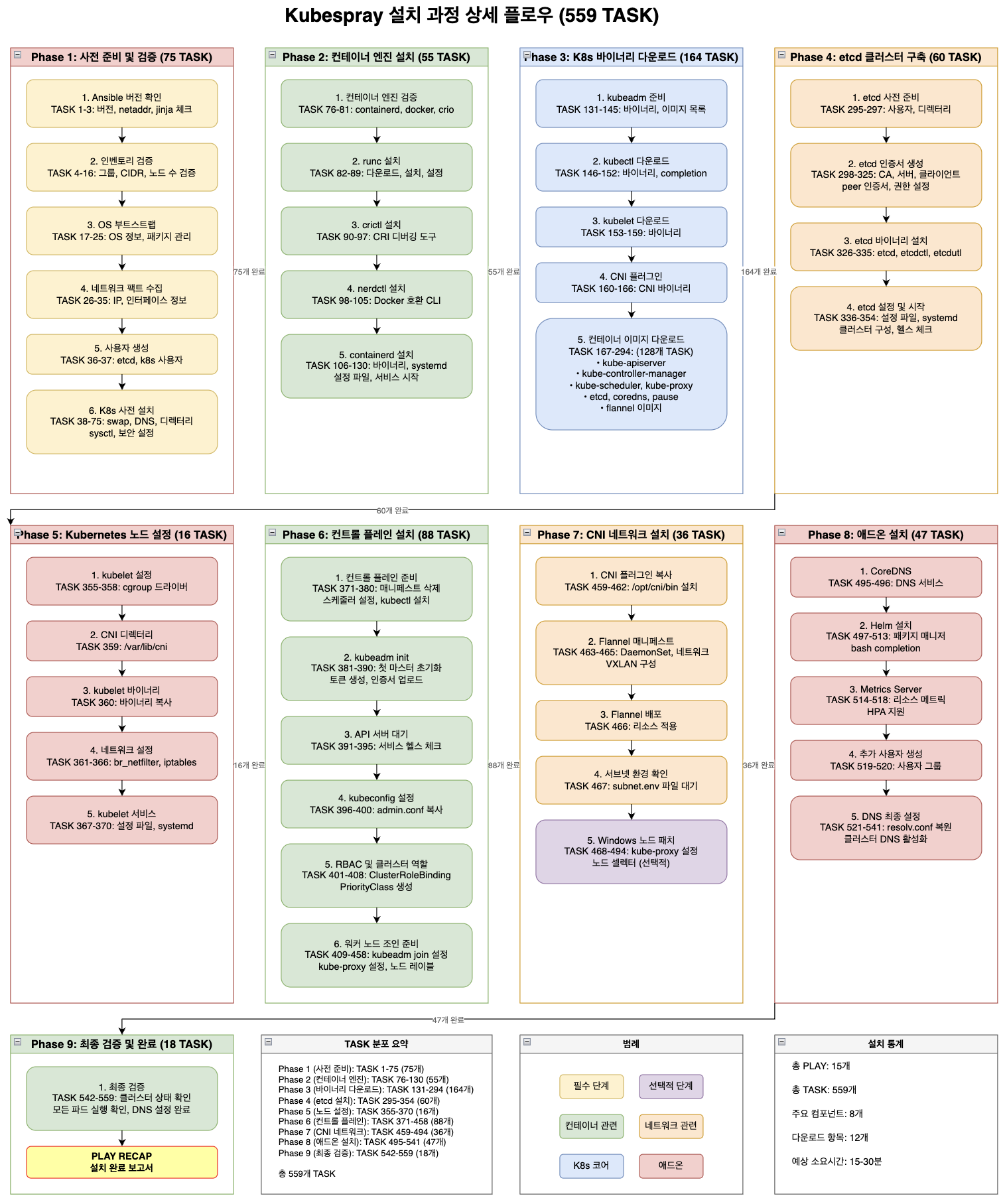
1. PLAY 단계별 정리
| 순서 | PLAY 명 | 설명 | 주요 작업 |
|---|---|---|---|
| 1 | Check Ansible version | Ansible 버전 호환성 검증 | Kubespray가 지원하는 Ansible 버전인지 확인 |
| 2 | Inventory setup and validation | 인벤토리 설정 검증 | kube_control_plane, etcd 그룹 존재 여부 etcd 노드 수 (홀수 권장) Pod/Service CIDR 유효성 Kubernetes 버전 지원 여부 |
| 3 | Install bastion ssh config | Bastion 호스트 설정 | 점프 호스트 환경 지원 (미사용 시 skip) |
| 4 | Bootstrap hosts for Ansible | 노드 초기화 | Python 설치, sudo 권한 확보 기본 패키지 설치, /usr/bin/python 보장 |
| 5 | Gather facts | 시스템 정보 수집 | Ansible fact 수집 OS 패밀리, 하드웨어 정보 등 |
| 6 | Prepare for etcd install | etcd 설치 준비 | etcd 사용자 생성, 디렉터리 생성 방화벽/포트 설정, 인증서 경로 준비 |
| 7 | Add worker nodes to etcd play | etcd 노드 확장 | worker + etcd 겸용 노드 지원 |
| 8 | Install etcd | etcd 설치 | etcd 바이너리 설치 TLS 인증서 생성 systemd 등록, 클러스터 구성 |
| 9 | Install Kubernetes nodes | K8s 노드 설치 | 모든 노드에 공통 K8s 컴포넌트 설치 |
| 10 | Install the control plane | 컨트롤 플레인 설치 | kube_control_plane 그룹 노드 구성 |
| 11 | Invoke kubeadm and install CNI | 클러스터 초기화 | kubeadm init/join 실행 네트워크(CNI) 설치 |
| 12 | Install Calico Route Reflector | Calico BGP 설정 | Calico BGP 미사용 환경이면 skip |
| 13 | Patch Kubernetes for Windows | Windows 노드 지원 | Linux-only 환경이면 skip |
| 14 | Install Kubernetes apps | 기본 애드온 설치 | CoreDNS, metrics-server 등 |
| 15 | Apply resolv.conf changes | DNS 설정 최종화 | CoreDNS 안정화 후 DNS 설정 되돌림 |
2. Phase별 TASK 상세 분석
2.1 Phase 1: 사전 준비 및 검증 (TASK 1-75, 75개)
| 순서 | 카테고리 | TASK 범위 | 설명 |
|---|---|---|---|
| 1 | Ansible 버전 확인 | TASK 1-3 | Ansible 2.17.3 <= version < 2.18.0, netaddr, jinja 체크 |
| 2 | 인벤토리 검증 | TASK 4-16 | 그룹 구성, CIDR 충돌, 노드 수 검증 |
| 3 | OS 부트스트랩 | TASK 17-25 | OS 정보 수집, 패키지 관리자 설정 |
| 4 | 네트워크 팩트 수집 | TASK 26-35 | IP 주소, 네트워크 인터페이스 정보 수집 |
| 5 | 사용자 생성 | TASK 36-37 | etcd, kubernetes 사용자 생성 |
| 6 | K8s 사전 설치 | TASK 38-75 | swap 비활성화, DNS 설정, 디렉터리, sysctl, 보안 설정 |
2.2 Phase 2: 컨테이너 엔진 설치 (TASK 76-130, 55개)
| 순서 | 카테고리 | TASK 범위 | 설명 |
|---|---|---|---|
| 1 | 컨테이너 엔진 검증 | TASK 76-81 | containerd, docker, crio 설치 상태 확인 |
| 2 | runc 설치 | TASK 82-89 | 컨테이너 런타임 바이너리 다운로드, 설치, 설정 |
| 3 | crictl 설치 | TASK 90-97 | CRI 디버깅 도구 설치 및 설정 |
| 4 | nerdctl 설치 | TASK 98-105 | Docker 호환 CLI 도구 설치 |
| 5 | containerd 설치 | TASK 106-130 | 바이너리, systemd 서비스, 설정 파일, 서비스 시작 |
2.3 Phase 3: K8s 바이너리 다운로드 (TASK 131-294, 164개)
| 순서 | 카테고리 | TASK 범위 | 설명 |
|---|---|---|---|
| 1 | kubeadm 준비 | TASK 131-145 | kubeadm 바이너리 다운로드, 필요 이미지 목록 생성 |
| 2 | kubectl 다운로드 | TASK 146-152 | kubectl 바이너리, bash completion 설정 |
| 3 | kubelet 다운로드 | TASK 153-159 | kubelet 바이너리 다운로드 |
| 4 | CNI 플러그인 | TASK 160-166 | CNI 플러그인 바이너리 다운로드 |
| 5 | 컨테이너 이미지 다운로드 | TASK 167-294 | kube-apiserver, controller-manager, scheduler, proxy, etcd, coredns, pause, flannel (128개 TASK) |
2.4 Phase 4: etcd 클러스터 구축 (TASK 295-354, 60개)
| 순서 | 카테고리 | TASK 범위 | 설명 |
|---|---|---|---|
| 1 | etcd 사전 준비 | TASK 295-297 | etcd 사용자 생성, 디렉터리 생성 |
| 2 | etcd 인증서 생성 | TASK 298-325 | CA, 서버, 클라이언트, peer 인증서 생성 및 권한 설정 |
| 3 | etcd 바이너리 설치 | TASK 326-335 | etcd, etcdctl, etcdutl 설치 |
| 4 | etcd 설정 및 시작 | TASK 336-354 | 설정 파일 생성, systemd 등록, 클러스터 구성, 헬스 체크 |
2.5 Phase 5: Kubernetes 노드 설정 (TASK 355-370, 16개)
| 순서 | 카테고리 | TASK 범위 | 설명 |
|---|---|---|---|
| 1 | kubelet 설정 | TASK 355-358 | cgroup 드라이버 설정 |
| 2 | CNI 디렉터리 | TASK 359 | /var/lib/cni 디렉터리 생성 |
| 3 | kubelet 바이너리 | TASK 360 | kubelet 바이너리 복사 |
| 4 | 네트워크 설정 | TASK 361-366 | br_netfilter 모듈, iptables 설정 |
| 5 | kubelet 서비스 | TASK 367-370 | 설정 파일 생성, systemd 서비스 등록 |
2.6 Phase 6: 컨트롤 플레인 설치 (TASK 371-458, 88개)
| 순서 | 카테고리 | TASK 범위 | 설명 |
|---|---|---|---|
| 1 | 컨트롤 플레인 준비 | TASK 371-380 | 매니페스트 삭제, 스케줄러 설정, kubectl 설치 |
| 2 | kubeadm init | TASK 381-390 | 첫 마스터 노드 초기화, 토큰 생성, 인증서 업로드 |
| 3 | API 서버 대기 | TASK 391-395 | 서비스 헬스 체크 및 연결 확인 |
| 4 | kubeconfig 설정 | TASK 396-400 | admin.conf 복사, 사용자 설정 |
| 5 | RBAC 및 클러스터 역할 | TASK 401-408 | ClusterRoleBinding, PriorityClass 생성 |
| 6 | 워커 노드 조인 준비 | TASK 409-458 | kubeadm join 설정, kube-proxy 설정, 노드 레이블 |
2.7 Phase 7: CNI 네트워크 설치 (TASK 459-494, 36개)
| 순서 | 카테고리 | TASK 범위 | 설명 |
|---|---|---|---|
| 1 | CNI 플러그인 복사 | TASK 459-462 | /opt/cni/bin 디렉터리에 CNI 바이너리 설치 |
| 2 | Flannel 매니페스트 | TASK 463-465 | DaemonSet 생성, 네트워크 설정, VXLAN 구성 |
| 3 | Flannel 배포 | TASK 466 | Flannel 리소스 적용 |
| 4 | 서브넷 환경 확인 | TASK 467 | subnet.env 파일 생성 대기 |
| 5 | Windows 노드 패치 | TASK 468-494 | kube-proxy 설정, 노드 셀렉터 (선택적) |
2.8 Phase 8: 애드온 설치 (TASK 495-541, 47개)
| 순서 | 카테고리 | TASK 범위 | 설명 |
|---|---|---|---|
| 1 | CoreDNS | TASK 495-496 | 클러스터 DNS 서비스 설치 |
| 2 | Helm 설치 | TASK 497-513 | 패키지 매니저 설치, bash completion |
| 3 | Metrics Server | TASK 514-518 | 리소스 메트릭 수집, HPA 지원 |
| 4 | 추가 사용자 생성 | TASK 519-520 | 사용자 그룹 생성 |
| 5 | DNS 최종 설정 | TASK 521-541 | resolv.conf 복원, 클러스터 DNS 활성화 |
2.9 Phase 9: 최종 검증 및 완료 (TASK 542-559, 18개)
| 순서 | 카테고리 | TASK 범위 | 설명 |
|---|---|---|---|
| 1 | 최종 검증 | TASK 542-559 | 클러스터 상태 확인, 모든 파드 실행 확인, DNS 설정 완료 |
| 2 | PLAY RECAP | - | 설치 완료 보고서 생성 |
3. 설치 통계 및 Phase별 분포
3.1 전체 통계
| 구분 | 수량 | 비고 |
|---|---|---|
| 총 PLAY 수 | 15개 | PLAY RECAP 포함 |
| 총 TASK 수 | 559개 | 전체 설치 과정 |
| 총 Phase 수 | 9개 | 사전 준비부터 최종 검증까지 |
| 주요 컴포넌트 | 8개 | etcd, kubelet, API서버, CNI, CoreDNS 등 |
| 다운로드 항목 | 12개 | 바이너리, 컨테이너 이미지 |
| 예상 소요시간 | 15-30분 | 네트워크 및 하드웨어 환경에 따라 차이 |
3.2 Phase별 TASK 분포
| Phase | 명칭 | TASK 범위 | TASK 수 | 비율 | 주요 작업 |
|---|---|---|---|---|---|
| Phase 1 | 사전 준비 및 검증 | 1-75 | 75개 | 13.4% | Ansible 검증, 인벤토리 확인, 시스템 준비 |
| Phase 2 | 컨테이너 엔진 설치 | 76-130 | 55개 | 9.8% | containerd, runc, crictl, nerdctl 설치 |
| Phase 3 | K8s 바이너리 다운로드 | 131-294 | 164개 | 29.3% | kubeadm, kubectl, kubelet, 컨테이너 이미지 |
| Phase 4 | etcd 클러스터 구축 | 295-354 | 60개 | 10.7% | etcd 인증서, 바이너리, 클러스터 구성 |
| Phase 5 | Kubernetes 노드 설정 | 355-370 | 16개 | 2.9% | kubelet 설정, 네트워크 모듈 |
| Phase 6 | 컨트롤 플레인 설치 | 371-458 | 88개 | 15.7% | kubeadm init, API 서버, RBAC 설정 |
| Phase 7 | CNI 네트워크 설치 | 459-494 | 36개 | 6.4% | Flannel 설치, 네트워크 구성 |
| Phase 8 | 애드온 설치 | 495-541 | 47개 | 8.4% | CoreDNS, Helm, Metrics Server |
| Phase 9 | 최종 검증 및 완료 | 542-559 | 18개 | 3.2% | 클러스터 상태 확인, 설치 완료 |
3.3 주요 특징
- 가장 많은 TASK: Phase 3 (바이너리 다운로드) - 164개 (29.3%)
- 가장 적은 TASK: Phase 5 (노드 설정) - 16개 (2.9%)
- 핵심 Phase: Phase 3, 4, 6이 전체의 55.7% 차지
- 네트워크 관련: Phase 7이 CNI 네트워크 구성 담당
- 최종화 단계: Phase 8, 9가 애드온 설치 및 검증 담당
4. 상세 TASK 목록 (559개)
TASK [Check 2.17.3 <= Ansible version < 2.18.0] ********************************
TASK [Check that python netaddr is installed] **********************************
TASK [Check that jinja is not too old (install via pip)] ***********************
TASK [dynamic_groups : Match needed groups by their old names or definition] ***
TASK [validate_inventory : Stop if removed tags are used] **********************
TASK [validate_inventory : Stop if kube_control_plane group is empty] **********
TASK [validate_inventory : Stop if etcd group is empty in external etcd mode] ***
TASK [validate_inventory : Stop if unsupported version of Kubernetes] **********
TASK [validate_inventory : Stop if known booleans are set as strings (Use JSON format on CLI: -e "{'key': true }")] ***
TASK [validate_inventory : Stop if even number of etcd hosts] ******************
TASK [validate_inventory : Guarantee that enough network address space is available for all pods] ***
TASK [validate_inventory : Check that kube_service_addresses is a network range] ***
TASK [validate_inventory : Check that kube_pods_subnet is a network range] *****
TASK [validate_inventory : Check that kube_pods_subnet does not collide with kube_service_addresses] ***
TASK [validate_inventory : Check that ipv4 IP range is enough for the nodes] ***
TASK [validate_inventory : Stop if unsupported options selected] ***************
TASK [validate_inventory : Ensure minimum containerd version] ******************
TASK [bootstrap_os : Fetch /etc/os-release] ************************************
TASK [bootstrap_os : Include tasks] ********************************************
TASK [bootstrap_os : Gather host facts to get ansible_distribution_version ansible_distribution_major_version] ***
TASK [bootstrap_os : Add proxy to yum.conf or dnf.conf if http_proxy is defined] ***
TASK [bootstrap_os : Check presence of fastestmirror.conf] *********************
TASK [system_packages : Gather OS information] *********************************
TASK [system_packages : Remove legacy docker repo file] ************************
TASK [system_packages : Manage packages] ***************************************
TASK [bootstrap_os : Create remote_tmp for it is used by another module] *******
TASK [bootstrap_os : Gather facts] *********************************************
TASK [bootstrap_os : Assign inventory name to unconfigured hostnames (non-CoreOS, non-Flatcar, Suse and ClearLinux, non-Fedora)] ***
TASK [bootstrap_os : Ensure bash_completion.d folder exists] *******************
TASK [network_facts : Gather ansible_default_ipv4] *****************************
TASK [network_facts : Set fallback_ip] *****************************************
TASK [network_facts : Gather ansible_default_ipv6] *****************************
TASK [network_facts : Set fallback_ip6] ****************************************
TASK [network_facts : Set main access ip(access_ip based on ipv4_stack/ipv6_stack options).] ***
TASK [network_facts : Set main ip(ip based on ipv4_stack/ipv6_stack options).] ***
TASK [network_facts : Set main access ips(mixed ips for dualstack).] ***********
TASK [network_facts : Set main ips(mixed ips for dualstack).] ******************
TASK [Gather minimal facts] ****************************************************
TASK [Gather necessary facts (network)] ****************************************
TASK [Gather necessary facts (hardware)] ***************************************
TASK [adduser : User | Create User Group] **************************************
TASK [adduser : User | Create User] ********************************************
TASK [kubernetes/preinstall : Check if /etc/fstab exists] **********************
TASK [kubernetes/preinstall : Remove swapfile from /etc/fstab] *****************
TASK [kubernetes/preinstall : Mask swap.target (persist swapoff)] **************
TASK [kubernetes/preinstall : Disable swap] ************************************
TASK [kubernetes/preinstall : Check resolvconf] ********************************
TASK [kubernetes/preinstall : Check existence of /etc/resolvconf/resolv.conf.d] ***
TASK [kubernetes/preinstall : Check status of /etc/resolv.conf] ****************
TASK [kubernetes/preinstall : Fetch resolv.conf] *******************************
TASK [kubernetes/preinstall : NetworkManager | Check if host has NetworkManager] ***
TASK [kubernetes/preinstall : Check systemd-resolved] **************************
TASK [kubernetes/preinstall : Set default dns if remove_default_searchdomains is false] ***
TASK [kubernetes/preinstall : Set dns facts] ***********************************
TASK [kubernetes/preinstall : Check if kubelet is configured] ******************
TASK [kubernetes/preinstall : Check if early DNS configuration stage] **********
TASK [kubernetes/preinstall : Target resolv.conf files] ************************
TASK [kubernetes/preinstall : Check if /etc/dhclient.conf exists] **************
TASK [kubernetes/preinstall : Check if /etc/dhcp/dhclient.conf exists] *********
TASK [kubernetes/preinstall : Target dhclient hook file for Red Hat family] ****
TASK [kubernetes/preinstall : Check /usr readonly] *****************************
TASK [kubernetes/preinstall : Stop if non systemd OS type] *********************
TASK [kubernetes/preinstall : Stop if the os does not support] *****************
TASK [kubernetes/preinstall : Stop if memory is too small for control plane nodes] ***
TASK [kubernetes/preinstall : Stop if memory is too small for nodes] ***********
TASK [kubernetes/preinstall : Stop if cgroups are not enabled on nodes] ********
TASK [kubernetes/preinstall : Stop if ip var does not match local ips] *********
TASK [kubernetes/preinstall : Stop if access_ip is not pingable] ***************
TASK [kubernetes/preinstall : Stop if bad hostname] ****************************
TASK [kubernetes/preinstall : Stop if /etc/resolv.conf has no configured nameservers] ***
TASK [kubernetes/preinstall : Create kubernetes directories] *******************
TASK [kubernetes/preinstall : Create other directories of root owner] **********
TASK [kubernetes/preinstall : Check if kubernetes kubeadm compat cert dir exists] ***
TASK [kubernetes/preinstall : Create kubernetes kubeadm compat cert dir (kubernetes/kubeadm issue 1498)] ***
TASK [kubernetes/preinstall : Create cni directories] **************************
TASK [kubernetes/preinstall : NetworkManager | Ensure NetworkManager conf.d dir] ***
TASK [kubernetes/preinstall : NetworkManager | Prevent NetworkManager from managing K8S interfaces (kube-ipvs0/nodelocaldns)] ***
TASK [kubernetes/preinstall : NetworkManager | Add nameservers to NM configuration] ***
TASK [kubernetes/preinstall : Set default dns if remove_default_searchdomains is false] ***
TASK [kubernetes/preinstall : NetworkManager | Add DNS search to NM configuration] ***
TASK [kubernetes/preinstall : NetworkManager | Add DNS options to NM configuration] ***
TASK [kubernetes/preinstall : Confirm selinux deployed] ************************
TASK [kubernetes/preinstall : Set selinux policy] ******************************
TASK [kubernetes/preinstall : Clean previously used sysctl file locations] *****
TASK [kubernetes/preinstall : Stat sysctl file configuration] ******************
TASK [kubernetes/preinstall : Change sysctl file path to link source if linked] ***
TASK [kubernetes/preinstall : Make sure sysctl file path folder exists] ********
TASK [kubernetes/preinstall : Enable ip forwarding] ****************************
TASK [kubernetes/preinstall : Check if we need to set fs.may_detach_mounts] ****
TASK [kubernetes/preinstall : Ensure kubelet expected parameters are set] ******
TASK [kubernetes/preinstall : Disable fapolicyd service] ***********************
TASK [kubernetes/preinstall : Check if we are running inside a Azure VM] *******
TASK [container-engine/validate-container-engine : Validate-container-engine | check if fedora coreos] ***
TASK [container-engine/validate-container-engine : Validate-container-engine | set is_ostree] ***
TASK [container-engine/validate-container-engine : Ensure kubelet systemd unit exists] ***
TASK [container-engine/validate-container-engine : Populate service facts] *****
TASK [container-engine/validate-container-engine : Check if containerd is installed] ***
TASK [container-engine/validate-container-engine : Check if docker is installed] ***
TASK [container-engine/validate-container-engine : Check if crio is installed] ***
TASK [container-engine/containerd-common : Containerd-common | check if fedora coreos] ***
TASK [container-engine/containerd-common : Containerd-common | set is_ostree] ***
TASK [container-engine/runc : Runc | check if fedora coreos] *******************
TASK [container-engine/runc : Runc | set is_ostree] ****************************
TASK [container-engine/runc : Runc | Uninstall runc package managed by package manager] ***
TASK [container-engine/runc : Runc | Download runc binary] *********************
TASK [container-engine/runc : Prep_download | Set a few facts] *****************
TASK [container-engine/runc : Download_file | Set pathname of cached file] *****
TASK [container-engine/runc : Download_file | Create dest directory on node] ***
TASK [container-engine/runc : Download_file | Download item] *******************
TASK [container-engine/runc : Download_file | Extract file archives] ***********
TASK [container-engine/runc : Copy runc binary from download dir] **************
TASK [container-engine/runc : Runc | Remove orphaned binary] *******************
TASK [container-engine/crictl : Install crictl] ********************************
TASK [container-engine/crictl : Crictl | Download crictl] **********************
TASK [container-engine/crictl : Prep_download | Set a few facts] ***************
TASK [container-engine/crictl : Download_file | Set pathname of cached file] ***
TASK [container-engine/crictl : Download_file | Create dest directory on node] ***
TASK [container-engine/crictl : Download_file | Download item] *****************
TASK [container-engine/crictl : Download_file | Extract file archives] *********
TASK [container-engine/crictl : Extract_file | Unpacking archive] **************
TASK [container-engine/crictl : Install crictl config] *************************
TASK [container-engine/crictl : Copy crictl binary from download dir] **********
TASK [container-engine/nerdctl : Nerdctl | Download nerdctl] *******************
TASK [container-engine/nerdctl : Prep_download | Set a few facts] **************
TASK [container-engine/nerdctl : Download_file | Set pathname of cached file] ***
TASK [container-engine/nerdctl : Download_file | Create dest directory on node] ***
TASK [container-engine/nerdctl : Download_file | Download item] ****************
TASK [container-engine/nerdctl : Download_file | Extract file archives] ********
TASK [container-engine/nerdctl : Extract_file | Unpacking archive] *************
TASK [container-engine/nerdctl : Nerdctl | Copy nerdctl binary from download dir] ***
TASK [container-engine/nerdctl : Nerdctl | Create configuration dir] ***********
TASK [container-engine/nerdctl : Nerdctl | Install nerdctl configuration] ******
TASK [container-engine/containerd : Containerd | Download containerd] **********
TASK [container-engine/containerd : Prep_download | Set a few facts] ***********
TASK [container-engine/containerd : Download_file | Set pathname of cached file] ***
TASK [container-engine/containerd : Download_file | Create dest directory on node] ***
TASK [container-engine/containerd : Download_file | Download item] *************
TASK [container-engine/containerd : Download_file | Extract file archives] *****
TASK [container-engine/containerd : Containerd | Unpack containerd archive] ****
TASK [container-engine/containerd : Containerd | Generate systemd service for containerd] ***
TASK [container-engine/containerd : Containerd | Ensure containerd directories exist] ***
TASK [container-engine/containerd : Containerd | Generate default base_runtime_spec] ***
TASK [container-engine/containerd : Containerd | Store generated default base_runtime_spec] ***
TASK [container-engine/containerd : Containerd | Write base_runtime_specs] *****
TASK [container-engine/containerd : Containerd | Copy containerd config file] ***
TASK [container-engine/containerd : Containerd | Create registry directories] ***
TASK [container-engine/containerd : Containerd | Write hosts.toml file] ********
TASK [container-engine/containerd : Containerd | Ensure containerd is started and enabled] ***
TASK [download : Prep_download | Set a few facts] ******************************
TASK [download : Prep_download | Register docker images info] ******************
TASK [download : Prep_download | Create staging directory on remote node] ******
TASK [download : Download | Get kubeadm binary and list of required images] ****
TASK [download : Prep_kubeadm_images | Download kubeadm binary] ****************
TASK [download : Prep_download | Set a few facts] ******************************
TASK [download : Download_file | Set pathname of cached file] ******************
TASK [download : Download_file | Create dest directory on node] ****************
TASK [download : Download_file | Download item] ********************************
TASK [download : Download_file | Extract file archives] ************************
TASK [download : Prep_kubeadm_images | Copy kubeadm binary from download dir to system path] ***
TASK [download : Prep_kubeadm_images | Create kubeadm config] ******************
TASK [download : Prep_kubeadm_images | Generate list of required images] *******
TASK [download : Prep_kubeadm_images | Parse list of images] *******************
TASK [download : Prep_kubeadm_images | Convert list of images to dict for later use] ***
TASK [download : Download | Download files / images] ***************************
TASK [download : Prep_download | Set a few facts] ******************************
TASK [download : Download_file | Set pathname of cached file] ******************
TASK [download : Download_file | Create dest directory on node] ****************
TASK [download : Download_file | Download item] ********************************
TASK [download : Download_file | Extract file archives] ************************
TASK [download : Extract_file | Unpacking archive] *****************************
TASK [download : Prep_download | Set a few facts] ******************************
TASK [download : Download_file | Set pathname of cached file] ******************
TASK [download : Download_file | Create dest directory on node] ****************
TASK [download : Download_file | Download item] ********************************
TASK [download : Download_file | Extract file archives] ************************
TASK [download : Prep_download | Set a few facts] ******************************
TASK [download : Download_file | Set pathname of cached file] ******************
TASK [download : Download_file | Create dest directory on node] ****************
TASK [download : Download_file | Download item] ********************************
TASK [download : Download_file | Extract file archives] ************************
TASK [download : Prep_download | Set a few facts] ******************************
TASK [download : Download_file | Set pathname of cached file] ******************
TASK [download : Download_file | Create dest directory on node] ****************
TASK [download : Download_file | Download item] ********************************
TASK [download : Download_file | Extract file archives] ************************
TASK [download : Prep_download | Set a few facts] ******************************
TASK [download : Download_file | Set pathname of cached file] ******************
TASK [download : Download_file | Create dest directory on node] ****************
TASK [download : Download_file | Download item] ********************************
TASK [download : Download_file | Extract file archives] ************************
TASK [download : Prep_download | Set a few facts] ******************************
TASK [download : Download_file | Set pathname of cached file] ******************
TASK [download : Download_file | Create dest directory on node] ****************
TASK [download : Download_file | Download item] ********************************
TASK [download : Download_file | Extract file archives] ************************
TASK [download : Extract_file | Unpacking archive] *****************************
TASK [download : Prep_download | Set a few facts] ******************************
TASK [download : Download_file | Set pathname of cached file] ******************
TASK [download : Download_file | Create dest directory on node] ****************
TASK [download : Download_file | Download item] ********************************
TASK [download : Download_file | Extract file archives] ************************
TASK [download : Prep_download | Set a few facts] ******************************
TASK [download : Download_file | Set pathname of cached file] ******************
TASK [download : Download_file | Create dest directory on node] ****************
TASK [download : Download_file | Download item] ********************************
TASK [download : Download_file | Extract file archives] ************************
TASK [download : Prep_download | Set a few facts] ******************************
TASK [download : Download_file | Set pathname of cached file] ******************
TASK [download : Download_file | Create dest directory on node] ****************
TASK [download : Download_file | Download item] ********************************
TASK [download : Download_file | Extract file archives] ************************
TASK [download : Extract_file | Unpacking archive] *****************************
TASK [download : Set default values for flag variables] ************************
TASK [download : Set_container_facts | Display the name of the image being processed] ***
TASK [download : Set_container_facts | Set if containers should be pulled by digest] ***
TASK [download : Set_container_facts | Define by what name to pull the image] ***
TASK [download : Set_container_facts | Define file name of image] **************
TASK [download : Set_container_facts | Define path of image] *******************
TASK [download : Set image save/load command for containerd] *******************
TASK [download : Set image save/load command for containerd on localhost] ******
TASK [download : Download_container | Prepare container download] **************
TASK [download : Check_pull_required |  Generate a list of information about the images on a node] ***
TASK [download : Check_pull_required | Set pull_required if the desired image is not yet loaded] ***
TASK [download : debug] ********************************************************
TASK [download : Download_container | Download image if required] **************
TASK [download : Download_container | Remove container image from cache] *******
TASK [download : Set default values for flag variables] ************************
TASK [download : Set_container_facts | Display the name of the image being processed] ***
TASK [download : Set_container_facts | Set if containers should be pulled by digest] ***
TASK [download : Set_container_facts | Define by what name to pull the image] ***
TASK [download : Set_container_facts | Define file name of image] **************
TASK [download : Set_container_facts | Define path of image] *******************
TASK [download : Set image save/load command for containerd] *******************
TASK [download : Set image save/load command for containerd on localhost] ******
TASK [download : Download_container | Prepare container download] **************
TASK [download : Check_pull_required |  Generate a list of information about the images on a node] ***
TASK [download : Check_pull_required | Set pull_required if the desired image is not yet loaded] ***
TASK [download : debug] ********************************************************
TASK [download : Download_container | Download image if required] **************
TASK [download : Download_container | Remove container image from cache] *******
TASK [download : Set default values for flag variables] ************************
TASK [download : Set_container_facts | Display the name of the image being processed] ***
TASK [download : Set_container_facts | Set if containers should be pulled by digest] ***
TASK [download : Set_container_facts | Define by what name to pull the image] ***
TASK [download : Set_container_facts | Define file name of image] **************
TASK [download : Set_container_facts | Define path of image] *******************
TASK [download : Set image save/load command for containerd] *******************
TASK [download : Set image save/load command for containerd on localhost] ******
TASK [download : Download_container | Prepare container download] **************
TASK [download : Check_pull_required |  Generate a list of information about the images on a node] ***
TASK [download : Check_pull_required | Set pull_required if the desired image is not yet loaded] ***
TASK [download : debug] ********************************************************
TASK [download : Download_container | Download image if required] **************
TASK [download : Download_container | Remove container image from cache] *******
TASK [download : Set default values for flag variables] ************************
TASK [download : Set_container_facts | Display the name of the image being processed] ***
TASK [download : Set_container_facts | Set if containers should be pulled by digest] ***
TASK [download : Set_container_facts | Define by what name to pull the image] ***
TASK [download : Set_container_facts | Define file name of image] **************
TASK [download : Set_container_facts | Define path of image] *******************
TASK [download : Set image save/load command for containerd] *******************
TASK [download : Set image save/load command for containerd on localhost] ******
TASK [download : Download_container | Prepare container download] **************
TASK [download : Check_pull_required |  Generate a list of information about the images on a node] ***
TASK [download : Check_pull_required | Set pull_required if the desired image is not yet loaded] ***
TASK [download : debug] ********************************************************
TASK [download : Download_container | Download image if required] **************
TASK [download : Download_container | Remove container image from cache] *******
TASK [download : Set default values for flag variables] ************************
TASK [download : Set_container_facts | Display the name of the image being processed] ***
TASK [download : Set_container_facts | Set if containers should be pulled by digest] ***
TASK [download : Set_container_facts | Define by what name to pull the image] ***
TASK [download : Set_container_facts | Define file name of image] **************
TASK [download : Set_container_facts | Define path of image] *******************
TASK [download : Set image save/load command for containerd] *******************
TASK [download : Set image save/load command for containerd on localhost] ******
TASK [download : Download_container | Prepare container download] **************
TASK [download : Check_pull_required |  Generate a list of information about the images on a node] ***
TASK [download : Check_pull_required | Set pull_required if the desired image is not yet loaded] ***
TASK [download : debug] ********************************************************
TASK [download : Download_container | Download image if required] **************
TASK [download : Download_container | Remove container image from cache] *******
TASK [download : Set default values for flag variables] ************************
TASK [download : Set_container_facts | Display the name of the image being processed] ***
TASK [download : Set_container_facts | Set if containers should be pulled by digest] ***
TASK [download : Set_container_facts | Define by what name to pull the image] ***
TASK [download : Set_container_facts | Define file name of image] **************
TASK [download : Set_container_facts | Define path of image] *******************
TASK [download : Set image save/load command for containerd] *******************
TASK [download : Set image save/load command for containerd on localhost] ******
TASK [download : Download_container | Prepare container download] **************
TASK [download : Check_pull_required |  Generate a list of information about the images on a node] ***
TASK [download : Check_pull_required | Set pull_required if the desired image is not yet loaded] ***
TASK [download : debug] ********************************************************
TASK [download : Download_container | Download image if required] **************
TASK [download : Download_container | Remove container image from cache] *******
TASK [download : Prep_download | Set a few facts] ******************************
TASK [download : Download_file | Set pathname of cached file] ******************
TASK [download : Download_file | Create dest directory on node] ****************
TASK [download : Download_file | Download item] ********************************
TASK [download : Download_file | Extract file archives] ************************
TASK [download : Extract_file | Unpacking archive] *****************************
TASK [download : Set default values for flag variables] ************************
TASK [download : Set_container_facts | Display the name of the image being processed] ***
TASK [download : Set_container_facts | Set if containers should be pulled by digest] ***
TASK [download : Set_container_facts | Define by what name to pull the image] ***
TASK [download : Set_container_facts | Define file name of image] **************
TASK [download : Set_container_facts | Define path of image] *******************
TASK [download : Set image save/load command for containerd] *******************
TASK [download : Set image save/load command for containerd on localhost] ******
TASK [download : Download_container | Prepare container download] **************
TASK [download : Check_pull_required |  Generate a list of information about the images on a node] ***
TASK [download : Check_pull_required | Set pull_required if the desired image is not yet loaded] ***
TASK [download : debug] ********************************************************
TASK [download : Download_container | Download image if required] **************
TASK [download : Download_container | Remove container image from cache] *******
TASK [download : Set default values for flag variables] ************************
TASK [download : Set_container_facts | Display the name of the image being processed] ***
TASK [download : Set_container_facts | Set if containers should be pulled by digest] ***
TASK [download : Set_container_facts | Define by what name to pull the image] ***
TASK [download : Set_container_facts | Define file name of image] **************
TASK [download : Set_container_facts | Define path of image] *******************
TASK [download : Set image save/load command for containerd] *******************
TASK [download : Set image save/load command for containerd on localhost] ******
TASK [download : Download_container | Prepare container download] **************
TASK [download : Check_pull_required |  Generate a list of information about the images on a node] ***
TASK [download : Check_pull_required | Set pull_required if the desired image is not yet loaded] ***
TASK [download : debug] ********************************************************
TASK [download : Download_container | Download image if required] **************
TASK [download : Download_container | Remove container image from cache] *******
TASK [download : Set default values for flag variables] ************************
TASK [download : Set_container_facts | Display the name of the image being processed] ***
TASK [download : Set_container_facts | Set if containers should be pulled by digest] ***
TASK [download : Set_container_facts | Define by what name to pull the image] ***
TASK [download : Set_container_facts | Define file name of image] **************
TASK [download : Set_container_facts | Define path of image] *******************
TASK [download : Set image save/load command for containerd] *******************
TASK [download : Set image save/load command for containerd on localhost] ******
TASK [download : Download_container | Prepare container download] **************
TASK [download : Check_pull_required |  Generate a list of information about the images on a node] ***
TASK [download : Check_pull_required | Set pull_required if the desired image is not yet loaded] ***
TASK [download : debug] ********************************************************
TASK [download : Download_container | Download image if required] **************
TASK [download : Download_container | Remove container image from cache] *******
TASK [download : Set default values for flag variables] ************************
TASK [download : Set_container_facts | Display the name of the image being processed] ***
TASK [download : Set_container_facts | Set if containers should be pulled by digest] ***
TASK [download : Set_container_facts | Define by what name to pull the image] ***
TASK [download : Set_container_facts | Define file name of image] **************
TASK [download : Set_container_facts | Define path of image] *******************
TASK [download : Set image save/load command for containerd] *******************
TASK [download : Set image save/load command for containerd on localhost] ******
TASK [download : Download_container | Prepare container download] **************
TASK [download : Check_pull_required |  Generate a list of information about the images on a node] ***
TASK [download : Check_pull_required | Set pull_required if the desired image is not yet loaded] ***
TASK [download : debug] ********************************************************
TASK [download : Download_container | Download image if required] **************
TASK [download : Download_container | Remove container image from cache] *******
TASK [download : Set default values for flag variables] ************************
TASK [download : Set_container_facts | Display the name of the image being processed] ***
TASK [download : Set_container_facts | Set if containers should be pulled by digest] ***
TASK [download : Set_container_facts | Define by what name to pull the image] ***
TASK [download : Set_container_facts | Define file name of image] **************
TASK [download : Set_container_facts | Define path of image] *******************
TASK [download : Set image save/load command for containerd] *******************
TASK [download : Set image save/load command for containerd on localhost] ******
TASK [download : Download_container | Prepare container download] **************
TASK [download : Check_pull_required |  Generate a list of information about the images on a node] ***
TASK [download : Check_pull_required | Set pull_required if the desired image is not yet loaded] ***
TASK [download : debug] ********************************************************
TASK [download : Download_container | Download image if required] **************
TASK [download : Download_container | Remove container image from cache] *******
TASK [Gathering Facts] *********************************************************
TASK [Check if nodes needs etcd client certs (depends on network_plugin)] ******
TASK [adduser : User | Create User Group] **************************************
TASK [adduser : User | Create User] ********************************************
TASK [adduser : User | Create User Group] **************************************
TASK [adduser : User | Create User] ********************************************
TASK [etcd : Check etcd certs] *************************************************
TASK [etcd : Check_certs | Register certs that have already been generated on first etcd node] ***
TASK [etcd : Check_certs | Set default value for 'sync_certs', 'gen_certs' and 'etcd_secret_changed' to false] ***
TASK [etcd : Check certs | Register ca and etcd admin/member certs on etcd hosts] ***
TASK [etcd : Check certs | Register ca and etcd node certs on kubernetes hosts] ***
TASK [etcd : Check_certs | Set 'gen_certs' to true if expected certificates are not on the first etcd node(1/2)] ***
TASK [etcd : Check_certs | Set 'gen_certs' to true if expected certificates are not on the first etcd node(2/2)] ***
TASK [etcd : Check_certs | Set 'gen_*_certs' groups to track which nodes needs to have certs generated on first etcd node] ***
TASK [etcd : Check_certs | Set 'etcd_member_requires_sync' to true if ca or member/admin cert and key don't exist on etcd member or checksum doesn't match] ***
TASK [etcd : Check_certs | Set 'sync_certs' to true] ***************************
TASK [etcd : Generate etcd certs] **********************************************
TASK [etcd : Gen_certs | create etcd cert dir] *********************************
TASK [etcd : Gen_certs | create etcd script dir (on k8s-ctr1)] *****************
TASK [etcd : Gen_certs | write openssl config] *********************************
TASK [etcd : Gen_certs | copy certs generation script] *************************
TASK [etcd : Gen_certs | run cert generation script for etcd and kube control plane nodes] ***
TASK [etcd : Gen_certs | run cert generation script for all clients] ***********
TASK [etcd : Gen_certs | check certificate permissions] ************************
TASK [etcd : Trust etcd CA] ****************************************************
TASK [etcd : Gen_certs | target ca-certificate store file] *********************
TASK [etcd : Gen_certs | add CA to trusted CA dir] *****************************
TASK [etcd : Gen_certs | update ca-certificates (RedHat)] **********************
TASK [etcd : Trust etcd CA on nodes if needed] *********************************
TASK [etcd : Gen_certs | target ca-certificate store file] *********************
TASK [etcd : Gen_certs | add CA to trusted CA dir] *****************************
TASK [etcd : Gen_certs | Get etcd certificate serials] *************************
TASK [etcd : Set etcd_client_cert_serial] **************************************
TASK [etcdctl_etcdutl : Download etcd binary] **********************************
TASK [etcdctl_etcdutl : Prep_download | Set a few facts] ***********************
TASK [etcdctl_etcdutl : Download_file | Set pathname of cached file] ***********
TASK [etcdctl_etcdutl : Download_file | Create dest directory on node] *********
TASK [etcdctl_etcdutl : Download_file | Download item] *************************
TASK [etcdctl_etcdutl : Download_file | Extract file archives] *****************
TASK [etcdctl_etcdutl : Extract_file | Unpacking archive] **********************
TASK [etcdctl_etcdutl : Copy etcd binary] **************************************
TASK [etcdctl_etcdutl : Copy etcdctl and etcdutl binary from download dir] *****
TASK [etcdctl_etcdutl : Create etcdctl wrapper script] *************************
TASK [etcd : Install etcd] *****************************************************
TASK [etcd : Get currently-deployed etcd version] ******************************
TASK [etcd : Restart etcd if necessary] ****************************************
TASK [etcd : Install | Copy etcd binary from download dir] *********************
TASK [etcd : Configure etcd] ***************************************************
TASK [etcd : Configure | Check if etcd cluster is healthy] *********************
TASK [etcd : Configure | Refresh etcd config] **********************************
TASK [etcd : Refresh config | Create etcd config file] *************************
TASK [etcd : Configure | Copy etcd.service systemd file] ***********************
TASK [etcd : Configure | reload systemd] ***************************************
TASK [etcd : Configure | Ensure etcd is running] *******************************
TASK [etcd : Configure | Wait for etcd cluster to be healthy] ******************
TASK [etcd : Configure | Check if member is in etcd cluster] *******************
TASK [etcd : Refresh etcd config] **********************************************
TASK [etcd : Refresh config | Create etcd config file] *************************
TASK [etcd : Refresh etcd config again for idempotency] ************************
TASK [etcd : Refresh config | Create etcd config file] *************************
TASK [kubernetes/node : Set kubelet_cgroup_driver_detected fact for containerd] ***
TASK [kubernetes/node : Set kubelet_cgroup_driver] *****************************
TASK [kubernetes/node : Ensure /var/lib/cni exists] ****************************
TASK [kubernetes/node : Install | Copy kubelet binary from download dir] *******
TASK [kubernetes/node : Ensure nodePort range is reserved] *********************
TASK [kubernetes/node : Verify if br_netfilter module exists] ******************
TASK [kubernetes/node : Verify br_netfilter module path exists] ****************
TASK [kubernetes/node : Enable br_netfilter module] ****************************
TASK [kubernetes/node : Persist br_netfilter module] ***************************
TASK [kubernetes/node : Check if bridge-nf-call-iptables key exists] ***********
TASK [kubernetes/node : Enable bridge-nf-call tables] **************************
TASK [kubernetes/node : Set kubelet api version to v1beta1] ********************
TASK [kubernetes/node : Write kubelet environment config file (kubeadm)] *******
TASK [kubernetes/node : Write kubelet config file] *****************************
TASK [kubernetes/node : Write kubelet systemd init file] ***********************
TASK [kubernetes/node : Enable kubelet] ****************************************
TASK [kubernetes/control-plane : Pre-upgrade | Delete control plane manifests if etcd secrets changed] ***
TASK [kubernetes/control-plane : Create kube-scheduler config] *****************
TASK [kubernetes/control-plane : Install | Copy kubectl binary from download dir] ***
TASK [kubernetes/control-plane : Install kubectl bash completion] **************
TASK [kubernetes/control-plane : Set kubectl bash completion file permissions] ***
TASK [kubernetes/control-plane : Check which kube-control nodes are already members of the cluster] ***
TASK [kubernetes/control-plane : Set fact first_kube_control_plane] ************
TASK [kubernetes/control-plane : Kubeadm | Check if kubeadm has already run] ***
TASK [kubernetes/control-plane : Kubeadm | aggregate all SANs] *****************
TASK [kubernetes/control-plane : Kubeadm | Create kubeadm config] **************
TASK [kubernetes/control-plane : Kubeadm | Initialize first control plane node (1st try)] ***
TASK [kubernetes/control-plane : Create kubeadm token for joining nodes with 24h expiration (default)] ***
TASK [kubernetes/control-plane : Set kubeadm_token] ****************************
TASK [kubernetes/control-plane : Kubeadm | Join other control plane nodes] *****
TASK [kubernetes/control-plane : Set kubeadm_discovery_address] ****************
TASK [kubernetes/control-plane : Upload certificates so they are fresh and not expired] ***
TASK [kubernetes/control-plane : Parse certificate key if not set] *************
TASK [kubernetes/control-plane : Wait for k8s apiserver] ***********************
TASK [kubernetes/control-plane : Check already run] ****************************
TASK [kubernetes/control-plane : Kubeadm | Remove taint for control plane node with node role] ***
TASK [kubernetes/control-plane : Include kubeadm secondary server apiserver fixes] ***
TASK [kubernetes/control-plane : Update server field in component kubeconfigs] ***
TASK [kubernetes/control-plane : Include kubelet client cert rotation fixes] ***
TASK [kubernetes/control-plane : Fixup kubelet client cert rotation 1/2] *******
TASK [kubernetes/control-plane : Fixup kubelet client cert rotation 2/2] *******
TASK [kubernetes/control-plane : Install script to renew K8S control plane certificates] ***
TASK [kubernetes/control-plane : Renew K8S control plane certificates monthly 1/2] ***
TASK [kubernetes/control-plane : Renew K8S control plane certificates monthly 2/2] ***
TASK [kubernetes/client : Set external kube-apiserver endpoint] ****************
TASK [kubernetes/client : Create kube config dir for current/ansible become user] ***
TASK [kubernetes/client : Copy admin kubeconfig to current/ansible become user home] ***
TASK [kubernetes/client : Wait for k8s apiserver] ******************************
TASK [kubernetes-apps/cluster_roles : Kubernetes Apps | Wait for kube-apiserver] ***
TASK [kubernetes-apps/cluster_roles : Kubernetes Apps | Add ClusterRoleBinding to admit nodes] ***
TASK [kubernetes-apps/cluster_roles : Apply workaround to allow all nodes with cert O=system:nodes to register] ***
TASK [kubernetes-apps/cluster_roles : Kubernetes Apps | Remove old webhook ClusterRole] ***
TASK [kubernetes-apps/cluster_roles : Kubernetes Apps | Remove old webhook ClusterRoleBinding] ***
TASK [kubernetes-apps/cluster_roles : PriorityClass | Copy k8s-cluster-critical-pc.yml file] ***
TASK [kubernetes-apps/cluster_roles : PriorityClass | Create k8s-cluster-critical] ***
TASK [kubernetes/kubeadm : Set kubeadm_discovery_address] **********************
TASK [kubernetes/kubeadm : Check if kubelet.conf exists] ***********************
TASK [kubernetes/kubeadm : Check if kubeadm CA cert is accessible] *************
TASK [kubernetes/kubeadm : Fetch CA certificate from control plane node] *******
TASK [kubernetes/kubeadm : Check if discovery kubeconfig exists] ***************
TASK [kubernetes/kubeadm : Get current resourceVersion of kube-proxy configmap] ***
TASK [kubernetes/kubeadm : Update server field in kube-proxy kubeconfig] *******
TASK [kubernetes/kubeadm : Get new resourceVersion of kube-proxy configmap] ****
TASK [kubernetes/kubeadm : Set ca.crt file permission] *************************
TASK [kubernetes/kubeadm : Restart all kube-proxy pods to ensure that they load the new configmap] ***
TASK [kubernetes/node-label : Kubernetes Apps | Wait for kube-apiserver] *******
TASK [kubernetes/node-label : Set role node label to empty list] ***************
TASK [kubernetes/node-label : Set inventory node label to empty list] **********
TASK [kubernetes/node-label : debug] *******************************************
TASK [kubernetes/node-label : debug] *******************************************
TASK [kubernetes/node-taint : Set role and inventory node taint to empty list] ***
TASK [kubernetes/node-taint : debug] *******************************************
TASK [kubernetes/node-taint : debug] *******************************************
TASK [network_plugin/cni : CNI | make sure /opt/cni/bin exists] ****************
TASK [network_plugin/cni : CNI | Copy cni plugins] *****************************
TASK [network_plugin/cni : CNI | make sure /opt/cni/bin exists] ****************
TASK [network_plugin/cni : CNI | Copy cni plugins] *****************************
TASK [network_plugin/flannel : Flannel | Create Flannel manifests] *************
TASK [network_plugin/flannel : Flannel | Start Resources] **********************
TASK [network_plugin/flannel : Flannel | Wait for flannel subnet.env file presence] ***
TASK [win_nodes/kubernetes_patch : Ensure that user manifests directory exists] ***
TASK [win_nodes/kubernetes_patch : Check current nodeselector for kube-proxy daemonset] ***
TASK [win_nodes/kubernetes_patch : Apply nodeselector patch for kube-proxy daemonset] ***
TASK [win_nodes/kubernetes_patch : debug] **************************************
TASK [win_nodes/kubernetes_patch : debug] **************************************
TASK [kubernetes-apps/ansible : Kubernetes Apps | Wait for kube-apiserver] *****
TASK [kubernetes-apps/ansible : Kubernetes Apps | CoreDNS] *********************
TASK [kubernetes-apps/helm : Helm | Gather os specific variables] **************
TASK [kubernetes-apps/helm : Helm | Install PyYaml] ****************************
TASK [kubernetes-apps/helm : Helm | Download helm] *****************************
TASK [kubernetes-apps/helm : Prep_download | Set a few facts] ******************
TASK [kubernetes-apps/helm : Download_file | Set pathname of cached file] ******
TASK [kubernetes-apps/helm : Download_file | Create dest directory on node] ****
TASK [kubernetes-apps/helm : Download_file | Download item] ********************
TASK [kubernetes-apps/helm : Download_file | Extract file archives] ************
TASK [kubernetes-apps/helm : Extract_file | Unpacking archive] *****************
TASK [kubernetes-apps/helm : Helm | Copy helm binary from download dir] ********
TASK [kubernetes-apps/helm : Helm | Get helm completion] ***********************
TASK [kubernetes-apps/helm : Helm | Install helm completion] *******************
TASK [kubernetes-apps/metrics_server : Metrics Server | Delete addon dir] ******
TASK [kubernetes-apps/metrics_server : Metrics Server | Create addon dir] ******
TASK [kubernetes-apps/metrics_server : Metrics Server | Templates list] ********
TASK [kubernetes-apps/metrics_server : Metrics Server | Create manifests] ******
TASK [kubernetes-apps/metrics_server : Metrics Server | Apply manifests] *******
TASK [adduser : User | Create User Group] **************************************
TASK [adduser : User | Create User] ********************************************
TASK [kubernetes/preinstall : Check resolvconf] ********************************
TASK [kubernetes/preinstall : Check existence of /etc/resolvconf/resolv.conf.d] ***
TASK [kubernetes/preinstall : Check status of /etc/resolv.conf] ****************
TASK [kubernetes/preinstall : Fetch resolv.conf] *******************************
TASK [kubernetes/preinstall : NetworkManager | Check if host has NetworkManager] ***
TASK [kubernetes/preinstall : Check systemd-resolved] **************************
TASK [kubernetes/preinstall : Set default dns if remove_default_searchdomains is false] ***
TASK [kubernetes/preinstall : Set dns facts] ***********************************
TASK [kubernetes/preinstall : Check if kubelet is configured] ******************
TASK [kubernetes/preinstall : Check if early DNS configuration stage] **********
TASK [kubernetes/preinstall : Target resolv.conf files] ************************
TASK [kubernetes/preinstall : Check if /etc/dhclient.conf exists] **************
TASK [kubernetes/preinstall : Check if /etc/dhcp/dhclient.conf exists] *********
TASK [kubernetes/preinstall : Target dhclient hook file for Red Hat family] ****
TASK [kubernetes/preinstall : Check /usr readonly] *****************************
TASK [kubernetes/preinstall : NetworkManager | Ensure NetworkManager conf.d dir] ***
TASK [kubernetes/preinstall : NetworkManager | Prevent NetworkManager from managing K8S interfaces (kube-ipvs0/nodelocaldns)] ***
TASK [kubernetes/preinstall : NetworkManager | Add nameservers to NM configuration] ***
TASK [kubernetes/preinstall : Set default dns if remove_default_searchdomains is false] ***
TASK [kubernetes/preinstall : NetworkManager | Add DNS search to NM configuration] ***
TASK [kubernetes/preinstall : NetworkManager | Add DNS options to NM configuration] ***

cat kubespray_install.log | grep -E 'TASK'

TASK [Check 2.17.3 <= Ansible version < 2.18.0] ********************************
TASK [dynamic_groups : Match needed groups by their old names or definition] ***
TASK [validate_inventory : Stop if removed tags are used] **********************
TASK [bootstrap_os : Fetch /etc/os-release] ************************************
TASK [system_packages : Gather OS information] *********************************
TASK [bootstrap_os : Create remote_tmp for it is used by another module] *******
TASK [network_facts : Gather ansible_default_ipv4] *****************************
TASK [Gather minimal facts] ****************************************************
TASK [adduser : User | Create User Group] **************************************
TASK [kubernetes/preinstall : Check if /etc/fstab exists] **********************
TASK [container-engine/validate-container-engine : Validate-container-engine | check if fedora coreos] ***
TASK [download : Prep_download | Set a few facts] ******************************
TASK [Gathering Facts] *********************************************************
TASK [Check if nodes needs etcd client certs (depends on network_plugin)] ******
TASK [adduser : User | Create User Group] **************************************
TASK [etcd : Check etcd certs] *************************************************
TASK [etcdctl_etcdutl : Download etcd binary] **********************************
TASK [etcd : Install etcd] *****************************************************
TASK [kubernetes/node : Set kubelet_cgroup_driver_detected fact for containerd] ***
TASK [kubernetes/control-plane : Pre-upgrade | Delete control plane manifests if etcd secrets changed] ***
TASK [kubernetes/client : Set external kube-apiserver endpoint] ****************
TASK [kubernetes-apps/cluster_roles : Kubernetes Apps | Wait for kube-apiserver] ***
TASK [kubernetes/kubeadm : Set kubeadm_discovery_address] **********************
TASK [kubernetes/node-label : Set role node label to empty list] ***************
TASK [network_plugin/cni : CNI | make sure /opt/cni/bin exists] ****************
TASK [network_plugin/flannel : Flannel | Create Flannel manifests] *************
TASK [win_nodes/kubernetes_patch : Ensure that user manifests directory exists] ***
TASK [kubernetes-apps/ansible : Kubernetes Apps | Wait for kube-apiserver] *****
TASK [kubernetes-apps/helm : Helm | Gather os specific variables] **************
TASK [kubernetes-apps/metrics_server : Metrics Server | Delete addon dir] ******
TASK [adduser : User | Create User Group] **************************************
TASK [kubernetes/preinstall : Check resolvconf] ********************************
실습 배포 환경 분석
다운로드 파일 경로 확인 : local_release_dir: "/tmp/releases"
# /tmp/releases/
# ├── cni-plugins-linux-arm64-1.8.0.tgz
# ├── containerd-2.1.5-linux-arm64.tar.gz
# ├── containerd-rootless-setuptool.sh
# ├── containerd-rootless.sh
# ├── crictl
# ├── crictl-1.33.0-linux-arm64.tar.gz
# ├── etcd-3.5.25-linux-arm64.tar.gz
# ├── etcd-v3.5.25-linux-arm64
# │   ├── Documentation
# │   │   ├── dev-guide
# │   │   │   └── apispec
# │   │   │       └── swagger
# │   │   │           ├── rpc.swagger.json
# │   │   │           ├── v3election.swagger.json
# │   │   │           └── v3lock.swagger.json
# │   │   └── README.md
# │   ├── etcd
# │   ├── etcdctl
# │   ├── etcdutl
# │   ├── README-etcdctl.md
# │   ├── README-etcdutl.md
# │   ├── README.md
# │   └── READMEv2-etcdctl.md
# ├── helm-3.18.4
# │   ├── helm-3.18.4-linux-arm64.tar.gz
# │   └── linux-arm64
# │       ├── helm
# │       ├── LICENSE
# │       └── README.md
# ├── images
# ├── kubeadm-1.33.3-arm64
# ├── kubectl-1.33.3-arm64
# ├── kubelet-1.33.3-arm64
# ├── nerdctl
# ├── nerdctl-2.1.6-linux-arm64.tar.gz
# └── runc-1.3.4.arm64
설치된 바이너리 확인 : bin_dir: /usr/local/bin
tree /usr/local/bin/

# /usr/local/bin/
# ├── ansible
# ├── ansible-community
# ├── ansible-config
# ├── ansible-connection
# ├── ansible-console
# ├── ansible-doc
# ├── ansible-galaxy
# ├── ansible-inventory
# ├── ansible-playbook
# ├── ansible-pull
# ├── ansible-test
# ├── ansible-vault
# ├── containerd
# ├── containerd-shim-runc-v2
# ├── containerd-stress
# ├── crictl
# ├── ctr
# ├── etcd
# ├── etcdctl
# ├── etcdctl.sh
# ├── etcd-scripts
# │   └── make-ssl-etcd.sh
# ├── etcdutl
# ├── helm
# ├── jp.py
# ├── k8s-certs-renew.sh
# ├── k9s
# ├── kubeadm
# ├── kubectl
# ├── kubelet
# ├── kubernetes-scripts
# ├── nerdctl
# ├── netaddr
# ├── __pycache__
# │   └── jp.cpython-312.pyc
# └── runc


cat inventory/mycluster/group_vars/k8s_cluster/addons.yml | grep helm
helm_enabled: true

# sed -i 's|helm_enabled: false|helm_enabled: true|g'
helm version
# version.BuildInfo{Version:"v3.18.4", GitCommit:"d80839cf37d860c8aa9a0503fe463278f26cd5e2", GitTreeState:"clean", GoVersion:"go1.24.4"}

etcdctl version
# etcdctl version: 3.5.25
# API version: 3.5

containerd --version
# containerd github.com/containerd/containerd/v2 v2.1.5 fcd43222d6b07379a4be9786bda52438f0dd16a1

kubeadm version -o yaml
# clientVersion:
#   buildDate: "2025-12-09T14:41:01Z"
#   compiler: gc
#   gitCommit: a7245cdf3f69e11356c7e8f92b3e78ca4ee4e757
#   gitTreeState: clean
#   gitVersion: v1.33.7
#   goVersion: go1.24.11
#   major: "1"
#   minor: "33"
#   platform: linux/arm64
설치된 cni 관련 파일 확인 & kube_owner 에 uid 로 생성되는 파일 목록 확인
cat inventory/mycluster/group_vars/k8s_cluster/k8s-cluster.yml
# 실리움을 설치할 때는 owner를 root로 지정해야함
# kube_owner: kube
# kube_network_plugin: flannel
# kube_service_addresses: 10.233.0.0/18
# kube_pods_subnet: 10.233.64.0/18
# kube_network_node_prefix: 24

# kube uid 파일 검색
find / -user kube 2>/dev/null
# /etc/cni
# /etc/cni/net.d
# /etc/kubernetes
# /etc/kubernetes/manifests
# /usr/libexec/kubernetes
# /usr/libexec/kubernetes/kubelet-plugins
# /usr/libexec/kubernetes/kubelet-plugins/volume
# /usr/libexec/kubernetes/kubelet-plugins/volume/exec
# /usr/local/bin/kubernetes-scripts
# /opt/cni
# /opt/cni/bin
# /opt/cni/bin/README.md
# /opt/cni/bin/static
# /opt/cni/bin/host-device
# /opt/cni/bin/ipvlan
# /opt/cni/bin/dhcp
# /opt/cni/bin/LICENSE
# /opt/cni/bin/portmap
# /opt/cni/bin/tap
# /opt/cni/bin/host-local
# /opt/cni/bin/vlan
# /opt/cni/bin/loopback
# /opt/cni/bin/sbr
# /opt/cni/bin/firewall
# /opt/cni/bin/bandwidth
# /opt/cni/bin/bridge
# /opt/cni/bin/vrf
# /opt/cni/bin/macvlan
# /opt/cni/bin/tuning
# /opt/cni/bin/dummy
# /opt/cni/bin/ptp

# /opt/cni 디렉터리에 uid 가 kube
ls -l /opt
# drwxr-xr-x. 3 kube root  17 Jan 24 21:29 cni
# drwx--x--x. 4 root root  28 Jan 24 21:29 containerd

# flannel cni 플러그인 설치 설정으로 flannel 바이너리만 uid 가 root.
tree -ug /opt/cni
# [kube     root    ]  /opt/cni
# └── [kube     root    ]  bin
#     ├── [kube     root    ]  bandwidth
#     ├── [kube     root    ]  bridge
#     ├── [kube     root    ]  dhcp
#     ├── [kube     root    ]  dummy
#     ├── [kube     root    ]  firewall
#     ├── [root     root    ]  flannel
#     ├── [kube     root    ]  host-device
#     ├── [kube     root    ]  host-local
#     ├── [kube     root    ]  ipvlan
#     ├── [kube     root    ]  LICENSE
#     ├── [kube     root    ]  loopback
#     ├── [kube     root    ]  macvlan
#     ├── [kube     root    ]  portmap
#     ├── [kube     root    ]  ptp
#     ├── [kube     root    ]  README.md
#     ├── [kube     root    ]  sbr
#     ├── [kube     root    ]  static
#     ├── [kube     root    ]  tap
#     ├── [kube     root    ]  tuning
#     ├── [kube     root    ]  vlan
#     └── [kube     root    ]  vrf

# /etc/cni
ls -l /etc | grep cni
# drwxr-xr-x.  3 kube root     19 Jan 30 01:50 cni

cat /etc/cni/net.d/10-flannel.conflist
# tree -ug /etc/cni
# [kube     root    ]  /etc/cni
# └── [kube     root    ]  net.d
#     └── [root     root    ]  10-flannel.conflist
설치된 스크립트 확인 : k8s-certs-renew.sh & 인증서 자동 갱신 동작 확인
systemctl list-timers --all --no-pager
# NEXT                        LEFT LAST                    PASSED UNIT                     ACTIVATES
# Sat 2026-01-31 19:36:4…  4min 6s -                            - systemd-tmpfiles-clean.… systemd-tmpfiles-clean.…
# Sat 2026-01-31 19:37:1… 4min 40s Fri 2026-01-30 01:41:4…      - plocate-updatedb.timer   plocate-updatedb.service
# Sat 2026-01-31 20:09:4…    37min Fri 2026-01-30 01:07:2…      - logrotate.timer          logrotate.service
# Sat 2026-01-31 20:13:1…    40min Fri 2026-01-30 09:22:5…      - fwupd-refresh.timer      fwupd-refresh.service
# Sat 2026-01-31 20:24:1…    51min -                            - dnf-makecache.timer      dnf-makecache.service
# Sun 2026-02-01 01:00:0… 5h 27min Fri 2026-01-30 01:00:4…      - raid-check.timer         raid-check.service
# Mon 2026-02-02 00:15:5… 1 day 4h Fri 2026-01-30 01:33:1…      - fstrim.timer             fstrim.service
# Mon 2026-02-02 03:03:0… 1 day 7h Fri 2026-01-30 02:03:4…      - k8s-certs-renew.timer    k8s-certs-renew.service

# 8 timers listed.

systemctl status k8s-certs-renew.timer --no-pager
# 트리거 확인
# ● k8s-certs-renew.timer - Timer to renew K8S control plane certificates
#      Loaded: loaded (/etc/systemd/system/k8s-certs-renew.timer; enabled; preset: disabled)
#      Active: active (waiting) since Sat 2026-01-31 19:21:48 KST; 11min ago
#  Invocation: 3fc6da20b6a349a2b7fd77cc31ec0f9e
#     Trigger: Mon 2026-02-02 03:03:00 KST; 1 day 7h left
#    Triggers: ● k8s-certs-renew.service

# Jan 31 19:21:48 k8s-ctr systemd[1]: Started k8s-certs-renew.timer - Timer to renew K8S control plane certificates.

cat /etc/systemd/system/k8s-certs-renew.timer
# 주기 확인
# [Unit]
# Description=Timer to renew K8S control plane certificates

# [Timer]
# OnCalendar=Mon *-*-1,2,3,4,5,6,7 03:00:00
# RandomizedDelaySec=10min
# FixedRandomDelay=yes
# Persistent=yes

# [Install]
# WantedBy=multi-user.target

systemctl status k8s-certs-renew.service
# ○ k8s-certs-renew.service - Renew K8S control plane certificates
#      Loaded: loaded (/etc/systemd/system/k8s-certs-renew.service; static)
#      Active: inactive (dead)
# TriggeredBy: ● k8s-certs-renew.timer

cat /etc/systemd/system/k8s-certs-renew.service
# [Unit]
# Description=Renew K8S control plane certificates

# [Service]
# Type=oneshot
# ExecStart=/usr/local/bin/k8s-certs-renew.sh

cat /usr/local/bin/k8s-certs-renew.sh
# #!/bin/bash

# # 인증서 갱신 전 만료일 확인
# echo "## Check Expiration before renewal ##"

# # kubeadm을 사용하여 인증서 만료 상태 체크
# /usr/local/bin/kubeadm certs check-expiration

# # 만료 기간 버퍼(며칠 전부터 갱신 트리거 할지) 설정
# days_buffer=7 # 너무 마지막에 갱신하지 않기 위해 여유 일수 설정

# # systemd timer가 다음번 실행될 캘린더 표현
# calendar="Mon *-*-1,2,3,4,5,6,7 03:00:00"
# # 다음 트리거 예정시간 얻기
# next_time=$(systemctl show k8s-certs-renew.timer -p NextElapseUSecRealtime --value)

# if [ "${next_time}" == "" ]; then
#     # systemd 캘린더 이벤트 파싱 실패 시: 그냥 바로 갱신
#     echo "## Skip expiry comparison due to fail to parse next elapse from systemd calendar, do renewal directly ##"
# else
#     # 현재 시간(unixtime)
#     current_time=$(date +%s)
#     # 다음 트리거로부터 days_buffer일을 더한 시점(unixtime)
#     target_time=$(date -d "${next_time} + ${days_buffer} days" +%s)
#     # 만료 임계값 계산
#     expiry_threshold=$(( target_time - current_time ))
#     # 임계값 이내로 남은 인증서가 있는지 확인
#     expired_certs=$(/usr/local/bin/kubeadm certs check-expiration -o jsonpath="{.certificates[?(@.residualTime<${expiry_threshold}.0)]}")
#     if [ "${expired_certs}" == "" ]; then
#         # 모두 여유가 충분하면 아무 액션 안함
#         echo "## Skip cert renew and K8S container restart, since all residualTimes are beyond threshold ##"
#         exit 0
#     fi
# fi

# # 인증서 본격 갱신
# echo "## Renewing certificates managed by kubeadm ##"
# # kubeadm으로 모든 인증서 갱신
# /usr/local/bin/kubeadm certs renew all

# # 갱신된 인증서를 사용하는 control plane Pod 재시작
# echo "## Restarting control plane pods managed by kubeadm ##"
# # 컨트롤 플레인 관련 파드만 필터링하여 삭제(재생성 유도)
# # crictl pods --namespace kube-system --name ... -q : 해당이름 파드 ID 추출
# # xargs crictl rmp -f : 파드들을 강제삭제
# /usr/local/bin/crictl pods --namespace kube-system --name 'kube-scheduler-*|kube-controller-manager-*|kube-apiserver-*|etcd-*' -q | /usr/bin/xargs /usr/local/bin/crictl rmp -f

# # kubeconfig 최신화(admin 권한 계정)
# echo "## Updating /root/.kube/config ##"
# cp /etc/kubernetes/admin.conf /root/.kube/config

# # apiserver 재기동 대기 (TCP 커넥트 시도, 열릴때까지)
# echo "## Waiting for apiserver to be up again ##"
# until printf "" 2>>/dev/null >>/dev/tcp/127.0.0.1/6443; do sleep 1; done

# # 인증서 갱신 후 만료일 재점검
# echo "## Expiration after renewal ##"
# # 갱신된 인증서 만료 상태 재확인
# /usr/local/bin/kubeadm certs check-expiration

crictl pods --namespace kube-system --name 'kube-scheduler-*|kube-controller-manager-*|kube-apiserver-*|etcd-*' -q | xargs crictl rmp -f
# Removed sandbox 01eeda6f92e65007a68723fb5e9704b04d0c5a97eb50a0038b49cb75c1dee556
# Removed sandbox 33e49deea1eab7883ac3c1b28a64146ed955801bf9401187fe25e77fe484327e
# Removed sandbox 5050ee5a7ff8f403c65631c127d69b38c9d7d9a30fca2247593e5eaf8dbe385b
# Stopped sandbox 2a9a324ca2e3769adba041bae46f516d71a27712d70906003181b730652ab973
# Removed sandbox 2a9a324ca2e3769adba041bae46f516d71a27712d70906003181b730652ab973
# Stopped sandbox b592f3757676c04ad5b7e7cf02c1e7be1f19c25ae91c1be9ddcef576c6500f4a
# Removed sandbox b592f3757676c04ad5b7e7cf02c1e7be1f19c25ae91c1be9ddcef576c6500f4a
# Stopped sandbox 8b5e2e79149180ec56024d6cbd9747f17e12f7fd4ce6ed40ae66a137fbb4a280
# Removed sandbox 8b5e2e79149180ec56024d6cbd9747f17e12f7fd4ce6ed40ae66a137fbb4a280

ss -tnlp | grep 6443
# LISTEN 0      4096               *:6443             *:*    users:(("kube-apiserver",pid=43138,fd=3))

# Waiting for apiserver to be up again
until printf "" 2>>/dev/null >>/dev/tcp/127.0.0.1/6443; do sleep 1; done
TASK [bootstrap_os : Gather facts] tags: always
기본적으로 모든 노드 정보를 수집하여 분기처리 합니다.
more /tmp/k8s-ctr
20 directories, 30 files
{
    "_ansible_facts_gathered": true,
    "ansible_all_ipv4_addresses": [
        "192.168.10.10",
        "10.0.2.15"
    ],
    "ansible_all_ipv6_addresses": [
        "fd2a:b6fc:560f:26a3:12b6:a104:81e2:5da6",
        "fe80::eae9:2966:f985:6f40",
        "fd17:625c:f037:2:a00:27ff:fe90:eaeb",
        "fe80::a00:27ff:fe90:eaeb"
    ],
    "ansible_apparmor": {
        "status": "disabled"
    },

more kubespray_install.log
#  Using /root/kubespray/ansible.cfg as config file

# PLAY [Check Ansible version] ***************************************************
# Friday 30 January 2026  02:00:33 +0900 (0:00:00.009)       0:00:00.009 ********

# TASK [Check 2.17.3 <= Ansible version < 2.18.0] ********************************
# ok: [k8s-ctr] => {
#     "changed": false,
#     "msg": "All assertions passed"
# }
# Friday 30 January 2026  02:00:33 +0900 (0:00:00.021)       0:00:00.030 ********

# TASK [Check that python netaddr is installed] **********************************
# ok: [k8s-ctr] => {
#     "changed": false,
#     "msg": "All assertions passed"
# }
# Friday 30 January 2026  02:00:33 +0900 (0:00:00.032)       0:00:00.063 ********

# TASK [Check that jinja is not too old (install via pip)] ***********************
# ok: [k8s-ctr] => {
#     "changed": false,
#     "msg": "All assertions passed"
# }

# PLAY [Inventory setup and validation] ******************************************
# Friday 30 January 2026  02:00:33 +0900 (0:00:00.019)       0:00:00.082 ********

# TASK [dynamic_groups : Match needed groups by their old names or definition] ***
# changed: [k8s-ctr] => (item={'key': 'k8s_cluster', 'value': ['kube_node', 'kube_control_plane', 'calico_rr']}) => {"add_group":
#  "k8s_cluster", "ansible_loop_var": "item", "changed": true, "item": {"key": "k8s_cluster", "value": ["kube_node", "kube_control_plan
# e", "calico_rr"]}, "parent_groups": ["all"]}
# Friday 30 January 2026  02:00:33 +0900 (0:00:00.036)       0:00:00.119 ********

# TASK [validate_inventory : Stop if removed tags are used] **********************
# ok: [k8s-ctr] => {
#     "changed": false,
#     "msg": "All assertions passed"
# }
# Friday 30 January 2026  02:00:33 +0900 (0:00:00.022)       0:00:00.142 ********

# TASK [validate_inventory : Stop if kube_control_plane group is empty] **********
# ok: [k8s-ctr] => {
#     "changed": false,
#     "msg": "All assertions passed"
# }
# Friday 30 January 2026  02:00:34 +0900 (0:00:00.021)       0:00:00.163 ********

# TASK [validate_inventory : Stop if etcd group is empty in external etcd mode] ***
# ok: [k8s-ctr] => {
#     "changed": false,
#     "msg": "All assertions passed"
# }
# Friday 30 January 2026  02:00:34 +0900 (0:00:00.019)       0:00:00.183 ********
# Friday 30 January 2026  02:00:34 +0900 (0:00:00.012)       0:00:00.195 ********

# TASK [validate_inventory : Stop if unsupported version of Kubernetes] **********

# 유저 확인
cat /etc/passwd | tail -n 3
# vboxadd:x:991:1::/var/run/vboxadd:/bin/false
# kube:x:990:988:Kubernetes user:/home/kube:/sbin/nologin
# etcd:x:989:987:Etcd user:/home/etcd:/sbin/nologin

# 그룹 확인
cat /etc/group | tail -n 3
# vboxdrmipc:x:989:
# kube-cert:x:988:
# etcd:x:987:

# uid etcd 파일 확인
find / -user etcd 2>/dev/null
# /etc/ssl/etcd
# /etc/ssl/etcd/ssl
# /etc/ssl/etcd/ssl/admin-k8s-ctr-key.pem
# /etc/ssl/etcd/ssl/admin-k8s-ctr.pem
# /etc/ssl/etcd/ssl/ca-key.pem
# /etc/ssl/etcd/ssl/ca.pem
# /etc/ssl/etcd/ssl/member-k8s-ctr-key.pem
# /etc/ssl/etcd/ssl/member-k8s-ctr.pem
# /etc/ssl/etcd/ssl/node-k8s-ctr-key.pem
# /etc/ssl/etcd/ssl/node-k8s-ctr.pem
sysctl 관련 작업
cat roles/kubernetes/preinstall/tasks/0080-system-configurations.yml
# ...
# - name: Ensure kubelet expected parameters are set
#   ansible.posix.sysctl:
#     sysctl_file: "{{ sysctl_file_path }}"
#     name: "{{ item.name }}"
#     value: "{{ item.value }}"
#     state: present
#     reload: true
#     ignoreerrors: "{{ sysctl_ignore_unknown_keys }}"
#   with_items:
#     - { name: kernel.keys.root_maxbytes, value: 25000000 }
#     - { name: kernel.keys.root_maxkeys, value: 1000000 }
#     - { name: kernel.panic, value: 10 }
#     - { name: kernel.panic_on_oops, value: 1 }
#     - { name: vm.overcommit_memory, value: 1 }
#     - { name: vm.panic_on_oom, value: 0 }
#   when: kubelet_protect_kernel_defaults | bool

# 설정값 확인
grep "^[^#]" /etc/sysctl.conf
# net.ipv4.ip_forward=1
# kernel.keys.root_maxbytes=25000000
# kernel.keys.root_maxkeys=1000000
# kernel.panic=10
# kernel.panic_on_oops=1
# vm.overcommit_memory=1
# vm.panic_on_oom=0
# net.ipv4.ip_local_reserved_ports=30000-32767
# net.bridge.bridge-nf-call-iptables=1
# net.bridge.bridge-nf-call-arptables=1
# net.bridge.bridge-nf-call-ip6tables=1

ls -l /etc/sysctl.d/
# lrwxrwxrwx. 1 root root  14 May 18  2025 99-sysctl.conf -> ../sysctl.conf
# -rw-r--r--. 1 root root 120 Jan 30 01:01 k8s.conf

# 관련 Task 실행 출력 확인
# TASK [kubernetes/preinstall : Enable ip forwarding] ****************************
# changed: [k8s-ctr] => {"changed": true}

# TASK [kubernetes/preinstall : Ensure kubelet expected parameters are set] ******
# changed: [k8s-ctr] => (item={'name': 'kernel.keys.root_maxbytes', 'value': 25000000}) => {"ansible_loop_var": "item"
# , "changed": true, "item": {"name": "kernel.keys.root_maxbytes", "value": 25000000}}
# changed: [k8s-ctr] => (item={'name': 'kernel.keys.root_maxkeys', 'value': 1000000}) => {"ansible_loop_var": "item",
# "changed": true, "item": {"name": "kernel.keys.root_maxkeys", "value": 1000000}}
# changed: [k8s-ctr] => (item={'name': 'kernel.panic', 'value': 10}) => {"ansible_loop_var": "item", "changed": true,
# "item": {"name": "kernel.panic", "value": 10}}
# changed: [k8s-ctr] => (item={'name': 'kernel.panic_on_oops', 'value': 1}) => {"ansible_loop_var": "item", "changed":
#  true, "item": {"name": "kernel.panic_on_oops", "value": 1}}
# changed: [k8s-ctr] => (item={'name': 'vm.overcommit_memory', 'value': 1}) => {"ansible_loop_var": "item", "changed":
#  true, "item": {"name": "vm.overcommit_memory", "value": 1}}
# changed: [k8s-ctr] => (item={'name': 'vm.panic_on_oom', 'value': 0}) => {"ansible_loop_var": "item", "changed": true
# , "item": {"name": "vm.panic_on_oom", "value": 0}}
kubernetes/preinstall tags: preinstall
kubelet이 안정적으로 기동되고, kubeadm이 실패하지 않도록 OS 상태를 Kubernetes 친화적으로 만드는 단계 입니다.
tree roles/kubernetes/preinstall/tasks/
# roles/kubernetes/preinstall/tasks/
# ├── 0010-swapoff.yml
# ├── 0020-set_facts.yml
# ├── 0040-verify-settings.yml
# ├── 0050-create_directories.yml
# ├── 0060-resolvconf.yml
# ├── 0061-systemd-resolved.yml
# ├── 0062-networkmanager-unmanaged-devices.yml
# ├── 0063-networkmanager-dns.yml
# ├── 0080-system-configurations.yml
# ├── 0081-ntp-configurations.yml
# ├── 0100-dhclient-hooks.yml
# ├── 0110-dhclient-hooks-undo.yml
# └── main.yml

cat roles/kubernetes/preinstall/defaults/main.yml
---
# # pre-check 단계에서 오류가 발생해도 배포를 계속 진행하려면 true로 설정
# ignore_assert_errors: false
# # 백업 파라미터를 비활성화하려면 false, 설정 파일의 백업을 누적하려면 true로 설정
# leave_etc_backup_files: true
# nameservers: []
# cloud_resolver: []
# disable_host_nameservers: false
# # clusterDNS가 동작한 후에 host의 resolv.conf에 변경사항을 적용할 때 Kubespray가 true로 변경함
# dns_late: false

# # 네트워크가 IPv6를 지원하지 않으면 true로 설정
# # GCE docker 저장소에서 Docker 이미지를 받을 때 필요할 수 있음
# disable_ipv6_dns: false

# # 기본 클러스터 서치 도메인(`default.svc.{{ dns_domain }}, svc.{{ dns_domain }}`)을 제거
# remove_default_searchdomains: false

# kube_owner: kube
# kube_cert_group: kube-cert
# kube_config_dir: /etc/kubernetes
# kube_cert_dir: "{{ kube_config_dir }}/ssl"
# kube_cert_compat_dir: /etc/kubernetes/pki
# kubelet_flexvolumes_plugins_dir: /usr/libexec/kubernetes/kubelet-plugins/volume/exec

# # Flatcar Container Linux by Kinvolk에서 hostnet pod 및 인프라에 필요한 /etc/resolv.conf 내용을 정의하는 cloud init 설정 파일
# resolveconf_cloud_init_conf: /etc/resolveconf_cloud_init.conf

# # sysctl 설정을 추가할 sysctl 파일 경로
# sysctl_file_path: "/etc/sysctl.d/99-sysctl.conf"

# # 안전점검을 위한 최소 메모리 요구사항(MB)
# minimal_node_memory_mb: 1024
# minimal_master_memory_mb: 1500

# ## NTP 설정

# # NTP 설정 파일을 관리할지 여부
# ntp_manage_config: false
# # 사용할 NTP 서버 목록 지정
# # ntp_manage_config가 true일 때만 적용됨
# ntp_servers:
#   - "0.pool.ntp.org iburst"
#   - "1.pool.ntp.org iburst"
#   - "2.pool.ntp.org iburst"
#   - "3.pool.ntp.org iburst"
# # NTP 접근을 제한할 호스트 지정
# # ntp_manage_config가 true일 때만 적용됨
# ntp_restrict:
#   - "127.0.0.1"
#   - "::1"
# # 인터페이스 필터링 여부 지정
# ntp_filter_interface: false
# # 사용할 인터페이스 목록 지정
# # ntp_filter_interface가 true일 때만 적용됨
# # ntp_interfaces:
# #   - 와일드카드 무시
# #   - listen xxx
# # NTP driftfile 경로 지정
# # ntp_manage_config가 true일 때만 적용됨
# # 기본값은 `/var/lib/ntp/ntp.drift`, ntpsec 사용 시 '/var/lib/ntpsec/ntp.drift' 사용
# ntp_driftfile: >-
#       {% if ntp_package == "ntpsec" -%}
#       /var/lib/ntpsec/ntp.drift
#       {%- else -%}
#       /var/lib/ntp/ntp.drift
#       {%- endif -%}
# # ntp_manage_config가 true일 때에만 적용
# ntp_tinker_panic: false

# # ntp 설치 후 즉시 시간 동기화를 강제 실행, 신규 설치 시스템에서 유용함
# ntp_force_sync_immediately: false

# # 서버의 타임존 설정 (예: "Etc/UTC", "Etc/GMT-8"). 미설정시 변경 없음
# ntp_timezone: ""

# # 현재 인식되는 OS 배포판 목록
# supported_os_distributions:
#   - 'RedHat'
#   - 'CentOS'
#   - 'Fedora'
#   - 'Ubuntu'
#   - 'Debian'
#   - 'Flatcar'
#   - 'Flatcar Container Linux by Kinvolk'
#   - 'Suse'
#   - 'openSUSE Leap'
#   - 'openSUSE Tumbleweed'
#   - 'ClearLinux'
#   - 'OracleLinux'
#   - 'AlmaLinux'
#   - 'Rocky'
#   - 'Amazon'
#   - 'Kylin Linux Advanced Server'
#   - 'UnionTech'
#   - 'UniontechOS'
#   - 'openEuler'

# # redhat 계열 OS에 추가적으로 포함시킬 배포판 목록
# redhat_os_family_extensions:
#   - "UnionTech"
#   - "UniontechOS"

# # DNSStubListener=no로 설정, "0.0.0.0:53: bind: address already in use" 에러 발생 시 유용
# systemd_resolved_disable_stub_listener: "{{ ansible_os_family in ['Flatcar', 'Flatcar Container Linux by Kinvolk'] }}"

# # File Access Policy Daemon 서비스를 비활성화하는 데 사용됨.
# # 해당 서비스가 활성화되면 CNI 플러그인 설치가 실패함
# disable_fapolicyd: true
TASK [kubernetes/preinstall : Check if host has NetworkManager , Check systemd-resolved ]
systemctl status NetworkManager.service --no-pager
# ● NetworkManager.service - Network Manager
#      Loaded: loaded (/usr/lib/systemd/system/NetworkManager.service; enabled; preset: enabled)
#      Active: active (running) since Sat 2026-01-31 19:21:48 KST; 24min ago
#  Invocation: 17281bc0319740d387780d438586f29f
#        Docs: man:NetworkManager(8)
#    Main PID: 640 (NetworkManager)
#       Tasks: 4 (limit: 24792)
#      Memory: 14.2M (peak: 14.7M)
#         CPU: 135ms
#      CGroup: /system.slice/NetworkManager.service
#              └─640 /usr/sbin/NetworkManager --no-daemon

# Jan 31 19:22:17 k8s-ctr NetworkManager[640]: <info>  [1769854937.8415] device (veth733280c8): carrier: link connected
# Jan 31 19:22:17 k8s-ctr NetworkManager[640]: <info>  [1769854937.8420] device (cni0): state change: ip-check -> secondaries…xternal')
# Jan 31 19:22:17 k8s-ctr NetworkManager[640]: <info>  [1769854937.8421] device (cni0): state change: secondaries -> activate…xternal')
# Jan 31 19:22:17 k8s-ctr NetworkManager[640]: <info>  [1769854937.8422] device (cni0): Activation: successful, device activated.
# Jan 31 19:22:19 k8s-ctr NetworkManager[640]: <info>  [1769854939.8444] manager: (veth43c9b7ae): new Veth device (/org/freed…evices/9)
# Jan 31 19:22:19 k8s-ctr NetworkManager[640]: <info>  [1769854939.8463] manager: (vethbf21bc86): new Veth device (/org/freed…vices/10)
# Jan 31 19:22:19 k8s-ctr NetworkManager[640]: <info>  [1769854939.8503] device (vethbf21bc86): carrier: link connected
# Jan 31 19:22:19 k8s-ctr NetworkManager[640]: <info>  [1769854939.8508] device (veth43c9b7ae): carrier: link connected
# Jan 31 19:22:20 k8s-ctr NetworkManager[640]: <info>  [1769854940.8411] manager: (veth9976b9b7): new Veth device (/org/freed…vices/11)
# Jan 31 19:22:20 k8s-ctr NetworkManager[640]: <info>  [1769854940.8447] device (veth9976b9b7): carrier: link connected
# Hint: Some lines were ellipsized, use -l to show in full.

systemctl status systemd-resolved
# Unit systemd-resolved.service could not be found.
TASK [kubernetes/preinstall : 관련 디렉터리 생성] : 각각 kube , root 유저
# 디렉터리 생성 : kube 유저 권한
TASK [kubernetes/preinstall : Create kubernetes directories] *******************
changed: [k8s-ctr] => (item=/etc/kubernetes) => {"ansible_loop_var": "item", "changed": true, "gid": 0, "group": "ro
ot", "item": "/etc/kubernetes", "mode": "0755", "owner": "kube", "path": "/etc/kubernetes", "secontext": "unconfined_u:obj
ect_r:kubernetes_file_t:s0", "size": 6, "state": "directory", "uid": 990}
changed: [k8s-ctr] => (item=/etc/kubernetes/manifests) => {"ansible_loop_var": "item", "changed": true, "gid": 0, "g
roup": "root", "item": "/etc/kubernetes/manifests", "mode": "0755", "owner": "kube", "path": "/etc/kubernetes/manifests",
"secontext": "unconfined_u:object_r:kubernetes_file_t:s0", "size": 6, "state": "directory", "uid": 990}
changed: [k8s-ctr] => (item=/usr/local/bin/kubernetes-scripts) => {"ansible_loop_var": "item", "changed": true, "gid
": 0, "group": "root", "item": "/usr/local/bin/kubernetes-scripts", "mode": "0755", "owner": "kube", "path": "/usr/local/b
in/kubernetes-scripts", "secontext": "unconfined_u:object_r:bin_t:s0", "size": 6, "state": "directory", "uid": 990}
changed: [k8s-ctr] => (item=/usr/libexec/kubernetes/kubelet-plugins/volume/exec) => {"ansible_loop_var": "item", "ch
anged": true, "gid": 0, "group": "root", "item": "/usr/libexec/kubernetes/kubelet-plugins/volume/exec", "mode": "0755", "o
wner": "kube", "path": "/usr/libexec/kubernetes/kubelet-plugins/volume/exec", "secontext": "unconfined_u:object_r:bin_t:s0
", "size": 6, "state": "directory", "uid": 990}

# 디렉터리 생성 : root 유저 권한
TASK [kubernetes/preinstall : Create other directories of root owner] **********
changed: [k8s-ctr] => (item=/etc/kubernetes/ssl) => {"ansible_loop_var": "item", "changed": true, "gid": 0, "group":
 "root", "item": "/etc/kubernetes/ssl", "mode": "0755", "owner": "root", "path": "/etc/kubernetes/ssl", "secontext": "unco
nfined_u:object_r:kubernetes_file_t:s0", "size": 6, "state": "directory", "uid": 0

# 디렉터리 생성 : root 유저 권한
TASK [kubernetes/preinstall : Create kubernetes kubeadm compat cert dir (kubernetes/kubeadm issue 1498)] ***
changed: [k8s-ctr] => {"changed": true, "dest": "/etc/kubernetes/pki", "gid": 0, "group": "root", "mode": "0777", "o
wner": "root", "secontext": "unconfined_u:object_r:kubernetes_file_t:s0", "size": 19, "src": "/etc/kubernetes/ssl", "state
": "link", "uid": 0}

# 디렉터리 생성 : kube 유저 권한
TASK [kubernetes/preinstall : Create cni directories] **************************
changed: [k8s-ctr] => (item=/etc/cni/net.d) => {"ansible_loop_var": "item", "changed": true, "gid": 0, "group": "roo
t", "item": "/etc/cni/net.d", "mode": "0755", "owner": "kube", "path": "/etc/cni/net.d", "secontext": "unconfined_u:object
_r:etc_t:s0", "size": 6, "state": "directory", "uid": 990}
changed: [k8s-ctr] => (item=/opt/cni/bin) => {"ansible_loop_var": "item", "changed": true, "gid": 0, "group": "root"
, "item": "/opt/cni/bin", "mode": "0755", "owner": "kube", "path": "/opt/cni/bin", "secontext": "unconfined_u:object_r:usr
_t:s0", "size": 6, "state": "directory", "uid": 990}
RUNNING HANDLER [kubernetes/preinstall : Preinstall | reload NetworkManager]
DNS 설정값 변경 시, 적용을 위해 NetworkManager.service 재시작 됩니다.
cat roles/kubernetes/preinstall/handlers/main.yml

# handlers - main.yml
- name: Preinstall | reload NetworkManager
  service:
    name: NetworkManager.service
    state: restarted
  listen: Preinstall | update resolvconf for networkmanager

# 아래 명령 실행
systemctl restart NetworkManager.service
journalctl -u NetworkManager.service --no-pager # 로그 확인
# Jan 31 19:21:48 k8s-ctr systemd[1]: Starting NetworkManager.service - Network Manager...
# Jan 31 19:21:48 k8s-ctr NetworkManager[640]: <info>  [1769854908.2439] NetworkManager (version 1.52.0-7.el10_0) is starting... (boot:920b36b8-825f-417f-9464-9249f028f4a5)
# Jan 31 19:21:48 k8s-ctr NetworkManager[640]: <info>  [1769854908.2441] Read config: /etc/NetworkManager/NetworkManager.conf, /usr/lib/NetworkManager/conf.d/{00-server.conf,99-nvme-nbft-no-ignore-carrier.conf}, /etc/NetworkManager/conf.d/{dns.conf,k8s.conf}
# Jan 31 19:21:48 k8s-ctr NetworkManager[640]: <info>  [1769854908.2488] manager[0xaaaac6fb34f0]: monitoring kernel firmware directory '/lib/firmware'.
# Jan 31 19:21:48 k8s-ctr NetworkManager[640]: <info>  [1769854908.2724] hostname: hostname: using hostnamed
# Jan 31 19:21:48 k8s-ctr NetworkManager[640]: <info>  [1769854908.2724] hostname: static hostname changed from (none) to "k8s-ctr"
# Jan 31 19:21:48 k8s-ctr NetworkManager[640]: <info>  [1769854908.2726] dns-mgr: init: dns=default,systemd-resolved rc-manager=symlink (auto)
# ...
role container-engine tags
tree roles/container-engine/ -L 2
# roles/container-engine/ 디렉터리 구조 및 각 서브 디렉터리 역할 설명
#
# 이 디렉터리는 다양한 컨테이너 엔진 및 런타임 관리를 위한 Ansible role 들로 구성되어 있습니다.
# 각 role은 컨테이너 런타임 설치, 설정, 관리, 검증 등을 자동화합니다.
#
# ├── containerd                # containerd 런타임의 설치 및 관리 역할
# │   ├── defaults              # 기본 변수(defaults/main.yml) 정의
# │   ├── handlers              # 상태 변경시 후속 동작(handlers/main.yml)
# │   ├── meta                  # 메타 정보와 dependencies
# │   ├── molecule              # Molecule 테스트 코드 디렉터리
# │   ├── tasks                 # 실제 태스크 실행(yml)
# │   └── templates             # config 템플릿 파일(j2 등)
# ├── containerd-common         # containerd 관련 공통 설정 역할
# │   ├── defaults
# │   ├── meta
# │   ├── tasks
# │   └── vars                  # 변수 선언파일
# ├── crictl                    # CRI용 crictl 바이너리 배포 및 설정 역할
# │   ├── handlers
# │   ├── tasks
# │   └── templates
# ├── cri-dockerd               # cri-dockerd(도커 shim) 관리 역할
# │   ├── defaults
# │   ├── handlers
# │   ├── meta
# │   ├── molecule
# │   ├── tasks
# │   └── templates
# ├── cri-o                     # cri-o 런타임의 설치 및 관리 역할
# │   ├── defaults
# │   ├── handlers
# │   ├── meta
# │   ├── molecule
# │   ├── tasks
# │   ├── templates
# │   └── vars
# ├── crun                      # 경량 runc 대체 런타임, crun 설치
# │   └── tasks
# ├── docker                    # 도커 엔진 관련 역할
# │   ├── defaults
# │   ├── files
# │   ├── handlers
# │   ├── meta
# │   ├── tasks
# │   ├── templates
# │   └── vars
# ├── gvisor                    # gVisor 샌드박스 런타임 역할
# │   ├── molecule
# │   └── tasks
# ├── kata-containers           # KataContainers 설치 및 설정 역할
# │   ├── defaults
# │   ├── molecule
# │   ├── tasks
# │   └── templates
# ├── meta                      # 전체 container-engine role의 메타정보
# │   └── main.yml
# ├── molecule                  # 통합 테스트 및 CI용 설정 디렉터리
# │   ├── files
# │   ├── prepare.yml
# │   ├── templates
# │   ├── test_cri.yml
# │   └── test_runtime.yml
# ├── nerdctl                   # nerdctl(cli) 배포 역할
# │   ├── handlers
# │   ├── tasks
# │   └── templates
# ├── runc                      # 표준 컨테이너 런타임(runc) 역할
# │   ├── defaults
# │   └── tasks
# ├── skopeo                    # 이미지를 복사/검증/skopoe 설치 역할
# │   └── tasks
# ├── validate-container-engine # 컨테이너 엔진 검증/테스트용 태스크
# │   └── tasks
# └── youki                     # 신규 경량 런타임(youki) 설치 역할
#     ├── defaults
#     ├── molecule
#     └── tasks
TASK [container-engine/validate-container-engine : Check if containerd is installed]
cat roles/container-engine/validate-container-engine/tasks/main.yml

# 기존에 kubelet, containerd 가 설치 되어 있는지 먼저 확인
# TASK [container-engine/validate-container-engine : Ensure kubelet systemd unit exists] ***
# ok: [k8s-ctr] => {"changed": false, "stat": {"exists": false}}

# TASK [container-engine/validate-container-engine : Check if containerd is installed] ***
# ok: [k8s-ctr] => {"changed": false, "examined": 949, "files": [], "matched": 0, "msg": "All paths examined", "skippe
# d_paths": {}}

# - name: Ensure kubelet systemd unit exists
#   stat:
#     path: "/etc/systemd/system/kubelet.service"
#   register: kubelet_systemd_unit_exists
#   tags:
#     - facts

# - name: Check if containerd is installed
#   find:
#     file_type: file
#     recurse: true
#     use_regex: true
#     patterns:
#       - containerd.service$
#     paths:
#       - /lib/systemd
#       - /etc/systemd
#       - /run/systemd
#   register: containerd_installed
#   tags:
#     - facts
TASK [container-engine/runc : Runc]
cat roles/container-engine/runc/tasks/main.yml
# ---  # Playbook 시작
# - name: Runc | check if fedora coreos
#   stat:
#     path: /run/ostree-booted               # Fedora CoreOS나 OSTree 기반 OS인지 확인
#     get_attributes: false
#     get_checksum: false
#     get_mime: false
#   register: ostree                        # 결과를 ostree 변수에 등록

# - name: Runc | set is_ostree
#   set_fact:
#     is_ostree: "{{ ostree.stat.exists }}"  # ostree 파일 존재 여부로 is_ostree 변수 설정

# - name: Runc | Uninstall runc package managed by package manager
#   package:
#     name: "{{ runc_package_name }}"        # 패키지 관리자로 설치된 runc 제거
#     state: absent
#   when:
#     - not (is_ostree or (ansible_distribution == "Flatcar Container Linux by Kinvolk") or (ansible_distribution == "Flatcar"))
#       # OSTree, Flatcar 계열이면 제거하지 않음

# - name: Runc | Download runc binary
#   include_tasks: "../../../download/tasks/download_file.yml"  # runc 바이너리 다운로드 역할 호출
#   vars:
#     download: "{{ download_defaults | combine(downloads.runc) }}" # 다운로드 파라미터

# - name: Copy runc binary from download dir
#   copy:
#     src: "{{ downloads.runc.dest }}"       # 다운로드 받은 바이너리 소스 경로
#     dest: "{{ runc_bin_dir }}/runc"        # runc를 설치할 목적 경로
#     mode: "0755"                           # 실행 권한 부여
#     remote_src: true                       # 원격 경로를 소스 파일로 사용

# - name: Runc | Remove orphaned binary
#   file:
#     path: /usr/bin/runc                    # /usr/bin/runc(고아 바이너리) 삭제
#     state: absent
#   when: runc_bin_dir != "/usr/bin"         # 바이너리가 /usr/bin 이 아닌 곳에 있을 때만 삭제
#   ignore_errors: true  # noqa ignore-errors # 오류 무시
TASK [container-engine/containerd]& /etc/containerd/certs.d/docker.io/hosts.toml
tree roles/container-engine/containerd/
# roles/container-engine/containerd/
# ├── defaults
# │   └── main.yml
# ├── handlers
# │   ├── main.yml
# │   └── reset.yml
# ├── meta
# │   └── main.yml
# ├── molecule
# │   └── default
# │       ├── converge.yml
# │       ├── molecule.yml
# │       └── verify.yml
# ├── tasks
# │   ├── main.yml
# │   └── reset.yml
# └── templates
#     ├── config.toml.j2
#     ├── config-v1.toml.j2
#     ├── containerd.service.j2
#     ├── hosts.toml.j2
#     └── http-proxy.conf.j2

# 8 directories, 14 files

cat roles/container-engine/containerd/tasks/main.yml
# ---
# 아래 단계들은 containerd 바이너리를 다운로드, 설치 및 설정하는 과정에 대한 ansible 태스크들입니다.


# 1. containerd 바이너리 다운로드
# - name: Containerd | Download containerd
#   include_tasks: "../../../download/tasks/download_file.yml"  # containerd 바이너리 다운로드 역할 호출
#   vars:
#     download: "{{ download_defaults | combine(downloads.containerd) }}"  # 다운로드 파라미터

# 2. 다운로드 받은 아카이브 압축 해제 및 바이너리 설치
# - name: Containerd | Unpack containerd archive
#   unarchive:
#     src: "{{ downloads.containerd.dest }}"      # 다운로드 받은 아카이브 파일 경로
#     dest: "{{ containerd_bin_dir }}"            # 바이너리 설치 경로
#     mode: "0755"                               # 실행 권한 부여
#     remote_src: true                           # 원격 파일 사용
#     extra_opts:
#       - --strip-components=1                   # 디렉터리 계층 제거
#   notify: Restart containerd                   # 변경시 containerd 재시작

# 3. systemd 서비스 파일 생성
# - name: Containerd | Generate systemd service for containerd
#   template:
#     src: containerd.service.j2
#     dest: /etc/systemd/system/containerd.service         # 서비스 파일 경로
#     mode: "0644"                                        # 읽기/쓰기 권한
#     validate: "sh -c '[ -f /usr/bin/systemd/system/factory-reset.target ] || exit 0 && systemd-analyze verify %s:containerd.service'"  # systemd 서비스 파일 유효성 검증
#     # FIXME: systemd 250 이상에서만 factory-reset.target 존재, 지원 중단시 삭제
#   notify: Restart containerd

# 4. containerd 관련 필수 디렉터리 생성
# - name: Containerd | Ensure containerd directories exist
#   file:
#     dest: "{{ item }}"           # 생성할 디렉터리 경로
#     state: directory
#     mode: "0755"
#     owner: root
#     group: root
#   with_items:
#     - "{{ containerd_systemd_dir }}"   # systemd drop-in 디렉터리
#     - "{{ containerd_cfg_dir }}"       # 설정 파일 디렉터리

# 5. 프록시 설정 drop-in 파일 생성 (프록시 변수 존재 시)
# - name: Containerd | Write containerd proxy drop-in
#   template:
#     src: http-proxy.conf.j2
#     dest: "{{ containerd_systemd_dir }}/http-proxy.conf"   # drop-in 경로
#     mode: "0644"
#   notify: Restart containerd
#   when: http_proxy is defined or https_proxy is defined     # 프록시 환경변수 있을 때만 실행

# 6. 기본 base_runtime_spec 생성 (제너릭 OCI spec 생성)
# - name: Containerd | Generate default base_runtime_spec
#   register: ctr_oci_spec
#   command: "{{ containerd_bin_dir }}/ctr oci spec"     # ctr 명령어로 기본 runtime spec json 출력
#   check_mode: false
#   changed_when: false

# 7. 방금 생성된 base_runtime_spec 결과를 fact로 저장
# - name: Containerd | Store generated default base_runtime_spec
#   set_fact:
#     containerd_default_base_runtime_spec: "{{ ctr_oci_spec.stdout | from_json }}" # json값 저장

# 8. base_runtime_specs 파일들을 cfg 디렉토리에 저장
# - name: Containerd | Write base_runtime_specs
#   copy:
#     content: "{{ item.value }}"           # 각 스펙의 콘텐츠
#     dest: "{{ containerd_cfg_dir }}/{{ item.key }}"   # 목적지 파일명
#     owner: "root"
#     mode: "0644"
#   with_dict: "{{ containerd_base_runtime_specs | default({}) }}"  # 여러 스펙 반복 저장
#   notify: Restart containerd

# 9. containerd 메인 설정 파일 템플릿 복사
# - name: Containerd | Copy containerd config file
#   template:
#     src: "{{ 'config.toml.j2' if containerd_version is version('2.0.0', '>=') else 'config-v1.toml.j2' }}"  # 버전별 템플릿 분기
#     dest: "{{ containerd_cfg_dir }}/config.toml"
#     owner: "root"
#     mode: "0640"
#   notify: Restart containerd

# 10. 프라이빗 레지스트리(미러) 설정
# - name: Containerd | Configure containerd registries
#   # mirror configuration에는 header 정보 등 민감한 설정이 포함될 수 있으니 로그에는 숨김(no_log)
#   no_log: "{{ not (unsafe_show_logs | bool) }}"
#   block:
#     - name: Containerd | Create registry directories
#       file:
#         path: "{{ containerd_cfg_dir }}/certs.d/{{ item.prefix }}"  # registry별 디렉터리
#         state: directory
#         mode: "0755"
#       loop: "{{ containerd_registries_mirrors }}"
#     - name: Containerd | Write hosts.toml file
#       template:
#         src: hosts.toml.j2
#         dest: "{{ containerd_cfg_dir }}/certs.d/{{ item.prefix }}/hosts.toml"  # registry별 hosts.toml 생성
#         mode: "0640"
#       loop: "{{ containerd_registries_mirrors }}"

# 11. 일부 경우 설치는 되었으나 서비스가 미실행 상태일 수 있으므로 핸들러(flush) 실행
# - name: Containerd | Flush handlers
#   meta: flush_handlers

# 12. containerd 서비스 활성화 및 시작
# - name: Containerd | Ensure containerd is started and enabled
#   systemd_service:
#     name: containerd                 # 서비스명
#     daemon_reload: true              # systemd reload
#     enabled: true                    # 부팅시 자동시작
#     state: started                   # 서비스 동작 상태


cat /etc/containerd/config.toml
# 아래는 예시 config.toml 파일 일부이며, 각 설정 항목마다 간단한 설명을 추가했습니다.

# version = 3                      # config 파일 버전

# root = "/var/lib/containerd"     # containerd가 사용하는 데이터 저장 경로
# state = "/run/containerd"        # 런타임 상태파일 경로
# oom_score = 0                    # OOM 스코어 조정값 (Out Of Memory killer)

# gRPC 설정
# [grpc]
#   max_recv_message_size = 16777216    # gRPC 최대 수신 메시지 크기 (바이트)
#   max_send_message_size = 16777216    # gRPC 최대 송신 메시지 크기 (바이트)

# 디버깅 관련 설정
# [debug]
#   address = ""                   # 디버그용 소켓 주소
#   level = "info"                 # 로그 레벨 (info/debug/warn/error)
#   format = ""                    # 로그 포맷
#   uid = 0                        # 디버그 소켓의 UID
#   gid = 0                        # 디버그 소켓의 GID

# 메트릭(모니터링) 관련 설정
# [metrics]
#   address = ""                   # 메트릭 엔드포인트 주소
#   grpc_histogram = false         # gRPC 히스토그램 활성화 여부

# plugin(확장기능) 관련 설정
# [plugins]
#   [plugins."io.containerd.cri.v1.runtime"]                  # Kubernetes CRI 런타임 관련 설정
#     max_container_log_line_size = 16384                     # 컨테이너 로그 한 줄의 최대 크기(바이트)
#     enable_unprivileged_ports = false                       # 비특권 포트 허용 여부
#     enable_unprivileged_icmp = false                        # 비특권 ICMP 허용 여부
#     enable_selinux = false                                  # SELinux 사용 여부
#     disable_apparmor = false                                # AppArmor 비활성화 여부
#     tolerate_missing_hugetlb_controller = true              # hugetlb 컨트롤러 누락 허용 여부
#     disable_hugetlb_controller = true                       # hugetlb 컨트롤러 비활성화 여부

#    [plugins."io.containerd.cri.v1.runtime".containerd]      # containerd 런타임 설정
#      default_runtime_name = "runc"                          # 기본 런타임 이름
#      [plugins."io.containerd.cri.v1.runtime".containerd.runtimes]
#        [plugins."io.containerd.cri.v1.runtime".containerd.runtimes.runc]  # runc 런타임 세부 설정
#          runtime_type = "io.containerd.runc.v2"             # 런타임 유형
#          runtime_engine = ""                                # 런타임 엔진 경로 (보통 빈 값)
#          runtime_root = ""                                  # 런타임 루트 경로 (보통 빈 값)
#          base_runtime_spec = "/etc/containerd/cri-base.json" # 컨테이너 기본 스펙 JSON 파일 경로

#          [plugins."io.containerd.cri.v1.runtime".containerd.runtimes.runc.options]
#            SystemdCgroup = true                             # systemd cgroup 사용 여부
#            BinaryName = "/usr/local/bin/runc"               # runc 바이너리 경로

#   [plugins."io.containerd.cri.v1.images"]                   # 컨테이너 이미지 관련 설정
#     snapshotter = "overlayfs"                              # 스냅샷터 종류 (보통 overlayfs)
#     discard_unpacked_layers = true                         # 압축 해제된 레이어 제거 여부
#     image_pull_progress_timeout = "5m"                     # 이미지 pull 타임아웃

#   [plugins."io.containerd.cri.v1.images".pinned_images]    # 기본 pod 이미지 설정
#     sandbox = "registry.k8s.io/pause:3.10"                 # pause 컨테이너 이미지

#   [plugins."io.containerd.cri.v1.images".registry]         # 프라이빗 레지스트리 설정
#     config_path = "/etc/containerd/certs.d"                # registry 인증서 경로

#   [plugins."io.containerd.nri.v1.nri"]                     # NRI(확장 플러그인) 기능
#     disable = false                                        # NRI 사용여부

# 최신 containerd 버전에서는 과거의 config.toml 방식 대신, /etc/containerd/certs.d/ 하위의 디렉토리 구조를 통해 레지스트리별 설정을 관리하는 방식을 권장
tree /etc/containerd/
# /etc/containerd/
# ├── certs.d
# │   └── docker.io
# │       └── hosts.toml
# ├── config.toml
# └── cri-base.json

# 레지스트리를 변경하려면 별도 디렉토리 하위에 저장소들을 변경
# containerd가 Docker Hub(docker.io)에서 컨테이너 이미지를 가져올 때 사용하는 호스트 접속 규칙 및 미러링 설정을 정의하는 파일.
# ctr, crictl, kubelet이 모두 이 설정을 따름.
cat /etc/containerd/certs.d/docker.io/hosts.toml
# server = "https://docker.io"            # 이 설정이 적용되는 대상 레지스트리의 대표 주소
# [host."https://registry-1.docker.io"]   # docker.io라는 주소로 요청이 들어왔을 때, 실제로 접속할 실제 엔드포인트(Endpoint) 주소입니다. (Docker Hub의 실제 레지스트리 서버 주소임)
#   capabilities = ["pull","resolve"]     # pull : 이미지를 내려받는 기능, resolve : 이미지의 태그나 다이제스트(Digest)를 실제 주소로 해석하는 기능. -> 이 endpoint는 이미지 조회 + 다운로드 둘 다 가능 (예: push는 불가)
#   skip_verify = false                   # TLS(SSL) 인증서 검증을 생략할지 여부입니다. false이므로 반드시 유효한 CA 인증서가 있어야 통신이 허용됩니다.
#   override_path = false                 # Docker Hub 표준 구조 사용 : containerd가 레지스트리 URL 경로를 자동으로 붙이게 허용


# # restart 마지막에 핸들러로 재시작
# RUNNING HANDLER [container-engine/containerd : Containerd | restart containerd] ***
# RUNNING HANDLER [container-engine/containerd : Containerd | wait for containerd]
# TASK [container-engine/containerd : Containerd | Ensure containerd is started and enabled]
(활용 예시) 만약 사내 미러 서버나 가속기(예: mirror.gcr.io)를 사용하고 싶다면, 이 파일에 호스트를 추가하여 우선순위를 줄 수 있습니다.
예시: 미러 서버 추가 시 이렇게 적으면 containerd는 먼저 my-mirror.local에 시도하고, 실패하면 registry-1.docker.io로 접속합니다
# [host."https://my-mirror.local"]
#   capabilities = ["pull", "resolve"]

# [host."https://registry-1.docker.io"]
#   capabilities = ["pull", "resolve"]
트러블 슈팅 - 대용양 처리시 문제가 발생
(TS) 파드 내에서 too many open files 에러 발생 시 & ansible-playbook … --tags "container-engine"
- OS 커널에 프로세스 단위 제한 (ulimit)을 파드에도 적용
Kubernetes 환경에서 대용량 처리가 필요할 때, 컨테이너 또는 파드 내에서too many open files오류가 발생할 수 있습니다. 이는 리눅스 시스템의 파일 오픈 한계인 ulimit(ulimit -n)가 기본적으로 낮게 설정되어 있기 때문에, 많은 파일 핸들/소켓/epoll 등을 사용하는 워크로드에서 병목 현상이 생길 수 있기 때문입니다.ctr oci spec | jq # 출력 내용을 기본으로 변경 사용 cat /etc/containerd/cri-base.json | jq ... "rlimits": [ { "type": "RLIMIT_NOFILE", "hard": 65535, "soft": 65535 } ], ... 커널 전역 한계* ├─ fs.file-max ├─ file-nr └─ inode 캐시 프로세스 한계* ├─ RLIMIT_NOFILE (ulimit -n) ├─ systemd LimitNOFILE └─ PAM limits.conf cgroup 한계 ├─ pids.max └─ systemd slice 제한 파일시스템 ├─ inode 수 ├─ dentry 캐시 └─ mount 옵션 런타임 ├─ kubelet / containerd* ├─ JVM / Nginx └─ epoll / socket 사용량 파드 기동하여 확인 cat << EOF | kubectl apply -f - apiVersion: v1 kind: Pod metadata: name: ubuntu spec: containers: name: ubuntu image: ubuntu command: ["sh", "-c", "sleep infinity"] securityContext: privileged: true EOF fs.file-max (가장 중요) : 시스템 전체에서 열 수 있는 최대 파일 수, 모든 프로세스 합계 기준 sysctl fs.file-max cat /proc/sys/fs/file-max 9223372036854775807 현재 사용량 확인 : 현재 열려 있는 파일 수(2080), 사용 안 하는 예약 값(0), 최대 허용 값 (file-max) cat /proc/sys/fs/file-nr 2080 0 9223372036854775807 ulimit -a real-time non-blocking time (microseconds, -R) unlimited core file size (blocks, -c) unlimited data seg size (kbytes, -d) unlimited scheduling priority (-e) 0 file size (blocks, -f) unlimited pending signals (-i) 15495 max locked memory (kbytes, -l) 8192 max memory size (kbytes, -m) unlimited open files (-n) 1024 pipe size (512 bytes, -p) 8 POSIX message queues (bytes, -q) 819200 real-time priority (-r) 0 stack size (kbytes, -s) 8192 cpu time (seconds, -t) unlimited max user processes (-u) 15495 virtual memory (kbytes, -v) unlimited file locks (-x) unlimited ulimit -n 1024 확인 및 설정 방법: 서비스 파일(*.service) 내에 LimitNOFILE=65535 항목이 있는지 확인합니다. systemctl show [서비스명] --property=DefaultLimitNOFILE systemctl show kubelet | grep LimitNOFILE LimitNOFILE=524288 #이 제한을 늘리기 LimitNOFILESoft=1024 kubelet 프로세스 기준 1,000,000 이지만 -> systemd 524,288 이므로 systemd 적용. cat /proc/$(pidof kubelet)/limits | grep open Max open files 1000000 1000000 files containerd 프로세스 기준 systemctl show containerd | grep LimitNOFILE LimitNOFILE=1048576 LimitNOFILESoft=1048576 cat /proc/$(pidof containerd)/limits | grep open Max open files 1048576 1048576 files cri-base.json에 rlimit 값 추가 및 적용 cat << EOF > /etc/containerd/cri-base.json {"ociVersion": "1.2.1", "process": {"user": {"uid": 0, "gid": 0}, "cwd": "/", "capabilities": {"bounding": ["CAP_CHOWN", "CAP_DAC_OVERRIDE", "CAP_FSETID", "CAP_FOWNER", "CAP_MKNOD", "CAP_NET_RAW", "CAP_SETGID", "CAP_SETUID", "CAP_SETFCAP", "CAP_SETPCAP", "CAP_NET_BIND_SERVICE", "CAP_SYS_CHROOT", "CAP_KILL", "CAP_AUDIT_WRITE"], "effective": ["CAP_CHOWN", "CAP_DAC_OVERRIDE", "CAP_FSETID", "CAP_FOWNER", "CAP_MKNOD", "CAP_NET_RAW", "CAP_SETGID", "CAP_SETUID", "CAP_SETFCAP", "CAP_SETPCAP", "CAP_NET_BIND_SERVICE", "CAP_SYS_CHROOT", "CAP_KILL", "CAP_AUDIT_WRITE"], "permitted": ["CAP_CHOWN", "CAP_DAC_OVERRIDE", "CAP_FSETID", "CAP_FOWNER", "CAP_MKNOD", "CAP_NET_RAW", "CAP_SETGID", "CAP_SETUID", "CAP_SETFCAP", "CAP_SETPCAP", "CAP_NET_BIND_SERVICE", "CAP_SYS_CHROOT", "CAP_KILL", "CAP_AUDIT_WRITE"]}, "noNewPrivileges": true}, "root": {"path": "rootfs"}, "mounts": [{"destination": "/proc", "type": "proc", "source": "proc", "options": ["nosuid", "noexec", "nodev"]}, {"destination": "/dev", "type": "tmpfs", "source": "tmpfs", "options": ["nosuid", "strictatime", "mode=755", "size=65536k"]}, {"destination": "/dev/pts", "type": "devpts", "source": "devpts", "options": ["nosuid", "noexec", "newinstance", "ptmxmode=0666", "mode=0620", "gid=5"]}, {"destination": "/dev/shm", "type": "tmpfs", "source": "shm", "options": ["nosuid", "noexec", "nodev", "mode=1777", "size=65536k"]}, {"destination": "/dev/mqueue", "type": "mqueue", "source": "mqueue", "options": ["nosuid", "noexec", "nodev"]}, {"destination": "/sys", "type": "sysfs", "source": "sysfs", "options": ["nosuid", "noexec", "nodev", "ro"]}, {"destination": "/run", "type": "tmpfs", "source": "tmpfs", "options": ["nosuid", "strictatime", "mode=755", "size=65536k"]}], "linux": {"resources": {"devices": [{"allow": false, "access": "rwm"}]}, "cgroupsPath": "/default", "namespaces": [{"type": "pid"}, {"type": "ipc"}, {"type": "uts"}, {"type": "mount"}, {"type": "network"}], "maskedPaths": ["/proc/acpi", "/proc/asound", "/proc/kcore", "/proc/keys", "/proc/latency_stats", "/proc/timer_list", "/proc/timer_stats", "/proc/sched_debug", "/sys/firmware", "/sys/devices/virtual/powercap", "/proc/scsi"], "readonlyPaths": ["/proc/bus", "/proc/fs", "/proc/irq", "/proc/sys", "/proc/sysrq-trigger"]}} EOF cat /etc/containerd/cri-base.json | jq | grep rlimits cat /etc/containerd/cri-base.json | jq systemctl restart containerd.service systemctl status containerd.service --no-pager ● containerd.service - containerd container runtime Loaded: loaded (/etc/systemd/system/containerd.service; enabled; preset: disabled) Active: active (running) since Sat 2026-01-31 20:06:47 KST; 47ms ago Invocation: e9a21e8b0bb7417f9637cd5330aee300 Docs: https://containerd.io Process: 23744 ExecStartPre=/sbin/modprobe overlay (code=exited, status=0/SUCCESS) Main PID: 23745 (containerd) Tasks: 168 Memory: 309.6M (peak: 346.3M) CPU: 183ms CGroup: /system.slice/containerd.service ├─ 2062 /usr/local/bin/containerd-shim-runc-v2 -namespace k8s.io -id a68fe07db0583a8d02db933f48d58379eef92f45f55bd6900d… ├─ 2094 /usr/local/bin/containerd-shim-runc-v2 -namespace k8s.io -id 94b6a12b4f7a3c8709d8f1c6dbd1fa8ce87690a9d3d9962b39… ├─ 3309 /usr/local/bin/containerd-shim-runc-v2 -namespace k8s.io -id fff8dd4ed22d1a8b5ba2681271480edd7980b7350836ce20fe… ├─ 3315 /usr/local/bin/containerd-shim-runc-v2 -namespace k8s.io -id e2b6fffc37e58272a081b54ab6d4a6a6b6240881a1488400c1… ├─ 3343 /usr/local/bin/containerd-shim-runc-v2 -namespace k8s.io -id 9ffbbb2d3ba7ad2c4dcd124161fc8cda2d2f61fa924384de25… ├─ 3665 /usr/local/bin/containerd-shim-runc-v2 -namespace k8s.io -id 18176461799bf5adf5a3562ce26894e7421717981f27c656ac… ├─ 3682 /usr/local/bin/containerd-shim-runc-v2 -namespace k8s.io -id 4484feda5217617487b0ba9ee006e8f0cafc37e7aedb610d4d… ├─ 3872 /usr/local/bin/containerd-shim-runc-v2 -namespace k8s.io -id cb82c3158a4b7e8dca4c006b76c70c1b97e2beb6ef913c43e0… ├─11693 /usr/local/bin/containerd-shim-runc-v2 -namespace k8s.io -id 372012f144366d6eb36a844164e9edbffa4b5935db57a0c999… ├─11705 /usr/local/bin/containerd-shim-runc-v2 -namespace k8s.io -id e4db29e899a2a5711951fce3cd3cbeb801ee65f267de1949fa… ├─11715 /usr/local/bin/containerd-shim-runc-v2 -namespace k8s.io -id 5176134b2e7c15689e56cca6c596ab2c3b156c2f9c08ef647b… ├─22295 /usr/local/bin/containerd-shim-runc-v2 -namespace k8s.io -id f9f0ba34332042e36512b9303b4193d409c511bacfc606794f… └─23745 /usr/local/bin/containerd Jan 31 20:06:47 k8s-ctr containerd[23745]: time="2026-01-31T20:06:47.913391184+09:00" level=info msg=serving... address=/ru…nerd.sock Jan 31 20:06:47 k8s-ctr containerd[23745]: time="2026-01-31T20:06:47.938280111+09:00" level=info msg="Start event monitor" Jan 31 20:06:47 k8s-ctr containerd[23745]: time="2026-01-31T20:06:47.938312528+09:00" level=info msg="Start cni network con… default" Jan 31 20:06:47 k8s-ctr containerd[23745]: time="2026-01-31T20:06:47.938318320+09:00" level=info msg="Start streaming server" Jan 31 20:06:47 k8s-ctr containerd[23745]: time="2026-01-31T20:06:47.938322736+09:00" level=info msg="Registered namespace …with NRI" Jan 31 20:06:47 k8s-ctr containerd[23745]: time="2026-01-31T20:06:47.938326778+09:00" level=info msg="runtime interface sta…ng up..." Jan 31 20:06:47 k8s-ctr containerd[23745]: time="2026-01-31T20:06:47.938329611+09:00" level=info msg="starting plugins..." Jan 31 20:06:47 k8s-ctr containerd[23745]: time="2026-01-31T20:06:47.938335111+09:00" level=info msg="Synchronizing NRI (pl…me state" Jan 31 20:06:47 k8s-ctr containerd[23745]: time="2026-01-31T20:06:47.945850194+09:00" level=info msg="containerd successful….114103s" Jan 31 20:06:47 k8s-ctr systemd[1]: Started containerd.service - containerd container runtime. Hint: Some lines were ellipsized, use -l to show in full. kubectl delete pod ubuntu cat << EOF | kubectl apply -f - apiVersion: v1 kind: Pod metadata: name: ubuntu spec: containers: name: ubuntu image: ubuntu command: ["sh", "-c", "sleep infinity"] securityContext: privileged: true EOF kubectl exec -it ubuntu -- sh -c 'ulimit -a' | grep nofiles 기대 결과: nofiles 값이 1048576 등 크게 늘어난 것을 확인
대량 파일 오픈 및 socket 사용이 많은 컨테이너 환경에서도 "too many open files" 오류를 사전에 방지할 수 있게 됩니다.

#### 다운로드의 경우 공통적으로 download role 를 활용함 tags: download
roles/download/ 디렉토리는 Ansible에서 다양한 파일 및 컨테이너 이미지를 다운로드하는 역할(role)을 담당합니다.
```bash
tree roles/download/


# 주요 구조
# - meta/main.yml               : 역할의 메타데이터(의존성 등)가 정의되어 있습니다.
# - tasks/                      : 실행되는 개별 작업(태스크)들이 들어있습니다.
#   - check_pull_required.yml   : 컨테이너 이미지가 풀(pull) 필요 여부를 확인합니다.
#   - download_container.yml    : 컨테이너 이미지를 다운로드합니다.
#   - download_file.yml         : 일반 파일을 다운로드합니다.
#   - extract_file.yml          : 다운로드한 파일의 압축을 해제합니다.
#   - main.yml                  : 역할의 기본 진입점, 다른 태스크를 순서대로 호출합니다.
#   - prep_download.yml         : 다운로드에 필요한 사전 준비 작업을 수행합니다.
#   - prep_kubeadm_images.yml   : kubeadm에서 사용할 이미지 리스트를 준비합니다.
#   - set_container_facts.yml   : 컨테이너 관련 변수(facts)를 설정합니다.
# - templates/
#   - kubeadm-images.yaml.j2    : kubeadm에 사용될 이미지 정보를 담은 Jinja2 템플릿 파일입니다.

#
# 4 directories, 10 files
즉, roles/download/는 쿠버네티스 및 관련 시스템 구성 시 필요한 각종 이미지/파일 다운로드 과정을 태스크 단위로 체계적으로 자동화해주는 역할입니다.
kubeadm 관련 바이너리, 컨테이너 이미지 다운로드
cat roles/download/tasks/prep_kubeadm_images.yml
# ---
# - name: Prep_kubeadm_images | Download kubeadm binary
#   # kubeadm 바이너리 파일을 다운로드한다.
#   include_tasks: "download_file.yml"
#   vars:
#     download: "{{ download_defaults | combine(downloads.kubeadm) }}"
#   when:
#     - not skip_downloads | default(false)
#     - downloads.kubeadm.enabled

# - name: Prep_kubeadm_images | Copy kubeadm binary from download dir to system path
#   # 다운로드된 kubeadm 바이너리를 시스템 바이너리 경로로 복사한다.
#   copy:
#     src: "{{ downloads.kubeadm.dest }}"
#     dest: "{{ bin_dir }}/kubeadm"
#     mode: "0755"
#     remote_src: true

# - name: Prep_kubeadm_images | Create kubeadm config
#   # kubeadm에 사용할 컨테이너 이미지 목록이 담긴 설정 파일을 생성한다.
#   template:
#     src: "kubeadm-images.yaml.j2"
#     dest: "{{ kube_config_dir }}/kubeadm-images.yaml"
#     mode: "0644"
#     validate: "{{ kubeadm_config_validate_enabled | ternary(bin_dir + '/kubeadm config validate --config %s', omit) }}"
#   when:
#     - not skip_kubeadm_images | default(false)

# - name: Prep_kubeadm_images | Generate list of required images
#   # kubeadm로 실제 필요한 이미지 리스트를 추출하며, coredns와 pause 이미지는 제외한다.
#   shell: "set -o pipefail && {{ bin_dir }}/kubeadm config images list --config={{ kube_config_dir }}/kubeadm-images.yaml | grep -Ev 'coredns|pause'"
#   args:
#     executable: /bin/bash
#   register: kubeadm_images_raw
#   run_once: true
#   changed_when: false
#   when:
#     - not skip_kubeadm_images | default(false)

# - name: Prep_kubeadm_images | Parse list of images
#   # 이미지 리스트를 순회하며 Ansible fact로 변환하여 저장한다.
#   vars:
#     kubeadm_images_list: "{{ kubeadm_images_raw.stdout_lines }}"
#   set_fact:
#     kubeadm_image:
#       key: "kubeadm_{{ (item | regex_replace('^(?:.*\\/)*', '')).split(':')[0] }}"
#       value:
#         enabled: true
#         container: true
#         repo: "{{ item | regex_replace('^(.*):.*$', '\\1') }}"
#         tag: "{{ item | regex_replace('^.*:(.*)$', '\\1') }}"
#         groups:
#           - k8s_cluster
#   loop: "{{ kubeadm_images_list | flatten(levels=1) }}"
#   register: kubeadm_images_cooked
#   run_once: true
#   when:
#     - not skip_kubeadm_images | default(false)

# - name: Prep_kubeadm_images | Convert list of images to dict for later use
#   # 위에서 생성한 이미지 fact들을 이용해 dict 형태로 변환하여 이후에 활용한다.
#   set_fact:
#     kubeadm_images: "{{ kubeadm_images_cooked.results | map(attribute='ansible_facts.kubeadm_image') | list | items2dict }}"
#   run_once: true
#   when:
#     - not skip_kubeadm_images | default(false)


# TASK [download : Download | Download files / images] ***************************
# included: /root/kubespray/roles/download/tasks/download_file.yml for k8s-ctr => (item={'key': 'etcd', 'value': {'con
# tainer': False, 'file': True, 'enabled': True, 'dest': '/tmp/releases/etcd-3.5.25-linux-arm64.tar.gz', 'repo': 'quay.io/co
# reos/etcd', 'tag': 'v3.5.25', 'checksum': 'sha256:419dce0b679df31cc45201ef2449b7a6a48e9d241af01741957c9ac86a35badc', 'url'
# : 'https://github.com/etcd-io/etcd/releases/download/v3.5.25/etcd-v3.5.25-linux-arm64.tar.gz', 'unarchive': True, 'owner':
#  'root', 'mode': '0755', 'groups': ['etcd']}})
# included: /root/kubespray/roles/download/tasks/download_file.yml for k8s-ctr => (item={'key': 'cni', 'value': {'enab
# led': True, 'file': True, 'dest': '/tmp/releases/cni-plugins-linux-arm64-1.8.0.tgz', 'checksum': 'sha256:57ce466fc3b79db1f
# 19b8f4c63e07a1112306efa53c94fe810a2150dd9e07ddb', 'url': 'https://github.com/containernetworking/plugins/releases/download
# /v1.8.0/cni-plugins-linux-arm64-v1.8.0.tgz', 'unarchive': False, 'owner': 'root', 'mode': '0755', 'groups': ['k8s_cluster'
# ]}})
# included: /root/kubespray/roles/download/tasks/download_file.yml for k8s-ctr => (item={'key': 'kubeadm', 'value': {'
# enabled': True, 'file': True, 'dest': '/tmp/releases/kubeadm-1.33.7-arm64', 'checksum': 'sha256:b24eeeff288f9565e11a2527e5
# aed42c21386596110537adb805a5a2a7b3e9ce', 'url': 'https://dl.k8s.io/release/v1.33.7/bin/linux/arm64/kubeadm', 'unarchive':
# False, 'owner': 'root', 'mode': '0755', 'groups': ['k8s_cluster']}})
# included: /root/kubespray/roles/download/tasks/download_file.yml for k8s-ctr => (item={'key': 'kubelet', 'value': {'
# enabled': True, 'file': True, 'dest': '/tmp/releases/kubelet-1.33.7-arm64', 'checksum': 'sha256:3035c44e0d429946d6b4b66c59
# 3d371cf5bbbfc85df39d7e2a03c422e4fe404a', 'url': 'https://dl.k8s.io/release/v1.33.7/bin/linux/arm64/kubelet', 'unarchive':
# False, 'owner': 'root', 'mode': '0755', 'groups': ['k8s_cluster']}})
# included: /root/kubespray/roles/download/tasks/download_file.yml for k8s-ctr => (item={'key': 'kubectl', 'value': {'
# enabled': True, 'file': True, 'dest': '/tmp/releases/kubectl-1.33.7-arm64', 'checksum': 'sha256:fa7ee98fdb6fba92ae05b5e0cd
# e0abd5972b2d9a4a084f7052a1fd0dce6bc1de', 'url': 'https://dl.k8s.io/release/v1.33.7/bin/linux/arm64/kubectl', 'unarchive':
# False, 'owner': 'root', 'mode': '0755', 'groups': ['kube_control_plane']}})
# included: /root/kubespray/roles/download/tasks/download_file.yml for k8s-ctr => (item={'key': 'crictl', 'value': {'f
# ile': True, 'enabled': True, 'dest': '/tmp/releases/crictl-1.33.0-linux-arm64.tar.gz', 'checksum': 'sha256:e1f34918d77d5b4
# be85d48f5d713ca617698a371b049ea1486000a5e86ab1ff3', 'url': 'https://github.com/kubernetes-sigs/cri-tools/releases/download
# /v1.33.0/crictl-v1.33.0-linux-arm64.tar.gz', 'unarchive': True, 'owner': 'root', 'mode': '0755', 'groups': ['k8s_cluster']
# }})
# included: /root/kubespray/roles/download/tasks/download_file.yml for k8s-ctr => (item={'key': 'runc', 'value': {'fil
# e': True, 'enabled': True, 'dest': '/tmp/releases/runc-1.3.4.arm64', 'checksum': 'sha256:d6dcab36d1b6af1b72c7f0662e5fcf446
# a291271ba6006532b95c4144e19d428', 'url': 'https://github.com/opencontainers/runc/releases/download/v1.3.4/runc.arm64', 'un
# archive': False, 'owner': 'root', 'mode': '0755', 'groups': ['k8s_cluster']}})
# included: /root/kubespray/roles/download/tasks/download_file.yml for k8s-ctr => (item={'key': 'containerd', 'value':
#  {'enabled': True, 'file': True, 'dest': '/tmp/releases/containerd-2.1.5-linux-arm64.tar.gz', 'checksum': 'sha256:fe81122c
# 0cc8222470fa3be51f42fa918ac29ffd956ccd2fc408c1997babd2ca', 'url': 'https://github.com/containerd/containerd/releases/downl
# oad/v2.1.5/containerd-2.1.5-linux-arm64.tar.gz', 'unarchive': False, 'owner': 'root', 'mode': '0755', 'groups': ['k8s_clus
# ter']}})
# ...

nerdctl -n k8s.io images
# REPOSITORY                                             TAG                IMAGE ID        CREATED           PLATFORM       SIZE       BLOB SIZE
# ubuntu                                                 <none>             cd1dba651b30    16 minutes ago    linux/arm64    107.8MB    28.87MB
# <none>                                                 <none>             cd1dba651b30    16 minutes ago    linux/arm64    107.8MB    28.87MB
# ubuntu                                                 latest             cd1dba651b30    16 minutes ago    linux/arm64    107.8MB    28.87MB
# registry.k8s.io/nfd/node-feature-discovery             <none>             d3f0fb2d50c2    42 hours ago      linux/arm64    219MB      62.6MB
# <none>                                                 <none>             d3f0fb2d50c2    42 hours ago      linux/arm64    219MB      62.6MB
# registry.k8s.io/nfd/node-feature-discovery             v0.16.4            d3f0fb2d50c2    42 hours ago      linux/arm64    219MB      62.6MB
# <none>                                                 <none>             c69929cfba9e    42 hours ago      linux/arm64    103.1MB    28.2MB
# registry.k8s.io/kube-proxy                             v1.33.3            c69929cfba9e    42 hours ago      linux/arm64    103.1MB    28.2MB
# <none>                                                 <none>             f3a2ffdd7483    42 hours ago      linux/arm64    73.42MB    19.85MB
# registry.k8s.io/kube-scheduler                         v1.33.3            f3a2ffdd7483    42 hours ago      linux/arm64    73.42MB    19.85MB
# <none>                                                 <none>             96091626e37c    42 hours ago      linux/arm64    93.34MB    25.09MB
# registry.k8s.io/kube-controller-manager                v1.33.3            96091626e37c    42 hours ago      linux/arm64    93.34MB    25.09MB
# <none>                                                 <none>             125a8b488def    42 hours ago      linux/arm64    99.89MB    27.35MB
# registry.k8s.io/kube-apiserver                         v1.33.3            125a8b488def    42 hours ago      linux/arm64    99.89MB    27.35MB
# <none>                                                 <none>             89258156d0e9    42 hours ago      linux/arm64    82.58MB    20.58MB
# registry.k8s.io/metrics-server/metrics-server          v0.8.0             89258156d0e9    42 hours ago      linux/arm64    82.58MB    20.58MB
# <none>                                                 <none>             69bf675e3567    42 hours ago      linux/arm64    39.98MB    10.43MB
# registry.k8s.io/cpa/cluster-proportional-autoscaler    v1.8.8             69bf675e3567    42 hours ago      linux/arm64    39.98MB    10.43MB
# <none>                                                 <none>             40384aa1f5ea    42 hours ago      linux/arm64    71.2MB     19.15MB
# registry.k8s.io/coredns/coredns                        v1.12.0            40384aa1f5ea    42 hours ago      linux/arm64    71.2MB     19.15MB
# <none>                                                 <none>             30f1c0d78e0a    42 hours ago      linux/arm64    52.73MB    21.85MB
# nginx                                                  1.28.0-alpine      30f1c0d78e0a    42 hours ago      linux/arm64    52.73MB    21.85MB
# <none>                                                 <none>             ee6521f290b2    42 hours ago      linux/arm64    516.1kB    265.5kB
# registry.k8s.io/pause                                  3.10               ee6521f290b2    42 hours ago      linux/arm64    516.1kB    265.5kB
# <none>                                                 <none>             39d51a8cf650    42 hours ago      linux/arm64    11.39MB    5.136MB
# flannel/flannel-cni-plugin                             v1.7.1-flannel1    39d51a8cf650    42 hours ago      linux/arm64    11.39MB    5.136MB
# <none>                                                 <none>             478ca1ac04e4    42 hours ago      linux/arm64    102.6MB    33.08MB
# flannel/flannel                                        v0.27.3            478ca1ac04e4    42 hours ago      linux/arm64    102.6MB    33.08MB
PLAY Install etcd tags: etcd
# tree ~/kubespray/roles/etcd
# /root/kubespray/roles/etcd
# ├── handlers
# │   ├── backup_cleanup.yml
# │   ├── backup.yml
# │   └── main.yml
# ├── meta
# │   └── main.yml
# ├── tasks
# │   ├── check_certs.yml
# │   ├── configure.yml
# │   ├── gen_certs_script.yml
# │   ├── gen_nodes_certs_script.yml
# │   ├── install_docker.yml
# │   ├── install_host.yml
# │   ├── join_etcd-events_member.yml
# │   ├── join_etcd_member.yml
# │   ├── main.yml
# │   ├── refresh_config.yml
# │   └── upd_ca_trust.yml
# └── templates
#     ├── etcd-docker.service.j2
#     ├── etcd.env.j2
#     ├── etcd-events-docker.service.j2
#     ├── etcd-events.env.j2
#     ├── etcd-events-host.service.j2
#     ├── etcd-events.j2
#     ├── etcd-host.service.j2
#     ├── etcd.j2
#     ├── make-ssl-etcd.sh.j2
#     └── openssl.conf.j2

# 5 directories, 25 files

more kubespray_install.log
# # 네트워크 플러그인에 따라 노드에 etcd 클라이언트 인증서가 필요한지 확인
# TASK [Check if nodes needs etcd client certs (depends on network_plugin)] ******
# changed: [k8s-ctr] => {"add_group": "_kubespray_needs_etcd", "changed": true, "parent_groups": ["all"]}

# # etcd 설치 play 시작
# PLAY [Install etcd] ************************************************************
# Friday 30 January 2026  02:02:58 +0900 (0:00:00.029)       0:02:24.330 ********

# # etcd 시스템 그룹 생성(adduser task)
# TASK [adduser : User | Create User Group] **************************************
# changed: [k8s-ctr] => {"changed": true, "gid": 987, "name": "etcd", "state": "present", "system": true}
# Friday 30 January 2026  02:02:58 +0900 (0:00:00.129)       0:02:24.460 ********

# # etcd 시스템 유저 생성(adduser task)
# TASK [adduser : User | Create User] ********************************************
# changed: [k8s-ctr] => {"changed": true, "comment": "Etcd user", "create_home": false, "group": 987, "home": "/home/etcd", "name
# ": "etcd", "shell": "/sbin/nologin", "state": "present", "system": true, "uid": 989}
# Friday 30 January 2026  02:02:58 +0900 (0:00:00.177)       0:02:24.637 ********

# # kube-cert 시스템 그룹 생성(adduser task)
# TASK [adduser : User | Create User Group] **************************************
# ok: [k8s-ctr] => {"changed": false, "gid": 988, "name": "kube-cert", "state": "present", "system": true}
# Friday 30 January 2026  02:02:58 +0900 (0:00:00.127)       0:02:24.764 ********

# # kubernetes 시스템 유저 생성(adduser task)
# TASK [adduser : User | Create User] ********************************************
# ok: [k8s-ctr] => {"append": false, "changed": false, "comment": "Kubernetes user", "group": 988, "home": "/home/kube", "move_ho
# me": false, "name": "kube", "shell": "/sbin/nologin", "state": "present", "uid": 990}
# Friday 30 January 2026  02:02:58 +0900 (0:00:00.158)       0:02:24.923 ********

# # etcd 인증서 체크(playbook 내 check_certs.yml 포함)
# TASK [etcd : Check etcd certs] *************************************************
# included: /root/kubespray/roles/etcd/tasks/check_certs.yml for k8s-ctr
# Friday 30 January 2026  02:02:58 +0900 (0:00:00.023)       0:02:24.947 ********

# # 첫 번째 etcd 노드에 이미 생성된 인증서가 있는지 등록
# TASK [etcd : Check_certs | Register certs that have already been generated on first etcd node] ***
# ok: [k8s-ctr] => {"changed": false, "examined": 0, "files": [], "matched": 0, "msg": "Not all paths examined, check warnings fo
# r details", "skipped_paths": {"/etc/ssl/etcd/ssl": "'/etc/ssl/etcd/ssl' is not a directory"}}
# Friday 30 January 2026  02:02:58 +0900 (0:00:00.129)       0:02:25.076 ********

# # 인증서 관련 변수 기본값 false로 설정
# TASK [etcd : Check_certs | Set default value for 'sync_certs', 'gen_certs' and 'etcd_secret_changed' to false] ***
# ok: [k8s-ctr] => {"ansible_facts": {"etcd_secret_changed": false, "gen_certs": false, "sync_certs": false}, "changed": false}

# Friday 30 January 2026  02:02:58 +0900 (0:00:00.019)       0:02:25.096 ********

# # etcd 호스트에 ca와 etcd admin/member 인증서 존재 여부 확인/등록
# TASK [etcd : Check certs | Register ca and etcd admin/member certs on etcd hosts] ***
# ok: [k8s-ctr] => (item=ca.pem) => {"ansible_loop_var": "item", "changed": false, "item": "ca.pem", "stat": {"exists": false}}

# ok: [k8s-ctr] => (item=member-k8s-ctr.pem) => {"ansible_loop_var": "item", "changed": false, "item": "member-k8s-ctr.pem", "sta
# t": {"exists": false}}
# ok: [k8s-ctr] => (item=member-k8s-ctr-key.pem) => {"ansible_loop_var": "item", "changed": false, "item": "member-k8s-ctr-key.pe
# m", "stat": {"exists": false}}
# ok: [k8s-ctr] => (item=admin-k8s-ctr.pem) => {"ansible_loop_var": "item", "changed": false, "item": "admin-k8s-ctr.pem", "stat"
# : {"exists": false}}
# ok: [k8s-ctr] => (item=admin-k8s-ctr-key.pem) => {"ansible_loop_var": "item", "changed": false, "item": "admin-k8s-ctr-key.pem"
# , "stat": {"exists": false}}
# Friday 30 January 2026  02:02:59 +0900 (0:00:00.535)       0:02:25.631 ********

# # 쿠버네티스 호스트에 ca, node 인증서 존재 여부 확인/등록
# TASK [etcd : Check certs | Register ca and etcd node certs on kubernetes hosts] ***
# ok: [k8s-ctr] => (item=ca.pem) => {"ansible_loop_var": "item", "changed": false, "item": "ca.pem", "stat": {"exists": false}}

# ok: [k8s-ctr] => (item=node-k8s-ctr.pem) => {"ansible_loop_var": "item", "changed": false, "item": "node-k8s-ctr.pem", "stat":
# {"exists": false}}
# ok: [k8s-ctr] => (item=node-k8s-ctr-key.pem) => {"ansible_loop_var": "item", "changed": false, "item": "node-k8s-ctr-key.pem",
# "stat": {"exists": false}}
# Friday 30 January 2026  02:02:59 +0900 (0:00:00.301)       0:02:25.933 ********

# # 첫 etcd 노드에 인증서 없으면 gen_certs true (1/2)
# TASK [etcd : Check_certs | Set 'gen_certs' to true if expected certificates are not on the first etcd node(1/2)] ***
# ok: [k8s-ctr] => (item=/etc/ssl/etcd/ssl/ca.pem) => {"ansible_facts": {"gen_certs": true}, "ansible_loop_var": "item", "changed
# ": false, "item": "/etc/ssl/etcd/ssl/ca.pem"}
# ok: [k8s-ctr] => (item=/etc/ssl/etcd/ssl/admin-k8s-ctr.pem) => {"ansible_facts": {"gen_certs": true}, "ansible_loop_var": "item
# ", "changed": false, "item": "/etc/ssl/etcd/ssl/admin-k8s-ctr.pem"}
# ok: [k8s-ctr] => (item=/etc/ssl/etcd/ssl/admin-k8s-ctr-key.pem) => {"ansible_facts": {"gen_certs": true}, "ansible_loop_var": "
# item", "changed": false, "item": "/etc/ssl/etcd/ssl/admin-k8s-ctr-key.pem"}
# ok: [k8s-ctr] => (item=/etc/ssl/etcd/ssl/member-k8s-ctr.pem) => {"ansible_facts": {"gen_certs": true}, "ansible_loop_var": "ite
# m", "changed": false, "item": "/etc/ssl/etcd/ssl/member-k8s-ctr.pem"}
# ok: [k8s-ctr] => (item=/etc/ssl/etcd/ssl/member-k8s-ctr-key.pem) => {"ansible_facts": {"gen_certs": true}, "ansible_loop_var":
# "item", "changed": false, "item": "/etc/ssl/etcd/ssl/member-k8s-ctr-key.pem"}
# ok: [k8s-ctr] => (item=/etc/ssl/etcd/ssl/node-k8s-ctr.pem) => {"ansible_facts": {"gen_certs": true}, "ansible_loop_var": "item"
# , "changed": false, "item": "/etc/ssl/etcd/ssl/node-k8s-ctr.pem"}
# ok: [k8s-ctr] => (item=/etc/ssl/etcd/ssl/node-k8s-ctr-key.pem) => {"ansible_facts": {"gen_certs": true}, "ansible_loop_var": "i
# tem", "changed": false, "item": "/etc/ssl/etcd/ssl/node-k8s-ctr-key.pem"}
# Friday 30 January 2026  02:02:59 +0900 (0:00:00.053)       0:02:25.987 ********

# # 첫 etcd 노드에 인증서 없으면 gen_certs true (2/2)
# TASK [etcd : Check_certs | Set 'gen_certs' to true if expected certificates are not on the first etcd node(2/2)] ***
# ok: [k8s-ctr] => (item=/etc/ssl/etcd/ssl/ca.pem) => {"ansible_facts": {"gen_certs": true}, "ansible_loop_var": "item", "changed
# ": false, "item": "/etc/ssl/etcd/ssl/ca.pem"}
# ok: [k8s-ctr] => (item=/etc/ssl/etcd/ssl/admin-k8s-ctr.pem) => {"ansible_facts": {"gen_certs": true}, "ansible_loop_var": "item
# ", "changed": false, "item": "/etc/ssl/etcd/ssl/admin-k8s-ctr.pem"}
# ok: [k8s-ctr] => (item=/etc/ssl/etcd/ssl/admin-k8s-ctr-key.pem) => {"ansible_facts": {"gen_certs": true}, "ansible_loop_var": "
# item", "changed": false, "item": "/etc/ssl/etcd/ssl/admin-k8s-ctr-key.pem"}
# ok: [k8s-ctr] => (item=/etc/ssl/etcd/ssl/member-k8s-ctr.pem) => {"ansible_facts": {"gen_certs": true}, "ansible_loop_var": "ite
# m", "changed": false, "item": "/etc/ssl/etcd/ssl/member-k8s-ctr.pem"}

# ok: [k8s-ctr] => (item=/etc/ssl/etcd/ssl/member-k8s-ctr-key.pem) => {"ansible_facts": {"gen_certs": true}, "ansible_loop_var":
# "item", "changed": false, "item": "/etc/ssl/etcd/ssl/member-k8s-ctr-key.pem"}
# ok: [k8s-ctr] => (item=/etc/ssl/etcd/ssl/node-k8s-ctr.pem) => {"ansible_facts": {"gen_certs": true}, "ansible_loop_var": "item"
# , "changed": false, "item": "/etc/ssl/etcd/ssl/node-k8s-ctr.pem"}
# ok: [k8s-ctr] => (item=/etc/ssl/etcd/ssl/node-k8s-ctr-key.pem) => {"ansible_facts": {"gen_certs": true}, "ansible_loop_var": "i
# tem", "changed": false, "item": "/etc/ssl/etcd/ssl/node-k8s-ctr-key.pem"}
# Friday 30 January 2026  02:02:59 +0900 (0:00:00.054)       0:02:26.041 ********

# # 각 노드마다 인증서 필요 그룹 생성(gen_*_certs 그룹)
# TASK [etcd : Check_certs | Set 'gen_*_certs' groups to track which nodes needs to have certs generated on first etcd node] ***
# changed: [k8s-ctr] => (item={'node_type': 'master', 'certs': ['/etc/ssl/etcd/ssl/member-k8s-ctr.pem', '/etc/ssl/etcd/ssl/member
# -k8s-ctr-key.pem', '/etc/ssl/etcd/ssl/admin-k8s-ctr.pem', '/etc/ssl/etcd/ssl/admin-k8s-ctr-key.pem']}) => {"add_group": "gen_master_c
# erts_True", "ansible_loop_var": "item", "changed": true, "item": {"certs": ["/etc/ssl/etcd/ssl/member-k8s-ctr.pem", "/etc/ssl/etcd/ss
# l/member-k8s-ctr-key.pem", "/etc/ssl/etcd/ssl/admin-k8s-ctr.pem", "/etc/ssl/etcd/ssl/admin-k8s-ctr-key.pem"], "node_type": "master"},
#  "parent_groups": ["all"]}
# changed: [k8s-ctr] => (item={'node_type': 'node', 'certs': ['/etc/ssl/etcd/ssl/node-k8s-ctr.pem', '/etc/ssl/etcd/ssl/node-k8s-c
# tr-key.pem']}) => {"add_group": "gen_node_certs_True", "ansible_loop_var": "item", "changed": true, "item": {"certs": ["/etc/ssl/etcd
# /ssl/node-k8s-ctr.pem", "/etc/ssl/etcd/ssl/node-k8s-ctr-key.pem"], "node_type": "node"}, "parent_groups": ["all"]}
# Friday 30 January 2026  02:02:59 +0900 (0:00:00.029)       0:02:26.071 ********

# # 멤버 노드에 ca/멤버/admin 키 없거나 불일치시 etcd_member_requires_sync true
# TASK [etcd : Check_certs | Set 'etcd_member_requires_sync' to true if ca or member/admin cert and key don't exist on etcd member or c
# hecksum doesn't match] ***
# ok: [k8s-ctr] => {"ansible_facts": {"etcd_member_requires_sync": true}, "changed": false}
# Friday 30 January 2026  02:02:59 +0900 (0:00:00.027)       0:02:26.098 ********
# Friday 30 January 2026  02:02:59 +0900 (0:00:00.014)       0:02:26.113 ********

# # sync_certs true로 설정(인증서 동기화 필요)
# TASK [etcd : Check_certs | Set 'sync_certs' to true] ***************************
# ok: [k8s-ctr] => {"ansible_facts": {"sync_certs": true}, "changed": false}
# Friday 30 January 2026  02:02:59 +0900 (0:00:00.022)       0:02:26.136 ********

# # etcd 인증서 생성 작업 포함(gen_certs_script.yml 포함)
# TASK [etcd : Generate etcd certs] **********************************************
# included: /root/kubespray/roles/etcd/tasks/gen_certs_script.yml for k8s-ctr
# Friday 30 January 2026  02:03:00 +0900 (0:00:00.024)       0:02:26.160 ********

# # etcd 인증서 디렉터리 생성
# TASK [etcd : Gen_certs | create etcd cert dir] *********************************
# changed: [k8s-ctr] => {"changed": true, "gid": 0, "group": "root", "mode": "0700", "owner": "etcd", "path": "/etc/ssl/etcd/ssl"
# , "secontext": "unconfined_u:object_r:cert_t:s0", "size": 6, "state": "directory", "uid": 989}
# Friday 30 January 2026  02:03:00 +0900 (0:00:00.117)       0:02:26.278 ********

# # etcd 인증서 생성 스크립트 디렉터리 생성
# TASK [etcd : Gen_certs | create etcd script dir (on k8s-ctr)] ******************
# changed: [k8s-ctr] => {"changed": true, "gid": 0, "group": "root", "mode": "0700", "owner": "root", "path": "/usr/local/bin/etc
# d-scripts", "secontext": "unconfined_u:object_r:bin_t:s0", "size": 6, "state": "directory", "uid": 0}
# Friday 30 January 2026  02:03:00 +0900 (0:00:00.121)       0:02:26.400 ********

# # openssl 인증서 생성 config 파일 작성
# TASK [etcd : Gen_certs | write openssl config] *********************************
# changed: [k8s-ctr] => {"changed": true, "checksum": "1109668d490365174be6cabdac1183a744a981d3", "dest": "/etc/ssl/etcd/openssl.
# conf", "gid": 0, "group": "root", "md5sum": "f9e229c43571ec4b5968f9130e4c6bef", "mode": "0640", "owner": "root", "secontext": "system
# _u:object_r:cert_t:s0", "size": 819, "src": "/root/.ansible/tmp/ansible-tmp-1769706180.3014805-24856-231238614587468/.source.conf", "
# state": "file", "uid": 0}
# Friday 30 January 2026  02:03:00 +0900 (0:00:00.323)       0:02:26.724 ********

# # 인증서 생성 스크립트 복사
# TASK [etcd : Gen_certs | copy certs generation script] *************************
# changed: [k8s-ctr] => {"changed": true, "checksum": "dcf5b3d0735c861aaafac8e0986aca8e902904c8", "dest": "/usr/local/bin/etcd-sc
# ripts/make-ssl-etcd.sh", "gid": 0, "group": "root", "md5sum": "0b456acf99727d54553508e43620e38d", "mode": "0700", "owner": "root", "s
# econtext": "system_u:object_r:bin_t:s0", "size": 3264, "src": "/root/.ansible/tmp/ansible-tmp-1769706180.622418-25015-14356187970863/
# .source.sh", "state": "file", "uid": 0}
# Friday 30 January 2026  02:03:00 +0900 (0:00:00.303)       0:02:27.028 ********

# # etcd/kube control plane 노드용 인증서 생성 스크립트 실행
# TASK [etcd : Gen_certs | run cert generation script for etcd and kube control plane nodes] ***
# changed: [k8s-ctr] => {"changed": true, ... [이하 생략: 스크립트 내부 출력] ...}
# Friday 30 January 2026  02:03:01 +0900 (0:00:00.354)       0:02:27.382 ********

# # 모든 클라이언트용 인증서 생성 스크립트 실행
# TASK [etcd : Gen_certs | run cert generation script for all clients] ***********
# changed: [k8s-ctr] => {"changed": true, ... [이하 생략: 스크립트 내부 출력] ...}
# Friday 30 January 2026  02:03:01 +0900 (0:00:00.198)       0:02:27.580 ********
# Friday 30 January 2026  02:03:01 +0900 (0:00:00.071)       0:02:27.652 ********
# Friday 30 January 2026  02:03:01 +0900 (0:00:00.038)       0:02:27.691 ********
# Friday 30 January 2026  02:03:01 +0900 (0:00:00.030)       0:02:27.722 ********
# Friday 30 January 2026  02:03:01 +0900 (0:00:00.017)       0:02:27.739 ********
# Friday 30 January 2026  02:03:01 +0900 (0:00:00.012)       0:02:27.752 ********
# Friday 30 January 2026  02:03:01 +0900 (0:00:00.015)       0:02:27.767 ********

# # 인증서 권한 확인 및 수정
# TASK [etcd : Gen_certs | check certificate permissions] ************************
# changed: [k8s-ctr] => {"changed": true, "gid": 0, "group": "root", "mode": "0700", "owner": "etcd", "path": "/etc/ssl/etcd/ssl"
# , "secontext": "unconfined_u:object_r:cert_t:s0", "size": 4096, "state": "directory", "uid": 989}
# Friday 30 January 2026  02:03:01 +0900 (0:00:00.125)       0:02:27.893 ********
# Friday 30 January 2026  02:03:01 +0900 (0:00:00.015)       0:02:27.909 ********

# # CA 신뢰 업데이트(playbook 포함)
# TASK [etcd : Trust etcd CA] ****************************************************
# included: /root/kubespray/roles/etcd/tasks/upd_ca_trust.yml for k8s-ctr
# Friday 30 January 2026  02:03:01 +0900 (0:00:00.023)       0:02:27.932 ********

# # etcd용 CA 인증서를 시스템 trust store 위치(ansible 변수)로 지정
# TASK [etcd : Gen_certs | target ca-certificate store file] *********************
# ok: [k8s-ctr] => {"ansible_facts": {"ca_cert_path": "/etc/pki/ca-trust/source/anchors/etcd-ca.crt"}, "changed": false}
# Friday 30 January 2026  02:03:01 +0900 (0:00:00.022)       0:02:27.955 ********

# # CA 인증서를 trust store 디렉터리에 복사
# TASK [etcd : Gen_certs | add CA to trusted CA dir] *****************************
# changed: [k8s-ctr] => {"changed": true, ...}
# Friday 30 January 2026  02:03:01 +0900 (0:00:00.150)       0:02:28.105 ********
# Friday 30 January 2026  02:03:01 +0900 (0:00:00.012)       0:02:28.117 ********

# # RedHat 계열 시스템에서 ca-certificates 갱신 실행
# TASK [etcd : Gen_certs | update ca-certificates (RedHat)] **********************
# changed: [k8s-ctr] => {"changed": true, "cmd": ["update-ca-trust", "extract"], ...}
# Friday 30 January 2026  02:03:03 +0900 (0:00:01.040)       0:02:29.157 ********
# Friday 30 January 2026  02:03:03 +0900 (0:00:00.012)       0:02:29.170 ********

# # 필요시 노드에 etcd CA 신뢰 갱신(playbook 포함)
# TASK [etcd : Trust etcd CA on nodes if needed] *********************************
# included: /root/kubespray/roles/etcd/tasks/upd_ca_trust.yml for k8s-ctr
# Friday 30 January 2026  02:03:03 +0900 (0:00:00.024)       0:02:29.194 ********

# # etcd용 CA 인증서를 시스템 trust store 위치(ansible 변수)로 지정 (노드)
# TASK [etcd : Gen_certs | target ca-certificate store file] *********************
# ok: [k8s-ctr] => {"ansible_facts": {"ca_cert_path": "/etc/pki/ca-trust/source/anchors/etcd-ca.crt"}, "changed": false}
# Friday 30 January 2026  02:03:03 +0900 (0:00:00.021)       0:02:29.215 ********

# # 노드에 CA 인증서 복사(이미 존재시 skip)
# TASK [etcd : Gen_certs | add CA to trusted CA dir] *****************************
# ok: [k8s-ctr] => {"changed": false, ...}
# Friday 30 January 2026  02:03:03 +0900 (0:00:00.175)       0:02:29.391 ********
# Friday 30 January 2026  02:03:03 +0900 (0:00:00.011)       0:02:29.403 ********
# Friday 30 January 2026  02:03:03 +0900 (0:00:00.014)       0:02:29.417 ********
# Friday 30 January 2026  02:03:03 +0900 (0:00:00.014)       0:02:29.431 ********

# # etcd 인증서(serial) 정보 가져오기
# TASK [etcd : Gen_certs | Get etcd certificate serials] *************************
# ok: [k8s-ctr] => {"changed": false, "cmd": ["openssl", "x509", "-in", "/etc/ssl/etcd/ssl/node-k8s-ctr.pem", "-noout", "-serial"]
# , ...}
# Friday 30 January 2026  02:03:03 +0900 (0:00:00.123)       0:02:29.554 ********

# # 인증서 시리얼값 ansible 변수로 설정
# TASK [etcd : Set etcd_client_cert_serial] **************************************
# ok: [k8s-ctr] => {"ansible_facts": {"etcd_client_cert_serial": "57B94A590377C5B26261E0C5A1784842D9855780"}, "changed": false}

# Friday 30 January 2026  02:03:03 +0900 (0:00:00.021)       0:02:29.576 ********
# Friday 30 January 2026  02:03:03 +0900 (0:00:00.017)       0:02:29.594 ********

# # etcd 바이너리 다운로드(playbook 포함)
# TASK [etcdctl_etcdutl : Download etcd binary] **********************************
# included: /root/kubespray/roles/etcdctl_etcdutl/tasks/../../download/tasks/download_file.yml for k8s-ctr
# Friday 30 January 2026  02:03:03 +0900 (0:00:00.019)       0:02:29.613 ********

# # 다운로드 캐시 관련 변수 설정
# TASK [etcdctl_etcdutl : Prep_download | Set a few facts] ***********************
# ok: [k8s-ctr] => {"ansible_facts": {"download_force_cache": false}, "changed": false}
# Friday 30 January 2026  02:03:03 +0900 (0:00:00.242)       0:02:29.855 ********
# Friday 30 January 2026  02:03:03 +0900 (0:00:00.013)       0:02:29.869 ********

# # etcd tar.gz 파일 경로 변수 설정
# TASK [etcdctl_etcdutl : Download_file | Set pathname of cached file] ***********
# ok: [k8s-ctr] => {"ansible_facts": {"file_path_cached": "/tmp/kubespray_cache/etcd-3.5.25-linux-arm64.tar.gz"}, "changed": fals
# e}
# Friday 30 January 2026  02:03:04 +0900 (0:00:00.383)       0:02:30.252 ********

# # 다운로드 결과 저장할 디렉터리 생성
# TASK [etcdctl_etcdutl : Download_file | Create dest directory on node] *********
# ok: [k8s-ctr] => {"changed": false, ...}
# Friday 30 January 2026  02:03:04 +0900 (0:00:00.664)       0:02:30.917 ********
# Friday 30 January 2026  02:03:04 +0900 (0:00:00.015)       0:02:30.932 ********
# Friday 30 January 2026  02:03:04 +0900 (0:00:00.019)       0:02:30.952 ********

# # etcd 바이너리 다운로드 실행
# TASK [etcdctl_etcdutl : Download_file | Download item] *************************
# ok: [k8s-ctr] => {"attempts": 1, "censored": "the output has been hidden due to the fact that 'no_log: true' was specified for
# this result", "changed": false}
# Friday 30 January 2026  02:03:06 +0900 (0:00:01.670)       0:02:32.622 ********
# Friday 30 January 2026  02:03:06 +0900 (0:00:00.015)       0:02:32.637 ********
# Friday 30 January 2026  02:03:06 +0900 (0:00:00.012)       0:02:32.650 ********
# Friday 30 January 2026  02:03:06 +0900 (0:00:00.014)       0:02:32.665 ********

# # 등 다운로드한 etcd 파일 압축 해제 작업 포함
# TASK [etcdctl_etcdutl : Download_file | Extract file archives] *****************
# included: /root/kubespray/roles/download/tasks/extract_file.yml for k8s-ctr
# Friday 30 January 2026  02:03:06 +0900 (0:00:00.018)       0:02:32.683 ********

# # etcd 바이너리 언패킹 실행
# TASK [etcdctl_etcdutl : Extract_file | Unpacking archive] **********************
# ok: [k8s-ctr] => {"changed": false, ...}
# Friday 30 January 2026  02:03:08 +0900 (0:00:01.979)       0:02:34.662 ********

# # etcd 바이너리를 지정한 위치에 복사
# TASK [etcdctl_etcdutl : Copy etcd binary] **************************************
# changed: [k8s-ctr] => {"changed": true, ...}
# Friday 30 January 2026  02:03:10 +0900 (0:00:01.539)       0:02:36.202 ********

# # etcdctl, etcdutl 클라이언트 바이너리 복사
# TASK [etcdctl_etcdutl : Copy etcdctl and etcdutl binary from download dir] *****
# changed: [k8s-ctr] => (item=etcdctl) => {"ansible_loop_var": "item", "changed": true, ...}
# changed: [k8s-ctr] => (item=etcdutl) => {"ansible_loop_var": "item", "changed": true, ...}
# Friday 30 January 2026  02:03:10 +0900 (0:00:00.406)       0:02:36.608 ********

# # etcdctl 명령어 wrapper 스크립트 생성
# TASK [etcdctl_etcdutl : Create etcdctl wrapper script] *************************
# changed: [k8s-ctr] => {"changed": true, ...}
# Friday 30 January 2026  02:03:10 +0900 (0:00:00.328)       0:02:36.937 ********

# # etcd 설치(host에 복사/설치, playbook 포함)
# TASK [etcd : Install etcd] *****************************************************
# included: /root/kubespray/roles/etcd/tasks/install_host.yml for k8s-ctr
# Friday 30 January 2026  02:03:10 +0900 (0:00:00.022)       0:02:36.959 ********

# # 현재 설치된 etcd 버전 확인
# TASK [etcd : Get currently-deployed etcd version] ******************************
# fatal: [k8s-ctr]: FAILED! => {"changed": false, "cmd": "/usr/local/bin/etcd --version", ...}
# ...ignoring
# Friday 30 January 2026  02:03:10 +0900 (0:00:00.113)       0:02:37.073 ********

# # 필요시 etcd 재시작 처리(임시 true 커맨드 실행)
# TASK [etcd : Restart etcd if necessary] ****************************************
# changed: [k8s-ctr] => {"changed": true, "cmd": ["/bin/true"], ...}
# Friday 30 January 2026  02:03:11 +0900 (0:00:00.126)       0:02:37.199 ********
# Friday 30 January 2026  02:03:11 +0900 (0:00:00.012)       0:02:37.212 ********

# # 다운로드 디렉터리에서 etcd 바이너리를 설치 경로로 복사
# TASK [etcd : Install | Copy etcd binary from download dir] *********************
# changed: [k8s-ctr] => (item=etcd) => {"ansible_loop_var": "item", "changed": true, ...}
# Friday 30 January 2026  02:03:11 +0900 (0:00:00.227)       0:02:37.440 ********

# # etcd 설정파일(환경변수 등) 및 시스템 서비스파일 배포(playbook 포함)
# TASK [etcd : Configure etcd] ***************************************************
# included: /root/kubespray/roles/etcd/tasks/configure.yml for k8s-ctr
# Friday 30 January 2026  02:03:11 +0900 (0:00:00.029)       0:02:37.469 ********

# # etcd 클러스터 상태 및 헬스체크(컨테이너 상태 검사)
# TASK [etcd : Configure | Check if etcd cluster is healthy] *********************
# ok: [k8s-ctr] => {"changed": false, "cmd": "set -o pipefail && /usr/local/bin/etcdctl endpoint --cluster status && /usr/local/b
# in/etcdctl endpoint --cluster health  2>&1 | grep -v 'Error: unhealthy cluster' >/dev/null", ...}
# Friday 30 January 2026  02:03:16 +0900 (0:00:05.160)       0:02:42.630 ********
# Friday 30 January 2026  02:03:16 +0900 (0:00:00.016)       0:02:42.646 ********

# # etcd 설정 갱신(playbook 포함)
# TASK [etcd : Configure | Refresh etcd config] **********************************
# included: /root/kubespray/roles/etcd/tasks/refresh_config.yml for k8s-ctr
# Friday 30 January 2026  02:03:16 +0900 (0:00:00.021)       0:02:42.667 ********

# # etcd 환경변수 등 config 파일 작성
# TASK [etcd : Refresh config | Create etcd config file] *************************
# changed: [k8s-ctr] => {"changed": true, ...}

# # etcd systemd 서비스파일 배포
# TASK [etcd : Configure | Copy etcd.service systemd file] ***********************
# changed: [k8s-ctr] => {"changed": true, ...}
# Friday 30 January 2026  02:03:17 +0900 (0:00:00.285)       0:02:43.321 ********
# Friday 30 January 2026  02:03:17 +0900 (0:00:00.016)       0:02:43.337 ********

# # systemd 데몬 리로드
# TASK [etcd : Configure | reload systemd] ***************************************
# ok: [k8s-ctr] => {"changed": false, "name": null, "status": {}}
# Friday 30 January 2026  02:03:17 +0900 (0:00:00.270)       0:02:43.607 ********

# # etcd 서비스 구동 및 활성화(서비스 시작)
# TASK [etcd : Configure | Ensure etcd is running] *******************************
# changed: [k8s-ctr] => {"changed": true, ...}
# Friday 30 January 2026  02:03:20 +0900 (0:00:03.249)       0:02:46.857 ********
# Friday 30 January 2026  02:03:20 +0900 (0:00:00.016)       0:02:46.873 ********

# # etcd 클러스터가 헬씨한지 대기(재확인)
# TASK [etcd : Configure | Wait for etcd cluster to be healthy] ******************
# ok: [k8s-ctr] => {"attempts": 1, ...}
# Friday 30 January 2026  02:03:20 +0900 (0:00:00.194)       0:02:47.068 ********
# Friday 30 January 2026  02:03:20 +0900 (0:00:00.017)       0:02:47.085 ********

# # 현재 노드가 etcd 클러스터 멤버인지 검사
# TASK [etcd : Configure | Check if member is in etcd cluster] *******************
# ok: [k8s-ctr] => {"changed": false, ...}
# Friday 30 January 2026  02:03:21 +0900 (0:00:00.172)       0:02:47.257 ********
# Friday 30 January 2026  02:03:21 +0900 (0:00:00.012)       0:02:47.270 ********
# Friday 30 January 2026  02:03:21 +0900 (0:00:00.016)       0:02:47.286 ********
# Friday 30 January 2026  02:03:21 +0900 (0:00:00.014)       0:02:47.300 ********

# # etcd 설정 갱신(playbook 포함)
# TASK [etcd : Refresh etcd config] **********************************************
# included: /root/kubespray/roles/etcd/tasks/refresh_config.yml for k8s-ctr
# Friday 30 January 2026  02:03:21 +0900 (0:00:00.023)       0:02:47.324 ********

# # etcd 환경파일 갱신/배포
# TASK [etcd : Refresh config | Create etcd config file] *************************
# changed: [k8s-ctr] => {"changed": true, ...}
# Friday 30 January 2026  02:03:21 +0900 (0:00:00.368)       0:02:47.692 ********
# Friday 30 January 2026  02:03:21 +0900 (0:00:00.015)       0:02:47.708 ********
# Friday 30 January 2026  02:03:21 +0900 (0:00:00.015)       0:02:47.724 ********
# Friday 30 January 2026  02:03:21 +0900 (0:00:00.012)       0:02:47.737 ********

# # 반복 idempotent 적용 위해 config 재갱신 (재실행)
# TASK [etcd : Refresh etcd config again for idempotency] ************************
# included: /root/kubespray/roles/etcd/tasks/refresh_config.yml for k8s-ctr
# Friday 30 January 2026  02:03:21 +0900 (0:00:00.024)       0:02:47.761 ********

# # etcd 환경파일 내용변경 없으면 no-change
# TASK [etcd : Refresh config | Create etcd config file] *************************
# ok: [k8s-ctr] => {"changed": false, ...}
# Friday 30 January 2026  02:03:21 +0900 (0:00:00.310)       0:02:48.071 ********
# Friday 30 January 2026  02:03:21 +0900 (0:00:00.020)       0:02:48.091 ********

# # [핸들러] 시간 관련 ansible fact 업데이트
# RUNNING HANDLER [etcd : Refresh Time Fact] *************************************
# ok: [k8s-ctr]
# Friday 30 January 2026  02:03:22 +0900 (0:00:00.835)       0:02:48.927 ********

# # [핸들러] 백업 디렉터리 위치 ansible fact 업데이트
# RUNNING HANDLER [etcd : Set Backup Directory] **********************************
# ok: [k8s-ctr] => {"ansible_facts": {"etcd_backup_directory": "/var/backups/etcd-2026-01-30_02:03:22"}, "changed": false}
# Friday 30 January 2026  02:03:22 +0900 (0:00:00.021)       0:02:48.948 ********

# # [핸들러] 백업 디렉터리 생성
# RUNNING HANDLER [etcd : Create Backup Directory] *******************************
# changed: [k8s-ctr] => {"changed": true, ...}
# Friday 30 January 2026  02:03:22 +0900 (0:00:00.129)       0:02:49.078 ********

# # [핸들러] etcd v2 데이터 디렉터리 stat 체크
# RUNNING HANDLER [etcd : Stat etcd v2 data directory] ***************************
# ok: [k8s-ctr] => {"changed": false, ...}

# # [핸들러] etcd v2 데이터 백업 실행
# RUNNING HANDLER [etcd : Backup etcd v2 data] ***********************************
# changed: [k8s-ctr] => {"attempts": 1, ...}
# Friday 30 January 2026  02:03:23 +0900 (0:00:00.141)       0:02:49.339 ********

# # [핸들러] etcd v3 데이터 스냅샷 백업 실행
# RUNNING HANDLER [etcd : Backup etcd v3 data] ***********************************
# changed: [k8s-ctr] => {"attempts": 1, ...}
# Friday 30 January 2026  02:03:23 +0900 (0:00:00.169)       0:02:49.509 ********

# # [핸들러] etcd 서비스 재시작
# RUNNING HANDLER [etcd : Restart etcd] ******************************************
# changed: [k8s-ctr] => {"changed": true, ...}
# Friday 30 January 2026  02:03:32 +0900 (0:00:09.124)       0:02:58.633 ********

# # [핸들러] etcd 서비스 정상 기동 대기
# RUNNING HANDLER [etcd : Wait for etcd up] **************************************
# ok: [k8s-ctr] => {"access_control_allow_headers": "accept, content-type, authorization", ...}
# Friday 30 January 2026  02:03:32 +0900 (0:00:00.285)       0:02:58.918 ********
# Friday 30 January 2026  02:03:32 +0900 (0:00:00.013)       0:02:58.931 ********
# Friday 30 January 2026  02:03:32 +0900 (0:00:00.012)       0:02:58.944 ********

# # [핸들러] etcd_secret_changed 값 true로 변경
# RUNNING HANDLER [etcd : Set etcd_secret_changed] *******************************
# ok: [k8s-ctr] => {"ansible_facts": {"etcd_secret_changed": true}, "changed": false}
설치된 etcd 정보 확인
# 'kubedam / kind' k8s 에서는 etcd를 파드로 기동했지만, kubespary 기본설정은 etcd 를 systemd 로 기동.
systemctl status etcd.service --no-pager
# ● etcd.service - etcd
#      Loaded: loaded (/etc/systemd/system/etcd.service; enabled; preset: disabled)
#      Active: active (running) since Sat 2026-01-31 19:22:04 KST; 1h 9min ago
#  Invocation: 3515c705e543431390439a388baa7467
#    Main PID: 1578 (etcd)
#       Tasks: 10 (limit: 24792)
#      Memory: 173.3M (peak: 174.3M)
#         CPU: 1min 14.097s
#      CGroup: /system.slice/etcd.service
#              └─1578 /usr/local/bin/etcd

# Jan 31 20:15:31 k8s-ctr etcd[1578]: {"level":"info","ts":"2026-01-31T20:15:31.406140+0900","caller":"mvcc/hash.go:151","ms…on":28109}
# Jan 31 20:20:31 k8s-ctr etcd[1578]: {"level":"info","ts":"2026-01-31T20:20:31.417732+0900","caller":"mvcc/index.go:214","m…on":28961}
# Jan 31 20:20:31 k8s-ctr etcd[1578]: {"level":"info","ts":"2026-01-31T20:20:31.420609+0900","caller":"mvcc/kvstore_compaction.go:72",…
# Jan 31 20:20:31 k8s-ctr etcd[1578]: {"level":"info","ts":"2026-01-31T20:20:31.420666+0900","caller":"mvcc/hash.go:151","ms…on":28541}
# Jan 31 20:25:31 k8s-ctr etcd[1578]: {"level":"info","ts":"2026-01-31T20:25:31.421184+0900","caller":"mvcc/index.go:214","m…on":29378}
# Jan 31 20:25:31 k8s-ctr etcd[1578]: {"level":"info","ts":"2026-01-31T20:25:31.422936+0900","caller":"mvcc/kvstore_compaction.go:72",…
# Jan 31 20:25:31 k8s-ctr etcd[1578]: {"level":"info","ts":"2026-01-31T20:25:31.422964+0900","caller":"mvcc/hash.go:151","ms…on":28961}
# Jan 31 20:30:31 k8s-ctr etcd[1578]: {"level":"info","ts":"2026-01-31T20:30:31.428078+0900","caller":"mvcc/index.go:214","m…on":29804}
# Jan 31 20:30:31 k8s-ctr etcd[1578]: {"level":"info","ts":"2026-01-31T20:30:31.429408+0900","caller":"mvcc/kvstore_compaction.go:72",…
# Jan 31 20:30:31 k8s-ctr etcd[1578]: {"level":"info","ts":"2026-01-31T20:30:31.429432+0900","caller":"mvcc/hash.go:151","ms…on":29378}
# Hint: Some lines were ellipsized, use -l to show in full.
cat /etc/systemd/system/etcd.service
# [Unit]
# Description=etcd
# After=network.target

# [Service]
# Type=notify
# User=root
# EnvironmentFile=/etc/etcd.env
# ExecStart=/usr/local/bin/etcd
# NotifyAccess=all
# Restart=always
# RestartSec=10s
# LimitNOFILE=40000

# [Install]
# WantedBy=multi-user.target

cat /etc/etcd.env
# # Environment file for etcd 3.5.25
# ETCD_DATA_DIR=/var/lib/etcd
# ETCD_ADVERTISE_CLIENT_URLS=https://192.168.10.10:2379
# ETCD_INITIAL_ADVERTISE_PEER_URLS=https://192.168.10.10:2380
# ETCD_INITIAL_CLUSTER_STATE=existing
# ETCD_METRICS=basic
# ETCD_LISTEN_CLIENT_URLS=https://192.168.10.10:2379,https://127.0.0.1:2379
# ETCD_ELECTION_TIMEOUT=5000
# ETCD_HEARTBEAT_INTERVAL=250
# ETCD_INITIAL_CLUSTER_TOKEN=k8s_etcd
# ETCD_LISTEN_PEER_URLS=https://192.168.10.10:2380
# ETCD_NAME=etcd1
# ETCD_PROXY=off
# ETCD_INITIAL_CLUSTER=etcd1=https://192.168.10.10:2380
# ETCD_AUTO_COMPACTION_RETENTION=8
# ETCD_SNAPSHOT_COUNT=100000
# ETCD_QUOTA_BACKEND_BYTES=2147483648
# ETCD_MAX_REQUEST_BYTES=1572864
# ETCD_LOG_LEVEL=info
# ETCD_MAX_SNAPSHOTS=5
# ETCD_MAX_WALS=5
# # Flannel need etcd v2 API
# ETCD_ENABLE_V2=true
# ...
etcd 설치 스크립트 확인 etcdctl.sh
cat /usr/local/bin/etcdctl.sh
# #!/bin/bash
# # Ansible managed
# # example invocation: etcdctl.sh get --keys-only --from-key ""

# etcdctl \
#   --cacert /etc/ssl/etcd/ssl/ca.pem \
#   --cert /etc/ssl/etcd/ssl/admin-k8s-ctr.pem \
#   --key /etc/ssl/etcd/ssl/admin-k8s-ctr-key.pem "$@"

tree /etc/ssl/etcd
# /etc/ssl/etcd
# ├── openssl.conf
# └── ssl
#     ├── admin-k8s-ctr-key.pem
#     ├── admin-k8s-ctr.pem
#     ├── ca-key.pem
#     ├── ca.pem
#     ├── member-k8s-ctr-key.pem
#     ├── member-k8s-ctr.pem
#     ├── node-k8s-ctr-key.pem
#     └── node-k8s-ctr.pem

# 2 directories, 9 files

cat /etc/ssl/etcd/openssl.conf
# [req]
# req_extensions = v3_req
# distinguished_name = req_distinguished_name

# [req_distinguished_name]

# [ v3_req ]
# basicConstraints = CA:FALSE
# keyUsage = nonRepudiation, digitalSignature, keyEncipherment
# subjectAltName = @alt_names

# [ ssl_client ]
# extendedKeyUsage = clientAuth, serverAuth
# basicConstraints = CA:FALSE
# subjectKeyIdentifier=hash
# authorityKeyIdentifier=keyid,issuer
# subjectAltName = @alt_names

# [ v3_ca ]
# basicConstraints = CA:TRUE
# keyUsage = nonRepudiation, digitalSignature, keyEncipherment
# subjectAltName = @alt_names
# authorityKeyIdentifier=keyid:always,issuer

# [alt_names]
# DNS.1 = localhost
# DNS.2 = k8s-ctr
# DNS.3 = lb-apiserver.kubernetes.local
# DNS.4 = etcd.kube-system.svc.cluster.local
# DNS.5 = etcd.kube-system.svc
# DNS.6 = etcd.kube-system
# DNS.7 = etcd
# IP.1 = 192.168.10.10
# IP.2 = 127.0.0.1
# IP.3 = ::1

etcdctl.sh endpoint status -w table
# +----------------+------------------+---------+---------+-----------+------------+-----------+------------+--------------------+--------+
# |    ENDPOINT    |        ID        | VERSION | DB SIZE | IS LEADER | IS LEARNER | RAFT TERM | RAFT INDEX | RAFT APPLIED INDEX | ERRORS |
# +----------------+------------------+---------+---------+-----------+------------+-----------+------------+--------------------+--------+
# | 127.0.0.1:2379 | a997582217e26c7f |  3.5.25 |  5.8 MB |      true |      false |         4 |      34881 |              34881 |        |
# +----------------+------------------+---------+---------+-----------+------------+-----------+------------+--------------------+--------+

etcdctl.sh member list -w table
# +------------------+---------+-------+----------------------------+----------------------------+------------+
# |        ID        | STATUS  | NAME  |         PEER ADDRS         |        CLIENT ADDRS        | IS LEARNER |
# +------------------+---------+-------+----------------------------+----------------------------+------------+
# | a997582217e26c7f | started | etcd1 | https://192.168.10.10:2380 | https://192.168.10.10:2379 |      false |
# +------------------+---------+-------+----------------------------+----------------------------+------------+
PLAY [Install Kubernetes nodes] tags: node
이 노드를 Kubernetes Node로 만들기 위한 모든 작업 입니다.
- name: Install Kubernetes nodes
  hosts: k8s_cluster
  gather_facts: false
  any_errors_fatal: "{{ any_errors_fatal | default(true) }}"
  environment: "{{ proxy_disable_env }}"
  roles:
    - { role: kubespray_defaults }
    - { role: kubernetes/node, tags: node }

# role 확인
roles/kubernetes/node
 ├─ facts        → 노드 역할/환경 판단
 ├─ install      → kubelet 설치
 ├─ kubelet      → 설정 + systemd
 ├─ kubeconfig   → API Server 인증
 └─ loadbalancer → (선택) 로컬 API 프록시

tree roles/kubernetes/node
roles/kubernetes/node
├── defaults
│   └── main.yml        # kubelet 기본 옵션, max-pods 계산 로직, eviction threshold, 로그 설정
├── handlers
│   └── main.yml        # kubelet 재시작 담당
├── tasks
│   ├── facts.yml       # 노드 환경 정보 수집 & 변수 정규화 - is_kube_control_plane vs is_kube_node 조건 분기
│   ├── install.yml     # kubelet 바이너리 설치 - Kubernetes repo 설정, kubelet 패키지 설치, 버전 고정
│   ├── kubelet.yml     # kubelet 설정 & systemd 서비스 구성
│   ├── loadbalancer    # 조건부 실행(control-plane이 여러 대, loadbalancer_apiserver_localhost: true), kubelet은 항상 localhost:6443만 바라봄
│   │   ├── haproxy.yml # 마스터 노드가 여러 대일 경우(High Availability), 워커 노드가 API 서버에 접속할 수 있도록 로컬 로드밸런서를 구성합니다.
│   │   ├── kube-vip.yml
│   │   └── nginx-proxy.yml
│   └── main.yml*
├── templates
│   ├── http-proxy.conf.j2
│   ├── kubelet-config.v1beta1.yaml.j2 # kubelet 내부 설정
│   ├── kubelet.env.v1beta1.j2         # kubelet CLI 옵션
│   ├── kubelet.service.j2             # systemd unit
│   ├── loadbalancer
│   │   ├── haproxy.cfg.j2
│   │   └── nginx.conf.j2
│   ├── manifests
│   │   ├── haproxy.manifest.j2
│   │   ├── kube-vip.manifest.j2
│   │   └── nginx-proxy.manifest.j2
│   └── node-kubeconfig.yaml.j2
└── vars                               # OS별 차이 처리 - Ubuntu / Fedora / Rocky 계열 차이 : 패키지 이름, systemd 경로
    ├── fedora.yml
    ├── ubuntu-18.yml
    ├── ubuntu-20.yml
    ├── ubuntu-22.yml
    └── ubuntu-24.yml

cat roles/kubernetes/node/tasks/main.yml
# ---
# # 노드의 파트별 주요 변수 및 OS 정보를 가져옵니다.
# - name: Fetch facts
#   import_tasks: facts.yml
#   tags:
#     - facts
#     - kubelet

# # CNI(Network 플러그인)용 디렉토리를 보장합니다.
# - name: Ensure /var/lib/cni exists
#   file:
#     path: /var/lib/cni
#     state: directory
#     mode: "0755"

# # kubelet 바이너리를 설치합니다. (실행 파일, 시스템 서비스 등)
# - name: Install kubelet binary
#   import_tasks: install.yml
#   tags:
#     - kubelet

# # kube-vip를 설치합니다. (로드밸런서/HA 환경 지원)
# - name: Install kube-vip
#   import_tasks: loadbalancer/kube-vip.yml
#   when:
#     - ('kube_control_plane' in group_names)
#     - kube_vip_enabled
#   tags:
#     - kube-vip

# # nginx-proxy를 설치합니다. (로드밸런서 역할, 워커/IPv6용)
# - name: Install nginx-proxy
#   import_tasks: loadbalancer/nginx-proxy.yml
#   when:
#     - ('kube_control_plane' not in group_names) or (kube_apiserver_bind_address != '::')
#     - loadbalancer_apiserver_localhost
#     - loadbalancer_apiserver_type == 'nginx'
#   tags:
#     - nginx

# # haproxy를 설치합니다. (로드밸런서 역할, 워커/IPv6용)
# - name: Install haproxy
#   import_tasks: loadbalancer/haproxy.yml
#   when:
#     - ('kube_control_plane' not in group_names) or (kube_apiserver_bind_address != '::')
#     - loadbalancer_apiserver_localhost
#     - loadbalancer_apiserver_type == 'haproxy'
#   tags:
#     - haproxy

# # kube-apiserver의 nodePort용 포트 범위를 예약합니다.
# - name: Ensure nodePort range is reserved
#   ansible.posix.sysctl:
#     name: net.ipv4.ip_local_reserved_ports
#     value: "{{ kube_apiserver_node_port_range }}"
#     sysctl_set: true
#     sysctl_file: "{{ sysctl_file_path }}"
#     state: present
#     reload: true
#     ignoreerrors: "{{ sysctl_ignore_unknown_keys }}"
#   when: kube_apiserver_node_port_range is defined
#   tags:
#     - kube-proxy

# # br_netfilter 커널 모듈 존재 여부를 확인합니다.
# - name: Verify if br_netfilter module exists
#   command: "modinfo br_netfilter"
#   environment:
#     PATH: "{{ ansible_env.PATH }}:/sbin"  # RHEL 계열 PATH 문제 우회
#   register: modinfo_br_netfilter
#   failed_when: modinfo_br_netfilter.rc not in [0, 1]
#   changed_when: false
#   check_mode: false

# # 커널 모듈 설정 폴더들이 존재하는지 확인합니다.
# - name: Verify br_netfilter module path exists
#   file:
#     path: "{{ item }}"
#     state: directory
#     mode: "0755"
#   loop:
#     - /etc/modules-load.d
#     - /etc/modprobe.d

# # br_netfilter 모듈을 커널에 올립니다.
# - name: Enable br_netfilter module
#   community.general.modprobe:
#     name: br_netfilter
#     state: present
#   when: modinfo_br_netfilter.rc == 0

# # 부팅 시 br_netfilter 모듈이 항상 올라오도록 설정합니다.
# - name: Persist br_netfilter module
#   copy:
#     dest: /etc/modules-load.d/kubespray-br_netfilter.conf
#     content: br_netfilter
#     mode: "0644"
#   when: modinfo_br_netfilter.rc == 0

# # (br_netfilter가 모듈이 아닐 경우) bridge netfilter sysctl 셋팅 키가 있는지 확인
# - name: Check if bridge-nf-call-iptables key exists
#   command: "sysctl net.bridge.bridge-nf-call-iptables"
#   failed_when: false
#   changed_when: false
#   check_mode: false
#   register: sysctl_bridge_nf_call_iptables

# # net.bridge.bridge-nf-call-iptables 등의 옵션을 활성화합니다.
# - name: Enable bridge-nf-call tables
#   ansible.posix.sysctl:
#     name: "{{ item }}"
#     state: present
#     sysctl_file: "{{ sysctl_file_path }}"
#     value: "1"
#     reload: true
#     ignoreerrors: "{{ sysctl_ignore_unknown_keys }}"
#   when: sysctl_bridge_nf_call_iptables.rc == 0
#   with_items:
#     - net.bridge.bridge-nf-call-iptables
#     - net.bridge.bridge-nf-call-arptables
#     - net.bridge.bridge-nf-call-ip6tables

# # kube-proxy에서 IPVS 모드 사용할 경우 필요한 커널 모듈들을 올립니다.
# - name: Modprobe Kernel Module for IPVS
#   community.general.modprobe:
#     name: "{{ item }}"
#     state: present
#     persistent: present
#   loop: "{{ kube_proxy_ipvs_modules }}"
#   when: kube_proxy_mode == 'ipvs'
#   tags:
#     - kube-proxy

# # kube-proxy에서 conntrack 관련 커널 모듈을 올립니다. (첫 성공시 루프 종료)
# - name: Modprobe conntrack module
#   community.general.modprobe:
#     name: "{{ item }}"
#     state: present
#     persistent: present
#   register: modprobe_conntrack_module
#   ignore_errors: true  # noqa ignore-errors
#   loop:
#     - nf_conntrack
#     - nf_conntrack_ipv4
#   when:
#     - kube_proxy_mode == 'ipvs'
#     - modprobe_conntrack_module is not defined or modprobe_conntrack_module is ansible.builtin.failed  # loop until first success
#   tags:
#     - kube-proxy

# # kube-proxy에서 nftables 모드 사용할 경우 필요한 nf_tables 커널 모듈을 올립니다.
# - name: Modprobe Kernel Module for nftables
#   community.general.modprobe:
#     name: "nf_tables"
#     state: present
#     persistent: present
#   when: kube_proxy_mode == 'nftables'
#   tags:
#     - kube-proxy

# # kubelet 설정 및 systemd 등록 등을 수행합니다.
# - name: Install kubelet
#   import_tasks: kubelet.yml
#   tags:
#     - kubelet
#     - kubeadm

cat roles/kubernetes/node/tasks/kubelet.yml
# ---  # kubelet 설정 및 systemd 서비스 파일을 생성하고 활성화하는 작업이 정의된 Ansible Task 파일

# kubelet API 버전을 v1beta1로 설정합니다.
# 이 변수는 템플릿 렌더링에 사용됩니다.
# - name: Set kubelet api version to v1beta1
#   set_fact:
#     kubeletConfig_api_version: v1beta1
#   tags:
#     - kubelet
#     - kubeadm

# kubeadm용 kubelet 환경 설정 파일을 생성합니다.
# (환경 변수 및 실행 옵션을 지정)
# - name: Write kubelet environment config file (kubeadm)
#   template:
#     src: "kubelet.env.{{ kubeletConfig_api_version }}.j2"
#     dest: "{{ kube_config_dir }}/kubelet.env"
#     setype: "{{ (preinstall_selinux_state != 'disabled') | ternary('etc_t', omit) }}"  # SELinux 적용시 유형 지정
#     backup: true    # 기존 파일 백업
#     mode: "0600"    # 파일 권한
#   notify: Node | restart kubelet  # 파일 생성/변경시 kubelet 재시작 핸들러 호출
#   tags:
#     - kubelet
#     - kubeadm

# kubelet config 파일 생성 (내부 설정용 YAML)
# - name: Write kubelet config file
#   template:
#     src: "kubelet-config.{{ kubeletConfig_api_version }}.yaml.j2"
#     dest: "{{ kube_config_dir }}/kubelet-config.yaml"
#     mode: "0600"
#   notify: Kubelet | restart kubelet
#   tags:
#     - kubelet
#     - kubeadm

# kubelet의 systemd 서비스 유닛 파일을 생성합니다.
# (systemd의 factory-reset.target 존재시, 검증 커맨드로 유닛 정상 여부 확인)
# - name: Write kubelet systemd init file
#   template:
#     src: "kubelet.service.j2"
#     dest: "/etc/systemd/system/kubelet.service"
#     backup: true
#     mode: "0600"
#     validate: "sh -c '[ -f /usr/bin/systemd/system/factory-reset.target ] || exit 0 && systemd-analyze verify %s:kubelet.service'"
#     # FIXME: systemd >= 250 버전 필요(factory-reset.target 도입), 하위 버전 지원 중단시 삭제 예정
#   notify: Node | restart kubelet
#   tags:
#     - kubelet
#     - kubeadm

# 핸들러 즉시 실행(flush_handlers) 및 systemd 재로딩을 트리거
# - name: Flush_handlers and reload-systemd
#   meta: flush_handlers

# kubelet 서비스를 활성화(enable)하고 바로 시작(start)합니다.
# (재부팅시 자동 실행됨)
# - name: Enable kubelet
#   service:
#     name: kubelet
#     enabled: true
#     state: started
#   tags:
#     - kubelet
#   notify: Kubelet | restart kubelet
install node 관련 Task 확인
# kubespray 설치 로그 확인 (아래는 주요 TASK와 변경 사항 결과 예시임)
more kubespray_install.log

# Kubernetes 노드 설치 Playbook 시작
# PLAY [Install Kubernetes nodes]

# # (1) 사전 필요 사항 체크 및 설정 작업
# TASK [kubernetes/node : Set kubelet_cgroup_driver_detected fact for containerd]

# # (2) kubelet cgroup driver 관련 fact 설정
# TASK [kubernetes/node : Set kubelet_cgroup_driver]
# # node에서 kubelet_cgroup_driver가 systemd로 감지됨
# ok: [k8s-ctr] => {"ansible_facts": {"kubelet_cgroup_driver": "systemd"}, "changed": false}

# # (3) CNI 네트워크용 디렉터리 생성 여부 확인 및 생성
# TASK [kubernetes/node : Ensure /var/lib/cni exists]

# # (4) kubelet 바이너리 복사 및 배포
# TASK [kubernetes/node : Install | Copy kubelet binary from download dir] *******
# changed: [k8s-ctr] => {
#     "changed": true,
#     "checksum": "16917b26505181c309639e93f67be58957fdda68",
#     "dest": "/usr/local/bin/kubelet",  # 복사된 위치
#     "gid": 0,
#     "group": "root",
#     "md5sum": "33225fc99134693a4fe6b34a8279a3ef",
#     "mode": "0755",
#     "owner": "root",
#     "secontext": "system_u:object_r:kubelet_exec_t:s0",
#     "size": 78184740,
#     "src": "/tmp/releases/kubelet-1.33.3-arm64",
#     "state": "file",
#     "uid": 0
# }

# # (5) NodePort 포트 예약 영역 적용
# TASK [kubernetes/node : Ensure nodePort range is reserved] *********************
# changed: [k8s-ctr] => {"changed": true}

# # (6) br_netfilter 커널 모듈 존재 여부 확인
# TASK [kubernetes/node : Verify if br_netfilter module exists]
# # ...

# # (7) bridge-nf-call 관련 커널 파라미터 활성화
# TASK [kubernetes/node : Enable bridge-nf-call tables]


# # (8) kubelet 환경설정 및 재시작 작업
# #   - kubelet.env 파일 작성/배포, 변경시 핸들러로 재시작 적용
# TASK [kubernetes/node : Write kubelet environment config file (kubeadm)] *******
# changed: [k8s-ctr] => {
#     "changed": true,
#     "checksum": "9fa87476de37606e577797e0ee3921754a55c1f5",
#     "dest": "/etc/kubernetes/kubelet.env",
#     "gid": 0,
#     "group": "root",
#     # ... 이하 생략
# }

# # (9) kubelet-config.yaml 내부 설정 YAML 작성/배포
# TASK [kubernetes/node : Write kubelet config file] *****************************
# changed: [k8s-ctr] => {
#     "changed": true,
#     "checksum": "7635cec9f64773529ce982982e34ba46b52cf0f4",
#     "dest": "/etc/kubernetes/kubelet-config.yaml",
#     "gid": 0,
#     "group": "root",
#     # ... 이하 생략
# }

# # (10) systemd용 kubelet 서비스 파일 배포
# TASK [kubernetes/node : Write kubelet systemd init file] ***********************
# changed: [k8s-ctr] => {
#     "changed": true,
#     "checksum": "7c6e996e6a33a8e05266c72a072d76f9aeff796d",
#     "dest": "/etc/systemd/system/kubelet.service",
#     "gid": 0,
#     "group": "root",
#     # ... 이하 생략
# }

# # (11) 핸들러: systemd 리로드 반영 (유닛 파일 변경시)
# RUNNING HANDLER [kubernetes/node : Kubelet | reload systemd] *******************
# ok: [k8s-ctr] => {"changed": false, "name": null, "status": {}}
# # 작업 완료 타임스탬프: Sunday 25 January 2026  13:46:39 +0900 (0:00:00.413)       0:03:42.933 ********

# # (12) 핸들러: kubelet 서비스 재시작
# RUNNING HANDLER [kubernetes/node : Kubelet | restart kubelet] ******************

# # (13) kubelet 서비스 enable(state: started)
# TASK [kubernetes/node : Enable kubelet] ****************************************
install 이후 정보 확인
cat sysctl-1.txt | grep net.ipv4.ip_local_reserved_ports
# net.ipv4.ip_local_reserved_ports =
# net.ipv4.ip_local_reserved_ports =

cat sysctl-2.txt | grep net.ipv4.ip_local_reserved_ports
# net.ipv4.ip_local_reserved_ports = 30000-32767

cat /etc/kubernetes/kubelet-config.yaml
# apiVersion: kubelet.config.k8s.io/v1beta1       # Kubelet 설정 파일의 API 버전
# kind: KubeletConfiguration                      # 리소스 종류
# nodeStatusUpdateFrequency: "10s"                # 노드 상태 업데이트 주기 (기본: 10초)
# failSwapOn: True                                # swap 활성화 시 kubelet 구동 실패 여부
# authentication:                                 # 인증 관련 옵션
#   anonymous:                                    # 익명 접근 허용 여부
#     enabled: false                              # 익명 접근 금지
#   webhook:                                      # 웹훅 인증 사용
#     enabled: True
#   x509:                                         # 클라이언트 인증서 기반 인증
#     clientCAFile: /etc/kubernetes/ssl/ca.crt    # CA 인증서 경로
# authorization:
#   mode: Webhook                                 # 권한 부여 방식(웹훅)
# staticPodPath: "/etc/kubernetes/manifests"      # static Pod들을 배치하는 경로
# cgroupDriver: systemd                           # 시스템 cgroup 드라이버 (systemd 추천)
# containerLogMaxFiles: 5                         # 컨테이너 로그 파일 최대 파일 개수
# containerLogMaxSize: 10Mi                       # 로그 파일 하나당 최대 용량
# containerRuntimeEndpoint : unix:///var/run/containerd/containerd.sock   # 컨테이너 런타임 엔드포인트 (containerd)
# maxPods: 110                                    # 노드당 허용 Pod 최대 개수
# podPidsLimit: -1                                # 노드 전체의 Pod 프로세스 제한 (-1: 제한 없음)
# address: "192.168.10.10"                        # kubelet이 바인딩할 IP 주소
# readOnlyPort: 0                                 # readOnlyPort 비활성화 (보안상 0 권장)
# healthzPort: 10248                              # 헬스 체크용 포트
# healthzBindAddress: "127.0.0.1"                 # healthz 인터페이스 바인딩 주소 (로컬 전용)
# kubeletCgroups: /system.slice/kubelet.service   # kubelet가 속할 cgroup 경로
# clusterDomain: cluster.local                    # 클러스터 내부 DNS 도메인
# protectKernelDefaults: true                     # 중요한 커널 파라미터(Kernel Default) 보호
# rotateCertificates: true                        # kubelet 서버 인증서 자동 교체 활성화
# clusterDNS:                                     # 클러스터 DNS 서버 주소 목록
# - 10.233.0.3
# kubeReserved:                                   # 시스템 컴포넌트(kubelet 등) 예약 리소스
#   cpu: "100m"
#   memory: "256Mi"
#   ephemeral-storage: "500Mi"
#   pid: "1000"
# systemReserved:                                 # OS 시스템 프로세스용 예약 리소스
#   cpu: "500m"
#   memory: "512Mi"
#   ephemeral-storage: "500Mi"
#   pid: "1000"
# resolvConf: "/etc/resolv.conf"                  # kubelet이 참조할 resolv.conf 경로
# eventRecordQPS: 50                              # 이벤트 기록 QPS(초당 이벤트 기록 수)
# shutdownGracePeriod: 60s                        # 전체 노드 셧다운 시 전체 벌크 타임아웃
# shutdownGracePeriodCriticalPods: 20s            # 크리티컬 Pod 종료 고객 타임아웃
# maxParallelImagePulls: 1                        # 하나의 노드에 동시에 가져올 수 있는 이미지 pull 개수 (실무에서는 변경해서 사용하기도 함)
Control Plane 설치
tree roles/kubernetes/control-plane/
# roles/kubernetes/control-plane/
# ├── defaults                         # 기본 변수 디렉터리
# │   └── main
# │       ├── etcd.yml                 # etcd 관련 기본 변수
# │       ├── kube-proxy.yml           # kube-proxy 관련 기본 변수
# │       ├── kube-scheduler.yml       # kube-scheduler 관련 기본 변수
# │       └── main.yml                 # 공통 기본 변수
# ├── handlers                         # 핸들러(변경 이벤트 발생 시 실행) 폴더
# │   └── main.yml                     # 핸들러 정의
# ├── meta                             # 롤 메타데이터
# │   └── main.yml
# ├── tasks                            # 주요 작업(Task) 디렉터리
# │   ├── check-api.yml                # API 서버 상태 확인
# │   ├── define-first-kube-control.yml# 첫 컨트롤플레인 정의
# │   ├── encrypt-at-rest.yml          # etcd 데이터 암호화 설정
# │   ├── kubeadm-backup.yml           # kubeadm 백업
# │   ├── kubeadm-etcd.yml             # etcd 관련 작업
# │   ├── kubeadm-fix-apiserver.yml    # API 서버 재설정(인증서 등)
# │   ├── kubeadm-secondary.yml        # 두번째 이후 컨트롤플레인 설정
# │   ├── kubeadm-setup.yml            # kubeadm 초기 세팅
# │   ├── kubeadm-upgrade.yml          # kubeadm 업그레이드 관련
# │   ├── kubelet-fix-client-cert-rotation.yml # kubelet 인증서 자동 갱신 패치
# │   ├── main.yml                     # 메인 작업 목록
# │   └── pre-upgrade.yml              # 업그레이드 전 사전작업
# ├── templates                        # 템플릿 디렉터리 (yaml, conf 등 생성용)
# │   ├── admission-controls.yaml.j2                # 어드미션 컨트롤 설정 템플릿
# │   ├── apiserver-audit-policy.yaml.j2            # API 서버 감사 정책
# │   ├── apiserver-audit-webhook-config.yaml.j2    # API 서버 감사 웹훅
# │   ├── apiserver-tracing.yaml.j2                 # 트레이싱 설정
# │   ├── eventratelimit.yaml.j2                    # 이벤트 rate limit
# │   ├── k8s-certs-renew.service.j2                # 인증서 자동갱신 systemd 서비스
# │   ├── k8s-certs-renew.sh.j2                     # 인증서 갱신 스크립트
# │   ├── k8s-certs-renew.timer.j2                  # 인증서 갱신 systemd 타이머
# │   ├── kubeadm-config.v1beta3.yaml.j2            # kubeadm v1beta3 config 템플릿
# │   ├── kubeadm-config.v1beta4.yaml.j2            # kubeadm v1beta4 config 템플릿
# │   ├── kubeadm-controlplane.yaml.j2              # control-plane용 kubeadm config
# │   ├── kubescheduler-config.yaml.j2              # kube-scheduler 설정
# │   ├── podnodeselector.yaml.j2                   # 노드 셀렉터 정책
# │   ├── podsecurity.yaml.j2                       # PodSecurity 정책
# │   ├── resourcequota.yaml.j2                     # 리소스 쿼터 설정
# │   ├── secrets_encryption.yaml.j2                # Secrets 암호화 설정
# │   ├── webhook-authorization-config.yaml.j2      # 웹훅 인증 설정
# │   └── webhook-token-auth-config.yaml.j2         # 토큰 인증 웹훅 설정
# └── vars                              # OS/환경별 변수
#     └── main.yaml                     # 메인 변수파일

# 8 directories, 37 files     # 전체 디렉터리/파일 개수

cat roles/kubernetes/control-plane/tasks/main.yml
# ---  # 메인 Task 파일 시작

# 컨트롤 플레인 업그레이드에 앞서 사전 작업 수행
# (예: 백업이나 상태 체크 등)
# - name: Pre-upgrade control plane
#   import_tasks: pre-upgrade.yml
#   tags:
#     - k8s-pre-upgrade

# 토큰 기반 인증을 위한 webhook token auth config 파일 생성
# - name: Create webhook token auth config
#   template:
#     src: webhook-token-auth-config.yaml.j2
#     dest: "{{ kube_config_dir }}/webhook-token-auth-config.yaml"
#     mode: "0640"
#   when: kube_webhook_token_auth | default(false)

# webhook을 이용한 추가 인증 설정 적용을 위한 config 파일 생성
# - name: Create webhook authorization config
#   template:
#     src: webhook-authorization-config.yaml.j2
#     dest: "{{ kube_config_dir }}/webhook-authorization-config.yaml"
#     mode: "0640"
#   when: kube_webhook_authorization | default(false)

# AuthorizationConfiguration 리소스 형식의 인증 파일 작성 (apiVersion, kind 등 포함)
# - name: Create structured AuthorizationConfiguration file
#   copy:
#     content: "{{ authz_config | to_nice_yaml(indent=2, sort_keys=false) }}"
#     dest: "{{ kube_config_dir }}/apiserver-authorization-config-{{ kube_apiserver_authorization_config_api_version }}.yaml"
#     mode: "0640"
#   vars:
#     authz_config:
#       apiVersion: apiserver.config.k8s.io/{{ kube_apiserver_authorization_config_api_version }}
#       kind: AuthorizationConfiguration
#       authorizers: "{{ kube_apiserver_authorization_config_authorizers }}"
#   when: kube_apiserver_use_authorization_config_file

# kube-scheduler 구성 파일 생성
# - name: Create kube-scheduler config
#   template:
#     src: kubescheduler-config.yaml.j2
#     dest: "{{ kube_config_dir }}/kubescheduler-config.yaml"
#     mode: "0644"

# etcd/시크릿 등 암호화 설정을 위한 encrypt-at-rest 처리
# - name: Apply Kubernetes encrypt at rest config
#   import_tasks: encrypt-at-rest.yml
#   when:
#     - kube_encrypt_secret_data
#   tags:
#     - kube-apiserver

# kubectl 바이너리 다운로드 폴더에서 실행 경로로 복사
# - name: Install | Copy kubectl binary from download dir
#   copy:
#     src: "{{ downloads.kubectl.dest }}"
#     dest: "{{ bin_dir }}/kubectl"
#     mode: "0755"
#     remote_src: true
#   tags:
#     - kubectl
#     - upgrade

# kubectl bash 자동완성 스크립트 설치 (지원 OS에만)
# - name: Install kubectl bash completion
#   shell: "{{ bin_dir }}/kubectl completion bash >/etc/bash_completion.d/kubectl.sh"
#   when: ansible_os_family in ["Debian","RedHat", "Suse"]
#   tags:
#     - kubectl
#   ignore_errors: true  # 오류 무시

# kubectl bash 자동완성 파일 권한 설정
# - name: Set kubectl bash completion file permissions
#   file:
#     path: /etc/bash_completion.d/kubectl.sh
#     owner: root
#     group: root
#     mode: "0755"
#   when: ansible_os_family in ["Debian","RedHat", "Suse"]
#   tags:
#     - kubectl
#     - upgrade
#   ignore_errors: true  # 오류 무시

# kubectl 명령어 별칭 및 자동완성 동작 추가 (alias, complete)
# - name: Set bash alias for kubectl
#   blockinfile:
#     path: /etc/bash_completion.d/kubectl.sh
#     block: |-
#       alias {{ kubectl_alias }}=kubectl
#       if [[ $(type -t compopt) = "builtin" ]]; then
#         complete -o default -F __start_kubectl {{ kubectl_alias }}
#       else
#         complete -o default -o nospace -F __start_kubectl {{ kubectl_alias }}
#       fi
#     state: present
#     marker: "# Ansible entries {mark}"
#   when:
#     - ansible_os_family in ["Debian","RedHat", "Suse"]
#     - kubectl_alias is defined and kubectl_alias != ""
#   tags:
#     - kubectl
#     - upgrade
#   ignore_errors: true  # 오류 무시

# 이미 클러스터에 조인된 노드 및 첫 control plane 노드를 정의
# - name: Define nodes already joined to existing cluster and first_kube_control_plane
#   import_tasks: define-first-kube-control.yml

# kubeadm 초기 세팅 포함
# - name: Include kubeadm setup
#   import_tasks: kubeadm-setup.yml

# etcd가 kubeadm 기반이면 관련 작업(스냅샷, 구성 등) 포함
# - name: Include kubeadm etcd extra tasks
#   include_tasks: kubeadm-etcd.yml
#   when: etcd_deployment_type == "kubeadm"

# 복수 컨트롤플레인 환경 시 apiserver 인증서 등 추가 설정
# - name: Include kubeadm secondary server apiserver fixes
#   include_tasks: kubeadm-fix-apiserver.yml

# 사용하지 않는 AuthorizationConfiguration 파일 버전 정리 (v1alpha1, v1beta1 등)
# - name: Cleanup unused AuthorizationConfiguration file versions
#   file:
#     path: "{{ kube_config_dir }}/apiserver-authorization-config-{{ item }}.yaml"
#     state: absent
#   loop: "{{ ['v1alpha1', 'v1beta1', 'v1'] | reject('equalto', kube_apiserver_authorization_config_api_version) | list }}"
#   when: kube_apiserver_use_authorization_config_file

# kubelet 클라이언트 인증서 자동갱신 패치 적용
# - name: Include kubelet client cert rotation fixes
#   include_tasks: kubelet-fix-client-cert-rotation.yml
#   when: kubelet_rotate_certificates

# K8S 컨트롤 플레인 인증서 갱신 스크립트 설치 (/usr/local/bin 등)
# - name: Install script to renew K8S control plane certificates
#   template:
#     src: k8s-certs-renew.sh.j2
#     dest: "{{ bin_dir }}/k8s-certs-renew.sh"
#     mode: "0755"

# 인증서 자동갱신 systemd 서비스/타이머 단위 파일 설치 (월1회 등)
# - name: Renew K8S control plane certificates monthly 1/2
#   template:
#     src: "{{ item }}.j2"
#     dest: "/etc/systemd/system/{{ item }}"
#     mode: "0644"
#     validate: "sh -c '[ -f /usr/bin/systemd/system/factory-reset.target ] || exit 0 && systemd-analyze verify %s:{{item}}'"
#     # FIXME: systemd 250 이상만 지원. 구버전 지원 중단 시 제거
#   with_items:
#     - k8s-certs-renew.service
#     - k8s-certs-renew.timer
#   register: k8s_certs_units
#   when: auto_renew_certificates

# 인증서 자동갱신 시스템d 타이머 동작 보장 (활성화 및 즉시시작)
# - name: Renew K8S control plane certificates monthly 2/2
#   systemd_service:
#     name: k8s-certs-renew.timer
#     enabled: true
#     state: started
#     daemon_reload: "{{ k8s_certs_units is changed }}"
#   when: auto_renew_certificates
kubeadm setup은 별도의 yaml로 생성되어있음
kubeadm-setup.yml : kubeadm init → (import) kubeadm upgrade, kubeadm (controlplane node) join
cat roles/kubernetes/control-plane/tasks/kubeadm-setup.yml
# ---
# # OIDC 인증서 설치
# - name: Install OIDC certificate
#   copy:
#     content: "{{ kube_oidc_ca_cert | b64decode }}"
#     dest: "{{ kube_oidc_ca_file }}"
#     owner: root
#     group: root
#     mode: "0644"
#   when:
#     - kube_oidc_auth
#     - kube_oidc_ca_cert is defined
#
# # kubeadm이 이미 실행되었는지 확인
# - name: Kubeadm | Check if kubeadm has already run
#   stat:
#     path: "/var/lib/kubelet/config.yaml"
#     get_attributes: false
#     get_checksum: false
#     get_mime: false
#   register: kubeadm_already_run
#
# # kubeadm 실행 이력이 있으면 certs 및 kubeconfig 백업
# - name: Kubeadm | Backup kubeadm certs / kubeconfig
#   import_tasks: kubeadm-backup.yml
#   when:
#     - kubeadm_already_run.stat.exists
#
# # apiserver SAN 목록 산출 (certificate SAN 확장)
# - name: Kubeadm | aggregate all SANs
#   set_fact:
#     apiserver_sans: "{{ (sans_base + groups['kube_control_plane'] + sans_lb + sans_lb_ip + sans_supp + sans_access_ip + sans_ip + sans_ipv4_address + sans_ipv6_address + sans_override + sans_hostname + sans_fqdn + sans_kube_vip_address) | unique }}"
#   vars:
#     sans_base:
#       - "kubernetes"
#       - "kubernetes.default"
#       - "kubernetes.default.svc"
#       - "kubernetes.default.svc.{{ dns_domain }}"
#       - "{{ kube_apiserver_ip }}"
#       - "localhost"
#       - "127.0.0.1"
#       - "::1"
#     # lb 도메인 이름 및 ip 등 필요한 SAN 확장 값
#     sans_lb: "{{ [apiserver_loadbalancer_domain_name] if apiserver_loadbalancer_domain_name is defined else [] }}"
#     sans_lb_ip: "{{ [loadbalancer_apiserver.address] if loadbalancer_apiserver is defined and loadbalancer_apiserver.address is defined else [] }}"
#     sans_supp: "{{ supplementary_addresses_in_ssl_keys if supplementary_addresses_in_ssl_keys is defined else [] }}"
#     sans_access_ip: "{{ groups['kube_control_plane'] | map('extract', hostvars, 'main_access_ip') | list | select('defined') | list }}"
#     sans_ip: "{{ groups['kube_control_plane'] | map('extract', hostvars, 'main_ip') | list | select('defined') | list }}"
#     sans_ipv4_address: "{{ groups['kube_control_plane'] | map('extract', hostvars, ['ansible_default_ipv4', 'address']) | list | select('defined') | list }}"
#     sans_ipv6_address: "{{ groups['kube_control_plane'] | map('extract', hostvars, ['ansible_default_ipv6', 'address']) | list | select('defined') | list }}"
#     sans_override: "{{ [kube_override_hostname] if kube_override_hostname else [] }}"
#     sans_hostname: "{{ groups['kube_control_plane'] | map('extract', hostvars, ['ansible_hostname']) | list | select('defined') | list }}"
#     sans_fqdn: "{{ groups['kube_control_plane'] | map('extract', hostvars, ['ansible_fqdn']) | list | select('defined') | list }}"
#     sans_kube_vip_address: "{{ [kube_vip_address] if kube_vip_address is defined and kube_vip_address else [] }}"
#   tags: facts
#
# # audit policy 디렉토리 생성
# - name: Create audit-policy directory
#   file:
#     path: "{{ audit_policy_file | dirname }}"
#     state: directory
#     mode: "0640"
#   when: kubernetes_audit or kubernetes_audit_webhook
#
# # API audit policy yaml 파일 생성
# - name: Write api audit policy yaml
#   template:
#     src: apiserver-audit-policy.yaml.j2
#     dest: "{{ audit_policy_file }}"
#     mode: "0640"
#   when: kubernetes_audit or kubernetes_audit_webhook
#   notify: Control plane | Restart apiserver
#
# # API audit webhook config yaml 생성
# - name: Write api audit webhook config yaml
#   template:
#     src: apiserver-audit-webhook-config.yaml.j2
#     dest: "{{ audit_webhook_config_file }}"
#     mode: "0640"
#   when: kubernetes_audit_webhook
#   notify: Control plane | Restart apiserver
#
# # apiserver tracing config 디렉토리 생성
# - name: Create apiserver tracing config directory
#   file:
#     path: "{{ kube_config_dir }}/tracing"
#     state: directory
#     mode: "0640"
#   when: kube_apiserver_tracing
#
# # apiserver tracing 설정 yaml 파일 생성
# - name: Write apiserver tracing config yaml
#   template:
#     src: apiserver-tracing.yaml.j2
#     dest: "{{ kube_config_dir }}/tracing/apiserver-tracing.yaml"
#     mode: "0640"
#   when: kube_apiserver_tracing
#   notify: Control plane | Restart apiserver
#
# # LB 도메인 정의 (nginx LB가 기본, 별도 LB 지정 가능)
# - name: Set kubeadm_config_api_fqdn define
#   set_fact:
#     kubeadm_config_api_fqdn: "{{ apiserver_loadbalancer_domain_name | default('lb-apiserver.kubernetes.local') }}"
#   when: loadbalancer_apiserver is defined
#
# # kubeadm config 생성
# - name: Kubeadm | Create kubeadm config
#   template:
#     src: "kubeadm-config.{{ kubeadm_config_api_version }}.yaml.j2"
#     dest: "{{ kube_config_dir }}/kubeadm-config.yaml"
#     mode: "0640"
#     validate: "{{ kubeadm_config_validate_enabled | ternary(bin_dir + '/kubeadm config validate --config %s', omit) }}"
#
# # admission control 설정 파일 저장용 디렉토리 생성
# - name: Kubeadm | Create directory to store admission control configurations
#   file:
#     path: "{{ kube_config_dir }}/admission-controls"
#     state: directory
#     mode: "0640"
#   when: kube_apiserver_admission_control_config_file
#
# # admission control 기본 설정 파일 생성
# - name: Kubeadm | Push admission control config file
#   template:
#     src: "admission-controls.yaml.j2"
#     dest: "{{ kube_config_dir }}/admission-controls/admission-controls.yaml"
#     mode: "0640"
#   when: kube_apiserver_admission_control_config_file
#   notify: Control plane | Restart apiserver
#
# # admission plugin별 개별 설정 파일 생성
# - name: Kubeadm | Push admission control config files
#   template:
#     src: "{{ item | lower }}.yaml.j2"
#     dest: "{{ kube_config_dir }}/admission-controls/{{ item | lower }}.yaml"
#     mode: "0640"
#   when:
#     - kube_apiserver_admission_control_config_file
#     - item in kube_apiserver_admission_plugins_needs_configuration
#   loop: "{{ kube_apiserver_enable_admission_plugins }}"
#   notify: Control plane | Restart apiserver
#
# # apiserver 인증서의 SAN이 올바른지 확인
# - name: Kubeadm | Check apiserver.crt SANs
#   vars:
#     apiserver_ips: "{{ apiserver_sans | map('ansible.utils.ipaddr') | reject('equalto', False) | list }}"
#     apiserver_hosts: "{{ apiserver_sans | difference(apiserver_ips) }}"
#   when:
#     - kubeadm_already_run.stat.exists
#     - not kube_external_ca_mode
#   block:
#     # SAN IP 검사
#     - name: Kubeadm | Check apiserver.crt SAN IPs
#       command:
#         cmd: "openssl x509 -noout -in {{ kube_cert_dir }}/apiserver.crt -checkip {{ item }}"
#       loop: "{{ apiserver_ips }}"
#       register: apiserver_sans_ip_check
#       changed_when: apiserver_sans_ip_check.stdout is not search('does match certificate')
#       failed_when: apiserver_sans_ip_check.rc != 0 and apiserver_sans_ip_check.stdout is not search('does NOT match certificate')
#     # SAN Host 검사
#     - name: Kubeadm | Check apiserver.crt SAN hosts
#       command:
#         cmd: "openssl x509 -noout -in {{ kube_cert_dir }}/apiserver.crt -checkhost {{ item }}"
#       loop: "{{ apiserver_hosts }}"
#       register: apiserver_sans_host_check
#       changed_when: apiserver_sans_host_check.stdout is not search('does match certificate')
#       failed_when: apiserver_sans_host_check.rc != 0 and apiserver_sans_host_check.stdout is not search('does NOT match certificate')
#
# # SAN에 문제가 있으면 apiserver cert/key 삭제(재생성됨)
# - name: Kubeadm | regenerate apiserver cert 1/2
#   file:
#     state: absent
#     path: "{{ kube_cert_dir }}/{{ item }}"
#   with_items:
#     - apiserver.crt
#     - apiserver.key
#   when:
#     - kubeadm_already_run.stat.exists
#     - apiserver_sans_ip_check.changed or apiserver_sans_host_check.changed
#     - not kube_external_ca_mode
#
# # apiserver cert 재생성
# - name: Kubeadm | regenerate apiserver cert 2/2
#   command: >-
#     {{ bin_dir }}/kubeadm
#     init phase certs apiserver
#     --config={{ kube_config_dir }}/kubeadm-config.yaml
#   when:
#     - kubeadm_already_run.stat.exists
#     - apiserver_sans_ip_check.changed or apiserver_sans_host_check.changed
#     - not kube_external_ca_mode
#
#   # TODO: v1beta4 UpgradeConfiguration 지원시 --skip-phases 제거
# # 첫번째 컨트롤 플레인 노드에서 kubeadm init 실행
# - name: Kubeadm | Initialize first control plane node
#   when: inventory_hostname == first_kube_control_plane and not kubeadm_already_run.stat.exists
#   vars:
#     kubeadm_init_first_control_plane_cmd: >-
#       timeout -k {{ kubeadm_init_timeout }} {{ kubeadm_init_timeout }}
#       {{ bin_dir }}/kubeadm init
#       --config={{ kube_config_dir }}/kubeadm-config.yaml
#       --ignore-preflight-errors={{ kubeadm_ignore_preflight_errors | join(',') }}
#       --skip-phases={{ kubeadm_init_phases_skip | join(',') }}
#       {{ kube_external_ca_mode | ternary('', '--upload-certs') }}
#   environment:
#     PATH: "{{ bin_dir }}:{{ ansible_env.PATH }}"
#   notify: Control plane | restart kubelet
#   block:
#     # 1차 시도
#     - name: Kubeadm | Initialize first control plane node (1st try)
#       command: "{{ kubeadm_init_first_control_plane_cmd }}"
#       register: kubeadm_init
#       failed_when: kubeadm_init.rc != 0 and "field is immutable" not in kubeadm_init.stderr
#   rescue:
#     # 업로드 config 관련 에러로 재시도
#     # 1차 실패 로그 확인을 위해 분리
#     - name: Kubeadm | Initialize first control plane node (retry)
#       command: "{{ kubeadm_init_first_control_plane_cmd }}"
#       register: kubeadm_init
#       retries: 2
#       until: kubeadm_init is succeeded or "field is immutable" in kubeadm_init.stderr
#       failed_when: kubeadm_init.rc != 0 and "field is immutable" not in kubeadm_init.stderr
#
# # certificate key 추출
# - name: Set kubeadm certificate key
#   set_fact:
#     kubeadm_certificate_key: "{{ item | regex_search('--certificate-key ([^ ]+)', '\\1') | first }}"
#   with_items: "{{ hostvars[groups['kube_control_plane'][0]]['kubeadm_init'].stdout_lines | default([]) }}"
#   when:
#     - kubeadm_certificate_key is not defined
#     - (item | trim) is match('.*--certificate-key.*')
#
# # 하드코딩된 token으로 join 허용 (token 재생성 시)
# - name: Create hardcoded kubeadm token for joining nodes with 24h expiration (if defined)
#   shell: >-
#     {{ bin_dir }}/kubeadm --kubeconfig {{ kube_config_dir }}/admin.conf token delete {{ kubeadm_token }} || :;
#     {{ bin_dir }}/kubeadm --kubeconfig {{ kube_config_dir }}/admin.conf token create {{ kubeadm_token }}
#   changed_when: false
#   when:
#     - inventory_hostname == first_kube_control_plane
#     - kubeadm_token is defined
#     - kubeadm_refresh_token
#   tags:
#     - kubeadm_token
#
# # anonymous user에 대한 rolebinding 삭제
# - name: Remove binding to anonymous user
#   command: "{{ kubectl }} -n kube-public delete rolebinding kubeadm:bootstrap-signer-clusterinfo --ignore-not-found"
#   when: inventory_hostname == first_kube_control_plane and remove_anonymous_access
#
# # 기본(랜덤) 토큰 생성 (token 지정되지 않은 경우)
# - name: Create kubeadm token for joining nodes with 24h expiration (default)
#   command: "{{ bin_dir }}/kubeadm --kubeconfig {{ kube_config_dir }}/admin.conf token create"
#   changed_when: false
#   register: temp_token
#   retries: 5
#   delay: 5
#   until: temp_token is succeeded
#   delegate_to: "{{ first_kube_control_plane }}"
#   when: kubeadm_token is not defined
#   tags:
#     - kubeadm_token
#
# # 생성된 토큰 변수 저장
# - name: Set kubeadm_token
#   set_fact:
#     kubeadm_token: "{{ temp_token.stdout }}"
#   when: temp_token.stdout is defined
#   tags:
#     - kubeadm_token
#
# # 추가 control plane 노드 join 실행
# - name: Kubeadm | Join other control plane nodes
#   include_tasks: kubeadm-secondary.yml
#
# # 쿠버네티스 클러스터 업그레이드 실행
# - name: Kubeadm | upgrade kubernetes cluster to {{ kube_version }}
#   include_tasks: kubeadm-upgrade.yml
#   when:
#     - upgrade_cluster_setup
#     - kubeadm_already_run.stat.exists
#
# # control-plane 노드 taint 제거 (노드 역할이 있을 때)
# # FIXME(mattymo): docs 참고: taint 제거 시 taints: {} 설정
# - name: Kubeadm | Remove taint for control plane node with node role
#   command: "{{ kubectl }} taint node {{ inventory_hostname }} {{ item }}"
#   delegate_to: "{{ first_kube_control_plane }}"
#   with_items:
#     - "node-role.kubernetes.io/control-plane:NoSchedule-"
#   when: ('kube_node' in group_names)
#   failed_when: false
설치된 정보 확인
# TASK [kubernetes/control-plane : Kubeadm | Create kubeadm config]
cat /etc/kubernetes/kubeadm-config.yaml
# apiVersion: kubeadm.k8s.io/v1beta4
# kind: InitConfiguration
# localAPIEndpoint:
#   advertiseAddress: "192.168.10.10"
#   bindPort: 6443
# ...
# ---
# apiVersion: kubeadm.k8s.io/v1beta4
# kind: ClusterConfiguration
# ...
# networking:
#   dnsDomain: cluster.local
#   serviceSubnet: "10.233.0.0/18"
#   podSubnet: "10.233.64.0/18"
# kubernetesVersion: v1.33.3
# controlPlaneEndpoint: "192.168.10.10:6443"
# certificatesDir: /etc/kubernetes/ssl
# apiServer:
#   extraArgs:
#   ...
#   - name: bind-address
#     value: "::"
#   ...
#   certSANs:
#   - "kubernetes"
#   - "kubernetes.default"
#   - "kubernetes.default.svc"
#   - "kubernetes.default.svc.cluster.local"
#   - "10.233.0.1"
#   - "localhost"
#   - "127.0.0.1"
#   - "::1"
#   - "k8s-ctr"
#   - "lb-apiserver.kubernetes.local"
#   - "192.168.10.10"
#   - "10.0.2.15"
#   - "fd17:625c:f037:2:a00:27ff:fe90:eaeb"
# controllerManager:
#   extraArgs:
#   ...
#   - name: bind-address
#     value: "::"
# scheduler:
#   extraArgs:
#   - name: bind-address
#     value: "::"
# ...
# ---
# apiVersion: kubeproxy.config.k8s.io/v1alpha1
# kind: KubeProxyConfiguration
# bindAddress: "0.0.0.0"
# ...
# metricsBindAddress: "127.0.0.1:10249"

# static pod 확인
tree /etc/kubernetes/manifests/
# /etc/kubernetes/manifests/
# ├── kube-apiserver.yaml
# ├── kube-controller-manager.yaml
# └── kube-scheduler.yaml

# 1 directory, 3 files
kubectl get pod -n kube-system -l tier=control-plane
# NAME                              READY   STATUS    RESTARTS   AGE
# kube-apiserver-k8s-ctr            1/1     Running   1          3h56m
# kube-controller-manager-k8s-ctr   1/1     Running   2          3h56m
# kube-scheduler-k8s-ctr            1/1     Running   1          3h56m

# ipv6 tcp 연결(ESTAB) 정보 확인
ss -tnp | grep 'ffff'
# ESTAB 0      0          [::ffff:127.0.0.1]:6443    [::ffff:127.0.0.1]:49146 users:(("kube-apiserver",pid=31847,fd=106))
# ESTAB 0      0          [::ffff:127.0.0.1]:6443    [::ffff:127.0.0.1]:48952 users:(("kube-apiserver",pid=31847,fd=78))
# ...

kubectl describe pod -n kube-system kube-apiserver-k8s-ctr | grep bind-address
#       --bind-address=::

kubectl describe pod -n kube-system kube-controller-manager-k8s-ctr |grep bind-address
#       --bind-address=::

kubectl describe pod -n kube-system kube-scheduler-k8s-ctr |grep bind-address
#       --bind-address=::

kubeadm certs check-expiration
# [check-expiration] Reading configuration from the "kubeadm-config" ConfigMap in namespace "kube-system"...
# [check-expiration] Use 'kubeadm init phase upload-config --config your-config-file' to re-upload it.
# W0131 20:51:06.298017   40663 utils.go:69] The recommended value for "clusterDNS" in "KubeletConfiguration" is: [10.233.0.10]; the provided value is: [10.233.0.3]

# CERTIFICATE                EXPIRES                  RESIDUAL TIME   CERTIFICATE AUTHORITY   EXTERNALLY MANAGED
# admin.conf                 Jan 29, 2027 17:03 UTC   363d            ca                      no
# apiserver                  Jan 29, 2027 17:03 UTC   363d            ca                      no
# apiserver-kubelet-client   Jan 29, 2027 17:03 UTC   363d            ca                      no
# controller-manager.conf    Jan 29, 2027 17:03 UTC   363d            ca                      no
# front-proxy-client         Jan 29, 2027 17:03 UTC   363d            front-proxy-ca          no
# scheduler.conf             Jan 29, 2027 17:03 UTC   363d            ca                      no
# super-admin.conf           Jan 29, 2027 17:03 UTC   363d            ca                      no

# CERTIFICATE AUTHORITY   EXPIRES                  RESIDUAL TIME   EXTERNALLY MANAGED
# ca                      Jan 27, 2036 17:03 UTC   9y              no
# front-proxy-ca          Jan 27, 2036 17:03 UTC   9y              no


# 인증서 디렉터리 확인
tree /etc/kubernetes/ssl/
# /etc/kubernetes/ssl/
# ├── apiserver.crt
# ├── apiserver.key
# ├── apiserver-kubelet-client.crt
# ├── apiserver-kubelet-client.key
# ├── ca.crt
# ├── ca.key
# ├── front-proxy-ca.crt
# ├── front-proxy-ca.key
# ├── front-proxy-client.crt
# ├── front-proxy-client.key
# ├── sa.key
# └── sa.pub

# 1 directory, 12 files

cat /etc/kubernetes/ssl/ca.crt | openssl x509 -text -noout
# Certificate:
#     Data:
#         Version: 3 (0x2)
#         Serial Number: 4173159689643044077 (0x39ea0aa09c272ced)
#         Signature Algorithm: sha256WithRSAEncryption
#         Issuer: CN=kubernetes
#         Validity
#             Not Before: Jan 29 16:58:40 2026 GMT
#             Not After : Jan 27 17:03:40 2036 GMT #10년!!
#         Subject: CN=kubernetes
#         Subject Public Key Info:
#             Public Key Algorithm: rsaEncryption
#                 Public-Key: (2048 bit)
#                 Modulus:

cat /etc/kubernetes/ssl/apiserver.crt | openssl x509 -text -noout
# Certificate:
#     Data:
#         Version: 3 (0x2)
#         Serial Number: 705698415041503051 (0x9cb24f8331adf4b)
#         Signature Algorithm: sha256WithRSAEncryption
#         Issuer: CN=kubernetes
#         Validity
#             Not Before: Jan 29 16:58:40 2026 GMT
#             Not After : Jan 29 17:03:40 2027 GMT #1년
#         Subject: CN=kube-apiserver
#         Subject Public Key Info:
#             Public Key Algorithm: rsaEncryption
#                 Public-Key: (2048 bit)
#                 Modulus:


cat /etc/kubernetes/ssl/apiserver-kubelet-client.crt | openssl x509 -text -noout
# Certificate:
#     Data:
#         Version: 3 (0x2)
#         Serial Number: 7548983927968995719 (0x68c360e2e1b99987)
#         Signature Algorithm: sha256WithRSAEncryption
#         Issuer: CN=kubernetes
#         Validity
#             Not Before: Jan 29 16:58:40 2026 GMT
#             Not After : Jan 29 17:03:40 2027 GMT #1년
#         Subject: O=kubeadm:cluster-admins, CN=kube-apiserver-kubelet-client
#         Subject Public Key Info:
Invoke kubeadm and install a CNI → role: network_plugin, tags: network
tree roles/network_plugin/ -L 1
# roles/network_plugin/
# ├── calico
# ├── calico_defaults
# ├── cilium
# ├── cni
# ├── custom_cni
# ├── flannel
# ├── kube-ovn
# ├── kube-router
# ├── macvlan
# ├── meta
# ├── multus
# └── ovn4nfv

# 13 directories, 0 files

tree roles/network_plugin/cni/
# roles/network_plugin/cni/
# ├── defaults
# │   └── main.yml
# └── tasks
#     └── main.yml

# 3 directories, 2 files

tree roles/network_plugin/flannel/
roles/network_plugin/flannel/
# ├── defaults
# │   └── main.yml
# ├── meta
# │   └── main.yml
# ├── tasks
# │   ├── main.yml
# │   └── reset.yml
# └── templates
#     ├── cni-flannel-rbac.yml.j2
#     └── cni-flannel.yml.j2

cat /etc/kubernetes/cni-flannel.yml
cat /etc/kubernetes/cni-flannel.yml | grep enp | uniq
        # command: [ "/opt/bin/flanneld", "--ip-masq", "--kube-subnet-mgr", "--iface=enp0s9" ]

cat /etc/kubernetes/cni-flannel-rbac.yml
# ---
# apiVersion: v1
# kind: ServiceAccount
# metadata:
#   name: flannel
#   namespace: kube-system
# ---
# kind: ClusterRole
# apiVersion: rbac.authorization.k8s.io/v1
# metadata:
#   name: flannel
# rules:
# - apiGroups:
#   - ""
#   resources:
#   - pods
#   verbs:
#   - get
# - apiGroups:
#   - ""
#   resources:
#   - nodes
#   verbs:
#   - get
#   - list
#   - watch
# - apiGroups:
#   - ""
#   resources:
#   - nodes/status
#   verbs:
#   - patch
# - apiGroups:
#   - "networking.k8s.io"
#   resources:
#   - clustercidrs
#   verbs:
#   - list
#   - watch
# ---
# kind: ClusterRoleBinding
# apiVersion: rbac.authorization.k8s.io/v1
# metadata:
#   name: flannel
# roleRef:
#   apiGroup: rbac.authorization.k8s.io
#   kind: ClusterRole
#   name: flannel
# subjects:
# - kind: ServiceAccount
#   name: flannel
#   namespace: kube-system
cat /run/flannel/subnet.env
# FLANNEL_NETWORK=10.233.64.0/18
# FLANNEL_SUBNET=10.233.64.1/24
# FLANNEL_MTU=1450
# FLANNEL_IPMASQ=true


# role file 확인
cat roles/network_plugin/flannel/defaults/main.yml
# flannel_backend_type: "vxlan"
# flannel_vxlan_vni: 1
# flannel_vxlan_port: 8472
# flannel_vxlan_direct_routing: false

# Limits for apps
# flannel_memory_limit: 500M
# flannel_cpu_limit: 300m
# flannel_memory_requests: 64M
# flannel_cpu_requests: 150m


cat roles/network_plugin/flannel/tasks/main.yml
# ---
# Flannel Wireguard 암호화를 사용할 경우 커널 버전이 충분히 높은지(5.6.0 이상) 체크, 아닐 시 중단
# - name: Flannel | Stop if kernel version is too low for Flannel Wireguard encryption
#   assert:
#     that: ansible_kernel.split('-')[0] is version('5.6.0', '>=')
#   when:
#     - kube_network_plugin == 'flannel'
#     - flannel_backend_type == 'wireguard'
#     - not ignore_assert_errors

# Flannel에 필요한 매니페스트 파일(서비스 어카운트/클러스터롤바인딩, DaemonSet 등) 템플릿화해서 배포
# - name: Flannel | Create Flannel manifests
#   template:
#     src: "{{ item.file }}.j2"
#     dest: "{{ kube_config_dir }}/{{ item.file }}"
#     mode: "0644"
#   with_items:
#     - {name: flannel, file: cni-flannel-rbac.yml, type: sa}      # RBAC 관련 리소스
#     - {name: kube-flannel, file: cni-flannel.yml, type: ds}      # DaemonSet
#   register: flannel_node_manifests
#   when:
#     - inventory_hostname == groups['kube_control_plane'][0]

# 위에서 생성한 리소스(manifest)를 실제로 쿠버네티스에 적용
# - name: Flannel | Start Resources
#   kube:
#     name: "{{ item.item.name }}"
#     namespace: "kube-system"
#     kubectl: "{{ bin_dir }}/kubectl"
#     resource: "{{ item.item.type }}"
#     filename: "{{ kube_config_dir }}/{{ item.item.file }}"
#     state: "latest"
#   with_items: "{{ flannel_node_manifests.results }}"
#   when: inventory_hostname == groups['kube_control_plane'][0] and not item is skipped

# flannel이 정상적으로 구동되어 /run/flannel/subnet.env 파일이 생성될 때까지 대기
# - name: Flannel | Wait for flannel subnet.env file presence
#   wait_for:
#     path: /run/flannel/subnet.env
#     delay: 5
#     timeout: 600
PLAY [Install Kubernetes apps]
tree roles/kubernetes-apps/external_provisioner/
# roles/kubernetes-apps/external_provisioner/
# ├── local_path_provisioner
# │   ├── defaults
# │   │   └── main.yml
# │   ├── tasks
# │   │   └── main.yml
# │   └── templates
# │       ├── local-path-storage-clusterrolebinding.yml.j2
# │       ├── local-path-storage-cm.yml.j2
# │       ├── local-path-storage-cr.yml.j2
# │       ├── local-path-storage-deployment.yml.j2
# │       ├── local-path-storage-ns.yml.j2
# │       ├── local-path-storage-sa.yml.j2
# │       └── local-path-storage-sc.yml.j2
# ├── local_volume_provisioner
# │   ├── defaults
# │   │   └── main.yml
# │   ├── tasks
# │   │   ├── basedirs.yml
# │   │   └── main.yml
# │   └── templates
# │       ├── local-volume-provisioner-clusterrolebinding.yml.j2
# │       ├── local-volume-provisioner-clusterrole.yml.j2
# │       ├── local-volume-provisioner-cm.yml.j2
# │       ├── local-volume-provisioner-ds.yml.j2
# │       ├── local-volume-provisioner-ns.yml.j2
# │       ├── local-volume-provisioner-sa.yml.j2
# │       └── local-volume-provisioner-sc.yml.j2
# └── meta
#     └── main.yml

# 10 directories, 20 files

# apps 디렉터리 전체 정보
tree roles/kubernetes-apps/ -L 1
# roles/kubernetes-apps/
# ├── ansible
# ├── argocd
# ├── cluster_roles
# ├── common_crds
# ├── container_engine_accelerator
# ├── container_runtimes
# ├── csi_driver
# ├── defaults
# ├── external_cloud_controller
# ├── external_provisioner
# ├── helm
# ├── ingress_controller
# ├── kubelet-csr-approver
# ├── meta
# ├── metallb
# ├── metrics_server
# ├── node_feature_discovery
# ├── persistent_volumes
# ├── policy_controller
# ├── registry
# ├── scheduler_plugins
# ├── snapshots
# └── vars
TASK & 설치 확인
# # Node Feature Discovery 애드온 디렉토리 생성
# TASK [kubernetes-apps/node_feature_discovery : Node Feature Discovery | Create addon dir] ***
# changed: [k8s-ctr] => {
#   "changed": true,
#   "gid": 0,
#   "group": "root",
#   "mode": "0755",
#   "owner": "root",
#   "path": "/etc/kubernetes/addons/node_feature_discovery",
#   "secontext": "unconfined_u:object_r:kubernetes_file_t:s0",
#   "size": 6,
#   "state": "directory",
#   "uid": 0
# }

# # Node Feature Discovery 템플릿 리스트 파악
# TASK [kubernetes-apps/node_feature_discovery : Node Feature Discovery | Templates list] ***
# ok: [k8s-ctr] => {
#   "ansible_facts": {
#     "node_feature_discovery_templates": [
#       {"file": "nfd-ns.yaml", "name": "nfd-ns", "type": "ns"},
#       {"file": "nfd-api-crds.yaml", "name": "nfd-api-crd", "type": "crd"},
#       {"file": "nfd-serviceaccount.yaml", "name": "nfd-serviceaccount", "type": "sa"},
#       {"file": "nfd-role.yaml", "name": "nfd-role", "type": "role"},
#       {"file": "nfd-clusterrole.yaml", "name": "nfd-clusterrole", "type": "clusterrole"},
#       {"file": "nfd-rolebinding.yaml", "name": "nfd-rolebinding", "type": "rolebinding"},
#       {"file": "nfd-clusterrolebinding.yaml", "name": "nfd-clusterrolebinding", "type": "clusterrolebinding"},
#       {"file": "nfd-master-conf.yaml", "name": "nfd-master-conf", "type": "cm"},
#       {"file": "nfd-worker-conf.yaml", "name": "nfd-worker-conf", "type": "cm"},
#       {"file": "nfd-topologyupdater-conf.yaml", "name": "nfd-topologyupdater-conf", "type": "cm"},
#       {"file": "nfd-gc.yaml", "name": "nfd-gc", "type": "deploy"},
#       {"file": "nfd-master.yaml", "name": "nfd-master", "type": "deploy"},
#       {"file": "nfd-worker.yaml", "name": "nfd-worker", "type": "ds"},
#       {"file": "nfd-service.yaml", "name": "nfd-service", "type": "srv"}
#     ]
#   },
#   "changed": false
# }

# # 매니페스트 파일 생성
# TASK [kubernetes-apps/node_feature_discovery : Node Feature Discovery | Create manifests] ***
# 각 매니페스트 파일들이 생성되었음:
# - nfd-ns.yaml (네임스페이스)
# - nfd-api-crds.yaml (CRD)
# - nfd-serviceaccount.yaml (ServiceAccount)
# - nfd-role.yaml (Role)
# - nfd-clusterrole.yaml (ClusterRole)
# - nfd-rolebinding.yaml (RoleBinding)
# - nfd-clusterrolebinding.yaml (ClusterRoleBinding)
# - nfd-master-conf.yaml (ConfigMap)
# - nfd-worker-conf.yaml (ConfigMap)
# - nfd-topologyupdater-conf.yaml (ConfigMap)
# - nfd-gc.yaml (Deployment)
# - nfd-master.yaml (Deployment)
# - nfd-worker.yaml (DaemonSet)
# - nfd-service.yaml (Service)

# # 생성된 매니페스트 적용 작업 진행 및 결과
# TASK [kubernetes-apps/node_feature_discovery : Node Feature Discovery | Apply manifests] ***
# - 네임스페이스, CRD, ServiceAccount, RBAC, ConfigMap 등 각각 성공적으로 생성됨
# - 주요 메시지 예시:
#   - "success: namespace/node-feature-discovery created"
#   - "success: customresourcedefinition.apiextensions.k8s.io/nodefeatures.nfd.k8s-sigs.io created ..."
#   - "success: serviceaccount/node-feature-discovery created ..."
#   - "success: role.rbac.authorization.k8s.io/node-feature-discovery-worker created"
#   - "success: clusterrole.rbac.authorization.k8s.io/node-feature-discovery created ..."
#   - "success: clusterrolebinding.rbac.authorization.k8s.io/node-feature-discovery created ..."
#   - "success: configmap/node-feature-discovery-master-conf created"
#   - "success: configmap/node-feature-discovery-worker-conf created"
#   - "success: configmap/node-feature-discovery-topology-updater-conf created"
#   - "success: deployment.apps/node-feature-discovery-gc created"
#   - "success: deployment.apps/node-feature-discovery-master created"
#   - "success: daemonset.apps/node-feature-discovery-worker created"
#   - "success: service/node-feature-discovery-master created"
Coredns & Dns-autoscaler
kubectl get deployment -n kube-system coredns dns-autoscaler -o wide
# NAME             READY   UP-TO-DATE   AVAILABLE   AGE   CONTAINERS   IMAGES                                                       SELECTOR
# coredns          1/1     1            1           42h   coredns      registry.k8s.io/coredns/coredns:v1.12.0                      k8s-app=kube-dns
# dns-autoscaler   1/1     1            1           42h   autoscaler   registry.k8s.io/cpa/cluster-proportional-autoscaler:v1.8.8   k8s-app=dns-autoscaler

kubectl describe cm -n kube-system coredns
# Name:         coredns
# Namespace:    kube-system
# Labels:       addonmanager.kubernetes.io/mode=EnsureExists
# Annotations:  <none>

# Data
# ====
# Corefile:
# ----
# .:53 {
#     errors {
#     }
#     health {
#         lameduck 5s
#     }
#     ready
#     kubernetes cluster.local in-addr.arpa ip6.arpa {
#       pods insecure
#       fallthrough in-addr.arpa ip6.arpa
#     }
#     prometheus :9153
#     forward . /etc/resolv.conf {
#       prefer_udp
#       max_concurrent 1000
#     }
#     cache 30

#     loop
#     reload
#     loadbalance
# }


# BinaryData
# ====

# Events:  <none>

kubectl describe cm -n kube-system dns-autoscaler
# Name:         dns-autoscaler
# Namespace:    kube-system
# Labels:       <none>
# Annotations:  <none>

# Data
# ====
# linear:
# ----
# {"coresPerReplica":256,"min":1,"nodesPerReplica":16,"preventSinglePointFailure":false}


# BinaryData
# ====

# Events:  <none>

tree /etc/kubernetes/addons/
# /etc/kubernetes/addons/
# ├── metrics_server
# │   ├── auth-delegator.yaml
# │   ├── auth-reader.yaml
# │   ├── metrics-apiservice.yaml
# │   ├── metrics-server-deployment.yaml
# │   ├── metrics-server-sa.yaml
# │   ├── metrics-server-service.yaml
# │   ├── resource-reader-clusterrolebinding.yaml
# │   └── resource-reader.yaml
# └── node_feature_discovery
#     ├── nfd-api-crds.yaml
#     ├── nfd-clusterrolebinding.yaml
#     ├── nfd-clusterrole.yaml
#     ├── nfd-gc.yaml
#     ├── nfd-master-conf.yaml
#     ├── nfd-master.yaml
#     ├── nfd-ns.yaml
#     ├── nfd-rolebinding.yaml
#     ├── nfd-role.yaml
#     ├── nfd-serviceaccount.yaml
#     ├── nfd-service.yaml
#     ├── nfd-topologyupdater-conf.yaml
#     ├── nfd-worker-conf.yaml
#     └── nfd-worker.yaml


kubectl get pod -n kube-system -l app.kubernetes.io/name=metrics-server
# NAME                             READY   STATUS    RESTARTS      AGE
# metrics-server-7cd7f9897-9xjdj   1/1     Running   1 (99m ago)   42h
마치며
이번 4주차에서는 Kubespray를 사용하여 Kubernetes 클러스터를 구축하는 방법에 대해 학습했습니다.
현재 실무에서도 클러스터를 구축할때 kubespary를 사용하고 있습니다만, 다른 분들의 의견처럼 수동으로 설정을 바꾸거나 하게되면, kubespray기능으로 업그레이드를 하거나 하는데 부담이 되어, 보통 초기 구축 과정에만 사용하는 것 같습니다.
스터디를 통해 다양한 기능들과, 내부구조를 학습하며 kubespary를 좀 더 효율적으로 사용하게 되길 희망합니다.
kubeadm이 학습과 개발 환경에 적합하다면, Kubespray는 프로덕션 환경에서 안정적이고 확장 가능한 클러스터 운영이 필요할 때 선택해야 할 도구로 생각됩니다.
감사합니다.
'클라우드 컴퓨팅 & NoSQL > [K8S Deploy] K8S 디플로이 스터디' 카테고리의 다른 글
| [6주차 - K8S Deploy] Kubespray-offline [Air-gap 환경] (26.02.08) (0) | 2026.02.15 |
|---|---|
| [5주차 - K8S Deploy] Kubespray 고가용성(HA) 실습 및 클러스터 운영 (26.02.01) (0) | 2026.02.07 |
| [3주차 - K8S Deploy] Kubeadm & K8S Upgrade 2/2 (26.01.23) (0) | 2026.01.23 |
| [3주차 - K8S Deploy] Kubeadm & K8S Upgrade 1/2 (26.01.23) (0) | 2026.01.23 |
| [2주차 - K8S Deploy] Ansible 기초 (26.01.11) (1) | 2026.01.15 |